> ## Documentation Index
> Fetch the complete documentation index at: https://notes.kodekloud.com/llms.txt
> Use this file to discover all available pages before exploring further.
# Containers vs VMs
> Explains differences between containers and virtual machines, their architectures, trade offs, deployment patterns, and guidance for choosing or combining them in production
This article compares containers and virtual machines (VMs), highlighting their architecture, trade-offs, and practical deployment patterns. It's aimed at readers familiar with virtualization who want a clear, structured comparison to help with architecture and operational decisions.
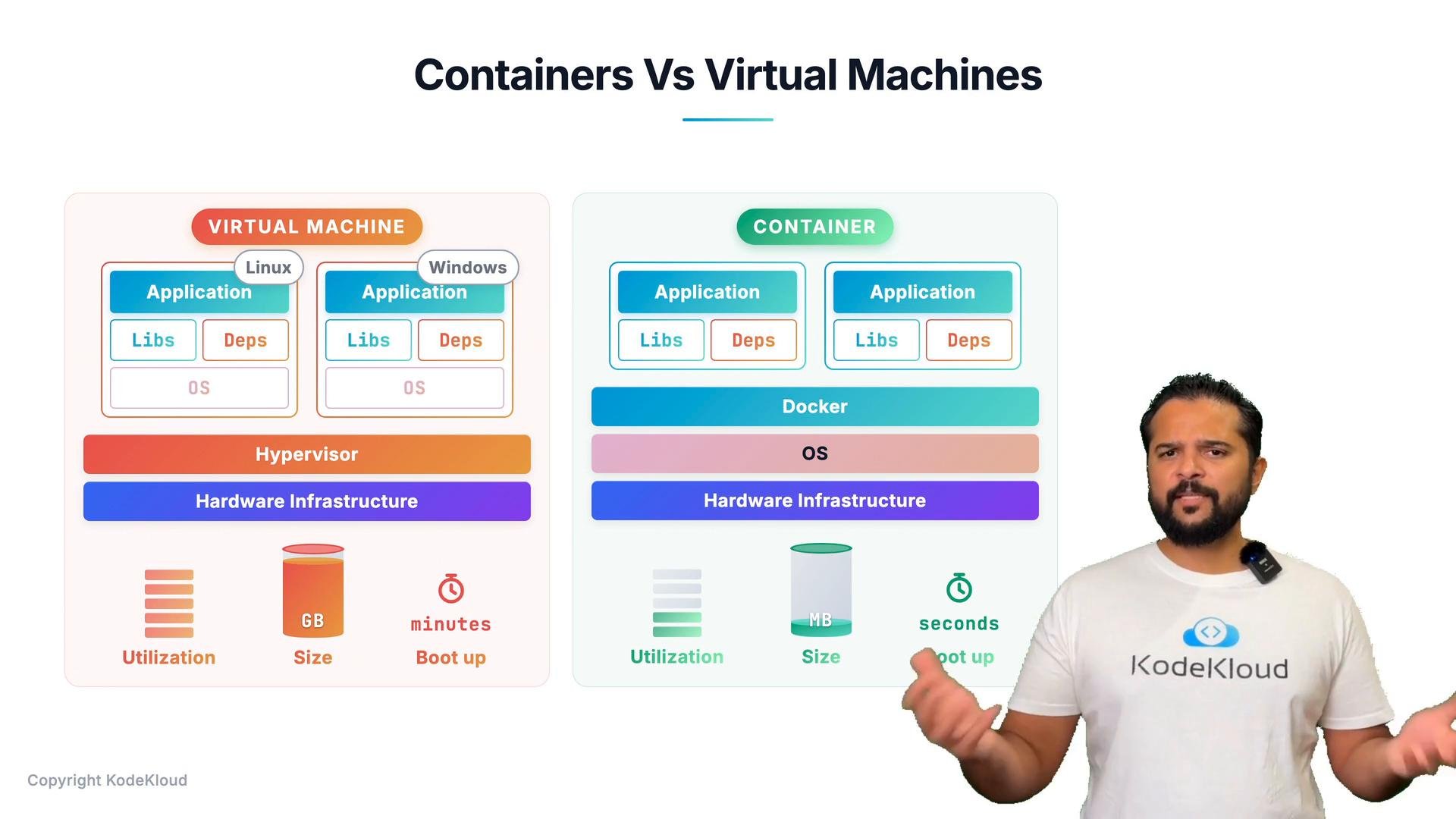 ## High-level architectures
### Docker (containers)
* Hardware -> Host OS -> Docker Engine -> Containers
* Each container contains the application and only the libraries and dependencies required by that application (implemented as container images and runtime instances).
* Containers share the host kernel and many OS services, making them lightweight and efficient to run.
Key practical benefits:
* Lower disk footprint (often measured in tens to hundreds of megabytes per image). Many layers are shared across containers.
* Fast startup times (seconds or less to start a runtime instance).
* Efficient resource utilization — there is no full guest OS per workload.
### Virtual machines
* Hardware -> Hypervisor (e.g., ESXi) -> Virtual machines
* Each VM contains a full guest OS plus the application and its dependencies.
* Each VM runs its own kernel and OS, which introduces more overhead on CPU, memory, and disk.
Typical trade-offs:
* Larger disk images (often gigabytes per VM).
* Slower boot times (tens of seconds to minutes to boot a full OS, depending on optimizations).
* Stronger isolation: VMs provide kernel-level separation because each VM has its own OS.
## Side-by-side comparison
| Characteristic | Containers | Virtual Machines |
| - | -: | -: |
| Resource utilization | Lower — share host OS and kernel | Higher — each VM has full OS instance |
| Disk footprint | Megabytes (shared image layers reduce per-container size) | Gigabytes (full guest OS per VM) |
| Startup time | Seconds or less (for pulled images) | Tens of seconds to minutes |
| Isolation | Namespaces & cgroups — lighter-weight isolation; share host kernel | Stronger isolation — separate kernels and OS instances |
| Heterogeneous OS support | Must be compatible with host kernel / OS family | Supports multiple OSes (e.g., Linux and Windows) on the same hypervisor |
## Typical deployment patterns
It is not an either/or decision — containers and virtual machines are frequently used together.
* Large environments commonly run containers on virtualized hosts. This combines the operational benefits of virtualization with the deployment and scaling benefits of containers.
* Use virtualization to provision or decommission Docker hosts quickly, and use containers to package, deploy, and scale applications rapidly.
* Instead of provisioning a VM per application (the older model), provision fewer VMs and run many containers on each VM. Each VM acts as a Docker host running multiple containerized applications. This reduces VM sprawl while preserving management and isolation benefits.
## When to choose each technology
* Choose containers when:
* You need fast, frequent deployments and rapid horizontal scaling.
* You want smaller images and efficient resource usage.
* Your applications are compatible with the host OS kernel.
* Choose VMs when:
* You require stronger isolation at the kernel level.
* You need to run different guest OS types on the same physical host.
* Legacy applications require a full OS environment.
## Practical example and operational tips
* Typical production setup:
1. Provision VMs (or cloud instances) as Docker/Kubernetes nodes.
2. Run containerized services on those nodes to get fast scaling and packaging benefits.
3. Use orchestration platforms (e.g., Kubernetes) to manage scheduling, health checks, and scaling across the VMs.
* Useful links:
* [Docker Documentation](https://docs.docker.com/)
* [Kubernetes Documentation](https://kubernetes.io/docs/)
For most production environments, running containers on virtual machines provides the best of both worlds: operational flexibility from virtualization and the lightweight, fast-scaling benefits of containers.
This documentation is built and hosted on [Mintlify](https://mintlify.com), a developer documentation platform.
## High-level architectures
### Docker (containers)
* Hardware -> Host OS -> Docker Engine -> Containers
* Each container contains the application and only the libraries and dependencies required by that application (implemented as container images and runtime instances).
* Containers share the host kernel and many OS services, making them lightweight and efficient to run.
Key practical benefits:
* Lower disk footprint (often measured in tens to hundreds of megabytes per image). Many layers are shared across containers.
* Fast startup times (seconds or less to start a runtime instance).
* Efficient resource utilization — there is no full guest OS per workload.
### Virtual machines
* Hardware -> Hypervisor (e.g., ESXi) -> Virtual machines
* Each VM contains a full guest OS plus the application and its dependencies.
* Each VM runs its own kernel and OS, which introduces more overhead on CPU, memory, and disk.
Typical trade-offs:
* Larger disk images (often gigabytes per VM).
* Slower boot times (tens of seconds to minutes to boot a full OS, depending on optimizations).
* Stronger isolation: VMs provide kernel-level separation because each VM has its own OS.
## Side-by-side comparison
| Characteristic | Containers | Virtual Machines |
| - | -: | -: |
| Resource utilization | Lower — share host OS and kernel | Higher — each VM has full OS instance |
| Disk footprint | Megabytes (shared image layers reduce per-container size) | Gigabytes (full guest OS per VM) |
| Startup time | Seconds or less (for pulled images) | Tens of seconds to minutes |
| Isolation | Namespaces & cgroups — lighter-weight isolation; share host kernel | Stronger isolation — separate kernels and OS instances |
| Heterogeneous OS support | Must be compatible with host kernel / OS family | Supports multiple OSes (e.g., Linux and Windows) on the same hypervisor |
## Typical deployment patterns
It is not an either/or decision — containers and virtual machines are frequently used together.
* Large environments commonly run containers on virtualized hosts. This combines the operational benefits of virtualization with the deployment and scaling benefits of containers.
* Use virtualization to provision or decommission Docker hosts quickly, and use containers to package, deploy, and scale applications rapidly.
* Instead of provisioning a VM per application (the older model), provision fewer VMs and run many containers on each VM. Each VM acts as a Docker host running multiple containerized applications. This reduces VM sprawl while preserving management and isolation benefits.
## When to choose each technology
* Choose containers when:
* You need fast, frequent deployments and rapid horizontal scaling.
* You want smaller images and efficient resource usage.
* Your applications are compatible with the host OS kernel.
* Choose VMs when:
* You require stronger isolation at the kernel level.
* You need to run different guest OS types on the same physical host.
* Legacy applications require a full OS environment.
## Practical example and operational tips
* Typical production setup:
1. Provision VMs (or cloud instances) as Docker/Kubernetes nodes.
2. Run containerized services on those nodes to get fast scaling and packaging benefits.
3. Use orchestration platforms (e.g., Kubernetes) to manage scheduling, health checks, and scaling across the VMs.
* Useful links:
* [Docker Documentation](https://docs.docker.com/)
* [Kubernetes Documentation](https://kubernetes.io/docs/)
For most production environments, running containers on virtual machines provides the best of both worlds: operational flexibility from virtualization and the lightweight, fast-scaling benefits of containers.
This documentation is built and hosted on [Mintlify](https://mintlify.com), a developer documentation platform.