> ## Documentation Index
> Fetch the complete documentation index at: https://notes.kodekloud.com/llms.txt
> Use this file to discover all available pages before exploring further.
# Deploying Mock E Commerce Application on K8s
> This tutorial covers deploying a mock e-commerce application on Kubernetes and integrating it with an EFK stack for efficient log management.
Welcome to this tutorial on deploying a mock e-commerce application on Kubernetes and integrating it with an EFK (Elasticsearch, Fluent Bit, Kibana) stack for efficient log management.
In this lesson, we'll demonstrate how to deploy an event-generating e-commerce application within a dedicated Kubernetes namespace, configure Fluent Bit for log collection, and visualize those logs using Kibana and Elasticsearch.
## Architecture Overview
Before diving into the implementation, it's important to understand the architecture of our deployment:
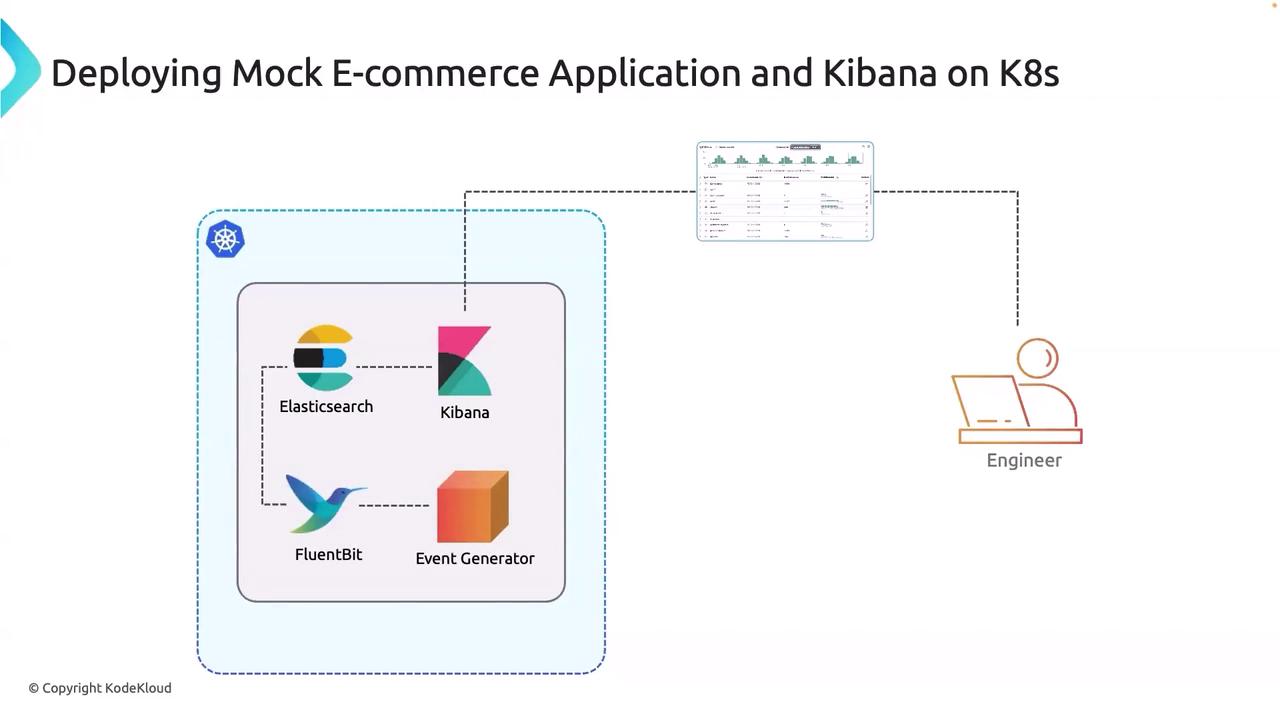
* **Kubernetes Cluster Setup:** The deployment occurs within a dedicated namespace where Elasticsearch and Kibana are already installed.
* **Log Management Integration:** Fluent Bit collects logs generated by the mock e-commerce application (event generator) and forwards them to Elasticsearch.
* **Visualization:** Kibana provides a user interface that allows engineers and developers to inspect and analyze the logs.
The diagram below provides a clear illustration of the deployment architecture:
## Implementation
In this section, we will walk through the key steps to set up our environment. The following components are involved in the implementation:
* **Deploying the Mock E-Commerce Application:** Launching the event generator within the Kubernetes namespace.
* **Configuring Fluent Bit:** Setting up Fluent Bit to collect and forward logs from the application.
* **Setting Up Elasticsearch:** Configuring Elasticsearch to store the logs received from Fluent Bit.
* **Using Kibana:** Accessing Kibana to visualize and analyze the log data.
These steps ensure that logs from the e-commerce application are efficiently collected, stored, and visualized, making troubleshooting and monitoring significantly easier.
After completing this setup, you will have a robust logging system integrated with your mock e-commerce application. This setup provides critical insights into application behavior, which is essential for maintaining high availability and performance.
That concludes this tutorial. We appreciate your attention, and we look forward to exploring more advanced topics in our next lesson.
Thank you for reading!