> ## Documentation Index
> Fetch the complete documentation index at: https://notes.kodekloud.com/llms.txt
> Use this file to discover all available pages before exploring further.
# Demo Creating First Topic in Kafka
> Guide to creating and configuring a Kafka topic using UI and CLI, explaining partitions, replication, retention, cleanup policies and best practices for development and production.
Hello and welcome back.
Earlier we set up a Kafka cluster using Docker and installed a Kafka UI to make exploration and management easier.
In this lesson we’ll create our first Kafka topic and walk through the common configuration options you’ll encounter when creating topics, both via the UI and the CLI.
## What is a Kafka topic?
* A topic is a named stream (or category) in Kafka where related events/messages are published and stored.
* Each topic is split into one or more partitions. Partitions provide parallelism and define message ordering within each partition.
* Topics include policies that govern retention and cleanup (how long messages are kept and how they’re removed).
## Create a topic using the Kafka UI
Open the Kafka UI, go to the Topics section, and click Add Topic.
* Enter a topic name (no spaces — the UI validates names and will show an error for invalid input).
* Choose the number of partitions. More partitions → more parallel consumers and higher throughput, but also more management overhead.
* Set retention (how long messages are retained). For local development a simple default is 1 partition and a 7-day retention.
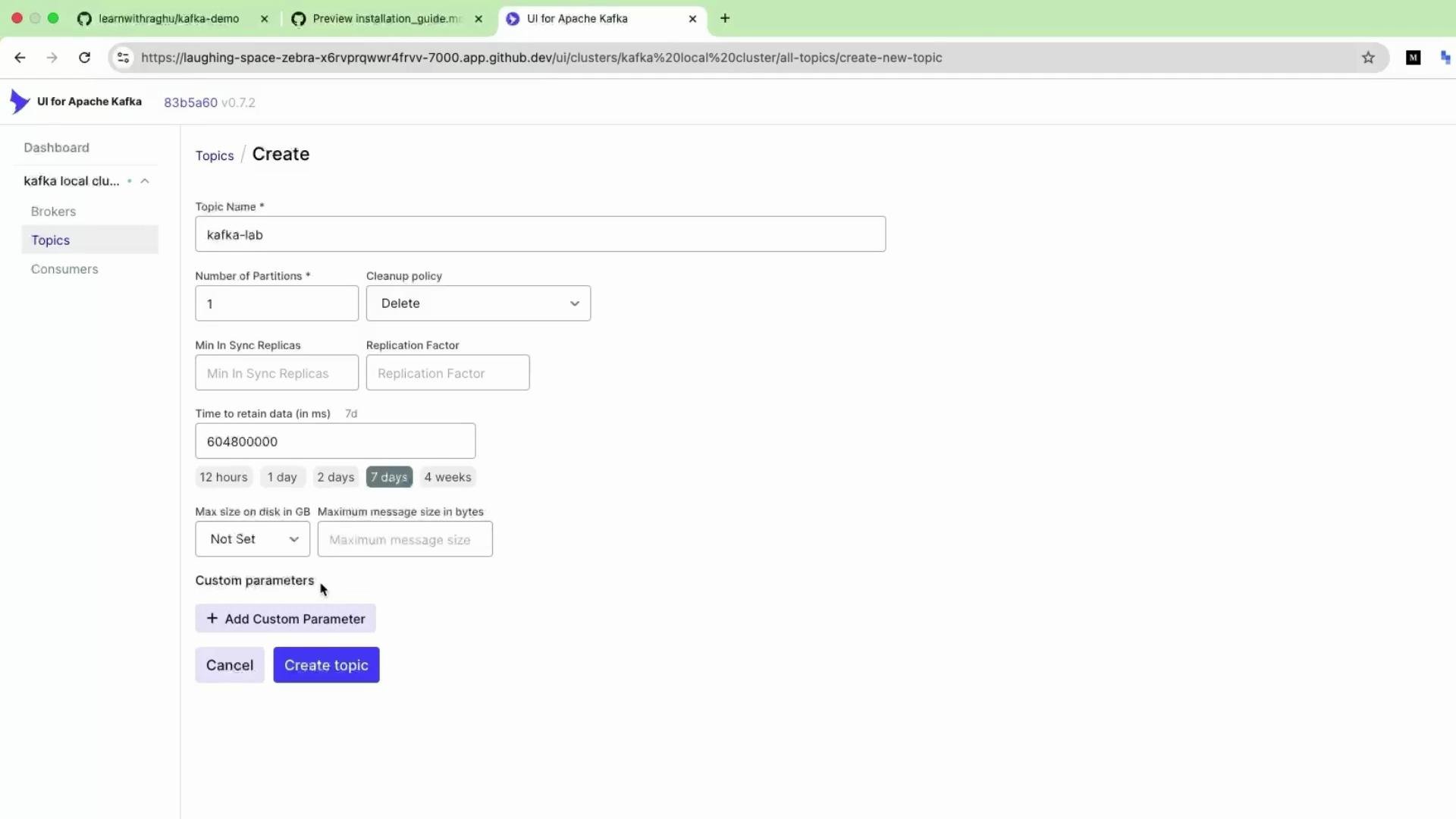 After completing the fields (for example: Topic name = `KafkaLab`, Partitions = `1`, Retention = `7 days`), click Create Topic. The UI submits the configuration to the cluster and the topic is created.
## Create a topic from the command line
Creating topics from the CLI is useful for automation, scripts, and environments without a UI. Example using the bundled Kafka tools:
```bash theme={null}
# Create a topic named KafkaLab with 1 partition and replication factor 1,
# and set retention to 7 days (604800000 ms).
kafka-topics.sh --create \
--bootstrap-server localhost:9092 \
--replication-factor 1 \
--partitions 1 \
--topic KafkaLab \
--config retention.ms=604800000
```
Use the CLI or the Admin API for reproducible, scriptable topic creation in CI/CD or production workflows.
## Common topic settings explained
| Setting | Purpose | Example / Notes |
| ----------------------------------- | ------------------------------------------------------------------------------------------- | ------------------------------------------------------------- |
| Partitions | Unit of parallelism. More partitions allow more concurrent consumers and higher throughput. | `--partitions 3` |
| Replication factor | Number of copies of each partition across brokers for fault tolerance. | Use `1` in single-node local setups; use `>=2` in production. |
| Retention (retention.ms) | How long messages are kept (milliseconds). | `--config retention.ms=604800000` (7 days) |
| Retention by size (retention.bytes) | Max size of the log before older messages are removed. | `--config retention.bytes=1073741824` (1 GB) |
| Cleanup policy | How logs are cleaned: `delete` (time/size based) or `compact` (keep latest record per key). | `--config cleanup.policy=compact` for changelog topics |
For quick exploration and ad-hoc testing the Kafka UI is very convenient. For production and automated deployments prefer the CLI, Kafka Admin APIs, or Infrastructure-as-Code tools so topic configuration is versionable and reproducible.
## Quick tips
* Topic names should be lowercase (convention), contain no spaces, and follow your organization’s naming strategy.
* Increasing partitions after heavy usage is possible but requires careful planning (it changes partition assignment and impacts ordering).
* Monitor topic retention and disk usage to avoid brokers filling up.
## Links and references
* [Apache Kafka Documentation](https://kafka.apache.org/documentation/)
* [Kafka Topics CLI reference](https://kafka.apache.org/documentation/#basic_ops_topics)
* [Best practices for Kafka topics](https://www.confluent.io/blog/kafka-topic-design-best-practices/)
That’s it — you’ve created your first Kafka topic. Further topic management and advanced configuration will be covered in later lessons.
After completing the fields (for example: Topic name = `KafkaLab`, Partitions = `1`, Retention = `7 days`), click Create Topic. The UI submits the configuration to the cluster and the topic is created.
## Create a topic from the command line
Creating topics from the CLI is useful for automation, scripts, and environments without a UI. Example using the bundled Kafka tools:
```bash theme={null}
# Create a topic named KafkaLab with 1 partition and replication factor 1,
# and set retention to 7 days (604800000 ms).
kafka-topics.sh --create \
--bootstrap-server localhost:9092 \
--replication-factor 1 \
--partitions 1 \
--topic KafkaLab \
--config retention.ms=604800000
```
Use the CLI or the Admin API for reproducible, scriptable topic creation in CI/CD or production workflows.
## Common topic settings explained
| Setting | Purpose | Example / Notes |
| ----------------------------------- | ------------------------------------------------------------------------------------------- | ------------------------------------------------------------- |
| Partitions | Unit of parallelism. More partitions allow more concurrent consumers and higher throughput. | `--partitions 3` |
| Replication factor | Number of copies of each partition across brokers for fault tolerance. | Use `1` in single-node local setups; use `>=2` in production. |
| Retention (retention.ms) | How long messages are kept (milliseconds). | `--config retention.ms=604800000` (7 days) |
| Retention by size (retention.bytes) | Max size of the log before older messages are removed. | `--config retention.bytes=1073741824` (1 GB) |
| Cleanup policy | How logs are cleaned: `delete` (time/size based) or `compact` (keep latest record per key). | `--config cleanup.policy=compact` for changelog topics |
For quick exploration and ad-hoc testing the Kafka UI is very convenient. For production and automated deployments prefer the CLI, Kafka Admin APIs, or Infrastructure-as-Code tools so topic configuration is versionable and reproducible.
## Quick tips
* Topic names should be lowercase (convention), contain no spaces, and follow your organization’s naming strategy.
* Increasing partitions after heavy usage is possible but requires careful planning (it changes partition assignment and impacts ordering).
* Monitor topic retention and disk usage to avoid brokers filling up.
## Links and references
* [Apache Kafka Documentation](https://kafka.apache.org/documentation/)
* [Kafka Topics CLI reference](https://kafka.apache.org/documentation/#basic_ops_topics)
* [Best practices for Kafka topics](https://www.confluent.io/blog/kafka-topic-design-best-practices/)
That’s it — you’ve created your first Kafka topic. Further topic management and advanced configuration will be covered in later lessons.