> ## Documentation Index
> Fetch the complete documentation index at: https://notes.kodekloud.com/llms.txt
> Use this file to discover all available pages before exploring further.
# Streaming data from Kafka to other systems
> Guide to Kafka Connect for building scalable fault tolerant pipelines that stream Kafka topics into long term stores like S3 data warehouses and databases
Hello and welcome back.
In this lesson/article we focus on Kafka Connect — the runtime and framework that helps you build reliable, production-ready data pipelines to and from Kafka with minimal custom code. This guide explains when and why to use Connect, how connectors are configured and deployed, and practical tips for streaming Kafka topics into long-term stores like Amazon S3, data warehouses, or databases.
## Why use Kafka Connect?
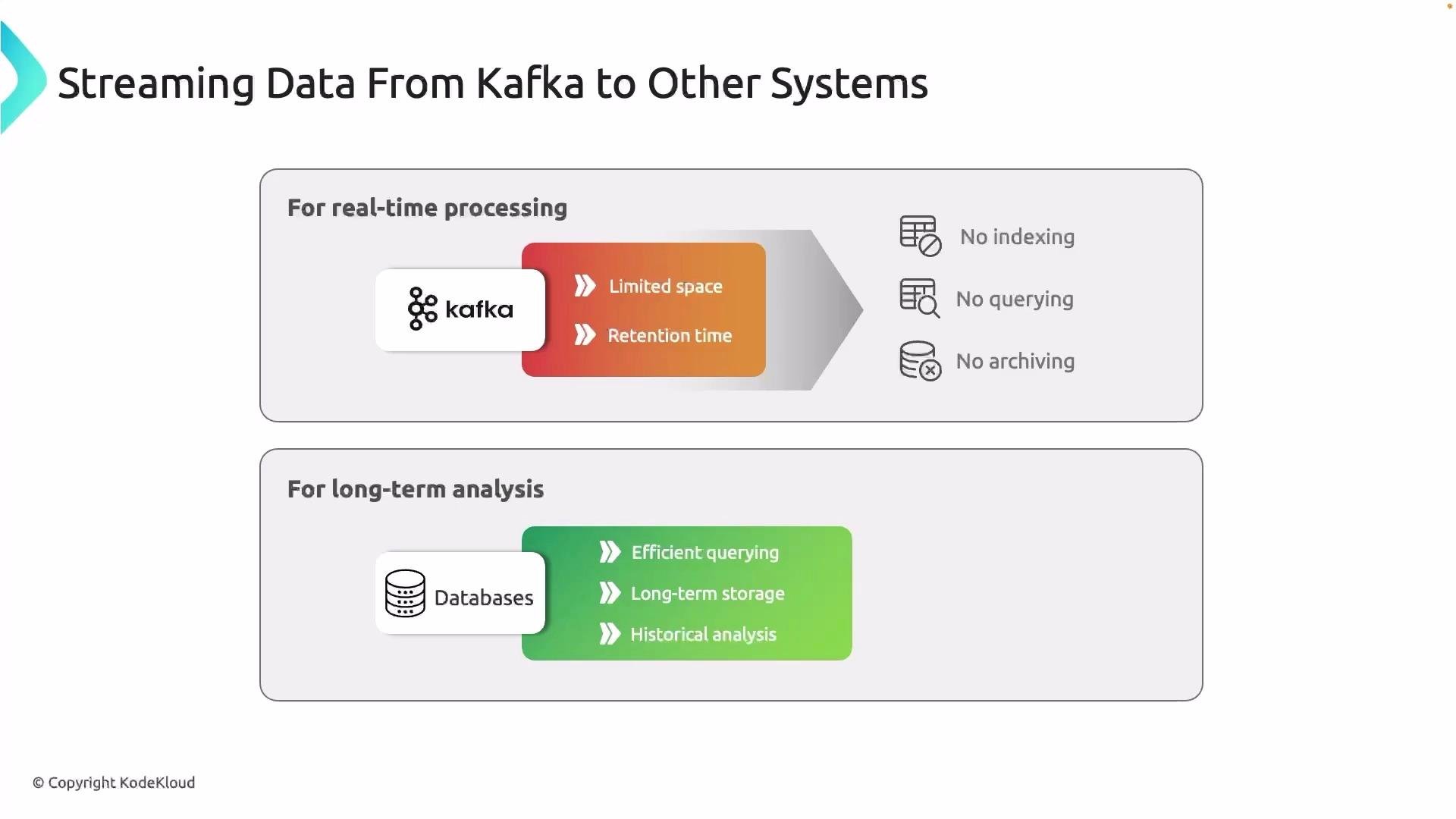
Kafka is designed for high-throughput, low-latency stream processing. However, it is not a replacement for long-term archival or analytical storage:
* Kafka stores data on disk with retention policies (time- or size-based). Retention keeps your cluster from growing indefinitely, but it is not a substitute for archival or analytics storage.
* For analytics, reporting, or ML pipelines you typically need durable, queryable storage such as object stores (Amazon S3, Google Cloud Storage), databases, or data warehouses (BigQuery, Redshift).
* Writing and maintaining custom consumer code to copy data from Kafka to these systems quickly becomes an operational burden.
 ## Real-world example: shopping application
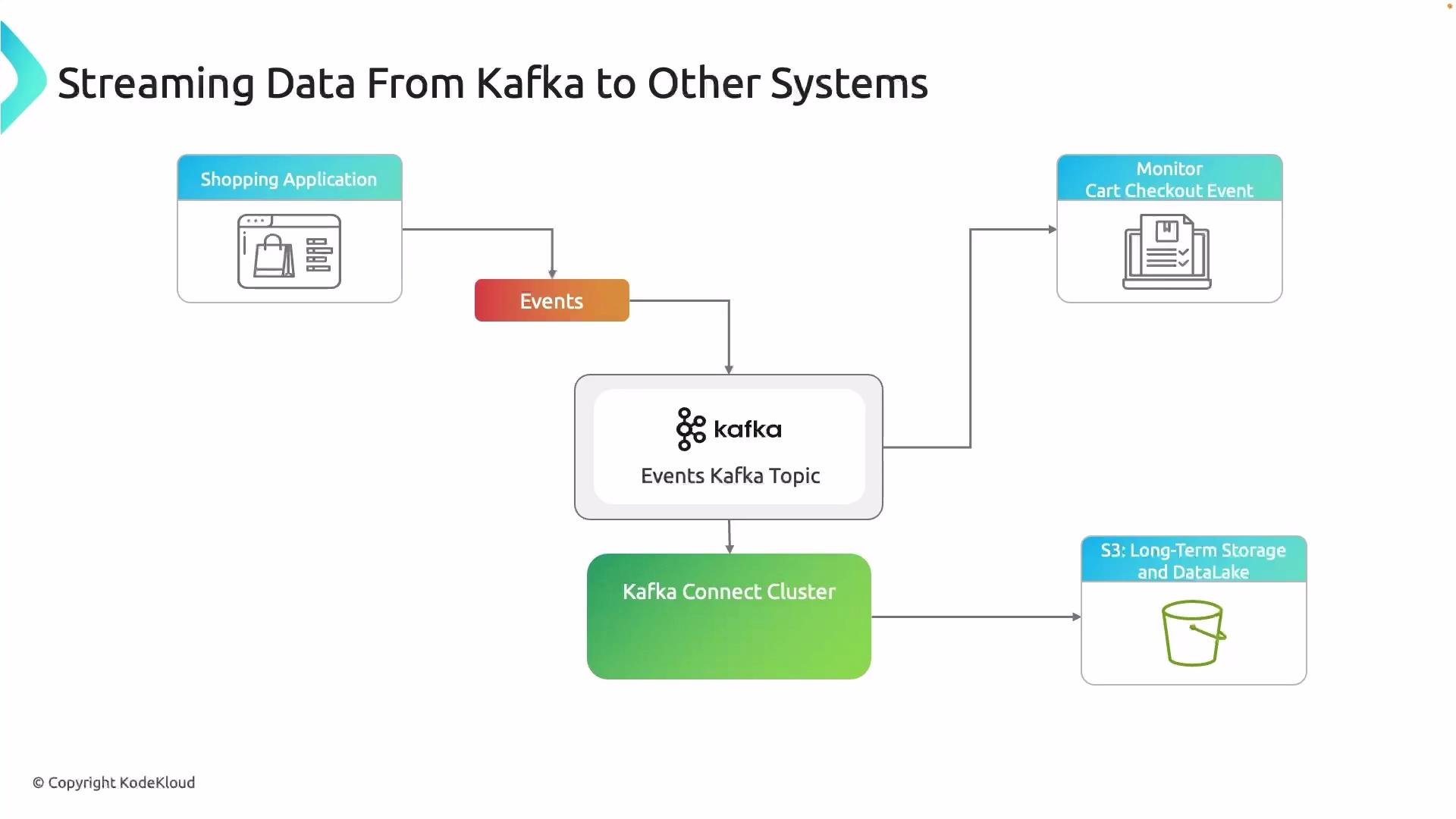
Imagine a shopping app that emits `click`, `cart`, and `checkout` events into an `events` Kafka topic. You use those events for:
* Real-time dashboards and alerts (stream processing).
* Long-term analytics (sales trends, customer lifetime value, ML features).
Rather than building and operating a custom consumer that polls Kafka and writes to S3 or a data warehouse, use Kafka Connect with a sink connector (for example, an S3 sink). Connect handles batching, partitioning, retries, and scaling so you can focus on analytics rather than operational plumbing.
## Real-world example: shopping application
Imagine a shopping app that emits `click`, `cart`, and `checkout` events into an `events` Kafka topic. You use those events for:
* Real-time dashboards and alerts (stream processing).
* Long-term analytics (sales trends, customer lifetime value, ML features).
Rather than building and operating a custom consumer that polls Kafka and writes to S3 or a data warehouse, use Kafka Connect with a sink connector (for example, an S3 sink). Connect handles batching, partitioning, retries, and scaling so you can focus on analytics rather than operational plumbing.
 ## What is Kafka Connect?
Kafka Connect is:
* A framework and long-running runtime for connectors that move large collections of data into and out of Kafka.
* Typically run as a separate service in either standalone or distributed mode.
* Connector-based: source connectors bring external data into Kafka; sink connectors move Kafka data out to external systems.
Benefits of using connectors:
* Minimal custom code
* Standardized configuration and lifecycle
* Built-in scaling and fault tolerance (in distributed mode)
## Connector configuration and REST API
Connectors are configured by supplying JSON (distributed mode) or properties files (standalone mode) to the Connect runtime. In distributed mode you typically POST a connector definition to the Connect REST API. The configuration includes:
* Connection to Kafka (bootstrap servers)
* Topics to read or write
* Connector-specific settings (e.g., for S3: bucket, region, format, flush size)
Example (simplified) S3 sink connector configuration to POST to the Connect REST API:
```json theme={null}
{
"name": "s3-sink-events",
"connector.class": "io.confluent.connect.s3.S3SinkConnector",
"tasks.max": "3",
"topics": "events",
"s3.bucket.name": "my-company-events-bucket",
"s3.region": "us-east-1",
"flush.size": "1000",
"storage.class": "io.confluent.connect.s3.storage.S3Storage",
"format.class": "io.confluent.connect.s3.format.json.JsonFormat"
}
```
Example curl command to create the connector (distributed Connect REST API usually on port 8083):
```bash theme={null}
curl -X POST http://localhost:8083/connectors \
-H "Content-Type: application/json" \
--data '@s3-sink-events.json'
```
Note: exact configuration keys differ between connector implementations (Confluent, community, cloud-managed). Always consult the connector documentation for required and optional properties.
## Connector types: quick reference
| Connector type | Use case | Examples |
| -------------: | ------------------------------------- | --------------------------------------------- |
| Source | Import external data into Kafka | Databases (Debezium), cloud services, logs |
| Sink | Export Kafka data to external systems | `S3`, `BigQuery`, `Postgres`, `Elasticsearch` |
| Common S3 sink properties | Purpose |
| ------------------------- | ----------------------------------- |
| `topics` | Kafka topic(s) to consume |
| `s3.bucket.name` | Destination S3 bucket |
| `flush.size` | Number of records before flush |
| `format.class` | Output format (JSON, Avro, Parquet) |
Wrap any examples with curly braces in code ticks to avoid MDX parsing issues (for example, use `` `{"key":"value"}` `` when required).
## Deployment considerations
Kafka Connect is a separate long-lived service from Kafka. You can deploy it:
* On VMs (for example, EC2)
* Containerized on Kubernetes
* As a managed/cloud Connect service (Confluent Cloud, cloud providers)
Although serverless functions are excellent for short-lived tasks, Kafka Connect expects persistent workers and coordinated task management—so running Connect in serverless or ephemeral environments is not recommended.
Kafka Connect runs as a long-lived process in either standalone or distributed mode. For production deployments, prefer containerized or VM-based deployments (for example Kubernetes) or a managed Connect service.
Do not use short-lived serverless functions (for example, AWS Lambda) to replace a Connect cluster. Connect relies on persistent workers, task coordination, and rebalancing that serverless platforms do not provide.
## Why use Kafka Connect? Key benefits
## What is Kafka Connect?
Kafka Connect is:
* A framework and long-running runtime for connectors that move large collections of data into and out of Kafka.
* Typically run as a separate service in either standalone or distributed mode.
* Connector-based: source connectors bring external data into Kafka; sink connectors move Kafka data out to external systems.
Benefits of using connectors:
* Minimal custom code
* Standardized configuration and lifecycle
* Built-in scaling and fault tolerance (in distributed mode)
## Connector configuration and REST API
Connectors are configured by supplying JSON (distributed mode) or properties files (standalone mode) to the Connect runtime. In distributed mode you typically POST a connector definition to the Connect REST API. The configuration includes:
* Connection to Kafka (bootstrap servers)
* Topics to read or write
* Connector-specific settings (e.g., for S3: bucket, region, format, flush size)
Example (simplified) S3 sink connector configuration to POST to the Connect REST API:
```json theme={null}
{
"name": "s3-sink-events",
"connector.class": "io.confluent.connect.s3.S3SinkConnector",
"tasks.max": "3",
"topics": "events",
"s3.bucket.name": "my-company-events-bucket",
"s3.region": "us-east-1",
"flush.size": "1000",
"storage.class": "io.confluent.connect.s3.storage.S3Storage",
"format.class": "io.confluent.connect.s3.format.json.JsonFormat"
}
```
Example curl command to create the connector (distributed Connect REST API usually on port 8083):
```bash theme={null}
curl -X POST http://localhost:8083/connectors \
-H "Content-Type: application/json" \
--data '@s3-sink-events.json'
```
Note: exact configuration keys differ between connector implementations (Confluent, community, cloud-managed). Always consult the connector documentation for required and optional properties.
## Connector types: quick reference
| Connector type | Use case | Examples |
| -------------: | ------------------------------------- | --------------------------------------------- |
| Source | Import external data into Kafka | Databases (Debezium), cloud services, logs |
| Sink | Export Kafka data to external systems | `S3`, `BigQuery`, `Postgres`, `Elasticsearch` |
| Common S3 sink properties | Purpose |
| ------------------------- | ----------------------------------- |
| `topics` | Kafka topic(s) to consume |
| `s3.bucket.name` | Destination S3 bucket |
| `flush.size` | Number of records before flush |
| `format.class` | Output format (JSON, Avro, Parquet) |
Wrap any examples with curly braces in code ticks to avoid MDX parsing issues (for example, use `` `{"key":"value"}` `` when required).
## Deployment considerations
Kafka Connect is a separate long-lived service from Kafka. You can deploy it:
* On VMs (for example, EC2)
* Containerized on Kubernetes
* As a managed/cloud Connect service (Confluent Cloud, cloud providers)
Although serverless functions are excellent for short-lived tasks, Kafka Connect expects persistent workers and coordinated task management—so running Connect in serverless or ephemeral environments is not recommended.
Kafka Connect runs as a long-lived process in either standalone or distributed mode. For production deployments, prefer containerized or VM-based deployments (for example Kubernetes) or a managed Connect service.
Do not use short-lived serverless functions (for example, AWS Lambda) to replace a Connect cluster. Connect relies on persistent workers, task coordination, and rebalancing that serverless platforms do not provide.
## Why use Kafka Connect? Key benefits
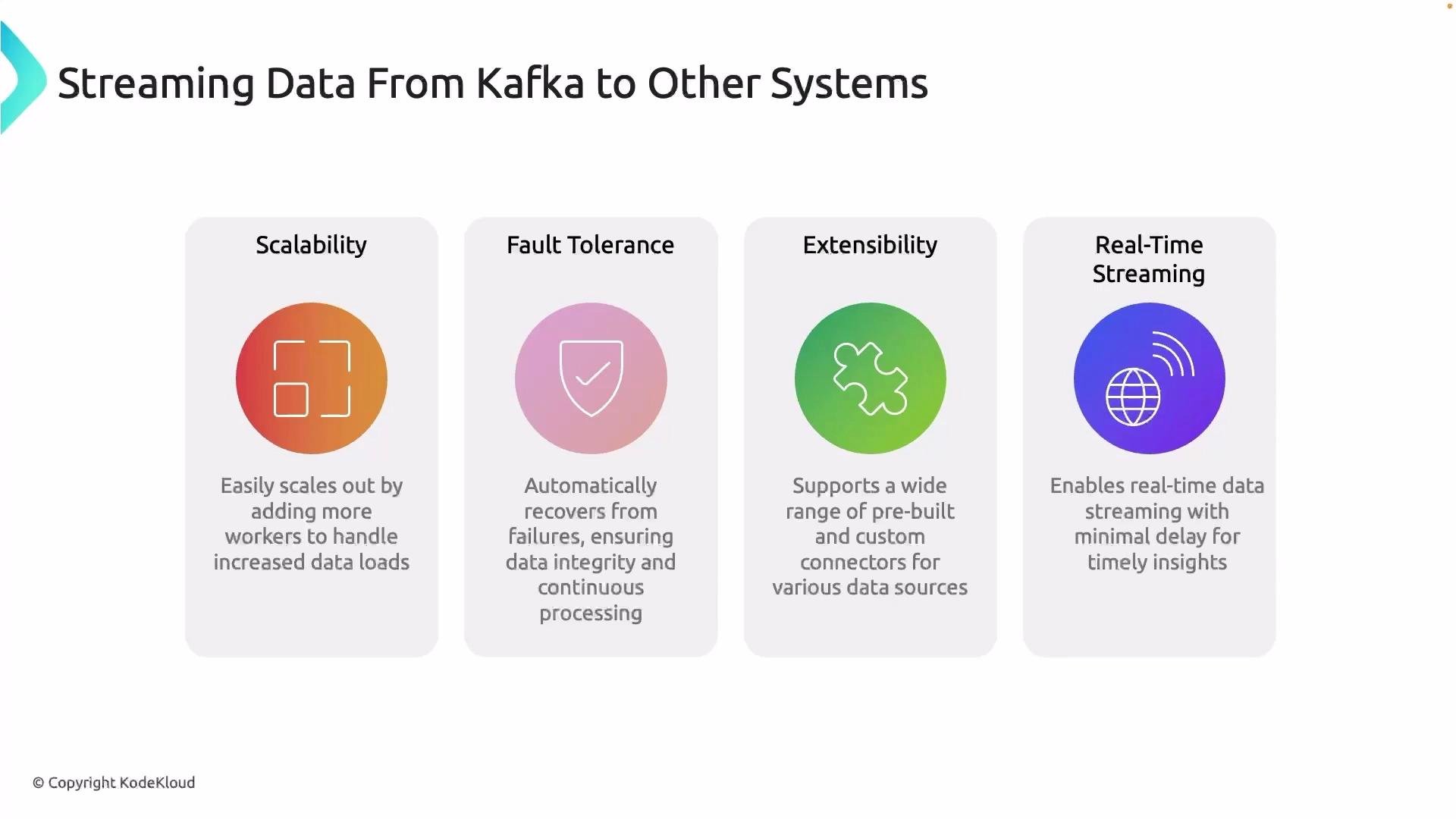 * Scalability: Connect clusters scale independently of Kafka. Add workers to increase connector throughput.
* Fault tolerance: Distributed mode provides task rebalancing and resumption on worker failure. Connectors include retry and error handling options.
* Extensibility: Large ecosystem of connectors covers S3, GCS, BigQuery, databases, search, and more—reducing custom development.
* Near-real-time analytics: Stream events from Kafka into analytics systems (S3 → Athena, BigQuery, Redshift, Looker Studio) to enable immediate querying and historical analysis.
## Summary
* Kafka is excellent for real-time stream processing but not intended for indefinite archival storage.
* Use Kafka Connect to build standardized, scalable, and fault-tolerant pipelines that move data from Kafka to durable stores (S3, databases, data warehouses).
* Configure connectors via the Connect REST API (JSON) or properties files, and deploy Connect as a long-running service (VMs, containers, or managed offerings).
* Choose connector implementations and tuning parameters (batch size, flush interval, serialization format) based on throughput, downstream query patterns, and storage cost.
## Links and references
* [Kafka Connect overview — Apache Kafka documentation](https://kafka.apache.org/documentation/#connect)
* [Confluent Hub — connectors](https://www.confluent.io/hub/)
* [Amazon S3 documentation](https://docs.aws.amazon.com/s3/)
* [BigQuery documentation](https://cloud.google.com/bigquery)
* [Debezium (change data capture) connectors](https://debezium.io/)
With this foundation, the next lesson/article will show a practical demo: setting up Kafka Connect and using an Amazon S3 sink connector to move topic data into an S3 bucket.
That is it for this lesson/article. See you in the next lesson.
* Scalability: Connect clusters scale independently of Kafka. Add workers to increase connector throughput.
* Fault tolerance: Distributed mode provides task rebalancing and resumption on worker failure. Connectors include retry and error handling options.
* Extensibility: Large ecosystem of connectors covers S3, GCS, BigQuery, databases, search, and more—reducing custom development.
* Near-real-time analytics: Stream events from Kafka into analytics systems (S3 → Athena, BigQuery, Redshift, Looker Studio) to enable immediate querying and historical analysis.
## Summary
* Kafka is excellent for real-time stream processing but not intended for indefinite archival storage.
* Use Kafka Connect to build standardized, scalable, and fault-tolerant pipelines that move data from Kafka to durable stores (S3, databases, data warehouses).
* Configure connectors via the Connect REST API (JSON) or properties files, and deploy Connect as a long-running service (VMs, containers, or managed offerings).
* Choose connector implementations and tuning parameters (batch size, flush interval, serialization format) based on throughput, downstream query patterns, and storage cost.
## Links and references
* [Kafka Connect overview — Apache Kafka documentation](https://kafka.apache.org/documentation/#connect)
* [Confluent Hub — connectors](https://www.confluent.io/hub/)
* [Amazon S3 documentation](https://docs.aws.amazon.com/s3/)
* [BigQuery documentation](https://cloud.google.com/bigquery)
* [Debezium (change data capture) connectors](https://debezium.io/)
With this foundation, the next lesson/article will show a practical demo: setting up Kafka Connect and using an Amazon S3 sink connector to move topic data into an S3 bucket.
That is it for this lesson/article. See you in the next lesson.