> ## Documentation Index
> Fetch the complete documentation index at: https://notes.kodekloud.com/llms.txt
> Use this file to discover all available pages before exploring further.
# Understanding the Role of Message Keys
> Explains how Kafka message keys determine partition assignment via hashing, ensuring per-key ordering, affecting parallelism and hotspots, and offers key design and sharding best practices.
Welcome back. In this lesson we’ll clarify the role of message keys in Apache Kafka, how the producer determines a partition for each message, and why keys matter for ordering and parallelism.
When a producer sends an event to a Kafka topic it can include a key and a value. The key is used by the producer’s partitioner to decide which partition will store the message. The producer does this without hard-coding a broker or partition; instead it uses cluster metadata and a partitioning strategy to pick the destination.
How the producer routes messages (high level)
* The producer is configured with one or more bootstrap server addresses. Those bootstrap servers are used to fetch cluster metadata (brokers, topics, number of partitions).
* Using that metadata, the producer applies a partitioning strategy to route each message to a partition.
* The default partitioning strategy for Kafka’s Java client hashes the key (using MurmurHash2 via `org.apache.kafka.common.utils.Utils.murmur2`), converts the hash to a non-negative integer, and maps that integer to a partition using modulo arithmetic.
Typical flow:
1. Producer sends a message with a key and value.
2. Producer fetches topic metadata (once or on change) from a bootstrap broker to learn the number of partitions.
3. Producer computes `hash = murmur2(key)` and converts to a positive integer (Kafka internally calls `toPositive()` to avoid negative values).
4. Producer computes:
```JavaScript theme={null}
partition = positiveHash % numberOfPartitions
```
5. Producer sends the message to the broker that is the leader for that partition.
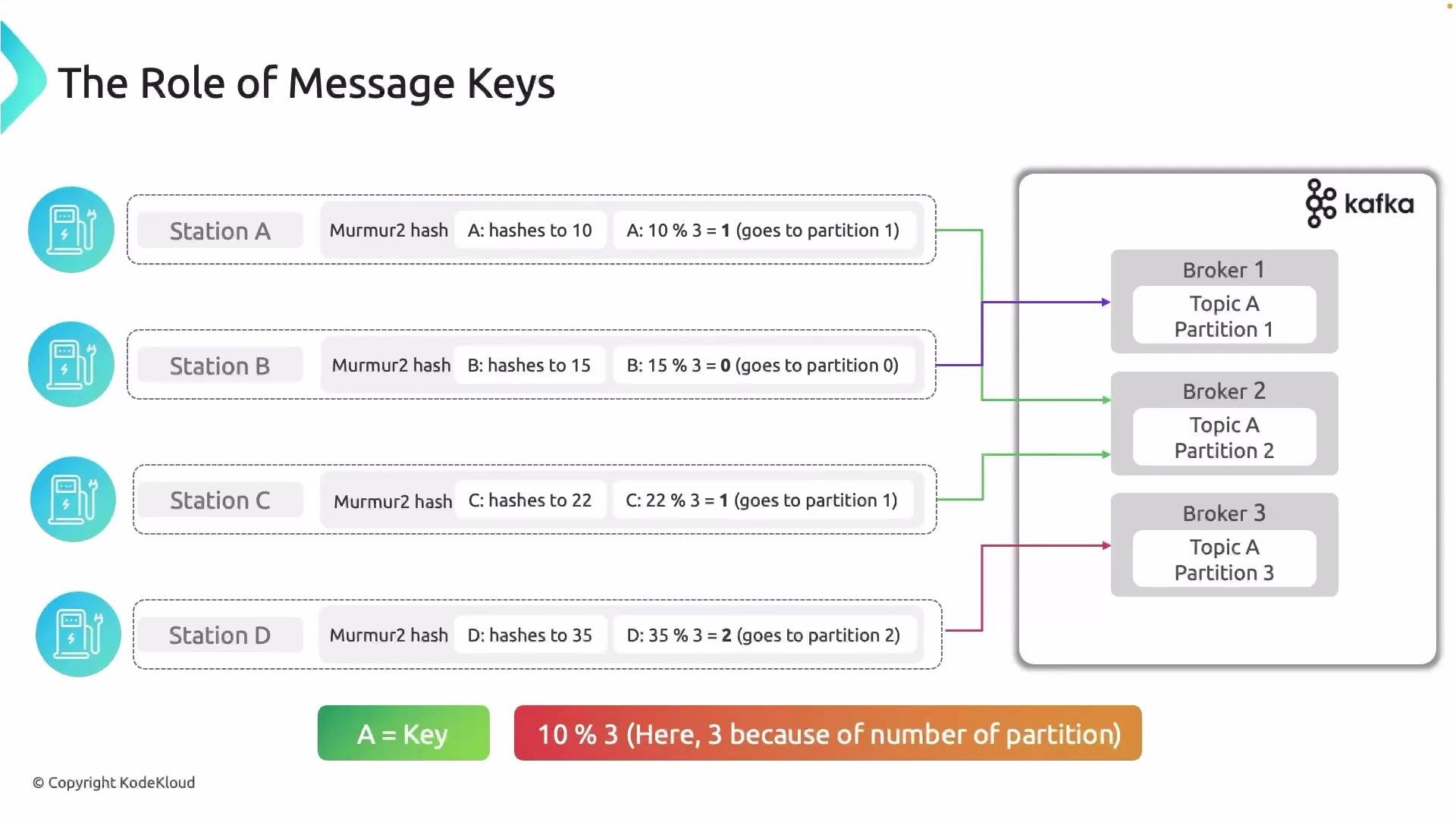 Example numeric mapping (topic with 3 partitions)
* MurmurHash2(keyA) = 10 → `10 % 3 = 1` → partition index 1
* MurmurHash2(keyB) = 15 → `15 % 3 = 0` → partition index 0
* MurmurHash2(keyC) = 22 → `22 % 3 = 1` → partition index 1
* MurmurHash2(keyD) = 35 → `35 % 3 = 2` → partition index 2
Because hashing and the modulo step are deterministic, the same key always maps to the same partition. This gives you ordering guarantees per key and predictable partition assignment for consumers.
Note: Partition indices are zero-based (`0`, `1`, `2`, ...). When explaining partitions informally you may see them labeled `1`, `2`, `3`, but Kafka internally uses `0`-based indexing.
Key behaviors and common partitioner outcomes
| Case | Behavior | Example / Notes |
| ------------------ | --------------------------------------------------------------------------------------- | ----------------------------------------------------------------------------- |
| Key present | Deterministic hashing → same key → same partition | Use when you need ordering for related events (e.g., all events for a user) |
| Key is `null` | Producer selects partition using a non-key strategy (round-robin or sticky partitioner) | Good for even load distribution when ordering across messages is not required |
| Many distinct keys | Keys distributed by hash → spread across partitions | Helps parallelism; watch for skew if keys are highly imbalanced |
| Hot key | Single key generates high traffic → that partition can become a hotspot | Consider sharding the key (e.g., append a suffix) to spread load |
Best practices
* Use a meaningful key when ordering per entity (userId, sessionId) is required.
* Avoid putting high-cardinality or constantly-changing values as keys if you want even distribution.
* If a key becomes a hotspot, consider a composite key or additional sharding to distribute load across partitions.
* Monitor partition sizes and consumer lag to detect uneven distribution.
References and further reading
* Kafka producer partitioning: [https://kafka.apache.org/](https://kafka.apache.org/) (search “partitioner” in the client docs)
* MurmurHash2 reference: `org.apache.kafka.common.utils.Utils.murmur2` (Kafka Java client source)
That’s it for this lesson — now you should understand how message keys influence partition selection and how to design keys to balance ordering and parallelism. See you in the next lesson.
Example numeric mapping (topic with 3 partitions)
* MurmurHash2(keyA) = 10 → `10 % 3 = 1` → partition index 1
* MurmurHash2(keyB) = 15 → `15 % 3 = 0` → partition index 0
* MurmurHash2(keyC) = 22 → `22 % 3 = 1` → partition index 1
* MurmurHash2(keyD) = 35 → `35 % 3 = 2` → partition index 2
Because hashing and the modulo step are deterministic, the same key always maps to the same partition. This gives you ordering guarantees per key and predictable partition assignment for consumers.
Note: Partition indices are zero-based (`0`, `1`, `2`, ...). When explaining partitions informally you may see them labeled `1`, `2`, `3`, but Kafka internally uses `0`-based indexing.
Key behaviors and common partitioner outcomes
| Case | Behavior | Example / Notes |
| ------------------ | --------------------------------------------------------------------------------------- | ----------------------------------------------------------------------------- |
| Key present | Deterministic hashing → same key → same partition | Use when you need ordering for related events (e.g., all events for a user) |
| Key is `null` | Producer selects partition using a non-key strategy (round-robin or sticky partitioner) | Good for even load distribution when ordering across messages is not required |
| Many distinct keys | Keys distributed by hash → spread across partitions | Helps parallelism; watch for skew if keys are highly imbalanced |
| Hot key | Single key generates high traffic → that partition can become a hotspot | Consider sharding the key (e.g., append a suffix) to spread load |
Best practices
* Use a meaningful key when ordering per entity (userId, sessionId) is required.
* Avoid putting high-cardinality or constantly-changing values as keys if you want even distribution.
* If a key becomes a hotspot, consider a composite key or additional sharding to distribute load across partitions.
* Monitor partition sizes and consumer lag to detect uneven distribution.
References and further reading
* Kafka producer partitioning: [https://kafka.apache.org/](https://kafka.apache.org/) (search “partitioner” in the client docs)
* MurmurHash2 reference: `org.apache.kafka.common.utils.Utils.murmur2` (Kafka Java client source)
That’s it for this lesson — now you should understand how message keys influence partition selection and how to design keys to balance ordering and parallelism. See you in the next lesson.