> ## Documentation Index
> Fetch the complete documentation index at: https://notes.kodekloud.com/llms.txt
> Use this file to discover all available pages before exploring further.
# Demo ChromaDB Implementation
> Guide to building a persistent local ChromaDB semantic search using SentenceTransformers embeddings, text chunking, idempotent ingestion, and similarity queries with optional metadata filters.
In this hands-on guide we'll build a local ChromaDB-backed semantic search workflow that persists to disk and demonstrates both ingestion and similarity queries using SentenceTransformers embeddings.
What you'll end up with:
* A persistent local ChromaDB instance.
* A simple ingestion flow that chunks text files and upserts embeddings.
* A query function that runs similarity searches with optional metadata filters.
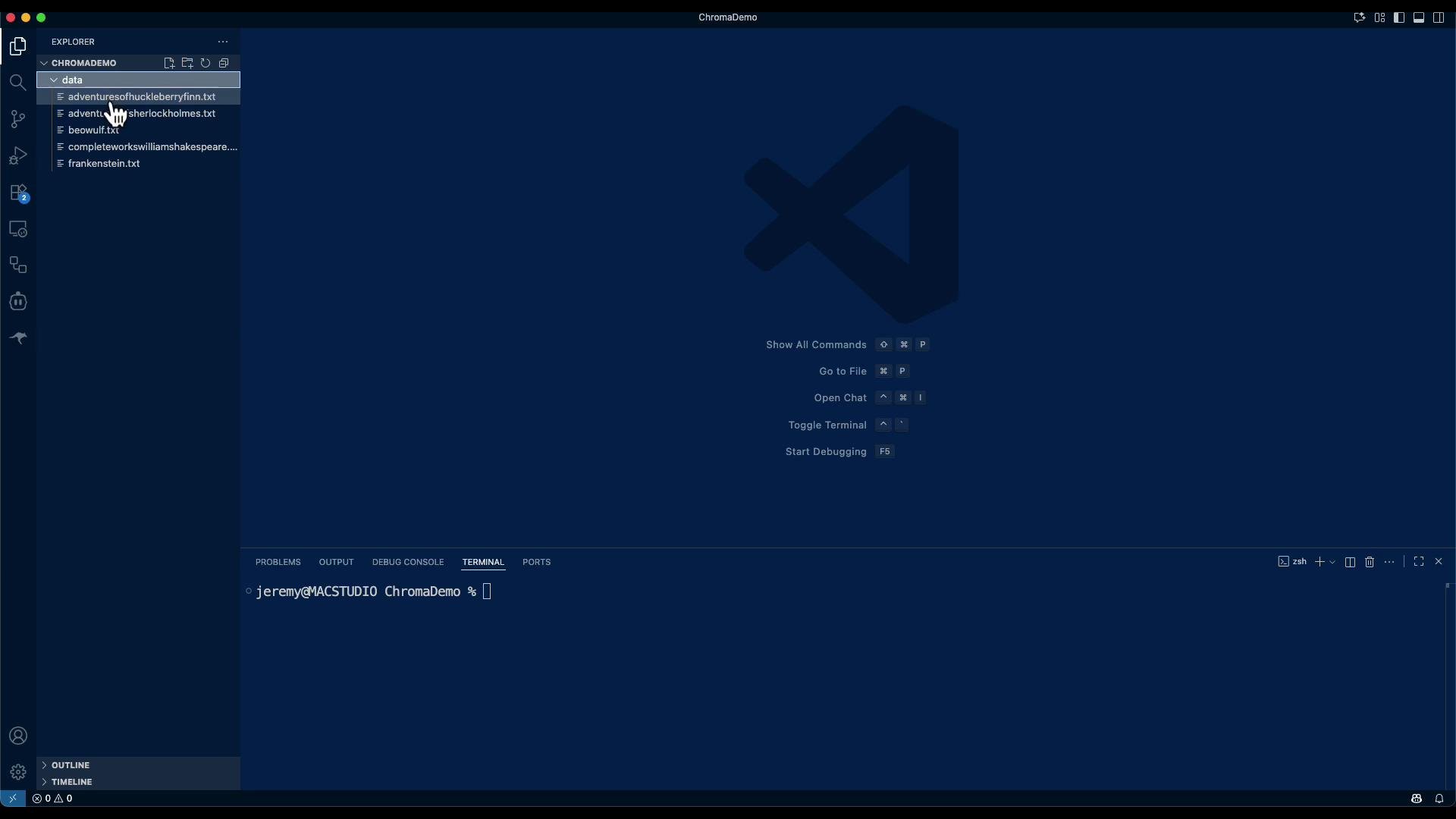
Dataset used in this demo: several public-domain texts such as The Adventures of Huckleberry Finn, Sherlock Holmes, Beowulf, Complete Works of William Shakespeare, and Frankenstein.
 Note: this is a demo of using a vector database for retrieval. It is not a complete search engine (there are additional components like LLM-based re-ranking, result aggregation, and QA prompt engineering you would add later).
This lesson/article demonstrates basic ingestion and retrieval with [ChromaDB](https://www.trychroma.com/). You will get document hits and snippet-level results but not a fully featured QA system out of the box. Consider adding an LLM re-ranker and result post-processing for production-quality answers.
Tip: If you run into compatibility issues with `PersistentClient`, check your installed chromadb version and adapt to `chromadb.Client(...)` or the version-appropriate persistent API. Also consider pinning `chromadb` and `sentence-transformers` versions in a `requirements.txt` for reproducible environments.
## Quick overview
The demo demonstrates:
* Setting a local persistence path for ChromaDB.
* Using a SentenceTransformers model to produce embeddings.
* Reading `.txt` files from `data/`, chunking long documents into overlapping segments, and creating deterministic chunk IDs for idempotent ingestion.
* Upserting (idempotent) into a Chroma collection.
* Running similarity queries with optional `where` metadata filters.
Files produced in this example:
| File | Purpose |
| --------------------- | ------------------------------------------------------------------------------ |
| `ingest_and_query.py` | Ingests `.txt` files into ChromaDB, then runs demo queries. |
| `data/*.txt` | Source plain-text documents to index (e.g., `beowulf.txt`, `shakespeare.txt`). |
## Environment and dependencies
Create and activate a Python virtual environment, then install required packages.
```bash theme={null}
python -m venv .venv
source .venv/bin/activate
pip install --upgrade pip
pip install chromadb sentence-transformers
```
Note: Installing `sentence-transformers` can pull several dependencies (transformers, torch) depending on your environment. Consider using a GPU-enabled environment or CPU-only builds as appropriate.
## Implementation — single consolidated script
Below is a consolidated, cleaned-up example that shows the key steps. Save as `ingest_and_query.py` (or split into `ingest.py` and `query.py` if you prefer to separate concerns).
```python theme={null}
# ingest_and_query.py
import os
import glob
from pathlib import Path
import chromadb
from chromadb.utils import embedding_functions
# --------- (A) Choose persistence location ---------
DB_DIR = Path("chroma_db")
DB_DIR.mkdir(exist_ok=True)
# Create a persistent client (data survives restarts)
# Note: PersistentClient is available in some chromadb versions.
# If your version expects chromadb.Client(...), adapt accordingly.
client = chromadb.PersistentClient(path=str(DB_DIR)) # loads existing DB if present
# --------- (B) Choose an embedding function ---------
# Use SentenceTransformers model for embeddings
embedding_fn = embedding_functions.SentenceTransformersEmbeddingFunction(
model_name="all-MiniLM-L6-v2"
)
# --------- (C) Get or create collection ---------
collection = client.get_or_create_collection(
name="demo_texts",
embedding_function=embedding_fn,
metadata={"hnsw:space": "cosine"} # cosine is common for semantic search
)
# --------- (D) Simple chunker ---------
def chunk_text(text: str, max_chars: int = 1500, overlap: int = 200):
"""Split long text into overlapping chunks to improve recall."""
chunks = []
start = 0
n = len(text)
while start < n:
end = min(start + max_chars, n)
chunk = text[start:end]
chunks.append(chunk.strip())
# move start forward, but keep 'overlap' characters overlapping
start = end - overlap if (end - overlap) > start else end
return [c for c in chunks if c]
# --------- (E) Read .txt files and prepare records ---------
DOCS_DIR = Path("data")
paths = sorted(glob.glob(str(DOCS_DIR / "*.txt")))
documents = []
metadatas = []
ids = []
for p in paths:
file_id_base = Path(p).stem # e.g., "beowulf"
with open(p, "r", encoding="utf-8") as f:
raw = f.read()
# If text is long, chunk it; otherwise keep as a single chunk
chunks = chunk_text(raw, max_chars=1500, overlap=200) if len(raw) > 1800 else [raw]
for idx, ch in enumerate(chunks):
uid = f"{file_id_base}__{idx:03d}" # idempotent ID per file chunk
documents.append(ch)
metadatas.append({
"source": os.path.basename(p),
"chunk": idx
})
ids.append(uid)
if not ids:
print("🚨 No .txt files found in ./data")
else:
# --------- (F) Upsert into Chroma (idempotent) ---------
# Upsert will add new records or replace existing records with same IDs.
collection.upsert(
ids=ids,
documents=documents,
metadatas=metadatas
)
print(f"✅ Ingested {len(ids)} records from {len(paths)} file(s).")
# --------- (G) Run a few demo queries ---------
def search(query_text: str, k: int = 4, where: dict = None):
"""
Query the collection.
- query_text: string to search
- k: number of results to return
- where: optional metadata filter dict, e.g. {"source": "beowulf.txt"}
"""
res = collection.query(
query_texts=[query_text],
n_results=k,
where=where # optional metadata filter dict
)
print(f"\n🔎 Query: {query_text}")
# robustly handle result structure
ids_res = res.get("ids", [[]])[0]
docs_res = res.get("documents", [[]])[0]
metas_res = res.get("metadatas", [[]])[0]
dists_res = res.get("distances", [[]])[0] if res.get("distances") else [None] * len(ids_res)
for i in range(len(ids_res)):
id_ = ids_res[i]
meta = metas_res[i] if i < len(metas_res) else {}
doc = docs_res[i] if i < len(docs_res) else ""
dist = dists_res[i] if i < len(dists_res) else None
dist_str = f"{dist:.4f}" if isinstance(dist, (int, float)) else "N/A"
snippet = doc[:180].replace("\n", " ")
print(f" • id={id_} dist={dist_str} source={meta.get('source')}\n {snippet}...")
# Example queries
if ids:
search("Describe how Beowulf defeats the monster's mother.", k=3)
search("Who was Grendel, and why did he attack Heorot?", k=3)
search("Why does Macbeth decide to kill Duncan?", k=3)
```
## Idempotency and duplicate handling
* Deterministic chunk IDs: we use `file_stem__{idx:03d}` so re-running ingestion with the same files won't create duplicate vectors.
* Use `collection.upsert(...)` for idempotent behavior: it inserts new IDs and replaces existing ones with the same identifier.
* If you want ingestion to fail on duplicate IDs, use `collection.add(...)`, which raises on duplicates.
## Running the script
1. Place plain-text files under `./data` (each book as a `.txt`).
2. Run:
```bash theme={null}
python ingest_and_query.py
```
The first run may take longer while embeddings are computed and the index is built.
Example (trimmed) terminal output:
```text theme={null}
✅ Ingested 5609 records from 5 file(s).
🔎 Query: Describe how Beowulf defeats the monster's mother.
• id=beowulf__009 dist=0.2638 source=beowulf.txt
...and the monster retreats to his den, howling and yelling with agony and fury. The wound is fatal....
• id=beowulf__002 dist=0.3854 source=beowulf.txt
...Rejoicing of the Danes (XIV). Hrothgar's Gratitude (XV). ...
🔎 Query: Who was Grendel, and why did he attack Heorot?
• id=beowulf__118 dist=0.4706 source=beowulf.txt
...The torch of the firmament. He glanced 'long the building, and turned...
...
```
These results show which document chunks the vector search considers most similar. For human-readable, direct answers, pass the retrieved chunks to an LLM for synthesis and re-ranking.
## Production considerations and next steps
* Add an LLM-based re-ranker or QA system to synthesize precise answers from retrieved chunks.
* Improve chunking: use sentence- or token-aware splits (e.g., Hugging Face tokenizers) and retain character offsets.
* Enrich metadata: store title, author, chapter, and location offsets to enable more powerful `where` filters and provenance.
* Indexing and scaling: if you scale beyond a laptop, evaluate managed vector DBs, clustering, or distributed deployments for performance and reliability.
* Security & cost: consider encryption, access controls, and cost of hosted embeddings vs local compute.
## Links and references
* ChromaDB: [https://www.trychroma.com/](https://www.trychroma.com/)
* Sentence Transformers: [https://www.sbert.net/](https://www.sbert.net/)
* ChromaDB docs (API & persistence): [https://www.trychroma.com/docs](https://www.trychroma.com/docs)
This demo shows how to set up and experiment locally with ChromaDB and Sentence Transformers for semantic retrieval.
Note: this is a demo of using a vector database for retrieval. It is not a complete search engine (there are additional components like LLM-based re-ranking, result aggregation, and QA prompt engineering you would add later).
This lesson/article demonstrates basic ingestion and retrieval with [ChromaDB](https://www.trychroma.com/). You will get document hits and snippet-level results but not a fully featured QA system out of the box. Consider adding an LLM re-ranker and result post-processing for production-quality answers.
Tip: If you run into compatibility issues with `PersistentClient`, check your installed chromadb version and adapt to `chromadb.Client(...)` or the version-appropriate persistent API. Also consider pinning `chromadb` and `sentence-transformers` versions in a `requirements.txt` for reproducible environments.
## Quick overview
The demo demonstrates:
* Setting a local persistence path for ChromaDB.
* Using a SentenceTransformers model to produce embeddings.
* Reading `.txt` files from `data/`, chunking long documents into overlapping segments, and creating deterministic chunk IDs for idempotent ingestion.
* Upserting (idempotent) into a Chroma collection.
* Running similarity queries with optional `where` metadata filters.
Files produced in this example:
| File | Purpose |
| --------------------- | ------------------------------------------------------------------------------ |
| `ingest_and_query.py` | Ingests `.txt` files into ChromaDB, then runs demo queries. |
| `data/*.txt` | Source plain-text documents to index (e.g., `beowulf.txt`, `shakespeare.txt`). |
## Environment and dependencies
Create and activate a Python virtual environment, then install required packages.
```bash theme={null}
python -m venv .venv
source .venv/bin/activate
pip install --upgrade pip
pip install chromadb sentence-transformers
```
Note: Installing `sentence-transformers` can pull several dependencies (transformers, torch) depending on your environment. Consider using a GPU-enabled environment or CPU-only builds as appropriate.
## Implementation — single consolidated script
Below is a consolidated, cleaned-up example that shows the key steps. Save as `ingest_and_query.py` (or split into `ingest.py` and `query.py` if you prefer to separate concerns).
```python theme={null}
# ingest_and_query.py
import os
import glob
from pathlib import Path
import chromadb
from chromadb.utils import embedding_functions
# --------- (A) Choose persistence location ---------
DB_DIR = Path("chroma_db")
DB_DIR.mkdir(exist_ok=True)
# Create a persistent client (data survives restarts)
# Note: PersistentClient is available in some chromadb versions.
# If your version expects chromadb.Client(...), adapt accordingly.
client = chromadb.PersistentClient(path=str(DB_DIR)) # loads existing DB if present
# --------- (B) Choose an embedding function ---------
# Use SentenceTransformers model for embeddings
embedding_fn = embedding_functions.SentenceTransformersEmbeddingFunction(
model_name="all-MiniLM-L6-v2"
)
# --------- (C) Get or create collection ---------
collection = client.get_or_create_collection(
name="demo_texts",
embedding_function=embedding_fn,
metadata={"hnsw:space": "cosine"} # cosine is common for semantic search
)
# --------- (D) Simple chunker ---------
def chunk_text(text: str, max_chars: int = 1500, overlap: int = 200):
"""Split long text into overlapping chunks to improve recall."""
chunks = []
start = 0
n = len(text)
while start < n:
end = min(start + max_chars, n)
chunk = text[start:end]
chunks.append(chunk.strip())
# move start forward, but keep 'overlap' characters overlapping
start = end - overlap if (end - overlap) > start else end
return [c for c in chunks if c]
# --------- (E) Read .txt files and prepare records ---------
DOCS_DIR = Path("data")
paths = sorted(glob.glob(str(DOCS_DIR / "*.txt")))
documents = []
metadatas = []
ids = []
for p in paths:
file_id_base = Path(p).stem # e.g., "beowulf"
with open(p, "r", encoding="utf-8") as f:
raw = f.read()
# If text is long, chunk it; otherwise keep as a single chunk
chunks = chunk_text(raw, max_chars=1500, overlap=200) if len(raw) > 1800 else [raw]
for idx, ch in enumerate(chunks):
uid = f"{file_id_base}__{idx:03d}" # idempotent ID per file chunk
documents.append(ch)
metadatas.append({
"source": os.path.basename(p),
"chunk": idx
})
ids.append(uid)
if not ids:
print("🚨 No .txt files found in ./data")
else:
# --------- (F) Upsert into Chroma (idempotent) ---------
# Upsert will add new records or replace existing records with same IDs.
collection.upsert(
ids=ids,
documents=documents,
metadatas=metadatas
)
print(f"✅ Ingested {len(ids)} records from {len(paths)} file(s).")
# --------- (G) Run a few demo queries ---------
def search(query_text: str, k: int = 4, where: dict = None):
"""
Query the collection.
- query_text: string to search
- k: number of results to return
- where: optional metadata filter dict, e.g. {"source": "beowulf.txt"}
"""
res = collection.query(
query_texts=[query_text],
n_results=k,
where=where # optional metadata filter dict
)
print(f"\n🔎 Query: {query_text}")
# robustly handle result structure
ids_res = res.get("ids", [[]])[0]
docs_res = res.get("documents", [[]])[0]
metas_res = res.get("metadatas", [[]])[0]
dists_res = res.get("distances", [[]])[0] if res.get("distances") else [None] * len(ids_res)
for i in range(len(ids_res)):
id_ = ids_res[i]
meta = metas_res[i] if i < len(metas_res) else {}
doc = docs_res[i] if i < len(docs_res) else ""
dist = dists_res[i] if i < len(dists_res) else None
dist_str = f"{dist:.4f}" if isinstance(dist, (int, float)) else "N/A"
snippet = doc[:180].replace("\n", " ")
print(f" • id={id_} dist={dist_str} source={meta.get('source')}\n {snippet}...")
# Example queries
if ids:
search("Describe how Beowulf defeats the monster's mother.", k=3)
search("Who was Grendel, and why did he attack Heorot?", k=3)
search("Why does Macbeth decide to kill Duncan?", k=3)
```
## Idempotency and duplicate handling
* Deterministic chunk IDs: we use `file_stem__{idx:03d}` so re-running ingestion with the same files won't create duplicate vectors.
* Use `collection.upsert(...)` for idempotent behavior: it inserts new IDs and replaces existing ones with the same identifier.
* If you want ingestion to fail on duplicate IDs, use `collection.add(...)`, which raises on duplicates.
## Running the script
1. Place plain-text files under `./data` (each book as a `.txt`).
2. Run:
```bash theme={null}
python ingest_and_query.py
```
The first run may take longer while embeddings are computed and the index is built.
Example (trimmed) terminal output:
```text theme={null}
✅ Ingested 5609 records from 5 file(s).
🔎 Query: Describe how Beowulf defeats the monster's mother.
• id=beowulf__009 dist=0.2638 source=beowulf.txt
...and the monster retreats to his den, howling and yelling with agony and fury. The wound is fatal....
• id=beowulf__002 dist=0.3854 source=beowulf.txt
...Rejoicing of the Danes (XIV). Hrothgar's Gratitude (XV). ...
🔎 Query: Who was Grendel, and why did he attack Heorot?
• id=beowulf__118 dist=0.4706 source=beowulf.txt
...The torch of the firmament. He glanced 'long the building, and turned...
...
```
These results show which document chunks the vector search considers most similar. For human-readable, direct answers, pass the retrieved chunks to an LLM for synthesis and re-ranking.
## Production considerations and next steps
* Add an LLM-based re-ranker or QA system to synthesize precise answers from retrieved chunks.
* Improve chunking: use sentence- or token-aware splits (e.g., Hugging Face tokenizers) and retain character offsets.
* Enrich metadata: store title, author, chapter, and location offsets to enable more powerful `where` filters and provenance.
* Indexing and scaling: if you scale beyond a laptop, evaluate managed vector DBs, clustering, or distributed deployments for performance and reliability.
* Security & cost: consider encryption, access controls, and cost of hosted embeddings vs local compute.
## Links and references
* ChromaDB: [https://www.trychroma.com/](https://www.trychroma.com/)
* Sentence Transformers: [https://www.sbert.net/](https://www.sbert.net/)
* ChromaDB docs (API & persistence): [https://www.trychroma.com/docs](https://www.trychroma.com/docs)
This demo shows how to set up and experiment locally with ChromaDB and Sentence Transformers for semantic retrieval.