> ## Documentation Index
> Fetch the complete documentation index at: https://notes.kodekloud.com/llms.txt
> Use this file to discover all available pages before exploring further.
# Change Management for Reliability
> Guidance for SRE change management to reduce production incidents using safe deployment strategies, monitoring, automated rollbacks, testing, and policies to balance velocity and stability
Welcome — this lesson covers change management for reliability in Site Reliability Engineering (SRE).
Change is both essential and risky. This guide explains how to accept that change is inevitable, and how to reduce the chance that a change causes production outages. Follow these practices to move faster with lower risk.
Start with a common story: an engineer pushes a hotfix directly to production without review because “it was just a quick config tweak.” Small, unreviewed changes frequently cause large, preventable incidents. That’s why structured change management is essential.
Change is the primary source of production incidents. At Google, roughly 70% of incidents were traced to system modifications — deployments, configuration edits, dependency updates, or environment changes. In short: most production issues are caused, directly or indirectly, by change.
 If you care about uptime, you must care about how changes are made. Most engineers will at some point be involved in a production outage. The difference between a career-limiting event and a learning experience is often how well your change management process limits and contains damage.
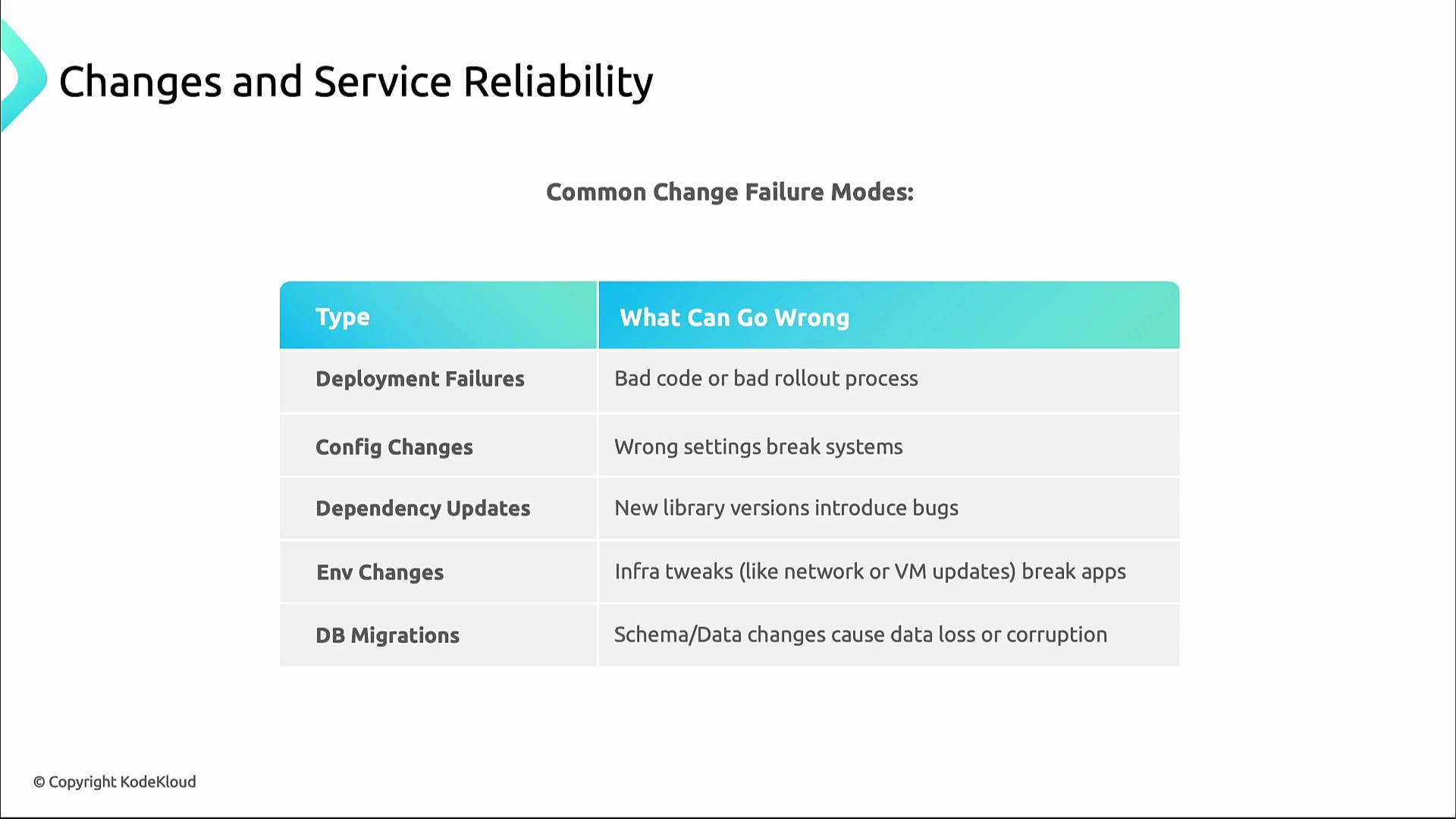
Common change failure modes (what often goes wrong):
| Change Type | Typical Failure Modes |
| ---------------------- | ---------------------------------------------------------------- |
| Deployments / Rollouts | Expose code bugs, configuration drift, or rollout tooling errors |
| Configuration edits | Typos, wrong environment targets, or incorrect values |
| Dependency upgrades | API changes, behavioral regressions, or compatibility breaks |
| Environment changes | OS/runtime updates, container runtime differences, infra changes |
| Database migrations | Long-running locks, schema incompatibilities, or data corruption |
If you care about uptime, you must care about how changes are made. Most engineers will at some point be involved in a production outage. The difference between a career-limiting event and a learning experience is often how well your change management process limits and contains damage.
Common change failure modes (what often goes wrong):
| Change Type | Typical Failure Modes |
| ---------------------- | ---------------------------------------------------------------- |
| Deployments / Rollouts | Expose code bugs, configuration drift, or rollout tooling errors |
| Configuration edits | Typos, wrong environment targets, or incorrect values |
| Dependency upgrades | API changes, behavioral regressions, or compatibility breaks |
| Environment changes | OS/runtime updates, container runtime differences, infra changes |
| Database migrations | Long-running locks, schema incompatibilities, or data corruption |
 The core SRE challenge is balancing two competing goals: velocity (delivering business value quickly) and stability (keeping services reliable during change). Your processes should let teams move fast while keeping risk acceptable.
 Think of change like training at the gym: someone who trains consistently builds resilience. Frequent, small, validated changes increase resilience, speed feedback loops, and make recovery easier. Infrequent, large, untested changes are high risk.
When testing and validation improve, teams can increase agility while preserving reliability. This produces a virtuous cycle:
Small, frequent changes → faster feedback → improved testing and validation → higher confidence → greater stability.
Think of change like training at the gym: someone who trains consistently builds resilience. Frequent, small, validated changes increase resilience, speed feedback loops, and make recovery easier. Infrequent, large, untested changes are high risk.
When testing and validation improve, teams can increase agility while preserving reliability. This produces a virtuous cycle:
Small, frequent changes → faster feedback → improved testing and validation → higher confidence → greater stability.
 Deployment strategies that reduce blast radius and increase safety
| Strategy | Description | When to use |
| ------------- | -------------------------------------------------------------------------------------------------------------------------------------------- | ------------------------------------------------------------------ |
| Blue-green | Deploy the new version alongside the current one, validate it, then switch traffic. Enables near-instant rollback and environment isolation. | Fast API updates, minimal downtime requirements |
| Canary | Roll out to a small subset of servers or users (e.g., 5% of traffic) and observe behavior before increasing traffic. | Testing new logic against production traffic with limited exposure |
| Feature flags | Ship code behind toggles and control feature exposure independently of deploys; enables gradual rollouts and rapid rollbacks. | Complex feature rollouts, gradual experimentation, A/B testing |
Deployment strategies that reduce blast radius and increase safety
| Strategy | Description | When to use |
| ------------- | -------------------------------------------------------------------------------------------------------------------------------------------- | ------------------------------------------------------------------ |
| Blue-green | Deploy the new version alongside the current one, validate it, then switch traffic. Enables near-instant rollback and environment isolation. | Fast API updates, minimal downtime requirements |
| Canary | Roll out to a small subset of servers or users (e.g., 5% of traffic) and observe behavior before increasing traffic. | Testing new logic against production traffic with limited exposure |
| Feature flags | Ship code behind toggles and control feature exposure independently of deploys; enables gradual rollouts and rapid rollbacks. | Complex feature rollouts, gradual experimentation, A/B testing |
 Monitoring and observability during change
Change without monitoring is flying blind. Track these key metrics during and after deployments to determine whether a change is safe or if it should be halted/rolled back:
| Metric | Why it matters |
| ------------------------------ | ------------------------------------------------------------------------ |
| Error rates | Detect spikes in failures immediately after a change |
| Latency | Identify degraded response times affecting UX |
| Traffic | Verify that users can access services and that routing behaves correctly |
| Saturation (CPU, memory, disk) | Catch resource pressure that can lead to cascading failures |
| Deployment progress | Detect stuck rollouts or nodes that fail to update |
Use dashboards and alerting based on these metrics to trigger automated or human responses.
Monitoring and observability during change
Change without monitoring is flying blind. Track these key metrics during and after deployments to determine whether a change is safe or if it should be halted/rolled back:
| Metric | Why it matters |
| ------------------------------ | ------------------------------------------------------------------------ |
| Error rates | Detect spikes in failures immediately after a change |
| Latency | Identify degraded response times affecting UX |
| Traffic | Verify that users can access services and that routing behaves correctly |
| Saturation (CPU, memory, disk) | Catch resource pressure that can lead to cascading failures |
| Deployment progress | Detect stuck rollouts or nodes that fail to update |
Use dashboards and alerting based on these metrics to trigger automated or human responses.
 When in doubt — roll back
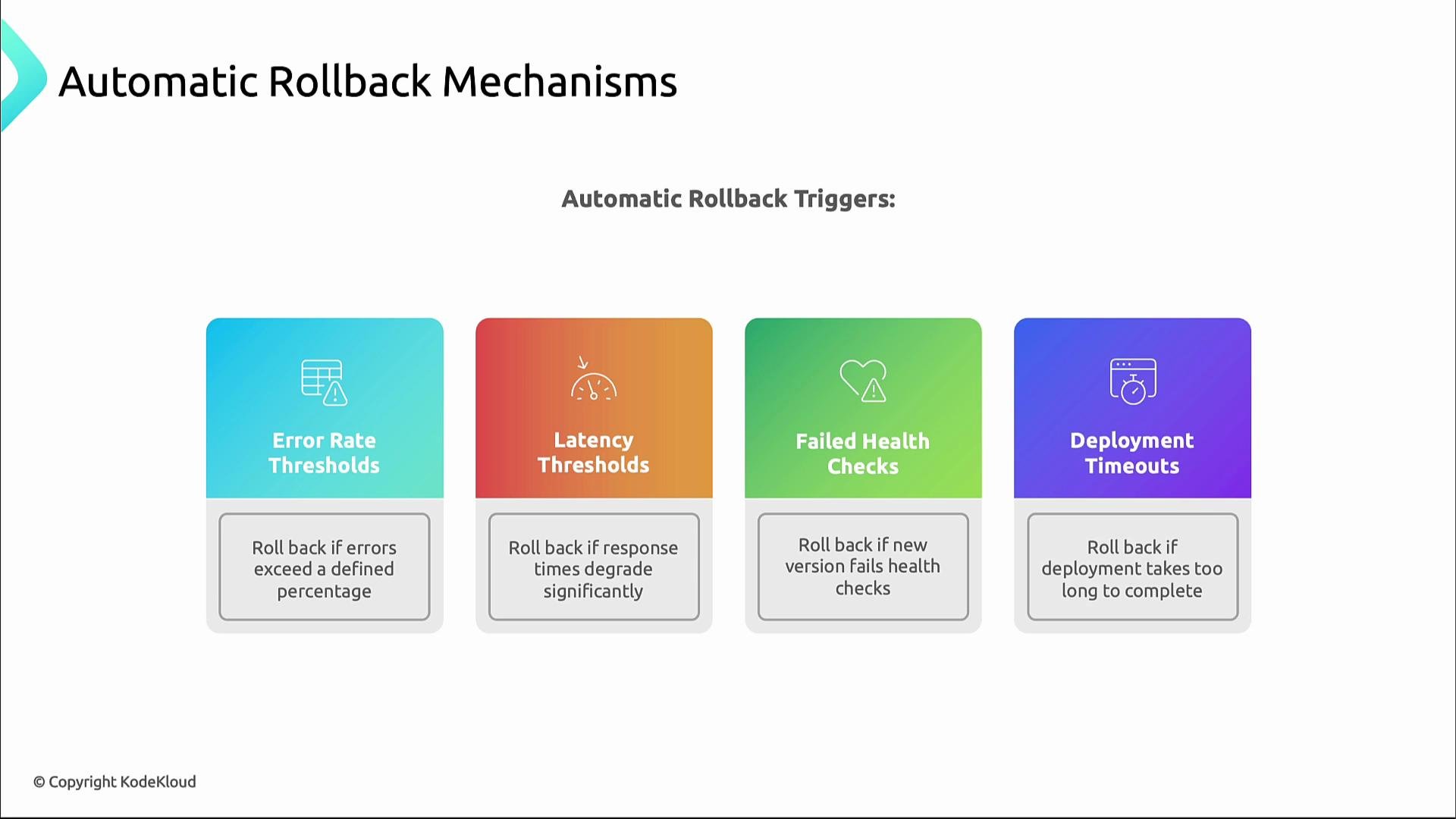
Prefer automatic rollbacks where possible. Modern deployment systems can detect problematic behavior and revert changes before human intervention is required. Common automatic rollback triggers:
* Error rate thresholds exceeded
* Latency thresholds exceeded
* Health checks failing for the new version
* Deployment timeouts or stalled rollouts
These triggers should align with your SLOs and error budgets so rollbacks happen before user experience degrades unacceptably.
When in doubt — roll back
Prefer automatic rollbacks where possible. Modern deployment systems can detect problematic behavior and revert changes before human intervention is required. Common automatic rollback triggers:
* Error rate thresholds exceeded
* Latency thresholds exceeded
* Health checks failing for the new version
* Deployment timeouts or stalled rollouts
These triggers should align with your SLOs and error budgets so rollbacks happen before user experience degrades unacceptably.
 Practical example — Argo Rollouts + Prometheus automated canary analysis
Below is a practical Argo Rollouts example that references an AnalysisTemplate named "error-rate-check". The template uses a Prometheus query to compute an error rate and triggers a failure (and thus a rollback) if the measured error rate exceeds the provided threshold argument.
Rollout (references the analysis template and sets the errorRate arg):
```yaml theme={null}
apiVersion: argoproj.io/v1alpha1
kind: Rollout
metadata:
name: example-rollout
spec:
replicas: 3
strategy:
canary:
steps:
- setWeight: 10
- pause: { duration: 30s }
- analysis:
templates:
- templateName: error-rate-check
args:
- name: errorRate
value: "5" # 5% error threshold
- setWeight: 50
- pause: { duration: 30s }
- setWeight: 100
```
AnalysisTemplate (invoked by the Rollout; uses a Prometheus query and a failureCondition referencing the passed argument):
```yaml theme={null}
apiVersion: argoproj.io/v1alpha1
kind: AnalysisTemplate
metadata:
name: error-rate-check
spec:
metrics:
- name: http-error-rate
provider:
prometheus:
# Prometheus query computing percentage of error requests over total requests in the last 1m
query: |
sum(rate(http_request_errors_total[1m]))
/
sum(rate(http_requests_total[1m])) * 100
# Use the passed-in argument to decide when the metric indicates failure.
# This template evaluates to a numeric "result" and the rollout will fail if the condition is true.
failureCondition: result > {{args.errorRate}}
```
Align thresholds (for example, 5%) with your SLOs and error budget. Use conservative values for early-stage rollouts and tighten them as you gain confidence.
Post-deployment verification
Continue validating after rollout with a layered approach:
* Smoke tests: basic functionality checks to confirm the service is up.
* Integration tests: validate interactions between services.
* Performance tests: simulate real-world load to check behavior under stress.
* Canary user testing: let a subset of real users try the change.
* Gradual traffic shifting: ramp traffic slowly while watching metrics.
Practical example — Argo Rollouts + Prometheus automated canary analysis
Below is a practical Argo Rollouts example that references an AnalysisTemplate named "error-rate-check". The template uses a Prometheus query to compute an error rate and triggers a failure (and thus a rollback) if the measured error rate exceeds the provided threshold argument.
Rollout (references the analysis template and sets the errorRate arg):
```yaml theme={null}
apiVersion: argoproj.io/v1alpha1
kind: Rollout
metadata:
name: example-rollout
spec:
replicas: 3
strategy:
canary:
steps:
- setWeight: 10
- pause: { duration: 30s }
- analysis:
templates:
- templateName: error-rate-check
args:
- name: errorRate
value: "5" # 5% error threshold
- setWeight: 50
- pause: { duration: 30s }
- setWeight: 100
```
AnalysisTemplate (invoked by the Rollout; uses a Prometheus query and a failureCondition referencing the passed argument):
```yaml theme={null}
apiVersion: argoproj.io/v1alpha1
kind: AnalysisTemplate
metadata:
name: error-rate-check
spec:
metrics:
- name: http-error-rate
provider:
prometheus:
# Prometheus query computing percentage of error requests over total requests in the last 1m
query: |
sum(rate(http_request_errors_total[1m]))
/
sum(rate(http_requests_total[1m])) * 100
# Use the passed-in argument to decide when the metric indicates failure.
# This template evaluates to a numeric "result" and the rollout will fail if the condition is true.
failureCondition: result > {{args.errorRate}}
```
Align thresholds (for example, 5%) with your SLOs and error budget. Use conservative values for early-stage rollouts and tighten them as you gain confidence.
Post-deployment verification
Continue validating after rollout with a layered approach:
* Smoke tests: basic functionality checks to confirm the service is up.
* Integration tests: validate interactions between services.
* Performance tests: simulate real-world load to check behavior under stress.
* Canary user testing: let a subset of real users try the change.
* Gradual traffic shifting: ramp traffic slowly while watching metrics.
 Change management policy — what to define
A written policy should specify different procedures for different change types (regular deployments, DB changes, emergency changes). For example:
| Change Category | Scheduling | Typical Window | Approval |
| --------------------------- | ----------------------------------: | ----------------------- | ------------------------------- |
| Regular deployments | Planned and scheduled | Tue/Thu 10:00–14:00 UTC | Team or release manager |
| Database changes/migrations | Low-traffic window | Sun 02:00–06:00 UTC | DB lead + SRE |
| Emergency changes | As needed, follow emergency process | N/A | Pre-defined approver (SRE Lead) |
Change management policy — what to define
A written policy should specify different procedures for different change types (regular deployments, DB changes, emergency changes). For example:
| Change Category | Scheduling | Typical Window | Approval |
| --------------------------- | ----------------------------------: | ----------------------- | ------------------------------- |
| Regular deployments | Planned and scheduled | Tue/Thu 10:00–14:00 UTC | Team or release manager |
| Database changes/migrations | Low-traffic window | Sun 02:00–06:00 UTC | DB lead + SRE |
| Emergency changes | As needed, follow emergency process | N/A | Pre-defined approver (SRE Lead) |
 Your policy should also specify:
* When to require a postmortem (for example, after emergency changes or any incident causing customer impact).
* Freeze periods when changes are restricted (e.g., during product launches or high-traffic events).
* Risk categories (low/medium/high) with approval gates and explicit approvers.
Wrap-up
Effective change management helps teams innovate without compromising reliability. Every deployment, configuration tweak, or feature also impacts capacity — the next step in reliable operations is capacity planning.
Related resources and references:
* [Site Reliability Engineering (SRE) concepts](https://sre.google/sre-book/)
* [Service-level objectives (SLOs)](https://en.wikipedia.org/wiki/Service-level_objective)
* [Argo Rollouts documentation](https://argoproj.github.io/argo-rollouts/)
* [Prometheus monitoring](https://prometheus.io/)
* [Kubernetes basics](https://kubernetes.io/docs/concepts/overview/what-is-kubernetes/)
Your policy should also specify:
* When to require a postmortem (for example, after emergency changes or any incident causing customer impact).
* Freeze periods when changes are restricted (e.g., during product launches or high-traffic events).
* Risk categories (low/medium/high) with approval gates and explicit approvers.
Wrap-up
Effective change management helps teams innovate without compromising reliability. Every deployment, configuration tweak, or feature also impacts capacity — the next step in reliable operations is capacity planning.
Related resources and references:
* [Site Reliability Engineering (SRE) concepts](https://sre.google/sre-book/)
* [Service-level objectives (SLOs)](https://en.wikipedia.org/wiki/Service-level_objective)
* [Argo Rollouts documentation](https://argoproj.github.io/argo-rollouts/)
* [Prometheus monitoring](https://prometheus.io/)
* [Kubernetes basics](https://kubernetes.io/docs/concepts/overview/what-is-kubernetes/)