> ## Documentation Index
> Fetch the complete documentation index at: https://notes.kodekloud.com/llms.txt
> Use this file to discover all available pages before exploring further.
# Cluster Multi Tenancy
> This guide explains how to host multiple tenants on a single Google Kubernetes Engine cluster while ensuring isolation and centralized management.
In this guide, you’ll learn how to host multiple tenants—users, teams, or workloads—on a single Google Kubernetes Engine (GKE) cluster. GKE Cluster Multi-Tenancy centralizes control-plane operations, security policies, and auditing while allowing each tenant to operate in isolation.
## Why Choose a Multitenant Cluster?
* **Cost Efficiency**\
Consolidate control-plane and compute resources to lower infrastructure costs.
* **Agility & Flexibility**\
Onboard or offboard tenants on demand without spinning up new clusters.
* **Simplified Management**\
Monitor and operate all tenants from one GKE console, streamlining DevOps workflows.
Before implementing multitenancy, evaluate your organization’s security posture and compliance requirements. Proper isolation is critical to safeguard tenant workloads and sensitive data.
## Isolation Layers in Kubernetes
Consider these five layers to enforce tenant separation:
| Isolation Layer | Purpose | Key Tools & Features |
| --------------- | ------------------------------------ | -------------------------------------------------------------- |
| Cluster Level | Single control plane for all tenants | GKE control-plane, central logging, cross-cluster policies |
| Node Level | Dedicated or shared node pools | Node taints & tolerations, custom node pools |
| Namespace Level | Logical resource partitioning | Namespaces, ResourceQuotas, LimitRanges, NetworkPolicies, RBAC |
| Pod Level | Per-pod security boundaries | Pod Security Admission, SecurityContexts, NetworkPolicies |
| Container Level | Hardened container runtime | Service accounts, vulnerability scanning, read-only root FS |
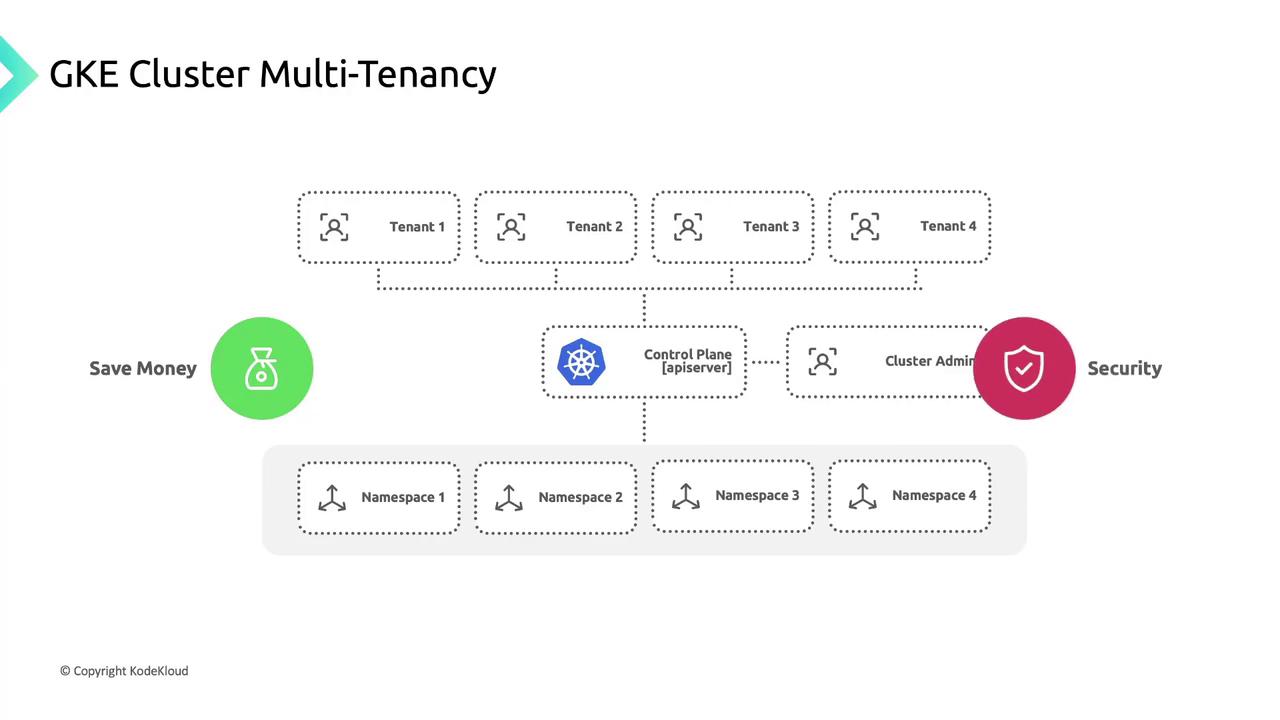
### Namespaces for Tenant Isolation
Namespaces are your primary sandbox for tenant workloads:
* Apply `ResourceQuota` and `LimitRange` to cap CPU, memory, and object counts.
* Enforce `NetworkPolicy` rules for traffic segmentation.
* Use `RoleBinding` and `ClusterRoleBinding` for fine-grained RBAC.
Combine namespaces with dedicated node pools and strict Pod Security Admission profiles for stronger isolation.
## Enterprise Best Practices
For large-scale, production-grade multitenancy, follow the enterprise best practices:
* Secure cluster provisioning with private clusters and VPC-native networking
* Policy enforcement via Anthos Config Management and Gatekeeper
* Centralized monitoring and audit logging
* Automated tenant onboarding and offboarding workflows
## Links and References
* [GKE Enterprise Multitenancy Best Practices](https://cloud.google.com/kubernetes-engine/docs/enterprise-multitenancy)
* [Kubernetes Namespaces](https://kubernetes.io/docs/concepts/overview/working-with-objects/namespaces/)
* [Anthos Config Management](https://cloud.google.com/anthos-config-management)
* [Pod Security Admission](https://kubernetes.io/docs/concepts/security/pod-security-admission/)