> ## Documentation Index
> Fetch the complete documentation index at: https://notes.kodekloud.com/llms.txt
> Use this file to discover all available pages before exploring further.
# Gateway Configuration Deep Dive
> Guide to configuring Kubernetes Gateway resources, listeners, routing, and TLS termination including GatewayClass, allowedRoutes, and terminate versus passthrough TLS patterns
This document explains the Gateway resource in the Kubernetes Gateway API, how it fits into your edge architecture, and configuration patterns for listeners, routing, and TLS termination. Use this as a practical reference after installing a Gateway controller (for example, via a Helm chart).
The Gateway is the core component of your edge architecture. Its primary responsibilities include:
* referencing a `GatewayClass` (the implementation/controller),
* hosting listeners (attachment points for Routes),
* accepting and routing `Route` objects,
* hosting TLS certificates when terminating TLS,
* and exposing a routable IP address.
Typically the Gateway is the first Kubernetes resource you create after installing the controller.
Gateways are implementation-specific. The `GatewayClass` you reference determines controller behavior, supported features, and how TLS or protocols are implemented. See the Gateway API docs for controller-specific details.
## Example Gateway manifest
Here is a minimal Gateway manifest that references a `GatewayClass` named `nginx` and creates an HTTP listener for `*.example.com` on port 80:
```yaml theme={null}
apiVersion: gateway.networking.k8s.io/v1
kind: Gateway
metadata:
name: gateway
spec:
gatewayClassName: nginx
listeners:
- name: http
port: 80
protocol: HTTP
hostname: "*.example.com"
```
Key fields in this example:
* `gatewayClassName` — references the `GatewayClass` object providing the implementation (the controller).
* `listeners` — describe how the Gateway accepts traffic and where `Route` kinds can attach. The `http` listener above listens on port `80` for HTTP requests and accepts hostnames that match `*.example.com`.
## Listener protocols
Listener protocols supported by the Gateway API include:
| Protocol | Typical use cases |
| - | - |
| HTTP | Standard unencrypted HTTP routing |
| HTTPS | HTTP over TLS (Gateway terminates TLS) |
| TLS | Layer 4 TLS routing/termination |
| TCP | Raw TCP proxying |
| UDP | Raw UDP proxying |
| GRPC | gRPC traffic (application-aware routing) |
Note: Controller implementations vary in feature support. Check your controller's documentation for exact behavior and extensions.
## Advanced listener settings
Listeners include several advanced options to control which Routes may attach and how they are matched.
* `allowedRoutes` controls which Route kinds and which namespaces are permitted to reference a listener.
* Namespace selection options:
* `from: All` — allow Routes from any namespace.
* `from: Same` — allow Routes only from the Gateway's namespace.
* `from: Selector` — allow Routes only from namespaces matching a label selector.
Example: restrict allowed Routes to namespaces selected by labels:
```yaml theme={null}
spec:
listeners:
- name: http
port: 80
protocol: HTTP
hostname: "*.example.com"
allowedRoutes:
namespaces:
from: Selector
selector:
matchLabels:
allow-gateway: "true"
```
Table: `allowedRoutes` namespace options
| `from` value | Meaning | Example |
| - | - | - |
| `All` | Allow Routes from any namespace | `from: All` |
| `Same` | Only allow Routes in the Gateway's namespace | `from: Same` |
| `Selector` | Allow Routes in namespaces matching a label selector | `from: Selector` + `selector` |
## TLS modes: Terminate vs Passthrough
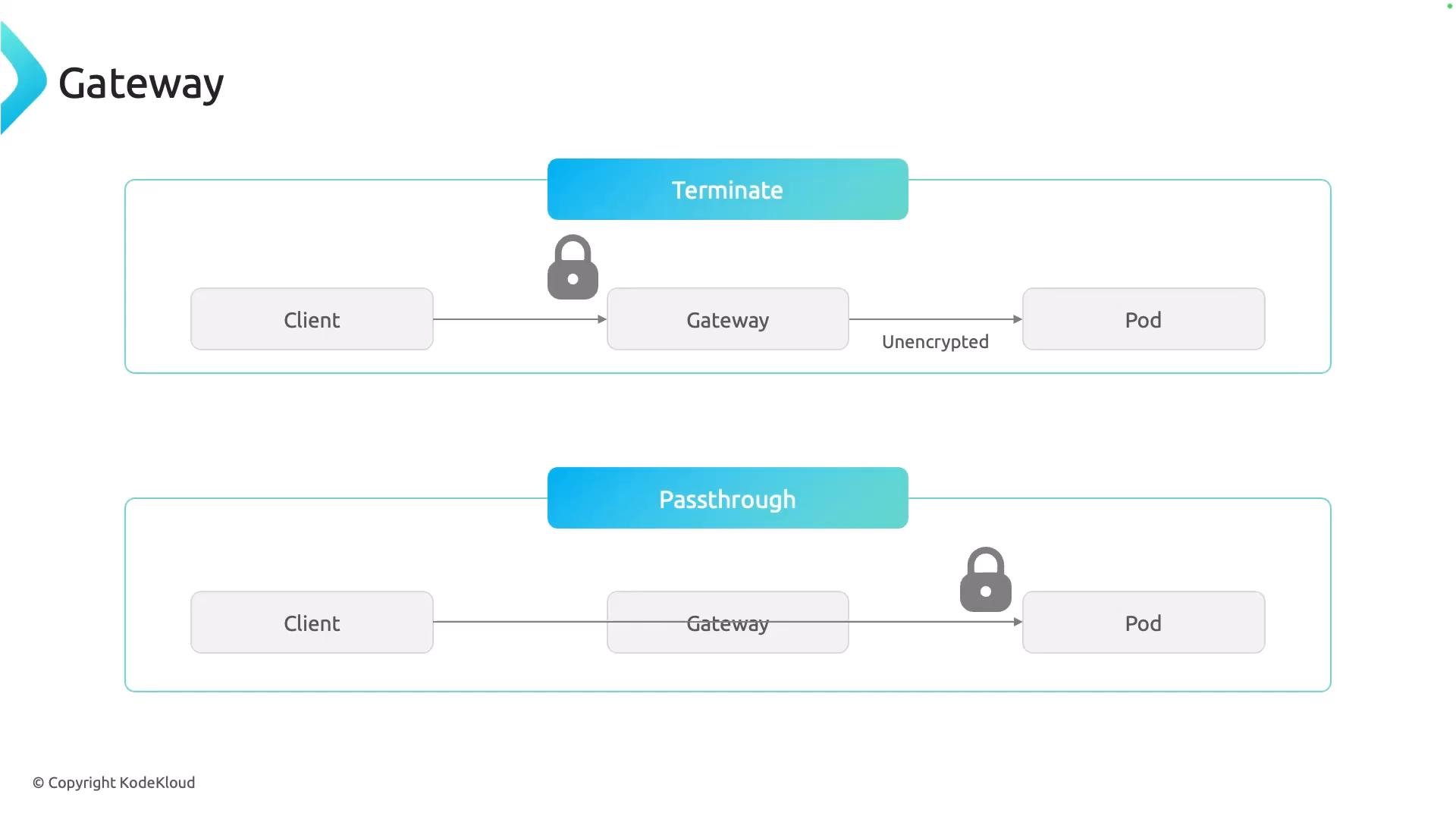
The Gateway API supports two primary TLS handling modes. Choose the one that fits your security and routing requirements.
| Mode | What happens | When to use |
| - | - | - |
| Terminate | Gateway decrypts (terminates) TLS using certificates configured on the Gateway. Traffic to backends can be unencrypted (HTTP) or re-encrypted depending on controller features. | Use when you need HTTP-level routing, SNI inspection, header inspection, or TLS offload. |
| Passthrough | Gateway forwards the encrypted connection to the backend Pod without decrypting it. Backend is responsible for TLS termination and client certificate validation. | Use when end-to-end encryption and backend certificate validation are required. |
Choose `terminate` when the Gateway needs to inspect HTTP for routing or perform TLS offload. Choose `passthrough` when your application must handle TLS termination or client certificate validation end-to-end.
 ## Quick reference and next steps
* Create a `GatewayClass` (controller) first, then create one or more `Gateway` resources.
* Define listeners for protocol, port, and hostname matching.
* Use `allowedRoutes` to scope which namespaces and Route kinds can attach.
* Decide whether the Gateway should `terminate` TLS or `passthrough` encrypted connections.
* Consult your controller’s documentation for implementation-specific features (certificate management, re-encryption to backends, etc.).
Further reading and references:
* Gateway API specification: [https://gateway-api.sigs.k8s.io/](https://gateway-api.sigs.k8s.io/)
* Kubernetes Networking concepts: [https://kubernetes.io/docs/concepts/services-networking/](https://kubernetes.io/docs/concepts/services-networking/)
* Controller-specific docs (example): check your controller’s Helm chart or provider documentation for TLS and listener extensions.
That's it for this lesson. I hope you found it helpful.
This documentation is built and hosted on [Mintlify](https://mintlify.com), a developer documentation platform.
## Quick reference and next steps
* Create a `GatewayClass` (controller) first, then create one or more `Gateway` resources.
* Define listeners for protocol, port, and hostname matching.
* Use `allowedRoutes` to scope which namespaces and Route kinds can attach.
* Decide whether the Gateway should `terminate` TLS or `passthrough` encrypted connections.
* Consult your controller’s documentation for implementation-specific features (certificate management, re-encryption to backends, etc.).
Further reading and references:
* Gateway API specification: [https://gateway-api.sigs.k8s.io/](https://gateway-api.sigs.k8s.io/)
* Kubernetes Networking concepts: [https://kubernetes.io/docs/concepts/services-networking/](https://kubernetes.io/docs/concepts/services-networking/)
* Controller-specific docs (example): check your controller’s Helm chart or provider documentation for TLS and listener extensions.
That's it for this lesson. I hope you found it helpful.
This documentation is built and hosted on [Mintlify](https://mintlify.com), a developer documentation platform.