> ## Documentation Index
> Fetch the complete documentation index at: https://notes.kodekloud.com/llms.txt
> Use this file to discover all available pages before exploring further.
# HTTP to HTTPS Redirects
> Implementing HTTP to HTTPS redirects using Kubernetes Gateway API to centralize TLS termination, issue redirects on HTTP listener, and serve secure traffic via HTTPS listener.
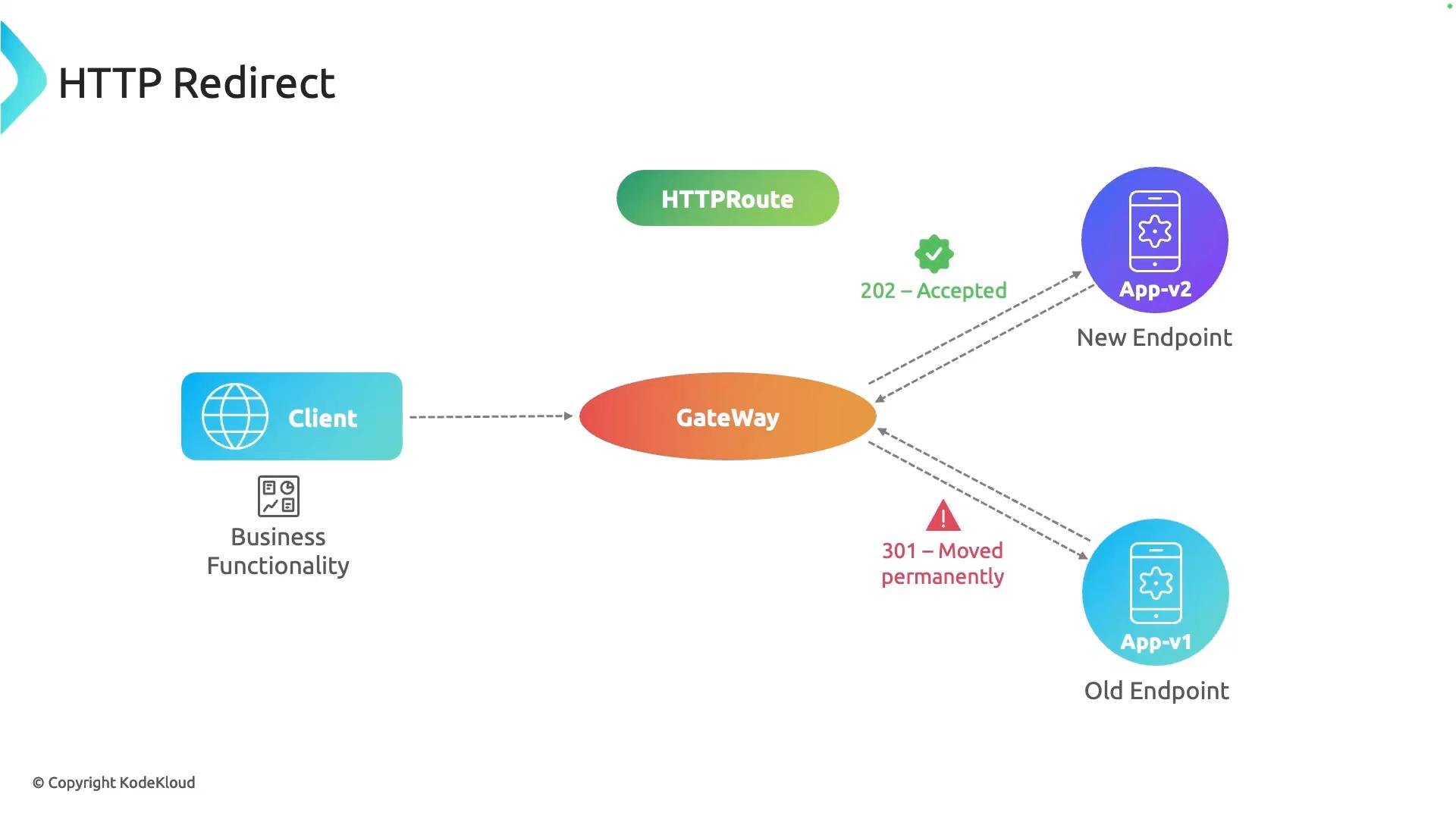
This lesson shows how to implement an HTTP → HTTPS redirect using the Kubernetes Gateway API. A redirect returns a response to the client indicating the requested endpoint has moved; the client then follows the returned location (new scheme and/or port) to reach the application. Using the Gateway API's RequestRedirect filter on an HTTP listener keeps the HTTP listener focused only on issuing redirects, while the HTTPS listener (with TLS configured on the Gateway) serves the actual application traffic.
 Why use this pattern?
* Centralizes TLS termination and certificate management on the Gateway resource.
* Ensures all plain HTTP traffic is consistently redirected to secure HTTPS.
* Avoids forwarding insecure traffic to application backends.
* Allows flexible control of redirect status codes (permanent vs temporary) and target ports/schemes.
How it works (high-level)
1. The Gateway exposes a listener on port 80 (HTTP) and a listener on port 443 (HTTPS).
2. An HTTPRoute attached to the Gateway's HTTP section uses a RequestRedirect filter to return a redirect response (e.g., to `https://...:443`).
3. A separate HTTPRoute attached to the Gateway's HTTPS section handles actual traffic and forwards to backend services.
Implementation steps
* Configure TLS on your Gateway (certificates, trust, etc.). The Gateway's TLS configuration applies to the HTTPS listener.
* Create an HTTPRoute for the HTTP section with a RequestRedirect filter that points to `https` and port `443`.
* Create an HTTPRoute for the HTTPS section that matches hostnames/paths and forwards to the service backend.
Example: HTTPRoute that issues the redirect
```yaml theme={null}
apiVersion: gateway.networking.k8s.io/v1
kind: HTTPRoute
metadata:
name: cafe-tls-redirect
spec:
parentRefs:
- name: gateway
sectionName: http
hostnames:
- "cafe.example.com"
rules:
- filters:
- type: RequestRedirect
requestRedirect:
scheme: https
port: 443
statusCode: 301
```
Notes about the HTTPRoute:
* `parentRefs` with `sectionName: http` attaches this route to the Gateway's HTTP listener.
* The `RequestRedirect` filter returns the redirect immediately; it does not forward the request to any backend.
* `scheme` and `port` define the new destination clients should use.
Example: HTTPRoute for the HTTPS listener (forwards to backend)
```yaml theme={null}
apiVersion: gateway.networking.k8s.io/v1
kind: HTTPRoute
metadata:
name: coffee
spec:
parentRefs:
- name: gateway
sectionName: https
hostnames:
- "cafe.example.com"
rules:
- matches:
- path:
type: PathPrefix
value: /coffee
backendRefs:
- name: coffee
port: 80
```
Notes about the HTTPS route:
* Attach this to the Gateway's HTTPS listener using `sectionName: https`.
* Configure `hostnames`, `matches` (paths, methods, headers), and `backendRefs` normally, just like any other HTTPRoute.
* TLS termination is handled by the Gateway (ensure your Gateway resource has the appropriate TLS configuration and certificates).
Status code guidance
Choose the appropriate redirect status code for your use case:
* `301` — Moved Permanently: browsers and search engines may cache. Use when the resource permanently moved to HTTPS.
* `302` — Found / Temporary Redirect: do not be treated as permanent by clients.
* `308` — Permanent Redirect that preserves the HTTP method (useful for non-GET requests where method preservation matters).
Quick reference table
| Field | Purpose | Example |
| - | - | - |
| `scheme` | Target URL scheme for redirected requests | `https` |
| `port` | Target port for the redirect | `443` |
| `statusCode` | HTTP status code returned for the redirect | `301`, `302`, `308` |
| `parentRefs.sectionName` | Attaches HTTPRoute to a specific Gateway listener | `http` or `https` |
Related links and references
* Gateway API: [https://gateway-api.sigs.k8s.io/](https://gateway-api.sigs.k8s.io/)
* Kubernetes Gateway API specification: [https://gateway-api.sigs.k8s.io/v1alpha2/](https://gateway-api.sigs.k8s.io/v1alpha2/) or the current stable version
* TLS and certificate management for Gateways (provider-specific docs)
This redirect pattern ensures your HTTP listener's only responsibility is to guide clients to HTTPS, while the HTTPS listener (with TLS configured on the Gateway) serves secure application traffic.
This documentation is built and hosted on [Mintlify](https://mintlify.com), a developer documentation platform.
Why use this pattern?
* Centralizes TLS termination and certificate management on the Gateway resource.
* Ensures all plain HTTP traffic is consistently redirected to secure HTTPS.
* Avoids forwarding insecure traffic to application backends.
* Allows flexible control of redirect status codes (permanent vs temporary) and target ports/schemes.
How it works (high-level)
1. The Gateway exposes a listener on port 80 (HTTP) and a listener on port 443 (HTTPS).
2. An HTTPRoute attached to the Gateway's HTTP section uses a RequestRedirect filter to return a redirect response (e.g., to `https://...:443`).
3. A separate HTTPRoute attached to the Gateway's HTTPS section handles actual traffic and forwards to backend services.
Implementation steps
* Configure TLS on your Gateway (certificates, trust, etc.). The Gateway's TLS configuration applies to the HTTPS listener.
* Create an HTTPRoute for the HTTP section with a RequestRedirect filter that points to `https` and port `443`.
* Create an HTTPRoute for the HTTPS section that matches hostnames/paths and forwards to the service backend.
Example: HTTPRoute that issues the redirect
```yaml theme={null}
apiVersion: gateway.networking.k8s.io/v1
kind: HTTPRoute
metadata:
name: cafe-tls-redirect
spec:
parentRefs:
- name: gateway
sectionName: http
hostnames:
- "cafe.example.com"
rules:
- filters:
- type: RequestRedirect
requestRedirect:
scheme: https
port: 443
statusCode: 301
```
Notes about the HTTPRoute:
* `parentRefs` with `sectionName: http` attaches this route to the Gateway's HTTP listener.
* The `RequestRedirect` filter returns the redirect immediately; it does not forward the request to any backend.
* `scheme` and `port` define the new destination clients should use.
Example: HTTPRoute for the HTTPS listener (forwards to backend)
```yaml theme={null}
apiVersion: gateway.networking.k8s.io/v1
kind: HTTPRoute
metadata:
name: coffee
spec:
parentRefs:
- name: gateway
sectionName: https
hostnames:
- "cafe.example.com"
rules:
- matches:
- path:
type: PathPrefix
value: /coffee
backendRefs:
- name: coffee
port: 80
```
Notes about the HTTPS route:
* Attach this to the Gateway's HTTPS listener using `sectionName: https`.
* Configure `hostnames`, `matches` (paths, methods, headers), and `backendRefs` normally, just like any other HTTPRoute.
* TLS termination is handled by the Gateway (ensure your Gateway resource has the appropriate TLS configuration and certificates).
Status code guidance
Choose the appropriate redirect status code for your use case:
* `301` — Moved Permanently: browsers and search engines may cache. Use when the resource permanently moved to HTTPS.
* `302` — Found / Temporary Redirect: do not be treated as permanent by clients.
* `308` — Permanent Redirect that preserves the HTTP method (useful for non-GET requests where method preservation matters).
Quick reference table
| Field | Purpose | Example |
| - | - | - |
| `scheme` | Target URL scheme for redirected requests | `https` |
| `port` | Target port for the redirect | `443` |
| `statusCode` | HTTP status code returned for the redirect | `301`, `302`, `308` |
| `parentRefs.sectionName` | Attaches HTTPRoute to a specific Gateway listener | `http` or `https` |
Related links and references
* Gateway API: [https://gateway-api.sigs.k8s.io/](https://gateway-api.sigs.k8s.io/)
* Kubernetes Gateway API specification: [https://gateway-api.sigs.k8s.io/v1alpha2/](https://gateway-api.sigs.k8s.io/v1alpha2/) or the current stable version
* TLS and certificate management for Gateways (provider-specific docs)
This redirect pattern ensures your HTTP listener's only responsibility is to guide clients to HTTPS, while the HTTPS listener (with TLS configured on the Gateway) serves secure application traffic.
This documentation is built and hosted on [Mintlify](https://mintlify.com), a developer documentation platform.