> ## Documentation Index
> Fetch the complete documentation index at: https://notes.kodekloud.com/llms.txt
> Use this file to discover all available pages before exploring further.
# TLS Termination Configuration
> Explains TLS termination with the Gateway API, certificate handling via Kubernetes Secrets, Terminate vs Passthrough modes, listener configuration, and ReferenceGrant for cross-namespace secret access
This lesson explains TLS termination with the Gateway API and how to attach certificates to a Gateway. You will learn the two TLS modes supported by the Gateway API, how to obtain and store certificates in Kubernetes, and how to reference those certificates from a Gateway (including cross-namespace access control).
We’ll cover:
* TLS modes (Terminate vs Passthrough)
* Creating and storing TLS materials in a Kubernetes Secret
* Referencing Secrets from a Gateway listener
* Using ReferenceGrant to allow cross-namespace Secret references
## TLS modes in Gateway API
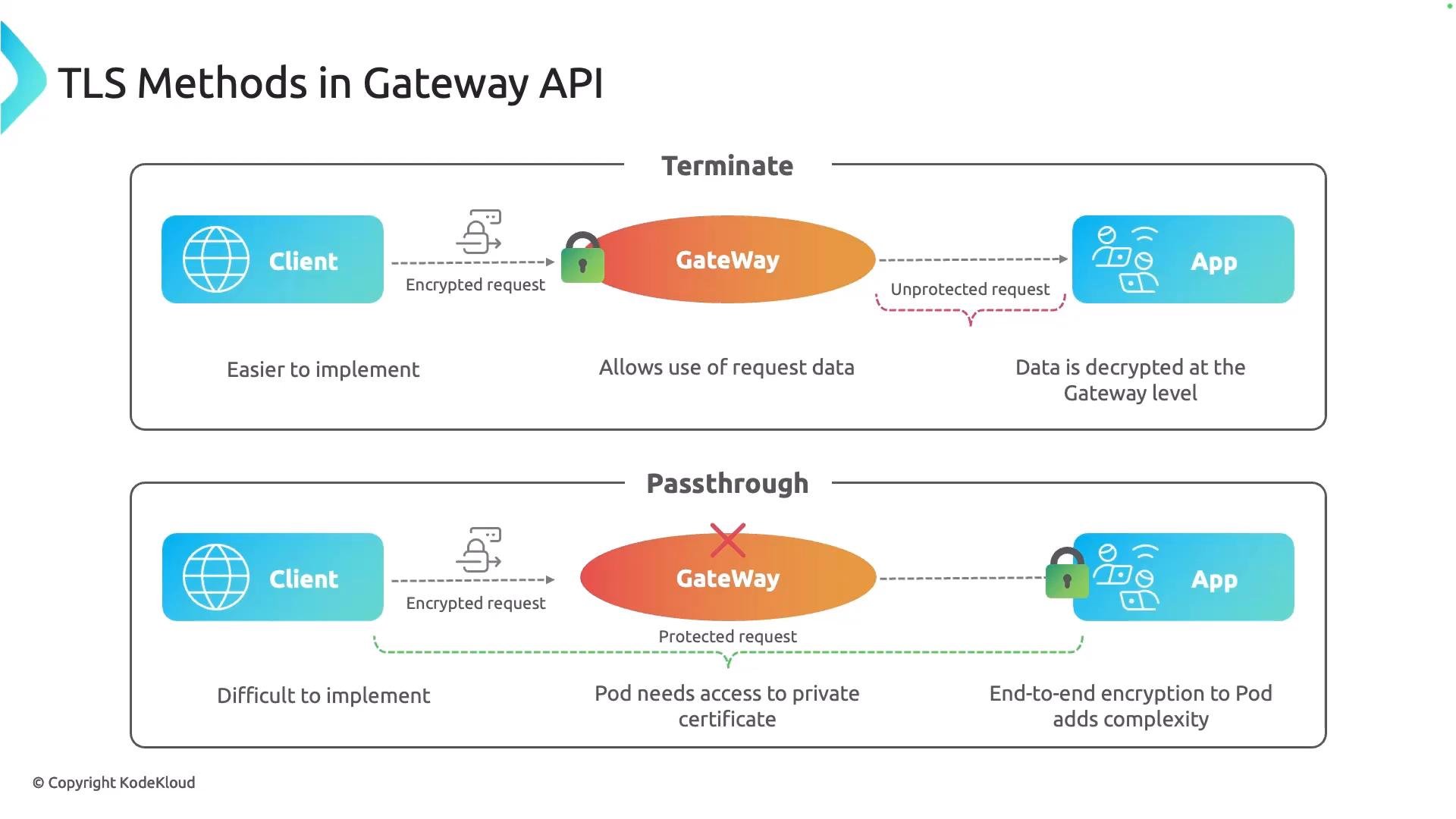
The Gateway API supports two TLS handling modes:
* Terminate\
The Gateway terminates TLS. It validates the certificate and decrypts the request. Traffic between the Gateway and backend is plain HTTP (or otherwise unencrypted). This is the simplest setup and lets the Gateway inspect request headers, paths, and bodies for routing or modification.
* Passthrough\
The Gateway forwards the encrypted client connection without terminating TLS. The backend (the application pod or a sidecar/proxy in front of it) must validate and terminate TLS. This preserves end-to-end encryption but requires the backend to have access to the certificate and private key and to perform TLS termination.
 If you need encryption all the way to the pod (passthrough), the backend must hold the private key and certificate to validate and terminate TLS. For automated issuance and rotation of certificates inside your cluster, consider using cert-manager.
If you plan to terminate TLS at the pod (passthrough), use an automated certificate solution like [cert-manager](https://cert-manager.io/) to simplify issuance, renewal, and rotation of TLS materials inside your cluster.
## Obtaining a signed certificate
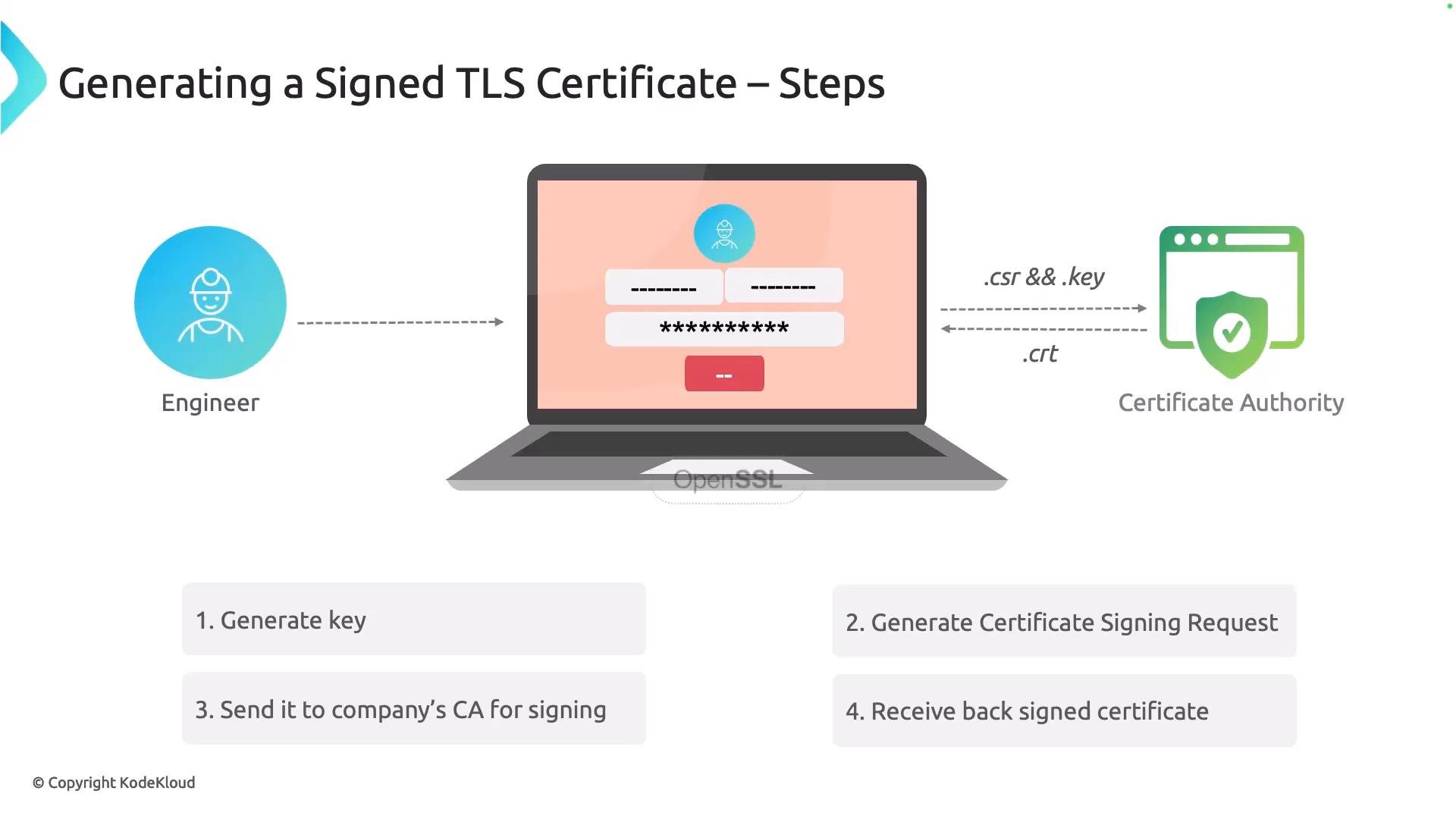
A certificate is required in both modes. Typical enterprise setups use an internal Certificate Authority (CA). The high-level flow to obtain a signed certificate:
1. Generate a private key.
2. Create a Certificate Signing Request (CSR) using the private key.
3. Submit the CSR to your CA.
4. Receive a signed certificate from the CA.
If you need encryption all the way to the pod (passthrough), the backend must hold the private key and certificate to validate and terminate TLS. For automated issuance and rotation of certificates inside your cluster, consider using cert-manager.
If you plan to terminate TLS at the pod (passthrough), use an automated certificate solution like [cert-manager](https://cert-manager.io/) to simplify issuance, renewal, and rotation of TLS materials inside your cluster.
## Obtaining a signed certificate
A certificate is required in both modes. Typical enterprise setups use an internal Certificate Authority (CA). The high-level flow to obtain a signed certificate:
1. Generate a private key.
2. Create a Certificate Signing Request (CSR) using the private key.
3. Submit the CSR to your CA.
4. Receive a signed certificate from the CA.
 You can use OpenSSL locally to generate a private key and CSR. Example:
```bash theme={null}
openssl genrsa -out tls.key 2048
openssl req -new -key tls.key -subj "/CN=example.com" -out tls.csr
# Submit tls.csr to your CA and receive tls.crt
```
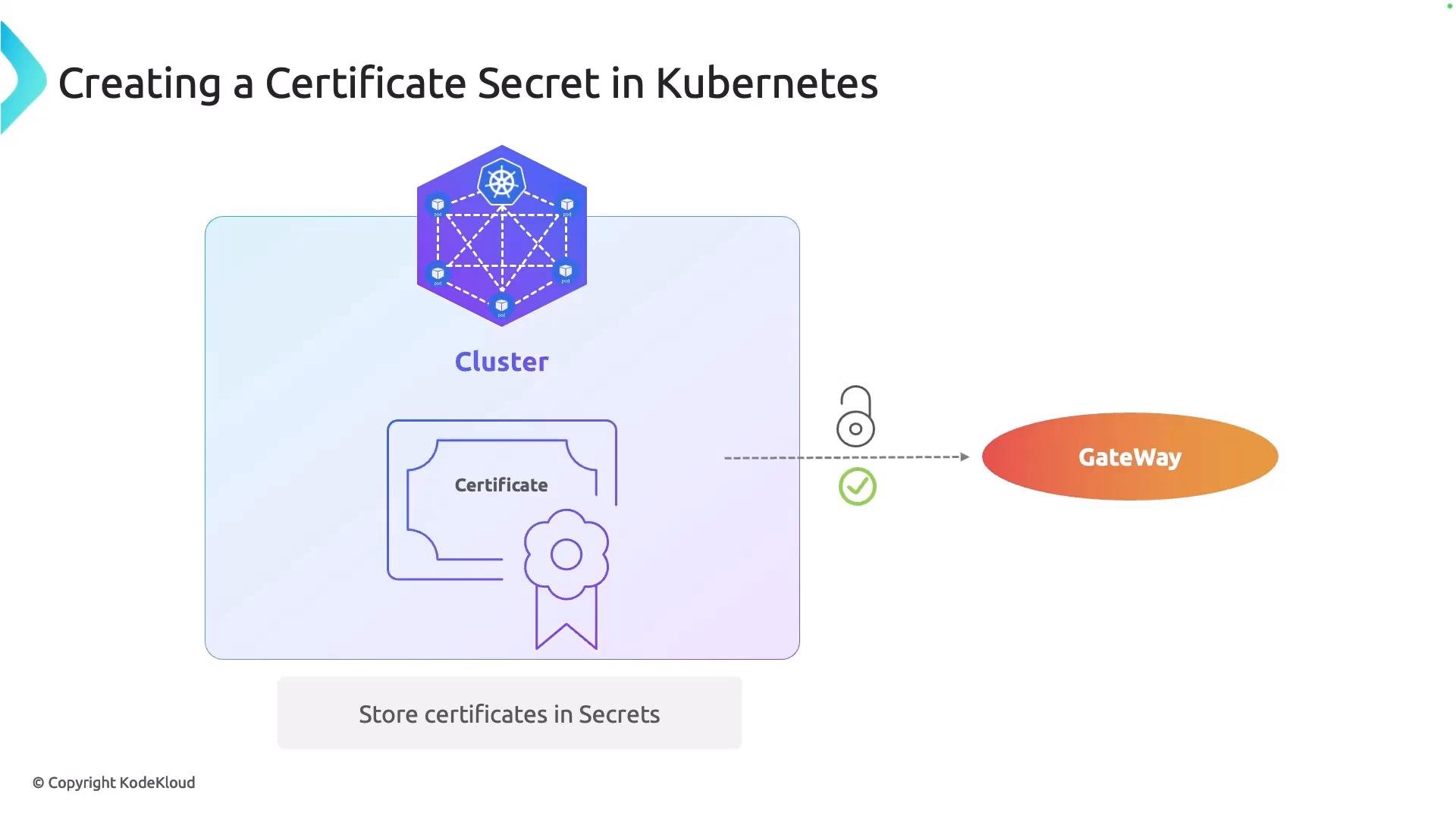
After you receive `tls.crt` and have the private key `tls.key`, store them in Kubernetes as a TLS Secret so your Gateway can access them.
You can use OpenSSL locally to generate a private key and CSR. Example:
```bash theme={null}
openssl genrsa -out tls.key 2048
openssl req -new -key tls.key -subj "/CN=example.com" -out tls.csr
# Submit tls.csr to your CA and receive tls.crt
```
After you receive `tls.crt` and have the private key `tls.key`, store them in Kubernetes as a TLS Secret so your Gateway can access them.
 ## Create a TLS Secret
Create a TLS Secret with kubectl (kubectl handles base64 encoding for you). Replace the placeholders (examples shown in a code block so angle brackets are safe):
```bash theme={null}
kubectl create secret tls --cert= --key= -n
```
Or create the Secret manifest yourself. A TLS Secret uses type `kubernetes.io/tls` and contains `tls.crt` and `tls.key` fields (base64-encoded):
```yaml theme={null}
apiVersion: v1
kind: Secret
metadata:
name: cafe-secret
namespace: certificate
type: kubernetes.io/tls
data:
tls.crt:
tls.key:
```
Inspect a created Secret as YAML:
```bash theme={null}
kubectl get secret cafe-secret -n certificate -o yaml
```
Treat private keys with care. Keep Secrets in restricted namespaces and limit RBAC access. If you must store private keys in the cluster, ensure appropriate RBAC, audit, and rotation policies are in place.
## Reference the Secret from a Gateway listener
To terminate TLS at the Gateway, add an HTTPS listener and reference the Secret via `certificateRefs`. Example Gateway manifest:
```yaml theme={null}
apiVersion: gateway.networking.k8s.io/v1
kind: Gateway
metadata:
name: cafe
namespace: gateway-namespace
spec:
gatewayClassName: nginx
listeners:
- name: http
port: 80
protocol: HTTP
- name: https
port: 443
protocol: HTTPS
tls:
mode: Terminate
certificateRefs:
- kind: Secret
name: cafe-secret
namespace: certificate
```
In this example the Secret `cafe-secret` resides in the `certificate` namespace, and the Gateway itself is in `gateway-namespace`. When the Secret is in a different namespace, the Gateway must be allowed to reference it.
## Allow cross-namespace references with ReferenceGrant
Use a Gateway API `ReferenceGrant` to permit a resource in one namespace to reference a resource (Secret) in another namespace. Create the ReferenceGrant in the namespace that owns the Secret. Example:
```yaml theme={null}
apiVersion: gateway.networking.k8s.io/v1
kind: ReferenceGrant
metadata:
name: grant-gateway-reference
namespace: certificate
spec:
from:
- group: gateway.networking.k8s.io
kind: Gateway
name: cafe
to:
- group: ""
kind: Secret
name: cafe-secret
```
Best practices for ReferenceGrant:
* Create the ReferenceGrant in the namespace owning the target resource (the Secret’s namespace).
* In `to`, list the exact resources allowed to be referenced (for Secrets use `group: ""` and `kind: Secret`).
* In `from`, specify the referencing resource (Gateway API group, kind, and name). You can widen the scope if needed (for example, use selectors or omit `name` to allow multiple Gateways).
## Quick reference: commands and manifests
| Action | Command / Manifest |
| - | - |
| Create TLS Secret (kubectl) | `kubectl create secret tls --cert= --key= -n ` |
| Inspect Secret | `kubectl get secret cafe-secret -n certificate -o yaml` |
| Gateway TLS listener (example) | See the Gateway manifest YAML block above |
| ReferenceGrant (example) | See the ReferenceGrant YAML block above |
## Links and references
* [Gateway API](https://gateway-api.sigs.k8s.io/) — Gateway API project documentation
* [cert-manager](https://cert-manager.io/) — Automate issuance and rotation of TLS certs in Kubernetes
* [OpenSSL](https://www.openssl.org/) — Generate keys and CSRs locally
That’s it for this lesson. You should now understand the two TLS modes in Gateway API, how to provision a certificate, store it in a Kubernetes Secret, and grant cross-namespace access so a Gateway can use the certificate.
This documentation is built and hosted on [Mintlify](https://mintlify.com), a developer documentation platform.
## Create a TLS Secret
Create a TLS Secret with kubectl (kubectl handles base64 encoding for you). Replace the placeholders (examples shown in a code block so angle brackets are safe):
```bash theme={null}
kubectl create secret tls --cert= --key= -n
```
Or create the Secret manifest yourself. A TLS Secret uses type `kubernetes.io/tls` and contains `tls.crt` and `tls.key` fields (base64-encoded):
```yaml theme={null}
apiVersion: v1
kind: Secret
metadata:
name: cafe-secret
namespace: certificate
type: kubernetes.io/tls
data:
tls.crt:
tls.key:
```
Inspect a created Secret as YAML:
```bash theme={null}
kubectl get secret cafe-secret -n certificate -o yaml
```
Treat private keys with care. Keep Secrets in restricted namespaces and limit RBAC access. If you must store private keys in the cluster, ensure appropriate RBAC, audit, and rotation policies are in place.
## Reference the Secret from a Gateway listener
To terminate TLS at the Gateway, add an HTTPS listener and reference the Secret via `certificateRefs`. Example Gateway manifest:
```yaml theme={null}
apiVersion: gateway.networking.k8s.io/v1
kind: Gateway
metadata:
name: cafe
namespace: gateway-namespace
spec:
gatewayClassName: nginx
listeners:
- name: http
port: 80
protocol: HTTP
- name: https
port: 443
protocol: HTTPS
tls:
mode: Terminate
certificateRefs:
- kind: Secret
name: cafe-secret
namespace: certificate
```
In this example the Secret `cafe-secret` resides in the `certificate` namespace, and the Gateway itself is in `gateway-namespace`. When the Secret is in a different namespace, the Gateway must be allowed to reference it.
## Allow cross-namespace references with ReferenceGrant
Use a Gateway API `ReferenceGrant` to permit a resource in one namespace to reference a resource (Secret) in another namespace. Create the ReferenceGrant in the namespace that owns the Secret. Example:
```yaml theme={null}
apiVersion: gateway.networking.k8s.io/v1
kind: ReferenceGrant
metadata:
name: grant-gateway-reference
namespace: certificate
spec:
from:
- group: gateway.networking.k8s.io
kind: Gateway
name: cafe
to:
- group: ""
kind: Secret
name: cafe-secret
```
Best practices for ReferenceGrant:
* Create the ReferenceGrant in the namespace owning the target resource (the Secret’s namespace).
* In `to`, list the exact resources allowed to be referenced (for Secrets use `group: ""` and `kind: Secret`).
* In `from`, specify the referencing resource (Gateway API group, kind, and name). You can widen the scope if needed (for example, use selectors or omit `name` to allow multiple Gateways).
## Quick reference: commands and manifests
| Action | Command / Manifest |
| - | - |
| Create TLS Secret (kubectl) | `kubectl create secret tls --cert= --key= -n ` |
| Inspect Secret | `kubectl get secret cafe-secret -n certificate -o yaml` |
| Gateway TLS listener (example) | See the Gateway manifest YAML block above |
| ReferenceGrant (example) | See the ReferenceGrant YAML block above |
## Links and references
* [Gateway API](https://gateway-api.sigs.k8s.io/) — Gateway API project documentation
* [cert-manager](https://cert-manager.io/) — Automate issuance and rotation of TLS certs in Kubernetes
* [OpenSSL](https://www.openssl.org/) — Generate keys and CSRs locally
That’s it for this lesson. You should now understand the two TLS modes in Gateway API, how to provision a certificate, store it in a Kubernetes Secret, and grant cross-namespace access so a Gateway can use the certificate.
This documentation is built and hosted on [Mintlify](https://mintlify.com), a developer documentation platform.