> ## Documentation Index
> Fetch the complete documentation index at: https://notes.kodekloud.com/llms.txt
> Use this file to discover all available pages before exploring further.
# Production Best Practices
> Guidance for phased non disruptive migration from Ingress to Gateway API including traffic splitting, mirroring, DNS cutover, observability, high availability, and rollback runbooks
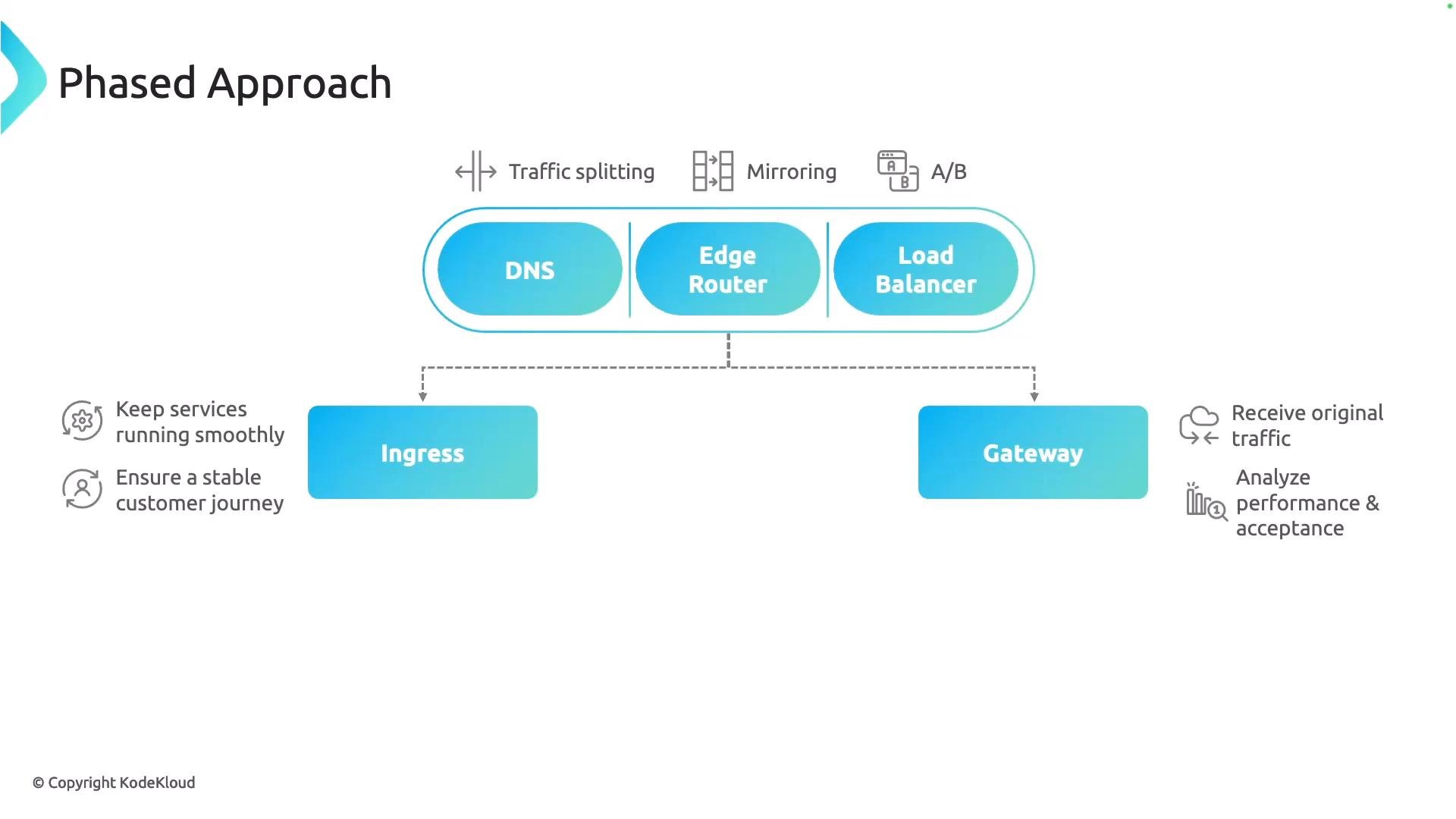
This lesson explains production best practices for migrating from an Ingress to the Gateway API. Use a phased, non‑disruptive migration so you can validate the Gateway while leaving your existing Ingress in place. The recommended approach is to rely on the infrastructure layer (DNS, edge routers, or external load balancers) to route traffic between the two data planes during cutover.
Common phased migration techniques
* Traffic splitting — send a controlled percentage of requests to the Gateway while the remainder continues to the Ingress.
* Mirroring (traffic shadowing) — duplicate live requests to the Gateway so you can test behavior without impacting users.
* A/B testing — route subsets of users to the Gateway to validate new behavior or features.
Mirroring is particularly valuable: it lets you exercise the Gateway data plane with real production traffic while the user‑facing path remains unchanged. The objective is to validate functionality and performance without disrupting end users.
 DNS cutover — planning and validation
DNS cutover is one of the most delicate parts of a migration. Plan carefully and validate continuously.
Recommended steps
1. Lower the DNS TTL well in advance so caches refresh quickly once you update records.
2. When ready, update DNS records to point to the new infrastructure (load balancer or edge router).
3. Continuously monitor DNS resolution and reachability after the change to detect propagation or routing issues.
4. Have automated rollback steps and runbooks ready so you can revert quickly if you detect misrouting or failures.
Lowering TTL shortens cache lifetimes, but some public resolvers and client caches may still ignore short TTLs. Schedule a maintenance window, monitor closely, and keep rollback steps ready.
Useful troubleshooting commands for validating DNS updates:
```bash theme={null}
# Query a specific resolver for the A record:
dig +short @8.8.8.8 example.com A
# Show authoritative answers and TTLs:
dig +nocmd example.com A +noall +answer
# Check end-to-end TCP reachability (replace and with your values):
curl -v --resolve example.com:: "https://example.com:/health"
```
Instrumentation and observability
* Instrument both old (Ingress) and new (Gateway) paths with metrics, logs, and traces so you can compare behavior.
* Monitor DNS resolution times, edge/router reachability, request success rates, latency percentiles, and resource utilization on gateway pods.
* Automate alerts for spikes in error rates, increased latency, or unexpected traffic routing.
High availability (control plane and data plane)
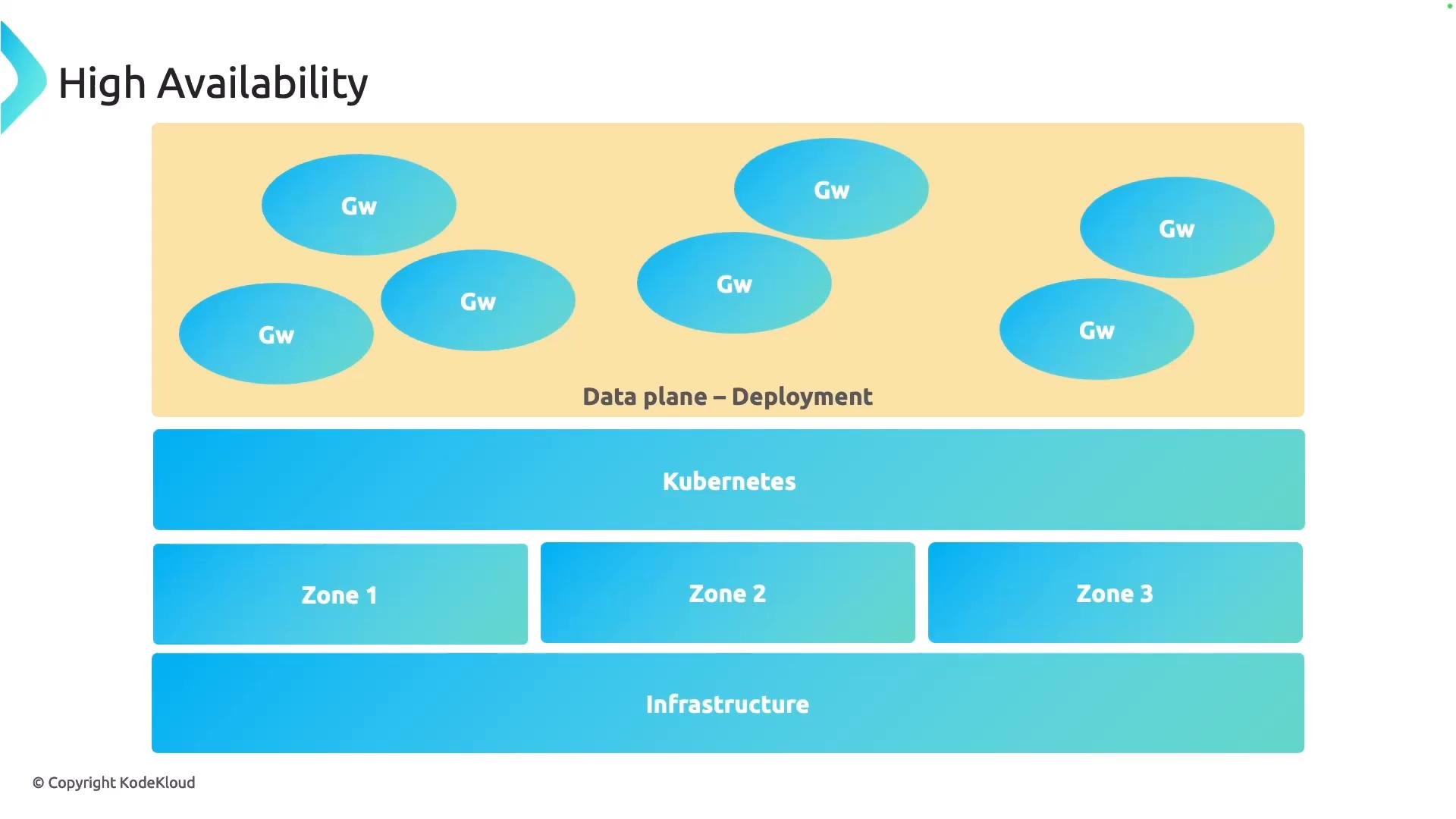
Ensure the Gateway is highly available throughout the migration and beyond. Key considerations:
* Scale the Gateway data plane (replicas, HPA) to handle peaks.
* Use PodDisruptionBudgets to ensure a minimum number of gateway pods remain available during upgrades and node drains.
* Distribute gateway pods across topology domains (zones/regions) with `topologySpreadConstraints` and node affinity/anti-affinity to avoid single‑zone failures.
* Tune readiness and liveness probes so pods only receive traffic when healthy.
* Select the appropriate Service type and configure your external load balancer for cross‑zone load balancing.
Example PodDisruptionBudget:
```yaml theme={null}
apiVersion: policy/v1
kind: PodDisruptionBudget
metadata:
name: gateway-pdb
spec:
minAvailable: 2
selector:
matchLabels:
app: gateway
```
Example HorizontalPodAutoscaler (autoscaling/v2):
```yaml theme={null}
apiVersion: autoscaling/v2
kind: HorizontalPodAutoscaler
metadata:
name: gateway-hpa
spec:
scaleTargetRef:
apiVersion: apps/v1
kind: Deployment
name: gateway
minReplicas: 2
maxReplicas: 10
metrics:
- type: Resource
resource:
name: cpu
target:
type: Utilization
averageUtilization: 50
```
Example topology spread constraint (inside a Deployment Pod spec):
```yaml theme={null}
topologySpreadConstraints:
- maxSkew: 1
topologyKey: topology.kubernetes.io/zone
whenUnsatisfiable: DoNotSchedule
labelSelector:
matchLabels:
app: gateway
```
Quick reference — HA resources
| Resource | Purpose | Example |
| - | - | - |
| PodDisruptionBudget | Prevents too many pods being voluntarily disrupted | `PodDisruptionBudget` YAML above |
| HorizontalPodAutoscaler | Scales gateway deployment based on resource metrics | `HorizontalPodAutoscaler` YAML above |
| Topology spread / affinity | Distribute pods across zones/nodes to avoid single‑zone failure | `topologySpreadConstraints` snippet above |
DNS cutover — planning and validation
DNS cutover is one of the most delicate parts of a migration. Plan carefully and validate continuously.
Recommended steps
1. Lower the DNS TTL well in advance so caches refresh quickly once you update records.
2. When ready, update DNS records to point to the new infrastructure (load balancer or edge router).
3. Continuously monitor DNS resolution and reachability after the change to detect propagation or routing issues.
4. Have automated rollback steps and runbooks ready so you can revert quickly if you detect misrouting or failures.
Lowering TTL shortens cache lifetimes, but some public resolvers and client caches may still ignore short TTLs. Schedule a maintenance window, monitor closely, and keep rollback steps ready.
Useful troubleshooting commands for validating DNS updates:
```bash theme={null}
# Query a specific resolver for the A record:
dig +short @8.8.8.8 example.com A
# Show authoritative answers and TTLs:
dig +nocmd example.com A +noall +answer
# Check end-to-end TCP reachability (replace and with your values):
curl -v --resolve example.com:: "https://example.com:/health"
```
Instrumentation and observability
* Instrument both old (Ingress) and new (Gateway) paths with metrics, logs, and traces so you can compare behavior.
* Monitor DNS resolution times, edge/router reachability, request success rates, latency percentiles, and resource utilization on gateway pods.
* Automate alerts for spikes in error rates, increased latency, or unexpected traffic routing.
High availability (control plane and data plane)
Ensure the Gateway is highly available throughout the migration and beyond. Key considerations:
* Scale the Gateway data plane (replicas, HPA) to handle peaks.
* Use PodDisruptionBudgets to ensure a minimum number of gateway pods remain available during upgrades and node drains.
* Distribute gateway pods across topology domains (zones/regions) with `topologySpreadConstraints` and node affinity/anti-affinity to avoid single‑zone failures.
* Tune readiness and liveness probes so pods only receive traffic when healthy.
* Select the appropriate Service type and configure your external load balancer for cross‑zone load balancing.
Example PodDisruptionBudget:
```yaml theme={null}
apiVersion: policy/v1
kind: PodDisruptionBudget
metadata:
name: gateway-pdb
spec:
minAvailable: 2
selector:
matchLabels:
app: gateway
```
Example HorizontalPodAutoscaler (autoscaling/v2):
```yaml theme={null}
apiVersion: autoscaling/v2
kind: HorizontalPodAutoscaler
metadata:
name: gateway-hpa
spec:
scaleTargetRef:
apiVersion: apps/v1
kind: Deployment
name: gateway
minReplicas: 2
maxReplicas: 10
metrics:
- type: Resource
resource:
name: cpu
target:
type: Utilization
averageUtilization: 50
```
Example topology spread constraint (inside a Deployment Pod spec):
```yaml theme={null}
topologySpreadConstraints:
- maxSkew: 1
topologyKey: topology.kubernetes.io/zone
whenUnsatisfiable: DoNotSchedule
labelSelector:
matchLabels:
app: gateway
```
Quick reference — HA resources
| Resource | Purpose | Example |
| - | - | - |
| PodDisruptionBudget | Prevents too many pods being voluntarily disrupted | `PodDisruptionBudget` YAML above |
| HorizontalPodAutoscaler | Scales gateway deployment based on resource metrics | `HorizontalPodAutoscaler` YAML above |
| Topology spread / affinity | Distribute pods across zones/nodes to avoid single‑zone failure | `topologySpreadConstraints` snippet above |
 Final recommendations and operational runbook
* Start small and iterate: validate with traffic splitting and mirroring before a full cutover.
* Automate checks and provide clear runbooks for cutover and rollback steps.
* Monitor end‑to‑end latency, error rates, and resource utilization for both Ingress and Gateway paths.
* Validate configuration parity: probes, timeouts, retry policies, and connection limits should match production behavior.
* Use canary releases and gradual ramp‑ups for traffic percentages to reduce risk.
When mirroring traffic, avoid duplicate state‑changing operations (for example, payments). Mirror requests should be read‑only or clearly guarded to prevent side effects.
Further reading and references
* Gateway API documentation: [https://gateway-api.sigs.k8s.io/](https://gateway-api.sigs.k8s.io/)
* Kubernetes concepts: [https://kubernetes.io/docs/concepts/overview/what-is-kubernetes/](https://kubernetes.io/docs/concepts/overview/what-is-kubernetes/)
* DNS and TTL best practices: [https://developers.google.com/speed/public-dns/docs/using](https://developers.google.com/speed/public-dns/docs/using)
* dig(1) and curl(1) manual pages for troubleshooting
That's it for this lesson — apply these practices to reduce risk and validate the Gateway migration safely.
This documentation is built and hosted on [Mintlify](https://mintlify.com), a developer documentation platform.
Final recommendations and operational runbook
* Start small and iterate: validate with traffic splitting and mirroring before a full cutover.
* Automate checks and provide clear runbooks for cutover and rollback steps.
* Monitor end‑to‑end latency, error rates, and resource utilization for both Ingress and Gateway paths.
* Validate configuration parity: probes, timeouts, retry policies, and connection limits should match production behavior.
* Use canary releases and gradual ramp‑ups for traffic percentages to reduce risk.
When mirroring traffic, avoid duplicate state‑changing operations (for example, payments). Mirror requests should be read‑only or clearly guarded to prevent side effects.
Further reading and references
* Gateway API documentation: [https://gateway-api.sigs.k8s.io/](https://gateway-api.sigs.k8s.io/)
* Kubernetes concepts: [https://kubernetes.io/docs/concepts/overview/what-is-kubernetes/](https://kubernetes.io/docs/concepts/overview/what-is-kubernetes/)
* DNS and TTL best practices: [https://developers.google.com/speed/public-dns/docs/using](https://developers.google.com/speed/public-dns/docs/using)
* dig(1) and curl(1) manual pages for troubleshooting
That's it for this lesson — apply these practices to reduce risk and validate the Gateway migration safely.
This documentation is built and hosted on [Mintlify](https://mintlify.com), a developer documentation platform.