> ## Documentation Index
> Fetch the complete documentation index at: https://notes.kodekloud.com/llms.txt
> Use this file to discover all available pages before exploring further.
# Brief Overview on Kubernetes
> Kubernetes is an open-source platform for automating deployment, scaling, and management of containerized applications in cloud-native architectures.
Kubernetes is an open-source container orchestration platform, originally developed by Google and now maintained by the [Cloud Native Computing Foundation (CNCF)](https://cncf.io/). It automates deployment, scaling, and management of containerized applications, making it a cornerstone technology for modern cloud-native architectures.
## Kubernetes Architecture
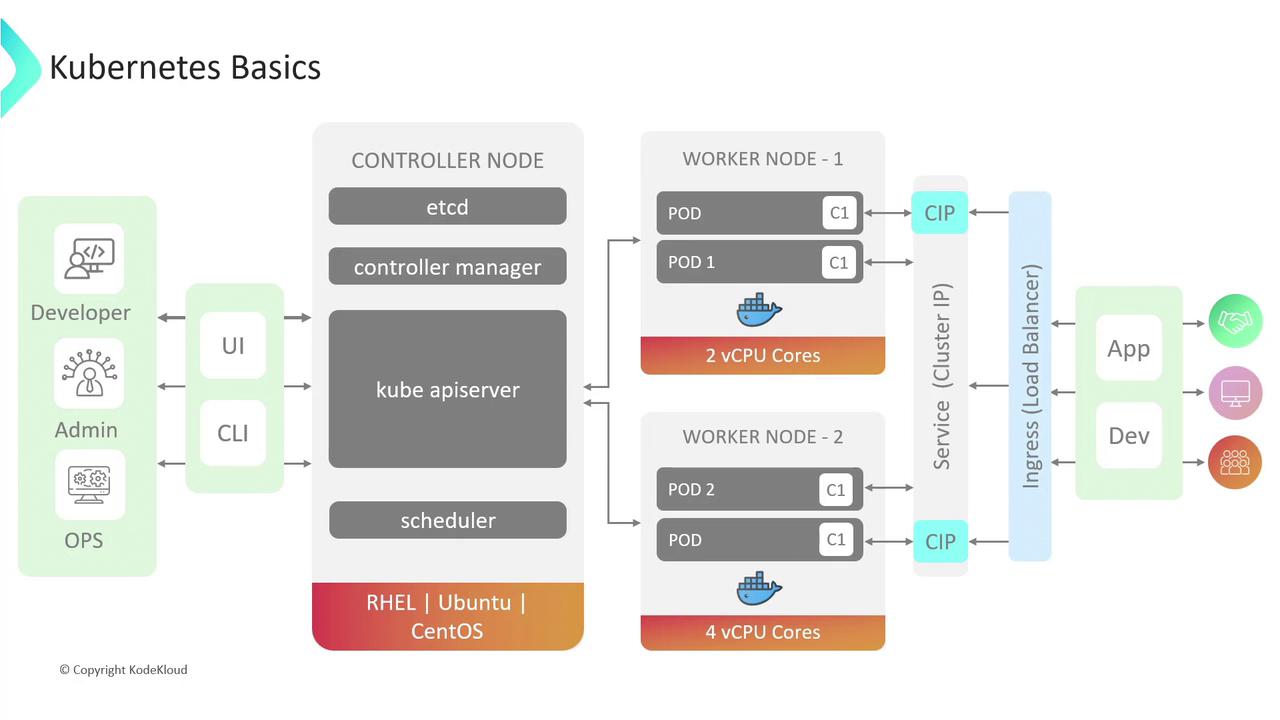
A Kubernetes cluster is composed of two main node types:
* **Control Plane Nodes**\
Hosts the core components that manage cluster state and orchestration:
* **etcd**: Distributed key-value store for all cluster data.
* **kube-apiserver**: Central API endpoint for administrative operations.
* **kube-controller-manager**: Runs controllers to reconcile desired vs. actual state.
* **kube-scheduler**: Assigns Pods to Nodes based on resource requirements.
* **Worker Nodes**\
Runs application workloads and contains:
* **kubelet**: Ensures containers in Pods are healthy and running.
* **kube-proxy**: Configures network routes and load balancing for Services.
* Container runtime (e.g., [Docker](https://www.docker.com/), [containerd](https://containerd.io/)).
## Pods
A **Pod** is the smallest deployable unit in Kubernetes, encapsulating one or more containers that share networking and storage. Containers within a Pod communicate over `localhost` and share volume mounts.
Example Pod manifest:
```yaml theme={null}
apiVersion: v1
kind: Pod
metadata:
name: my-pod
spec:
containers:
- name: web
image: nginx:latest
ports:
- containerPort: 80
```
By default, Pods use `restartPolicy: Always`. While containers will restart on failure, if the Pod object is deleted or its Node fails, Kubernetes will not recreate it unless managed by a higher-level controller (see Deployments).
## Controllers: ReplicaSets & Deployments
Controllers ensure your Pods maintain the desired state and scale automatically.
| Controller | Purpose | Definition Example |
| ---------- | ---------------------------------------------------- | ------------------ |
| ReplicaSet | Maintains a specified number of identical Pods. | `kind: ReplicaSet` |
| Deployment | Declarative updates, rollbacks, and scaling of Pods. | `kind: Deployment` |
Example Deployment manifest:
```yaml theme={null}
apiVersion: apps/v1
kind: Deployment
metadata:
name: nginx-deployment
spec:
replicas: 3
selector:
matchLabels:
app: nginx
template:
metadata:
labels:
app: nginx
spec:
containers:
- name: nginx
image: nginx:1.21
ports:
- containerPort: 80
```
With a Deployment, you declare the desired state—such as replica count and container image—and Kubernetes handles rolling updates, rollbacks, and Pod rescheduling.
## Services
**Services** provide stable network endpoints for Pods, decoupling clients from dynamically assigned Pod IPs. Kubernetes supports several Service types:
| Type | Description | Use Case |
| ------------ | --------------------------------------------------------- | ------------------------------------- |
| ClusterIP | Internal-only cluster IP (default). | In-cluster communication. |
| NodePort | Exposes Service on each Node’s IP at a static port. | Simple external access on known port. |
| LoadBalancer | Provisions cloud provider LB to route traffic externally. | Production-grade external access. |
Example LoadBalancer Service:
```yaml theme={null}
apiVersion: v1
kind: Service
metadata:
name: web-service
spec:
type: LoadBalancer
selector:
app: nginx
ports:
- port: 80
targetPort: 80
```
LoadBalancer Services may incur additional cloud provider costs. To consolidate routing for multiple hostnames or paths under a single IP, consider using an **Ingress** resource.
## Ingress
**Ingress** manages HTTP/HTTPS routing into the cluster with host- and path-based rules. Unlike a LoadBalancer, Ingress can serve multiple domains or paths on one IP.
Example Ingress manifest:
```yaml theme={null}
apiVersion: networking.k8s.io/v1
kind: Ingress
metadata:
name: example-ingress
spec:
rules:
- host: example.com
http:
paths:
- path: /
pathType: Prefix
backend:
service:
name: web-service
port:
number: 80
```
Ingress controllers (e.g., [NGINX](https://nginx.org/), [Traefik](https://traefik.io/)) must be installed separately to process Ingress resources. Services used by Ingress typically remain of type `ClusterIP`.
## References
* [Kubernetes Documentation](https://kubernetes.io/docs/)
* [Cloud Native Computing Foundation (CNCF)](https://cncf.io/)
* [Docker Official Site](https://www.docker.com/)
* [containerd Project](https://containerd.io/)