> ## Documentation Index
> Fetch the complete documentation index at: https://notes.kodekloud.com/llms.txt
> Use this file to discover all available pages before exploring further.
# Workflow Deploy to Kubernetes Prod Environment
> This tutorial extends a GitHub Actions CI/CD pipeline to deploy Kubernetes manifests into a production environment.
In this tutorial, we’ll extend our GitHub Actions CI/CD pipeline to deploy Kubernetes manifests into a **production** environment. By cloning the existing `dev-deploy` and `dev-integration-testing` jobs, renaming them for production, updating manifest paths, and configuring environment protection, you’ll achieve a safe, repeatable deployment process.
## Workflow Configuration
Begin by updating the workflow metadata, trigger conditions, and shared environment variables:
```yaml theme={null}
name: Solar System Workflow
on:
workflow_dispatch:
push:
branches:
- main
- feature/*
env:
MONGO_URI: "mongodb+srv://supercluster.d83jj.mongodb.net/superData"
MONGO_USERNAME: ${{ vars.MONGO_USERNAME }}
MONGO_PASSWORD: ${{ secrets.MONGO_PASSWORD }}
jobs:
unit-testing:
# existing configuration
code-coverage:
# existing configuration
docker:
# existing configuration
dev-deploy:
# existing configuration
dev-integration-testing:
# existing configuration
```
### Production Deployment Jobs
Below is the new **production** deployment job, which depends on `dev-integration-testing`, runs against the `production` environment, and exports the ingress URL:
```yaml theme={null}
prod-deploy:
needs: dev-integration-testing
environment:
name: production
url: https://${{ steps.set-ingress-host-address.outputs.APP_INGRESS_HOST }}
runs-on: ubuntu-latest
steps:
- name: Checkout Repo
uses: actions/checkout@v4
- name: Fetch Kubernetes Cluster Details
run: |
kubectl version --short
echo "----- Nodes -----"
kubectl get nodes
- name: Save Nginx Ingress IP
run: |
echo "INGRESS_IP=$(kubectl -n ingress-nginx get svc ingress-nginx-controller \
-o jsonpath='{.status.loadBalancer.ingress[0].ip}')" >> $GITHUB_ENV
- name: Replace Tokens in Production Manifests
uses: cschleiden/replace-tokens@v1
with:
tokenPrefix: '{{%'
tokenSuffix: '%}}'
files: ["kubernetes/production/*.yaml"]
env:
NAMESPACE: ${{ vars.NAMESPACE }}
REPLICAS: ${{ vars.REPLICAS }}
IMAGE: ${{ vars.DOCKERHUB_USERNAME }}/solar-system:${{ github.sha }}
INGRESS_IP: ${{ env.INGRESS_IP }}
- name: Review Production Manifests
run: cat kubernetes/production/*.yaml
- name: Create MongoDB Secret
run: |
kubectl -n ${{ vars.NAMESPACE }} create secret generic mongo-db-creds \
--from-literal=MONGO_URI=${{ env.MONGO_URI }} \
--from-literal=MONGO_USERNAME=${{ vars.MONGO_USERNAME }} \
--from-literal=MONGO_PASSWORD=${{ secrets.MONGO_PASSWORD }} \
--save-config --dry-run=client -o yaml | kubectl apply -f -
- name: Deploy to Production
run: kubectl apply -f kubernetes/production
- name: Set App Ingress Host URL
id: set-ingress-host-address
run: |
echo "APP_INGRESS_HOST=$(kubectl -n ${{ vars.NAMESPACE }} get ingress \
-o jsonpath='{.items[0].spec.tls[0].hosts[0]}')" >> $GITHUB_OUTPUT
outputs:
APP_INGRESS_URL: ${{ steps.set-ingress-host-address.outputs.APP_INGRESS_HOST }}
```
Next, add a job to validate the live endpoint via Curl and JQ:
```yaml theme={null}
prod-integration-testing:
name: Prod Integration Testing
needs: prod-deploy
runs-on: ubuntu-latest
steps:
- name: Verify Live Endpoint
env:
URL: ${{ needs.prod-deploy.outputs.APP_INGRESS_URL }}
run: |
echo "Testing URL: https://$URL/live"
curl https://$URL/live -s -k | jq -r .status | grep -i live
```
> **Note:** Ensure that `vars.NAMESPACE`, `vars.REPLICAS`, and `secrets.MONGO_PASSWORD` are defined in your GitHub repository settings or organization variables.
## Job Overview
Here’s a quick breakdown of the full CI/CD pipeline:
| Job Name | Purpose | Depends On |
| ------------------------ | ------------------------------------------ | ----------------------- |
| unit-testing | Run unit tests | — |
| code-coverage | Measure code coverage | unit-testing |
| docker | Build and push Docker images | code-coverage |
| dev-deploy | Deploy to development namespace | docker |
| dev-integration-testing | Run integration tests against dev cluster | dev-deploy |
| prod-deploy | Apply production manifests to prod cluster | dev-integration-testing |
| prod-integration-testing | Validate production endpoint | prod-deploy |
## Running the Workflow
After pushing these changes from a feature branch, GitHub Actions will schedule all jobs:
1. `unit-testing`
2. `code-coverage`
3. `docker`
4. `dev-deploy`
5. `dev-integration-testing`
6. `prod-deploy`
7. `prod-integration-testing`
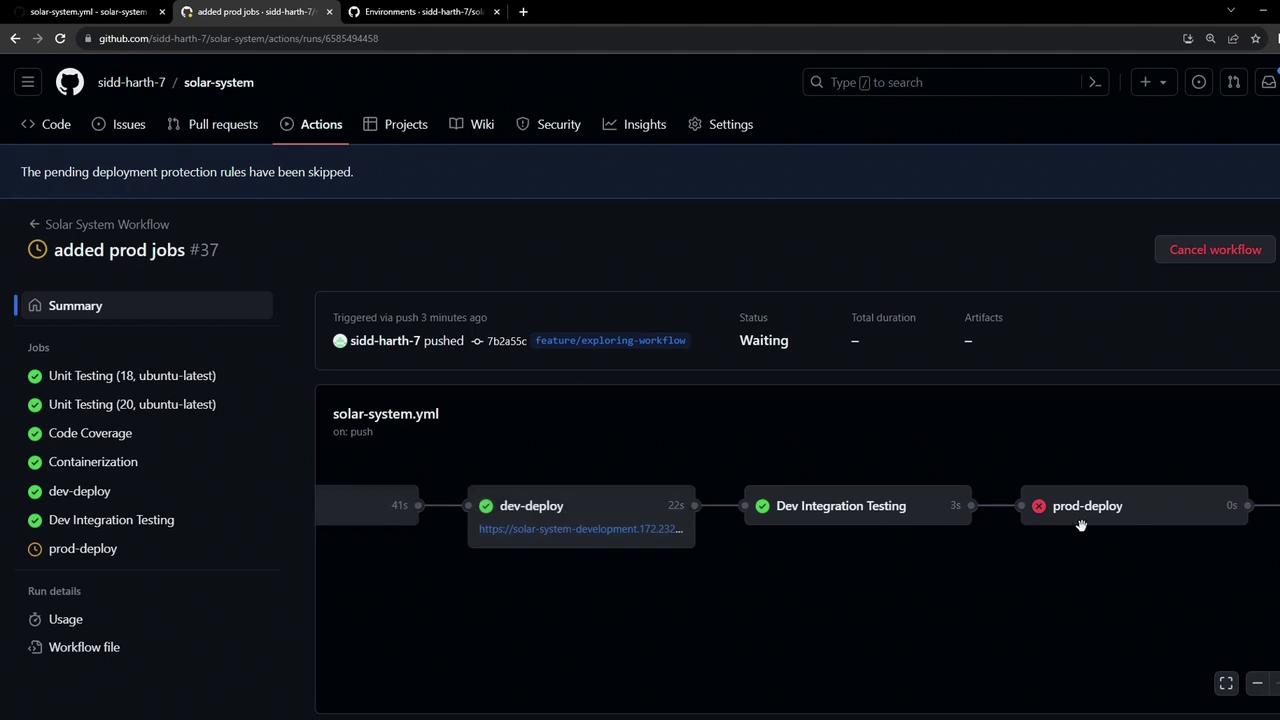
> **Warning:** Because the production environment has branch protection rules (only `main` allowed), any attempt to deploy from a feature branch will be blocked. Subsequent jobs in the workflow are skipped when this rule is not met.
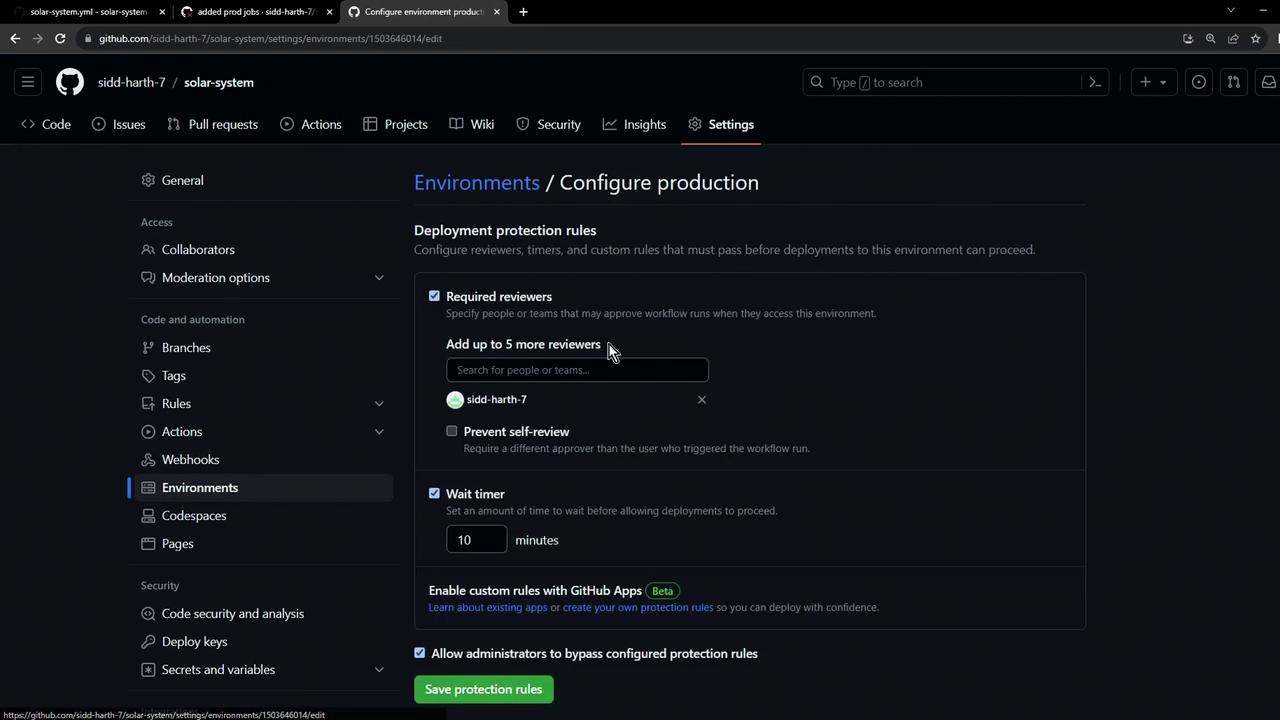
Any unmet protection rule halts the `prod-deploy` job and skips downstream steps. In the next lesson, we’ll cover how to configure approvals and satisfy these rules for safe, automated releases.
***
## Links and References
* [GitHub Actions Environments](https://docs.github.com/en/actions/deployment/targeting-different-environments/using-environments-for-deployment)
* [Kubernetes Ingress-NGINX Guide](https://kubernetes.github.io/ingress-nginx/)
* [replace-tokens Action](https://github.com/cschleiden/replace-tokens)
* [Kubectl Cheat Sheet](https://kubernetes.io/docs/reference/kubectl/cheatsheet/)