> ## Documentation Index
> Fetch the complete documentation index at: https://notes.kodekloud.com/llms.txt
> Use this file to discover all available pages before exploring further.
# Run Unit Testing using Matrix Strategy
> This guide explains how to configure GitHub Actions to run unit tests across various operating systems and Node.js versions using a matrix strategy.
In this guide, you’ll learn how to configure a GitHub Actions workflow to run unit tests across multiple operating systems and Node.js versions by leveraging the [matrix strategy](https://docs.github.com/en/actions/using-jobs/using-a-matrix-for-your-jobs). This approach generates a job for every combination of variables—such as `nodejs_version` and `operating_system`—while allowing you to exclude specific pairs.
## Defining the Matrix
First, we define a matrix with three Node.js versions (18, 19, 20) and two operating systems (`ubuntu-latest`, `macos-latest`), excluding the unwanted combination of Node.js 18 on macOS:
```yaml theme={null}
name: Run Unit Tests
on:
workflow_dispatch:
push:
branches:
- main
- feature/*
env:
MONGO_URI: 'mongodb+srv://supercluster.d83jj.mongodb.net/superData'
MONGO_USERNAME: ${{ vars.MONGO_USERNAME }}
MONGO_PASSWORD: ${{ secrets.MONGO_PASSWORD }}
jobs:
unit-testing:
name: Unit Testing
strategy:
matrix:
nodejs_version: [18, 19, 20]
operating_system: [ubuntu-latest, macos-latest]
exclude:
- nodejs_version: 18
operating_system: macos-latest
runs-on: ubuntu-latest
steps:
- name: Checkout Repository
uses: actions/checkout@v4
- name: Setup Node.js Version - 18
uses: actions/setup-node@v3
with:
node-version: 18
- name: Install Dependencies
run: npm install
- name: Unit Testing
run: npm test
- name: Archive Test Result
uses: actions/upload-artifact@v3
```
At this stage, both `runs-on` and `node-version` are hardcoded. In the next section, we’ll update them to use matrix variables.
## Matrix Combinations Overview
To visualize which jobs will run, consider this table of all possible combinations:
| Node.js Version | Operating System | Excluded? |
| --------------- | ---------------- | --------- |
| 18 | ubuntu-latest | No |
| 18 | macos-latest | Yes |
| 19 | ubuntu-latest | No |
| 19 | macos-latest | No |
| 20 | ubuntu-latest | No |
| 20 | macos-latest | No |
## Referencing the Matrix Variables
Replace the hardcoded values with `${{ matrix.operating_system }}` and `${{ matrix.nodejs_version }}` so each job picks up the correct OS and Node.js version:
```yaml theme={null}
name: Run Unit Tests
on:
workflow_dispatch:
push:
branches:
- main
- feature/*
env:
MONGO_URI: 'mongodb+srv://supercluster.d83jj.mongodb.net/superData'
MONGO_USERNAME: ${{ vars.MONGO_USERNAME }}
MONGO_PASSWORD: ${{ secrets.MONGO_PASSWORD }}
jobs:
unit-testing:
name: Unit Testing
strategy:
matrix:
nodejs_version: [18, 19, 20]
operating_system: [ubuntu-latest, macos-latest]
exclude:
- nodejs_version: 18
operating_system: macos-latest
runs-on: ${{ matrix.operating_system }}
steps:
- name: Checkout Repository
uses: actions/checkout@v4
- name: Setup Node.js Version - ${{ matrix.nodejs_version }}
uses: actions/setup-node@v3
with:
node-version: ${{ matrix.nodejs_version }}
- name: Install Dependencies
run: npm install
- name: Unit Testing
run: npm test
- name: Archive Test Result
uses: actions/upload-artifact@v3
```
Each job will now automatically run on the specified operating system and install the appropriate Node.js version.
## Commit and Observe the Workflow
Commit your changes with a descriptive message like:
```bash theme={null}
git add .github/workflows/run-unit-tests.yml
git commit -m "Test on multiple OS using matrix strategy"
git push
```
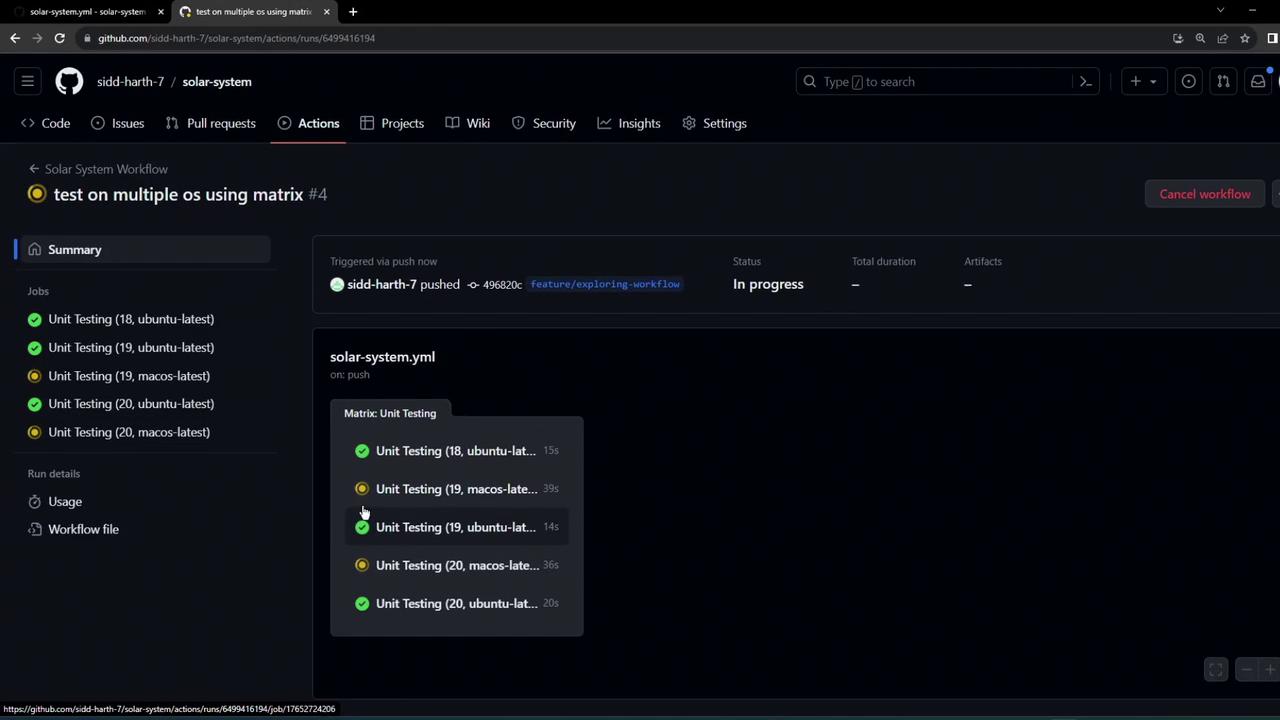
GitHub Actions will queue five parallel jobs, each labeled by OS and Node.js version:
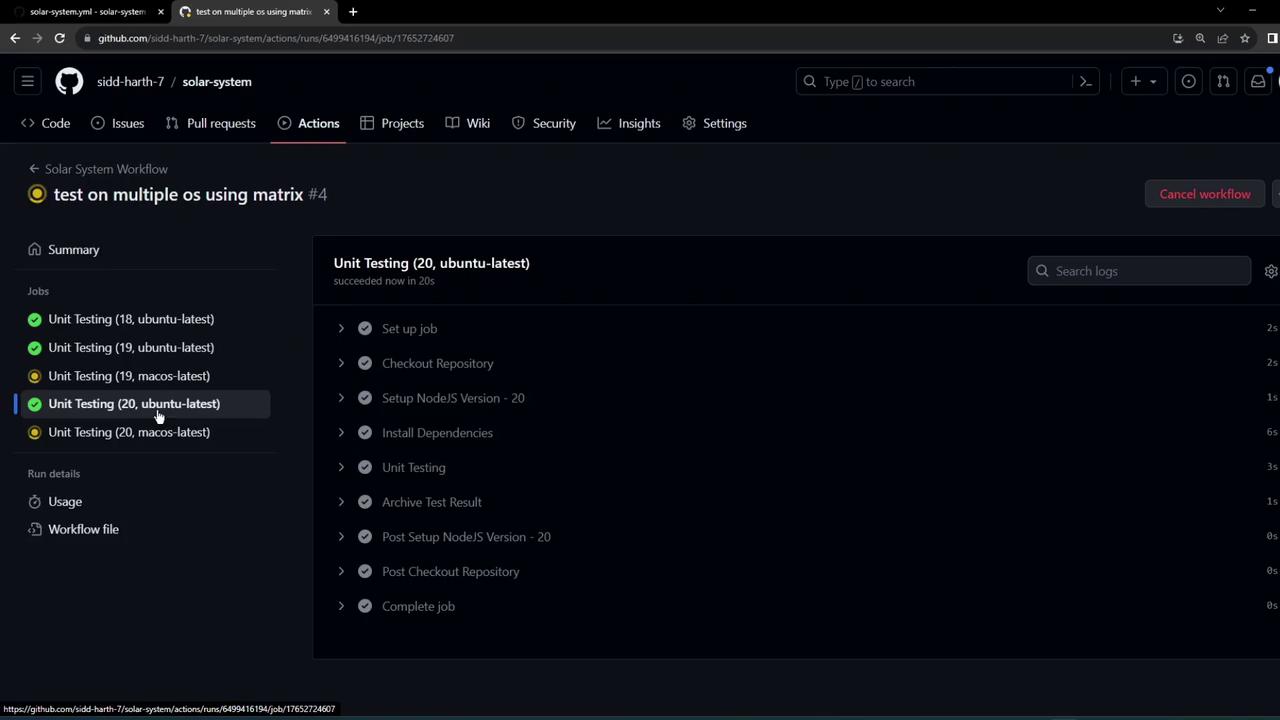
You can drill down into any job—for example, Ubuntu with Node.js 20—to see the step-by-step execution:
The logs confirm the setup of each Node.js version, including detailed installer output:
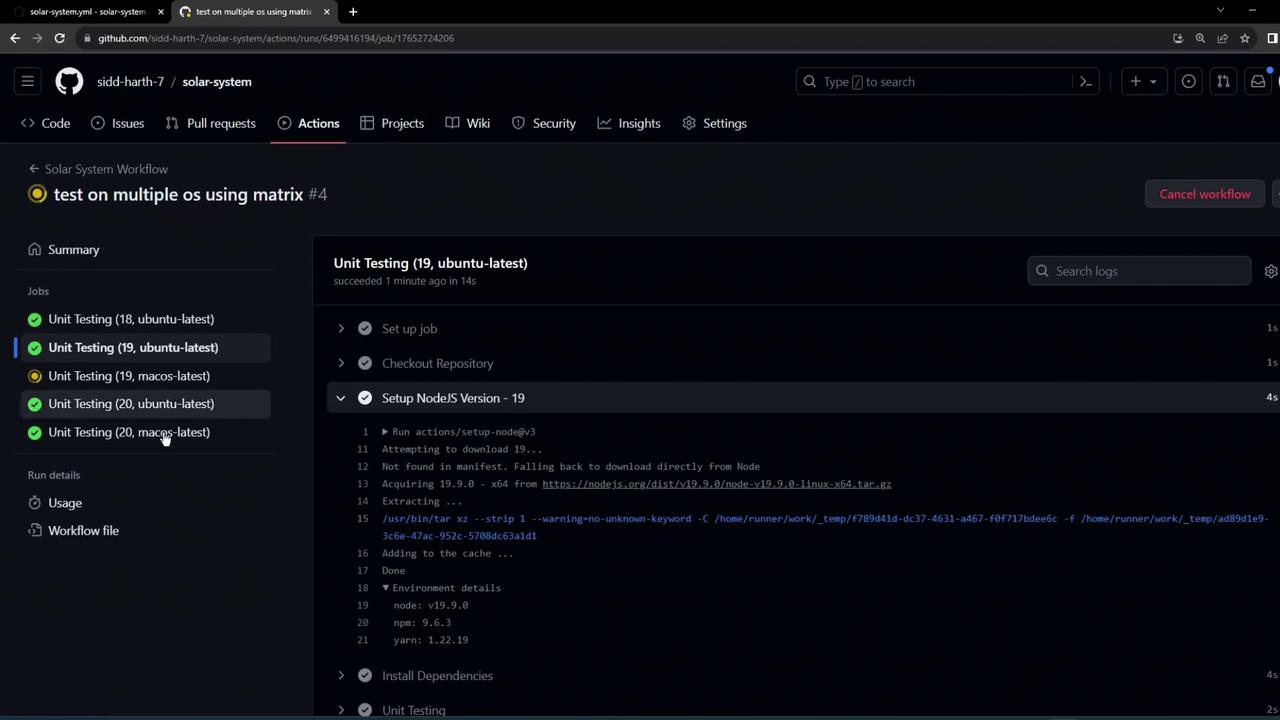
macOS runners often take a bit longer to start. Be patient as those jobs initialize.
With the matrix strategy in place, you’ll efficiently validate your code across multiple environments without duplicating workflow configurations.
## Links and References
* [GitHub Actions: Using a matrix for your jobs](https://docs.github.com/en/actions/using-jobs/using-a-matrix-for-your-jobs)
* [actions/checkout](https://github.com/actions/checkout)
* [actions/setup-node](https://github.com/actions/setup-node)
* [actions/upload-artifact](https://github.com/actions/upload-artifact)