> ## Documentation Index
> Fetch the complete documentation index at: https://notes.kodekloud.com/llms.txt
> Use this file to discover all available pages before exploring further.
# Understanding DevOps Pipeline
> This guide covers a complete DevOps pipeline including CI, CD, CDel, and post-build reporting using Jenkins and various deployment targets.
In this guide, we’ll walk through a complete DevOps pipeline—covering Continuous Integration (CI), Continuous Deployment (CD), Continuous Delivery (CDel), and Post-Build Reporting. We’ll orchestrate everything with [Jenkins][jenkins], deploying to three targets:
* **AWS EC2** (Docker container)
* **Kubernetes** via GitOps ([Argo CD][argocd])
* **AWS Lambda** (serverless)
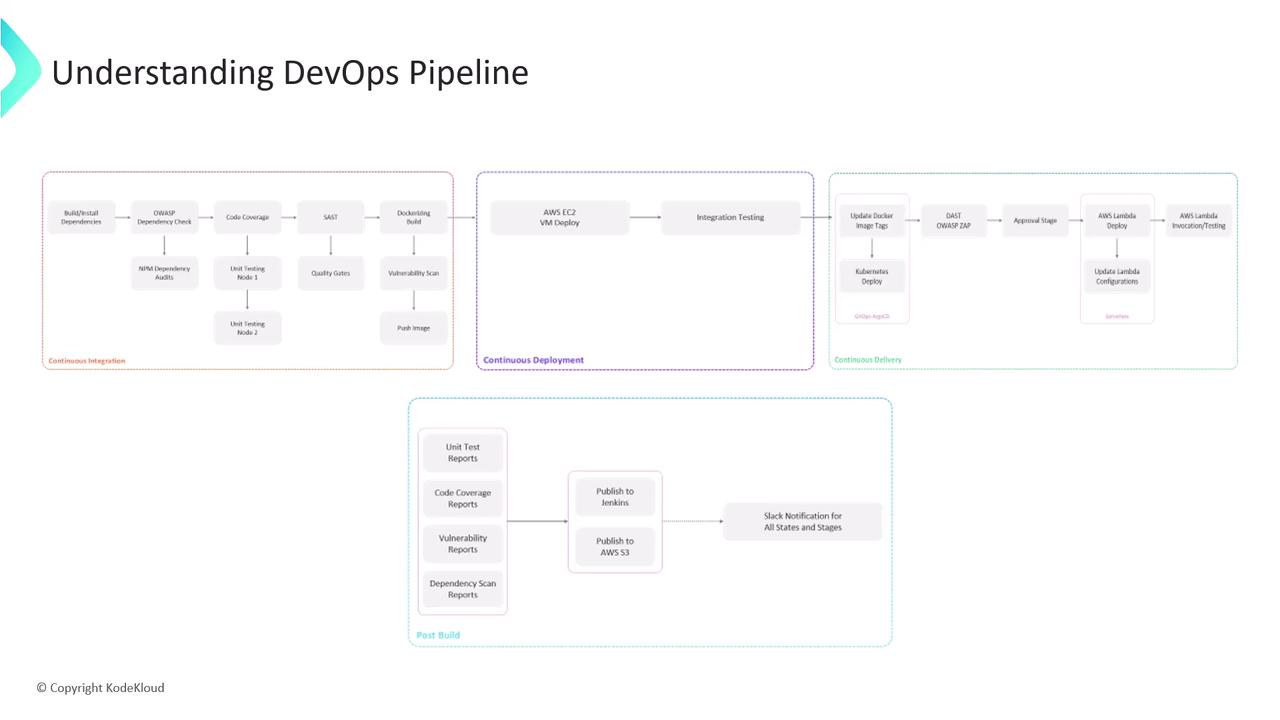
***
## Continuous Integration (CI)
We adopt a **feature-branch workflow**:
Developers work in `feature/*` branches. Every push to a feature branch automatically triggers the Jenkins CI pipeline.
### CI Stages Overview
| Stage | Tool/Command | Purpose |
| ------------------------ | ------------------------------------------------------------------------ | ------------------------------------------- |
| Install Dependencies | `npm install` | Install Node.js packages |
| Dependency Vulnerability | `owasp-dependency-check`, `npm audit` | Detect known security issues |
| Unit Tests & Coverage | `npm test`, `nyc --reporter=lcov npm test` | Validate functionality and measure coverage |
| Static Code Analysis | `sonar-scanner` | Enforce quality gates via SonarCloud |
| Containerization | `docker build -t my-app:${BRANCH_NAME}-${BUILD_NUMBER} .` | Package app into a Docker image |
| Image Vulnerability Scan | `snyk test --docker my-app:${BRANCH_NAME}-${BUILD_NUMBER}` | Scan container image for vulnerabilities |
| Push to Registry | `docker push 123456789012.dkr.ecr.us-east-1.amazonaws.com/my-app:latest` | Store image in AWS ECR |
***
### 1. Install Dependencies
```bash theme={null}
npm install
```
### 2. Dependency Vulnerability Scans
```bash theme={null}
owasp-dependency-check --project my-app
npm audit --audit-level=moderate
```
### 3. Unit Tests & Coverage
```bash theme={null}
npm test
# Generate HTML/LCOV report
nyc --reporter=lcov npm test
```
### 4. Static Code Analysis (SonarCloud)
```bash theme={null}
sonar-scanner \
-Dsonar.projectKey=my-app \
-Dsonar.organization=my-org \
-Dsonar.host.url=https://sonarcloud.io \
-Dsonar.login=$SONAR_TOKEN
```
### 5. Containerization
```bash theme={null}
docker build -t my-app:${BRANCH_NAME}-${BUILD_NUMBER} .
```
### 6. Image Vulnerability Scan (Snyk)
```bash theme={null}
snyk test --docker my-app:${BRANCH_NAME}-${BUILD_NUMBER}
```
### 7. Push to Container Registry
```bash theme={null}
docker tag my-app:${BRANCH_NAME}-${BUILD_NUMBER} \
123456789012.dkr.ecr.us-east-1.amazonaws.com/my-app:latest
docker push 123456789012.dkr.ecr.us-east-1.amazonaws.com/my-app:latest
```
***
## Continuous Deployment (CD)
Once the Docker image lands in AWS ECR, we deploy to an **EC2** instance:
1. **Run Container on EC2**
```bash theme={null}
ssh ec2-user@ec2-instance \
"docker pull 123456789012.dkr.ecr.us-east-1.amazonaws.com/my-app:latest && \
docker run -d --name my-app -p 80:3000 \
123456789012.dkr.ecr.us-east-1.amazonaws.com/my-app:latest"
```
2. **Integration Tests**
```bash theme={null}
curl --fail http://ec2-instance/api/health
curl --fail http://ec2-instance/api/endpoint
```
3. **Open Pull Request**\
Contributors open a PR to merge `feature/*` into `main`, kicking off Continuous Delivery.
***
## Continuous Delivery (CDel)
After the PR CI build succeeds:
1. **Deploy to Kubernetes via GitOps**\
Update the image tag in your Git manifest:
```bash theme={null}
git checkout main
sed -i "s|image: my-app:.*|image: my-app:${BUILD_NUMBER}|g" k8s/deployment.yaml
git commit -am "chore: update image to ${BUILD_NUMBER}"
git push origin main
```
Argo CD auto-detects the change and syncs the cluster.
2. **Dynamic Application Security Testing (DAST)**
```bash theme={null}
zap-baseline.py -t http://my-k8s-loadbalancer/api -r zap-report.html
```
3. **Merge Pull Request**\
After security review, approve and merge into `main`.
4. **Approval & AWS Lambda Deployment**\
Jenkins pauses for a manual approval. Once approved:
```bash theme={null}
aws lambda update-function-code \
--function-name my-app-function \
--image-uri 123456789012.dkr.ecr.us-east-1.amazonaws.com/my-app:latest
aws lambda update-function-configuration \
--function-name my-app-function \
--environment Variables={NODE_ENV=production} \
--publish
```
5. **Lambda Invocation Tests**
```bash theme={null}
aws lambda invoke \
--function-name my-app-function \
--payload '{}' response.json
jq . response.json
```
Ensure your AWS credentials have `lambda:UpdateFunctionCode` and `lambda:UpdateFunctionConfiguration` permissions.
***
## Post-Build Reporting
Finalize the pipeline by aggregating results and notifying the team:
* **Archive & Publish Reports**
```groovy theme={null}
archiveArtifacts artifacts: 'reports/**/*'
aws s3 sync reports s3://my-app-ci-reports/${BUILD_NUMBER}/
```
* **Slack Notifications**
```groovy theme={null}
slackSend(
channel: '#ci-cd',
color: currentBuild.currentResult == 'SUCCESS' ? 'good' : 'danger',
message: "${env.JOB_NAME} build #${env.BUILD_NUMBER}: ${currentBuild.currentResult}"
)
```
***
This end-to-end pipeline integrates roughly 15–20 stages, combining multiple security checks, tests, and deployment strategies. Let’s begin by configuring the Jenkinsfile for CI!
***
## Links and References
* [Jenkins][jenkins]
* [Argo CD (GitOps)][argocd]
* [AWS Lambda][aws-lambda]
* [SonarCloud](https://sonarcloud.io/)
* [OWASP Dependency Checker](https://owasp.org/www-project-dependency-check/)
* [Snyk](https://snyk.io/)
[jenkins]: https://www.jenkins.io/
[argocd]: https://argo-cd.readthedocs.io/
[aws-lambda]: https://docs.aws.amazon.com/lambda/latest/dg/welcome.html