> ## Documentation Index
> Fetch the complete documentation index at: https://notes.kodekloud.com/llms.txt
> Use this file to discover all available pages before exploring further.
# What are Custom Actions
> Custom GitHub Actions allow you to customize CI/CD pipelines for specific project needs beyond existing marketplace options.
Custom GitHub Actions empower you to tailor your CI/CD pipelines to meet project-specific requirements. While the GitHub Marketplace offers a wealth of community-maintained Actions—covering tasks like runtime setup, artifact transfer, Docker builds, test report syncing, and Kubernetes deployments—there are scenarios where you need:
* **Project-specific logic** not covered by existing Actions
* **Integration** with internal or legacy services
* **Complex orchestration** with conditional steps or custom dependencies
* **Strict compliance** or security policies requiring in-house solutions
Leverage community Actions whenever possible to reduce maintenance overhead. Create a custom Action only when you need functionality that isn’t already available.
Common use cases include:
* **Publishing an npm package** when a new Git tag is created
* **Sending SMS or Slack alerts** upon critical issue creation
* **Deploying custom security policies** or infrastructure templates
GitHub supports three main Action types. You can compare their features below:
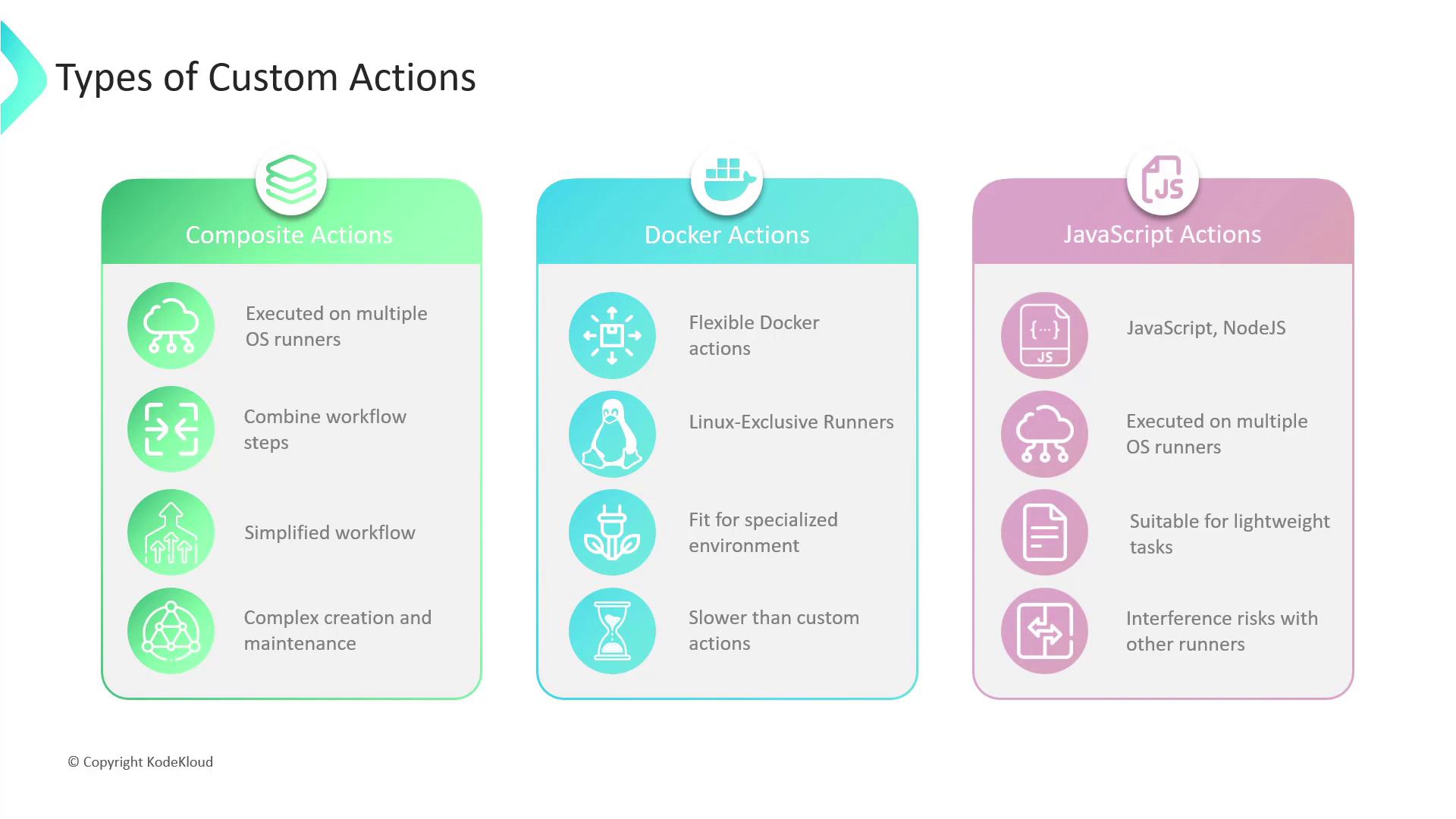
| Action Type | Runner Support | Isolation | Best For |
| ------------------ | --------------------- | ---------------- | -------------------------------------- |
| Composite Actions | Linux, macOS, Windows | Low (host) | Bundling repeated workflow steps |
| Docker Container | Linux only | High (container) | Complex environment or OS dependencies |
| JavaScript Actions | Linux, macOS, Windows | Medium | Fast, lightweight scripting tasks |
## Composite Actions
Composite Actions let you encapsulate multiple workflow steps into a single reusable unit.
```yaml theme={null}
# .github/actions/my-composite/action.yml
name: "My Composite Action"
description: "Install deps, run tests, and lint code"
runs:
using: composite
steps:
- name: Checkout code
uses: actions/checkout@v3
- name: Install dependencies
run: npm ci
- name: Run tests
run: npm test
```
* **Pros**: Simplifies workflows, DRY principle, cross-platform
* **Cons**: Can become hard to maintain if too many steps are bundled
## Docker Container Actions
Container Actions run inside a Docker environment defined by you.
```dockerfile theme={null}
# .github/actions/my-docker/Dockerfile
FROM node:16
RUN npm install -g aws-cli
COPY entrypoint.sh /entrypoint.sh
ENTRYPOINT ["/entrypoint.sh"]
```
```yaml theme={null}
# .github/actions/my-docker/action.yml
name: "My Docker Action"
runs:
using: docker
image: Dockerfile
args:
- "--region"
- "us-east-1"
```
* **Pros**: Full OS control, consistent environment, ideal for complex dependencies
* **Cons**: Linux only, requires Docker knowledge, startup overhead
Docker container Actions run exclusively on Linux runners. Make sure your workflow requirements align with Linux-only execution.
## JavaScript Actions
JavaScript Actions execute directly on the runner via Node.js.
```javascript theme={null}
// .github/actions/my-js-action/index.js
import core from "@actions/core";
async function run() {
try {
const name = core.getInput("name");
core.info(`Hello, ${name}!`);
} catch (error) {
core.setFailed(error.message);
}
}
run();
```
```yaml theme={null}
# .github/actions/my-js-action/action.yml
name: "My JS Action"
runs:
using: "node16"
main: "index.js"
inputs:
name:
description: "Your name"
required: true
```
* **Pros**: Fast startup, cross-platform, simple scripting
* **Cons**: Less isolated—be mindful of side effects on the host runner
| Criteria | Composite | Docker Container | JavaScript |
| ---------------------- | --------- | ---------------- | ---------- |
| Speed | Fast | Moderate | Fastest |
| Isolation | Low | High | Medium |
| Cross-platform support | Yes | No | Yes |
| Maintenance overhead | Moderate | High | Low |
Select the type that best aligns with your project’s needs—whether you prioritize simplicity, isolation, performance, or cross-platform support.
* [GitHub Actions Documentation](https://docs.github.com/actions)
* [Creating a composite run steps action](https://docs.github.com/actions/creating-actions/creating-a-composite-run-steps-action)
* [Docker container actions](https://docs.github.com/actions/creating-actions/creating-a-docker-container-action)
* [JavaScript actions](https://docs.github.com/actions/creating-actions/creating-a-javascript-action)