> ## Documentation Index
> Fetch the complete documentation index at: https://notes.kodekloud.com/llms.txt
> Use this file to discover all available pages before exploring further.
# Additional Matrix Configuration
> Learn to optimize GitHub Actions matrix configurations by excluding, including job combinations, and controlling failure propagation and concurrency.
In this guide, you’ll learn how to leverage advanced matrix features in GitHub Actions to:
* Exclude specific job combinations
* Include custom job combinations
* Control failure propagation (`fail-fast`)
* Limit concurrent executions (`max-parallel`)
These techniques help you optimize CI/CD workflows for Docker images, operating systems, and more. For full details, see the [GitHub Actions workflow syntax for `strategy.matrix`](https://docs.github.com/en/actions/using-workflows/workflow-syntax-for-github-actions#jobsjob_idstrategy).
***
## 1. Base Matrix Example
The simplest matrix runs two Docker images (`hello-world`, `alpine`) across three operating systems (`ubuntu-latest`, `ubuntu-20.04`, `windows-latest`):
```yaml theme={null}
on:
workflow_dispatch:
jobs:
deploy:
strategy:
matrix:
os: [ubuntu-latest, ubuntu-20.04, windows-latest]
images: [hello-world, alpine]
runs-on: ${{ matrix.os }}
steps:
- name: Show Docker Info
run: docker info
- name: Run ${{ matrix.images }} on ${{ matrix.os }}
run: docker run ${{ matrix.images }}
```
This configuration produces 3 × 2 = 6 jobs, all running in parallel. By default, if one job fails, the remaining jobs are canceled (the **fail-fast** behavior).
***
## 2. Excluding Specific Combinations
If a particular image isn’t compatible with an OS, you can remove that pair using `exclude`:
```yaml theme={null}
on:
workflow_dispatch:
jobs:
deploy:
strategy:
matrix:
os: [ubuntu-latest, ubuntu-20.04, windows-latest]
images: [hello-world, alpine]
exclude:
- os: windows-latest
images: alpine
runs-on: ${{ matrix.os }}
steps:
- name: Show Docker Info
run: docker info
- name: Run ${{ matrix.images }} on ${{ matrix.os }}
run: docker run ${{ matrix.images }}
```
Now you’ll get only 5 jobs—omitting the `windows-latest + alpine` combination.
***
## 3. Including Custom Combinations
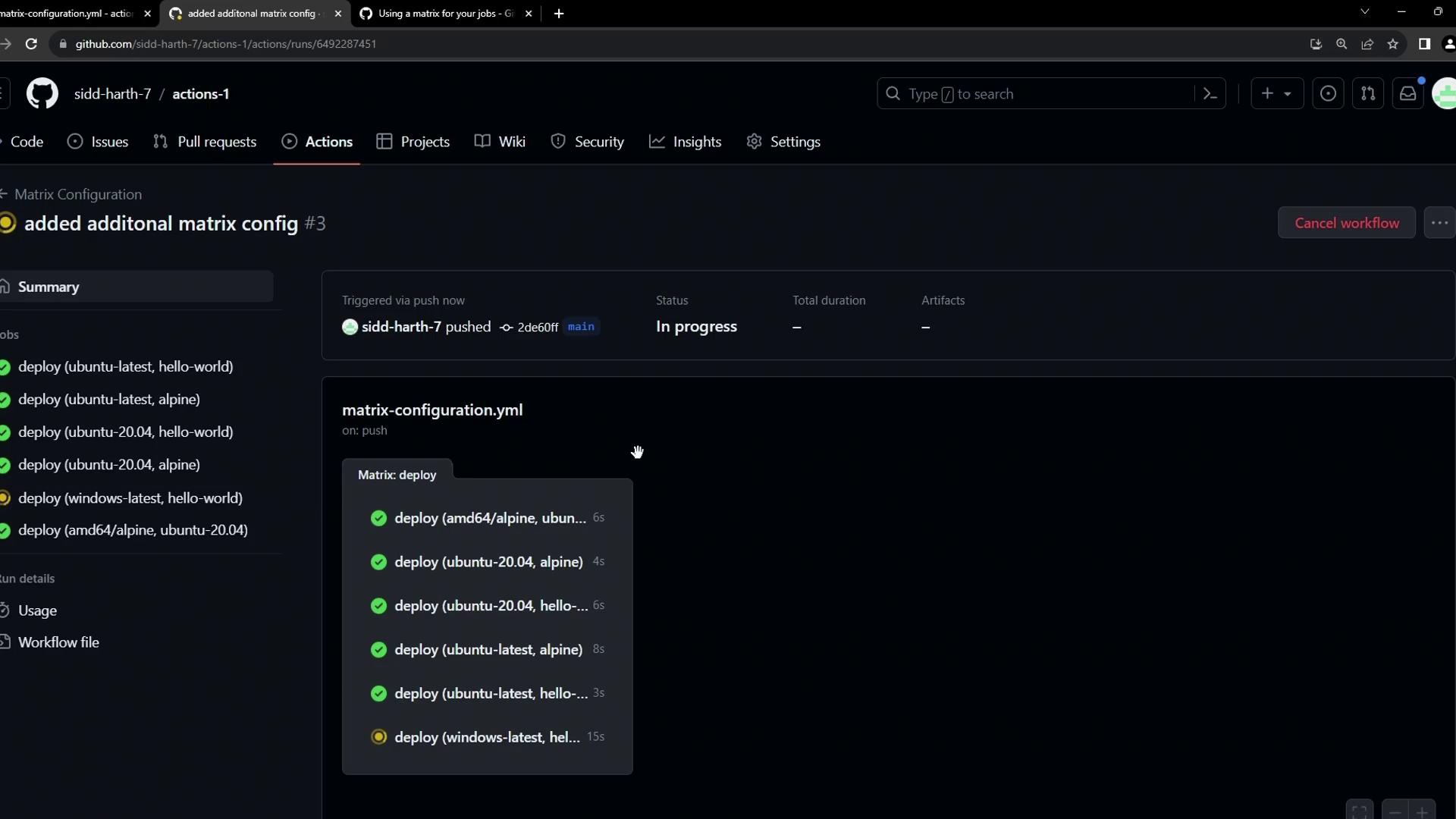
To add specialized pairings not covered by the default lists, use `include`. For example, run the `amd64/alpine` image on Ubuntu 20.04:
```yaml theme={null}
on:
workflow_dispatch:
jobs:
deploy:
strategy:
matrix:
os: [ubuntu-latest, ubuntu-20.04, windows-latest]
images: [hello-world, alpine]
exclude:
- os: windows-latest
images: alpine
include:
- os: ubuntu-20.04
images: amd64/alpine
runs-on: ${{ matrix.os }}
steps:
- name: Show Docker Info
run: docker info
- name: Run ${{ matrix.images }} on ${{ matrix.os }}
run: docker run ${{ matrix.images }}
```
This adds one more job—Ubuntu 20.04 + `amd64/alpine`—for a total of 6 jobs.
***
## 4. Controlling Failure and Concurrency
Fine-tune your workflow execution with these two settings:
| Setting | Description | Default |
| ------------ | ------------------------------------------------------ | --------- |
| fail-fast | Cancel in-progress or queued jobs when one fails | `true` |
| max-parallel | Maximum number of matrix jobs running at the same time | unlimited |
Use `fail-fast: false` to let other jobs complete even if one fails, and set `max-parallel` to control resource usage in large matrices.
Example—the same matrix as before, with explicit failure and concurrency control:
```yaml theme={null}
on:
workflow_dispatch:
jobs:
deploy:
strategy:
fail-fast: false
max-parallel: 2
matrix:
os: [ubuntu-latest, ubuntu-20.04, windows-latest]
images: [hello-world, alpine]
exclude:
- os: windows-latest
images: alpine
include:
- os: ubuntu-20.04
images: amd64/alpine
runs-on: ${{ matrix.os }}
steps:
- name: Show Docker Info
run: docker info
- name: Run ${{ matrix.images }} on ${{ matrix.os }}
run: docker run ${{ matrix.images }}
```
* With `fail-fast: false`, failures don’t cancel other jobs.
* With `max-parallel: 2`, only two jobs run concurrently; queued jobs start as others finish.
***
By mastering **exclude**, **include**, **fail-fast**, and **max-parallel**, you gain precise control over matrix workflows in GitHub Actions.