> ## Documentation Index
> Fetch the complete documentation index at: https://notes.kodekloud.com/llms.txt
> Use this file to discover all available pages before exploring further.
# Execute multiple jobs in Sequence using needs
> Learn to orchestrate sequential job execution in GitHub Actions using the needs keyword for efficient workflows.
Learn how to orchestrate sequential job execution in GitHub Actions using the `needs` keyword. By the end of this guide, you'll configure:
1. A **build** job that installs dependencies and generates an output file.
2. A **test** job that runs only after the **build** job completes.
3. A **deploy** job that runs after successful testing.
## 1. Default Workflow: Parallel Job Execution
By default, GitHub Actions runs all jobs in parallel if no dependencies are declared. Here’s an example workflow that attempts to build, test, and deploy simultaneously:
```yaml theme={null}
name: Generate ASCII Artwork
on:
push:
jobs:
build_job_1:
runs-on: ubuntu-latest
steps:
- name: Install Cowsay Program
run: sudo apt-get install cowsay -y
- name: Execute Cowsay CMD
run: cowsay -f dragon "Run for cover, I am a DRAGON....RAWR" >> dragon.txt
- name: Sleep for 30 seconds
run: sleep 30
test_job_2:
runs-on: ubuntu-latest
steps:
- name: Sleep for 10 seconds
run: sleep 10
- name: Test File Exists
run: grep -i "dragon" dragon.txt
deploy_job_3:
runs-on: ubuntu-latest
steps:
- name: Read File
run: cat dragon.txt
```
All three jobs start at once, causing **test\_job\_2** and **deploy\_job\_3** to fail because `dragon.txt` isn’t created yet.
***
## 2. Chain `test_job_2` to `build_job_1`
Use `needs: build_job_1` so that **test\_job\_2** waits for **build\_job\_1** to finish successfully:
```yaml theme={null}
name: Generate ASCII Artwork
on:
push:
jobs:
build_job_1:
runs-on: ubuntu-latest
steps:
- name: Install Cowsay Program
run: sudo apt-get install cowsay -y
- name: Execute Cowsay CMD
run: cowsay -f dragon "Run for cover, I am a DRAGON....RAWR" >> dragon.txt
- name: Sleep for 30 seconds
run: sleep 30
test_job_2:
needs: build_job_1
runs-on: ubuntu-latest
steps:
- name: Sleep for 10 seconds
run: sleep 10
- name: Test File Exists
run: grep -i "dragon" dragon.txt
```
The `needs` keyword accepts a single job name or an array. You can hover over `needs` in VS Code with the [GitHub Actions plugin](https://marketplace.visualstudio.com/items?itemName=GitHub.vscode-github-actions) to see usage details.
***
## 3. Chain `deploy_job_3` to `test_job_2`
Add `needs: test_job_2` to ensure **deploy\_job\_3** runs only after testing passes:
```yaml theme={null}
name: Generate ASCII Artwork
on:
push:
jobs:
build_job_1:
runs-on: ubuntu-latest
steps:
- name: Install Cowsay Program
run: sudo apt-get install cowsay -y
- name: Execute Cowsay CMD
run: cowsay -f dragon "Run for cover, I am a DRAGON....RAWR" >> dragon.txt
- name: Sleep for 30 seconds
run: sleep 30
test_job_2:
needs: build_job_1
runs-on: ubuntu-latest
steps:
- name: Sleep for 10 seconds
run: sleep 10
- name: Test File Exists
run: grep -i "dragon" dragon.txt
deploy_job_3:
needs: test_job_2
runs-on: ubuntu-latest
steps:
- name: Read File
run: cat dragon.txt
```
You can also list multiple dependencies:
```yaml theme={null}
deploy_job_3:
needs: [build_job_1, test_job_2]
# ...
```
***
### Job Dependency Summary
| Job Name | Depends On | Purpose |
| -------------- | ------------- | ------------------------------------------ |
| build\_job\_1 | – | Install `cowsay` and create `dragon.txt` |
| test\_job\_2 | build\_job\_1 | Verify that `dragon.txt` contains "dragon" |
| deploy\_job\_3 | test\_job\_2 | Output contents of `dragon.txt` |
***
## 4. Visualize the Dependency Graph
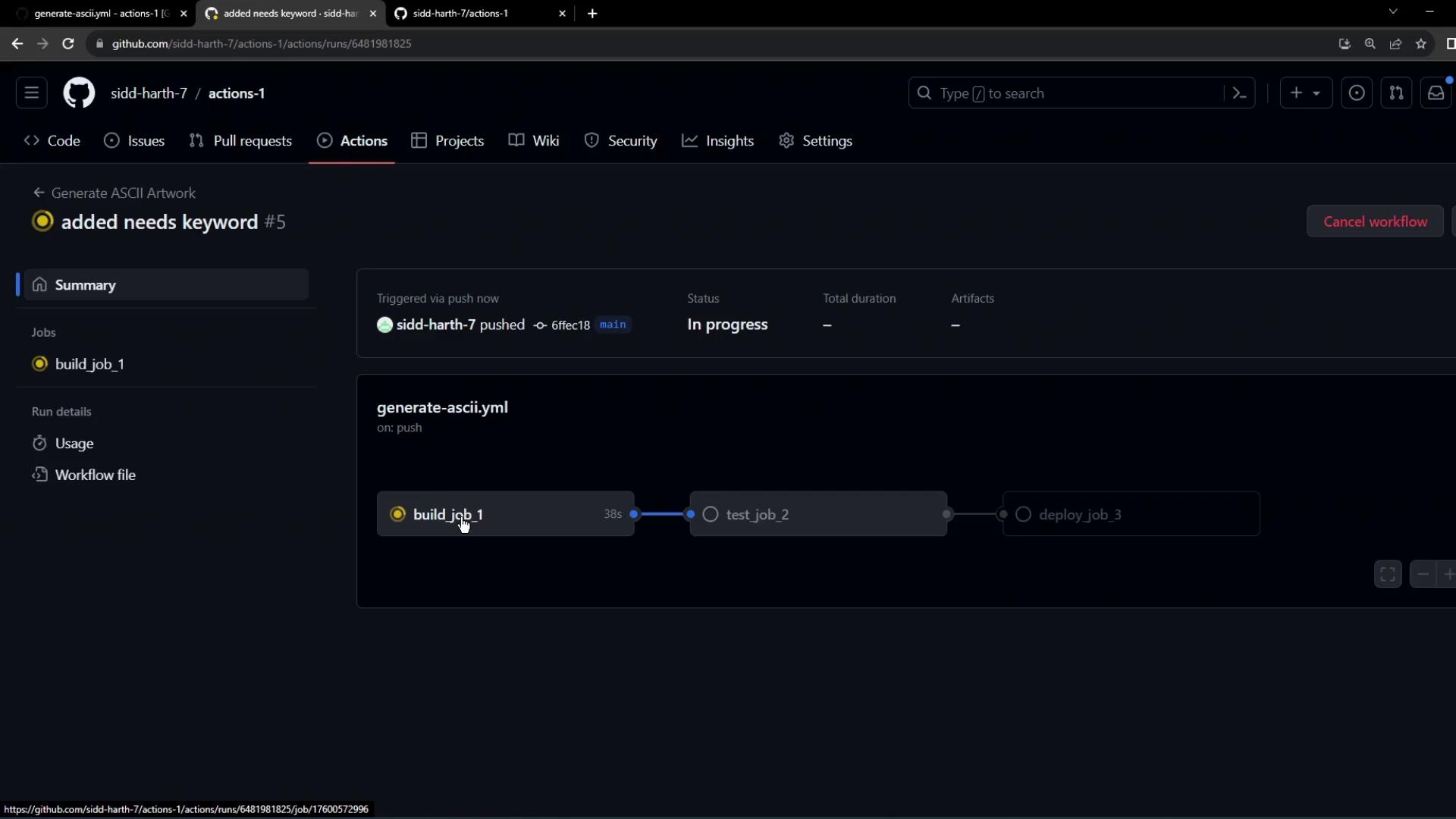
After pushing these changes, GitHub Actions will queue `build_job_1` first, followed by `test_job_2`, then `deploy_job_3`.
***
## 5. Troubleshooting: Fresh VM and Missing Files
Each job runs on a clean virtual machine. If you don’t persist files between jobs, later steps will fail:
```bash theme={null}
Run grep -i "dragon" dragon.txt
grep: dragon.txt: No such file or directory
Error: Process completed with exit code 2.
```
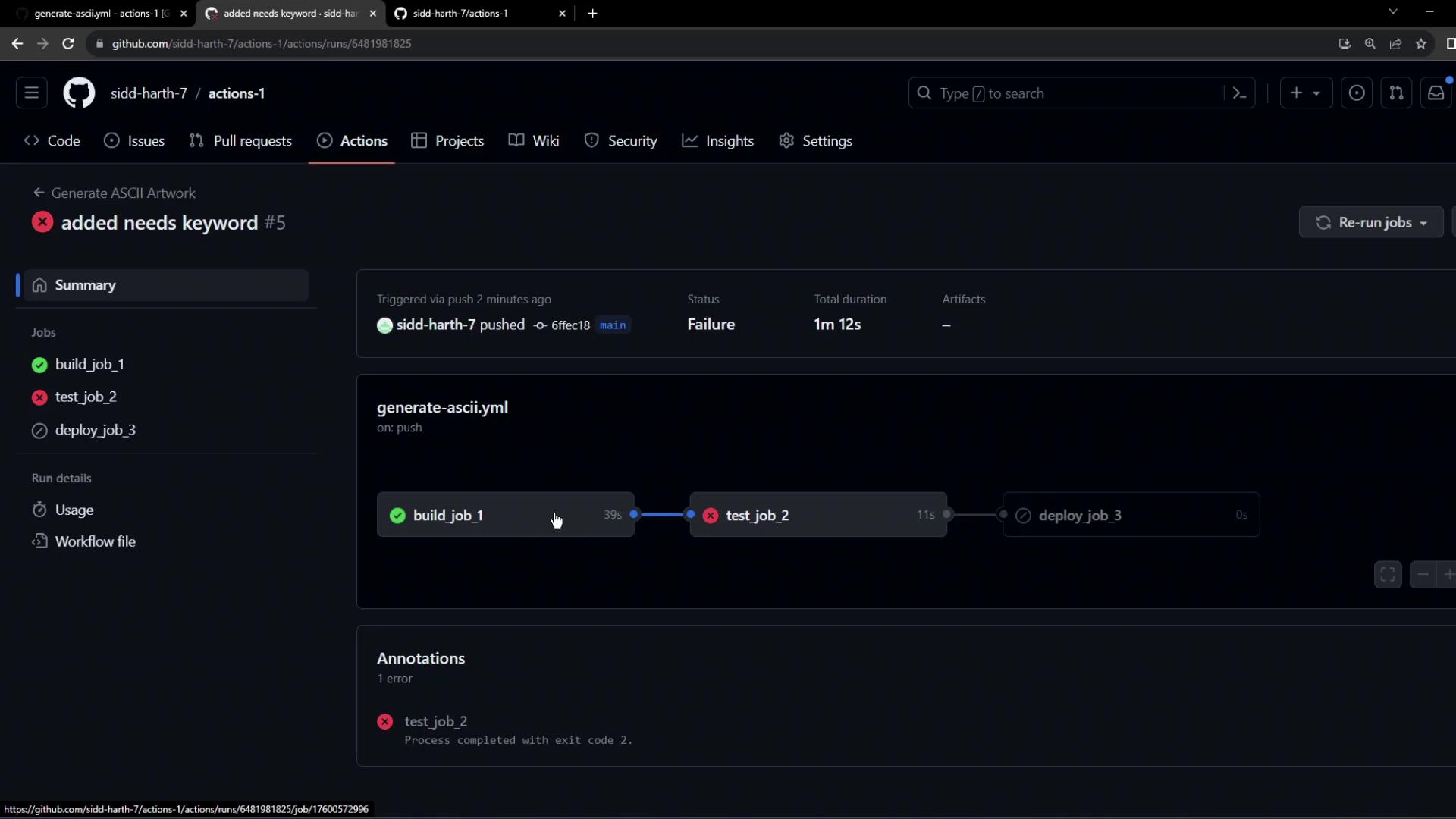
Jobs do not share the filesystem by default. Use [artifacts](https://docs.github.com/actions/using-workflows/storing-workflow-data-as-artifacts) or [workspaces](https://docs.github.com/actions/using-workflows/workflow-syntax-for-github-actions#jobsjob_idworkspace) to pass files between jobs.
***
## Next Steps
In the next lesson, we'll explore how to share files and data between jobs using artifacts and workspaces for a fully automated CI/CD pipeline.
## References
* [GitHub Actions: Workflow syntax for `needs`](https://docs.github.com/actions/using-workflows/workflow-syntax-for-github-actions#jobsjob_idneeds)
* [GitHub Actions Artifacts](https://docs.github.com/actions/using-workflows/storing-workflow-data-as-artifacts)
* [GitHub Actions Workspaces](https://docs.github.com/actions/using-workflows/workflow-syntax-for-github-actions#jobsjob_idworkspace)