> ## Documentation Index
> Fetch the complete documentation index at: https://notes.kodekloud.com/llms.txt
> Use this file to discover all available pages before exploring further.
# Multi Line commands and Executing Third Party Libraries
> This guide explains how to optimize GitHub Actions workflows by combining shell commands and integrating third-party CLI tools like cowsay.
In this guide, you’ll learn how to streamline your GitHub Actions workflow by combining multiple shell commands into a single step and integrating a third-party CLI tool (`cowsay`). This approach reduces verbosity and keeps your CI/CD pipeline maintainable.
## Workflow with Separate Steps
Initially, our workflow consisted of four discrete steps:
```yaml theme={null}
name: My First Workflow
on: push
jobs:
first_job:
runs-on: ubuntu-latest
steps:
- name: Checkout Repo
uses: actions/checkout@v4
- name: Welcome message
run: echo "My first GitHub Actions Job"
- name: List files
run: ls
- name: Read file
run: cat README.md
```
While functional, this pattern can become repetitive as your CI job grows.
## Combining Multiple Commands in One Step
You can collapse several shell commands under a single `run` key by using a multiline pipe (`|`). Each command executes in sequence on the same virtual environment.
Grouping commands reduces the number of workflow steps and improves readability. Remember that if any command fails, the entire step stops.
```yaml theme={null}
name: My First Workflow
on: push
jobs:
first_job:
runs-on: ubuntu-latest
steps:
- name: Checkout Repo
uses: actions/checkout@v4
- name: List and Read Files
run: |
echo "My first GitHub Actions Job"
ls -ltra
cat README.md
```
## Adding a Third-Party CLI Tool
Next, let’s use `cowsay`—a fun ASCII art generator—to create a dragon illustration and append it to `dragon.txt`:
```yaml theme={null}
- name: Generate ASCII Artwork
run: cowsay -f dragon "Run for cover, I am a DRAGON....RAWR" >> dragon.txt
```
The default Ubuntu runner does **not** include `cowsay`. You must install it before running the command.
### Installing Dependencies
Add an installation step immediately before invoking `cowsay`:
```yaml theme={null}
- name: Install Cowsay
run: |
sudo apt-get update
sudo apt-get install -y cowsay
```
## Complete Workflow Example
Putting it all together, here’s your optimized workflow:
```yaml theme={null}
name: My First Workflow
on: push
jobs:
first_job:
runs-on: ubuntu-latest
steps:
- name: Checkout Repo
uses: actions/checkout@v4
- name: List and Read Files
run: |
echo "My first GitHub Actions Job"
ls -ltra
cat README.md
- name: Install Cowsay
run: |
sudo apt-get update
sudo apt-get install -y cowsay
- name: Generate ASCII Artwork
run: cowsay -f dragon "Run for cover, I am a DRAGON....RAWR" >> dragon.txt
```
| Step Name | Action | Purpose |
| ---------------------- | ----------------- | ------------------------------------ |
| Checkout Repo | `uses` | Clone the repository to the runner |
| List and Read Files | `run` (multiline) | Echo a message, list and read files |
| Install Cowsay | `run` (multiline) | Install the `cowsay` package |
| Generate ASCII Artwork | `run` | Generate ASCII art into `dragon.txt` |
## Troubleshooting
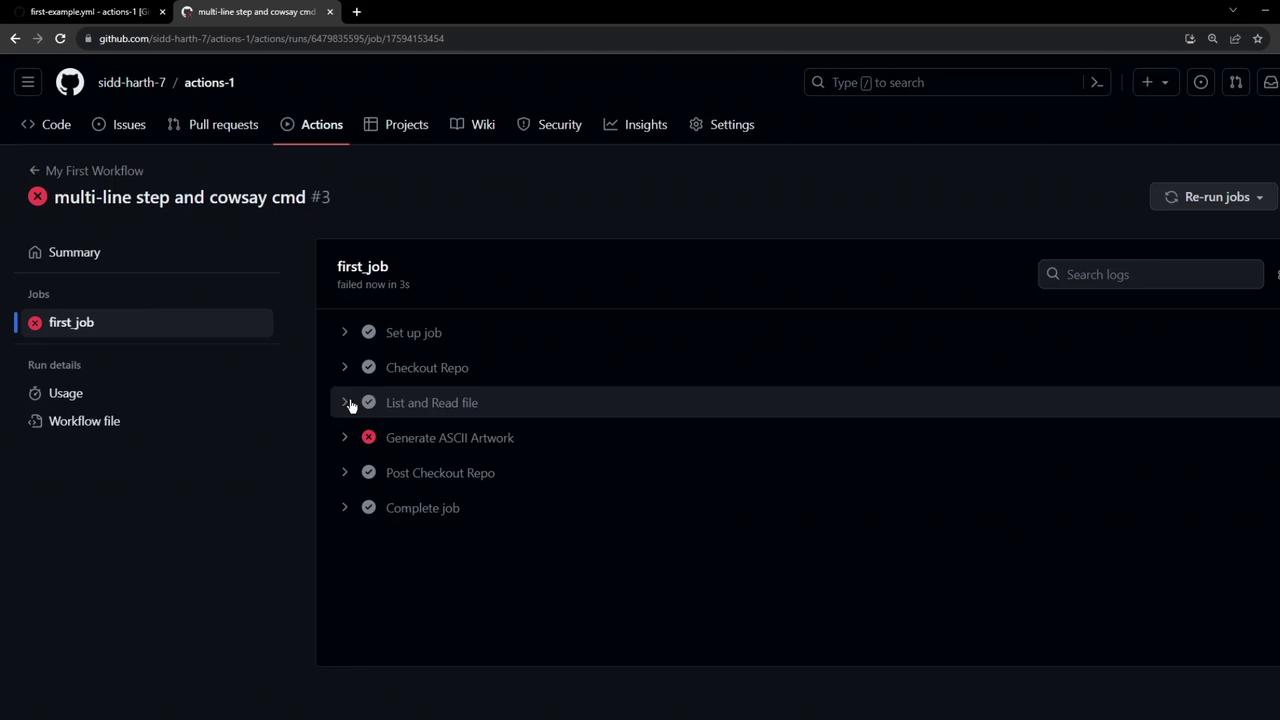
Once you commit and push these changes, navigate to the **Actions** tab to monitor your workflow. If you forget to install `cowsay`, you’ll see a failure like this:
## References
* [GitHub Actions: Workflow Syntax](https://docs.github.com/en/actions/using-workflows/workflow-syntax-for-github-actions)
* [actions/checkout](https://github.com/actions/checkout)
* [GitHub Actions Runner Images](https://github.com/actions/runner-images)