> ## Documentation Index
> Fetch the complete documentation index at: https://notes.kodekloud.com/llms.txt
> Use this file to discover all available pages before exploring further.
# Using Job concurrency
> This guide explains how to use the concurrency key in GitHub Actions to manage overlapping deployments effectively.
In this guide, you’ll learn how to prevent overlapping deployments by using the `concurrency` key in GitHub Actions. We’ll start with a simple Docker build-and-publish workflow, simulate a long-running deployment, and then introduce concurrency controls to ensure only one deployment runs at a time.
## 1. Base Workflow
This workflow builds, logs in, and publishes a Docker image when manually triggered:
```yaml theme={null}
on:
workflow_dispatch:
env:
CONTAINER_REGISTRY: docker.io
IMAGE_NAME: github-actions-nginx
jobs:
docker:
runs-on: ubuntu-latest
steps:
- name: Docker Build
run: echo docker build -t ${{ env.CONTAINER_REGISTRY }}/${{ vars.DOCKER_USERNAME }}/${{ IMAGE_NAME }}:latest
- name: Docker Login
run: echo docker login --username=${{ vars.DOCKER_USERNAME }} --password=${{ secrets.DOCKER_PASSWORD }}
- name: Docker Publish
run: echo docker push ${{ env.CONTAINER_REGISTRY }}/${{ vars.DOCKER_USERNAME }}/${{ IMAGE_NAME }}:latest
```
## 2. Adding a Long-Running Deploy Job
To demonstrate overlapping runs, let’s add a `deploy` job that runs the container and then sleeps for 10 minutes:
```yaml theme={null}
jobs:
docker:
runs-on: ubuntu-latest
steps:
- name: Docker Build
run: echo docker build -t ${{ env.CONTAINER_REGISTRY }}/${{ vars.DOCKER_USERNAME }}/${{ IMAGE_NAME }}:latest
- name: Docker Login
run: echo docker login --username=${{ vars.DOCKER_USERNAME }} --password=${{ secrets.DOCKER_PASSWORD }}
- name: Docker Publish
run: echo docker push ${{ env.CONTAINER_REGISTRY }}/${{ vars.DOCKER_USERNAME }}/${{ IMAGE_NAME }}:latest
deploy:
needs: docker
runs-on: ubuntu-latest
steps:
- name: Docker Run
run: |
echo docker run -d -p 8080:80 ${{ env.CONTAINER_REGISTRY }}/${{ vars.DOCKER_USERNAME }}/${{ IMAGE_NAME }}:latest
sleep 600s
```
If you trigger this workflow while the previous deploy is still sleeping, you’ll end up with two simultaneous deployments—often a recipe for configuration drift or resource conflicts.
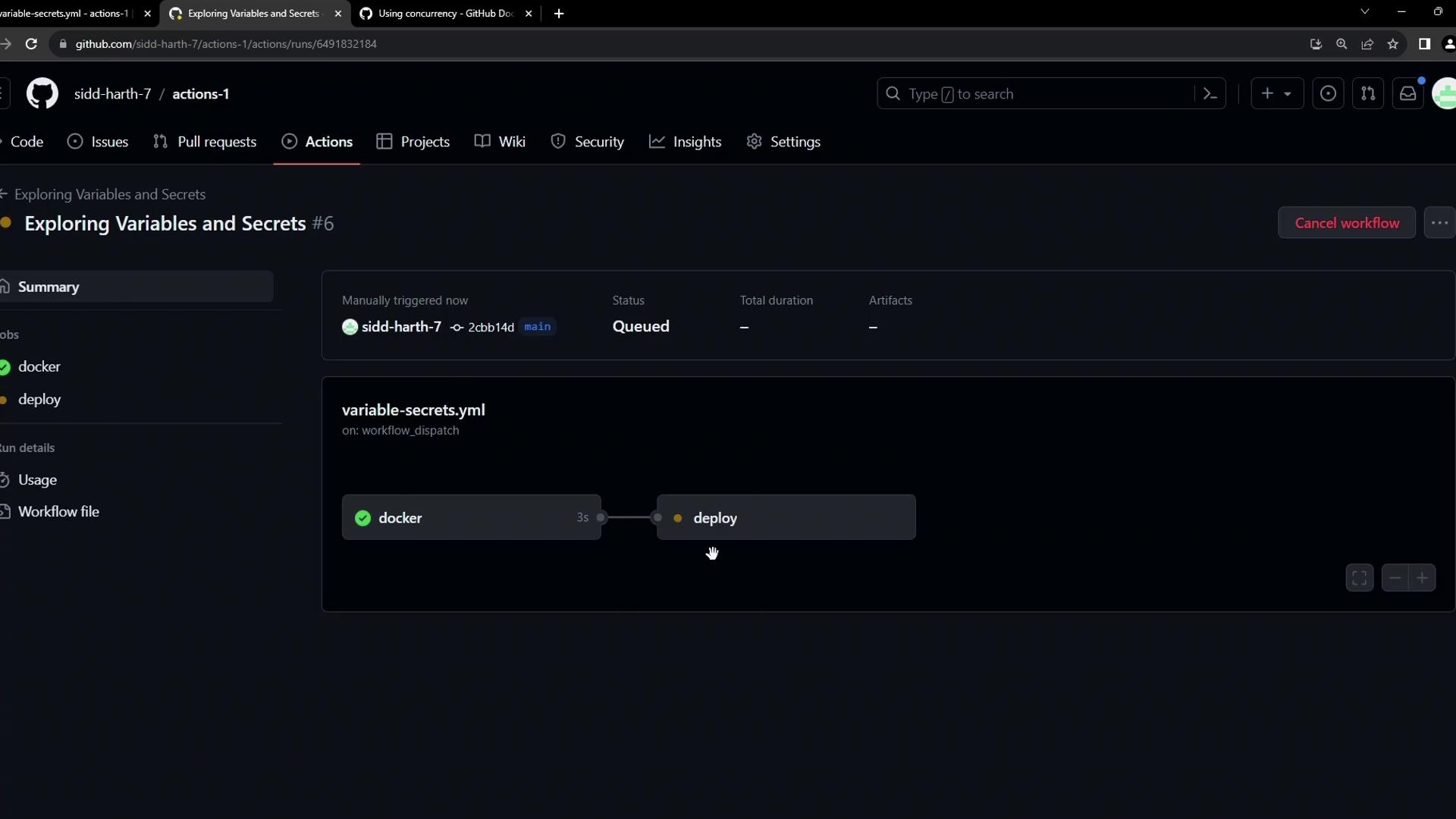
Once pushed, manually trigger the workflow:
## 3. Understanding Concurrency in GitHub Actions
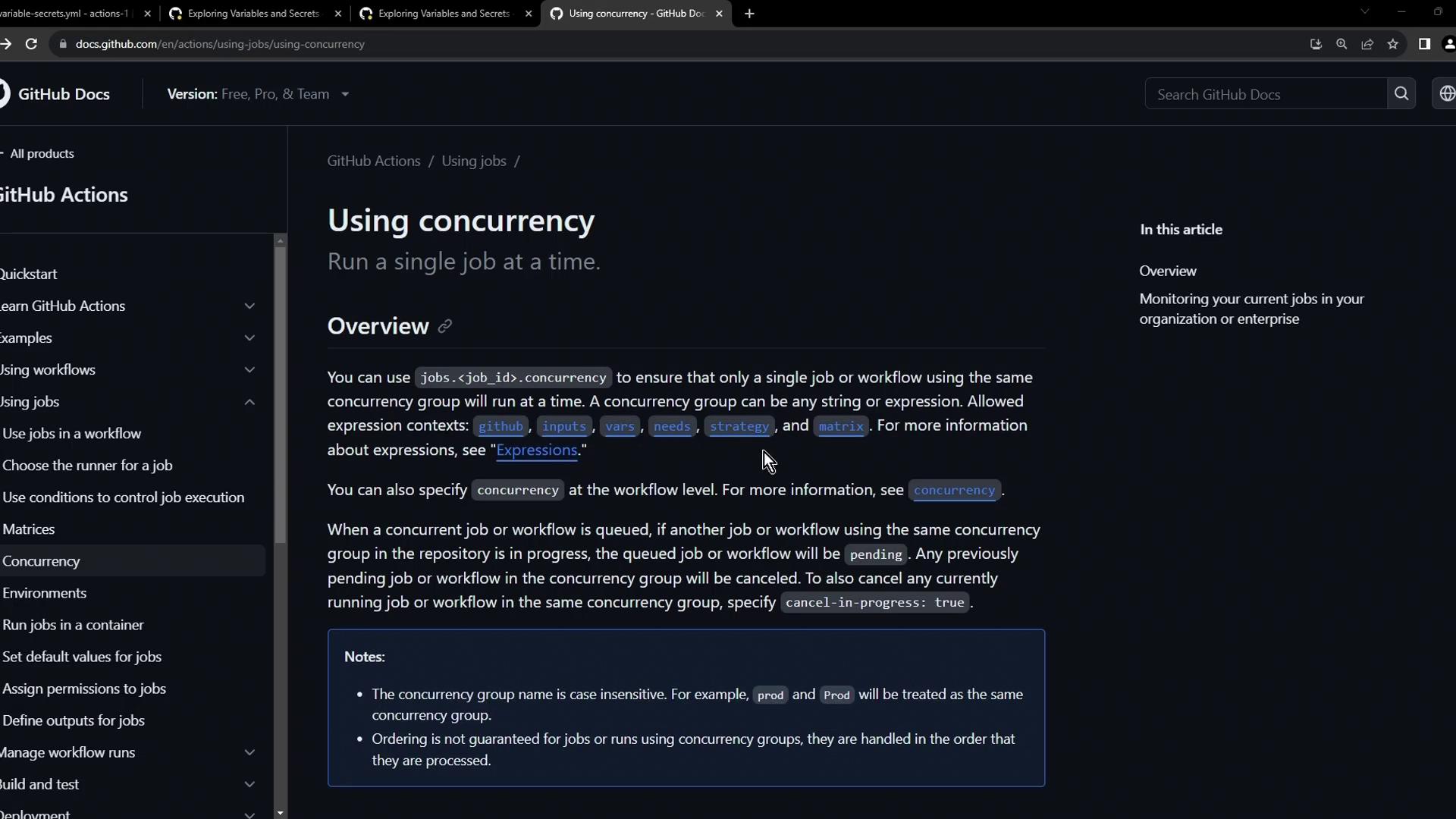
GitHub Actions offers a [`concurrency`](https://docs.github.com/en/actions/using-workflows/workflow-syntax-for-github-actions#concurrency) key to group runs and control whether new runs cancel or queue behind in-progress ones:
| Key | Description | Default |
| ------------------ | ------------------------------------------------------------ | ------- |
| group | Unique name for the concurrency group | none |
| cancel-in-progress | Cancel any in-flight runs in the same group (`true`/`false`) | false |
Use a descriptive `group` name (for example, `production-deployment`) so unrelated workflows do not interfere with each other.
## 4. Enabling Concurrency on the Deploy Job
Add `concurrency` to the `deploy` job so that any new deployment run cancels the one in progress:
```yaml theme={null}
env:
CONTAINER_REGISTRY: docker.io
IMAGE_NAME: github-actions-nginx
jobs:
docker:
runs-on: ubuntu-latest
steps:
- name: Docker Build
run: echo docker build -t ${{ env.CONTAINER_REGISTRY }}/${{ vars.DOCKER_USERNAME }}/${{ IMAGE_NAME }}:latest
- name: Docker Login
run: echo docker login --username=${{ vars.DOCKER_USERNAME }} --password=${{ secrets.DOCKER_PASSWORD }}
- name: Docker Publish
run: echo docker push ${{ env.CONTAINER_REGISTRY }}/${{ vars.DOCKER_USERNAME }}/${{ IMAGE_NAME }}:latest
deploy:
needs: docker
concurrency:
group: production-deployment
cancel-in-progress: true
runs-on: ubuntu-latest
steps:
- name: Docker Run
run: |
echo docker run -d -p 8080:80 ${{ env.CONTAINER_REGISTRY }}/${{ vars.DOCKER_USERNAME }}/${{ IMAGE_NAME }}:latest
sleep 600s
```
After committing the change, triggering another run will immediately cancel the previous deploy:
```bash theme={null}
docker run -d -p 8080:80 $CONTAINER_REGISTRY/siddharth67/$IMAGE_NAME:latest
Error: The operation was canceled.
```
## 5. Demonstration: Cancel in Progress = true
1. **Trigger Workflow A** → `deploy` starts and sleeps.
2. **Trigger Workflow B** → cancels A’s `deploy` job and starts B’s.
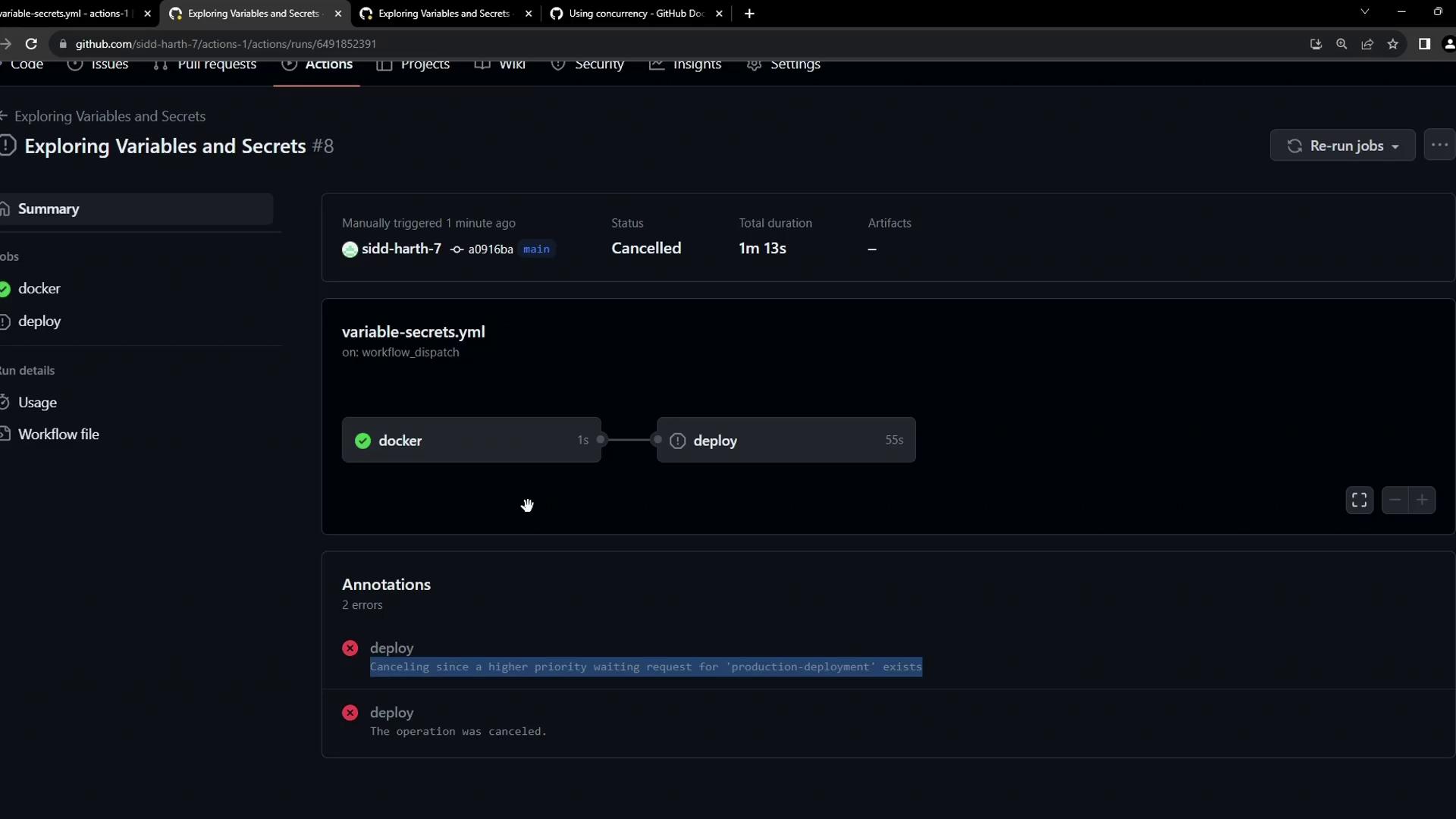
You’ll see:
> *“The deploy job was canceled because a higher priority waiting request for the production deployment exists.”*
## 6. Demonstration: Cancel in Progress = false
If you prefer to queue new runs behind in-progress ones, set `cancel-in-progress: false`:
```yaml theme={null}
deploy:
needs: docker
concurrency:
group: production-deployment
cancel-in-progress: false
runs-on: ubuntu-latest
steps:
- name: Docker Run
run: |
echo docker run -d -p 8080:80 ${{ env.CONTAINER_REGISTRY }}/${{ vars.DOCKER_USERNAME }}/${{ IMAGE_NAME }}:latest
sleep 600s
```
1. **Trigger Workflow A** → sleeps in `deploy`.
2. **Trigger Workflow B** → its `docker` job runs immediately, but its `deploy` job waits.
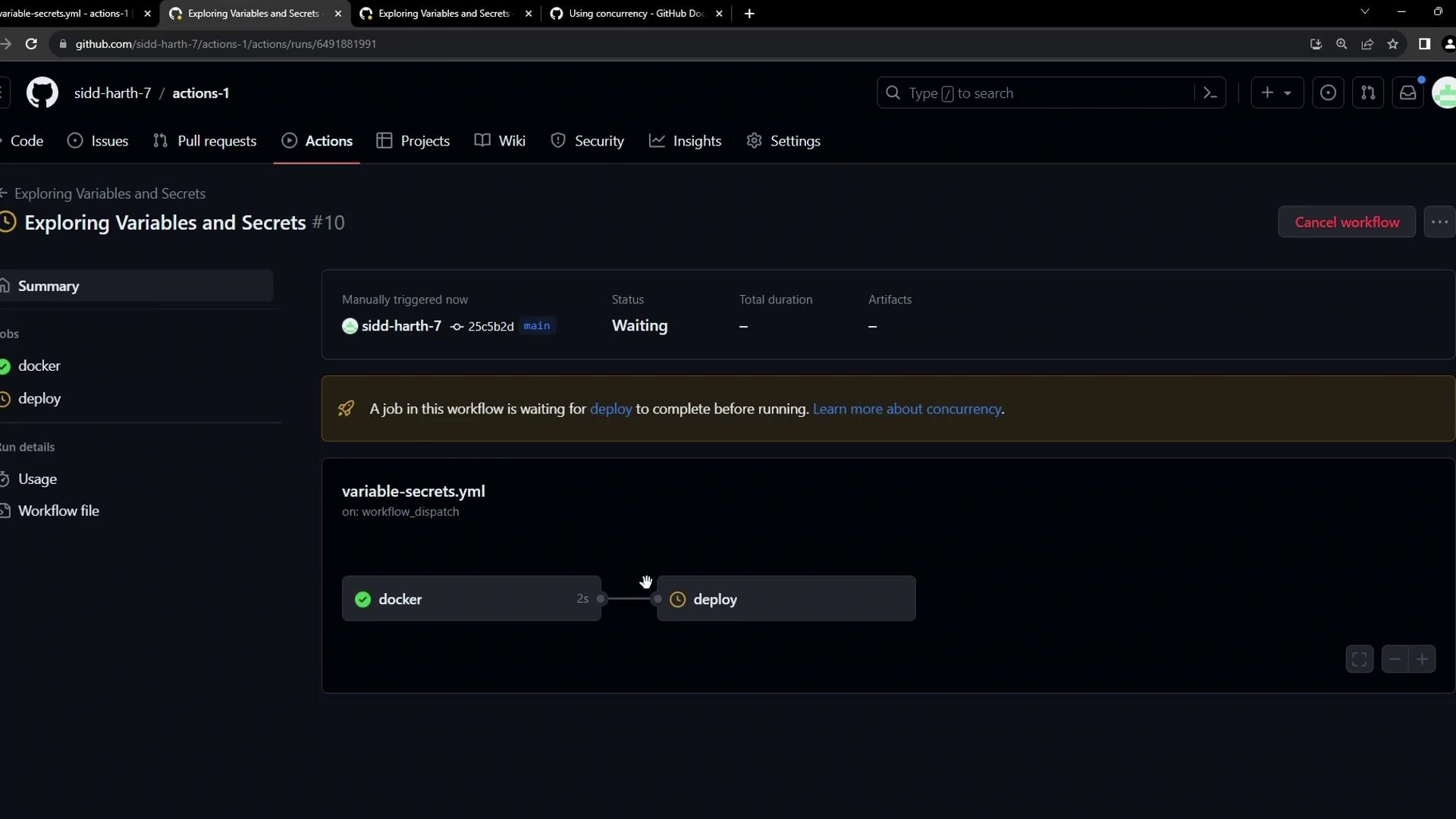
Hovering over the pending job reveals it’s waiting for the prior deployment to finish.
## Conclusion
By defining `concurrency.group` and choosing whether to `cancel-in-progress`, you can enforce single-instance deployments or queue them, protecting your production environment from conflicts and ensuring predictable rollouts.