> ## Documentation Index
> Fetch the complete documentation index at: https://notes.kodekloud.com/llms.txt
> Use this file to discover all available pages before exploring further.
# Workflow with multiple Jobs
> This guide explains how to create a multi-job CI/CD pipeline in GitHub Actions, covering job sequencing and artifact sharing.
In this guide, we’ll transform a simple, single-job GitHub Actions workflow into a robust multi-job CI/CD pipeline. You’ll learn how to split **build**, **test**, and **deploy** stages into separate jobs, ensure proper sequencing, and share artifacts between steps.
***
## Table of Contents
1. [Recap: Single-Job Workflow](#recap-single-job-workflow)
2. [Multi-Job Workflow Setup](#multi-job-workflow-setup)
3. [Default Parallel Execution & Failures](#default-parallel-execution--failures)
4. [Common Errors](#common-errors)
5. [Issues to Address Next](#issues-to-address-next)
6. [References](#references)
***
## Recap: Single-Job Workflow
Our original workflow ran every step in one job:
```yaml theme={null}
# .github/workflows/generate-ascii.yml
name: Generate ASCII Artwork
on: push
jobs:
ascii_job:
runs-on: ubuntu-latest
steps:
- name: Checkout repository
uses: actions/checkout@v2
- name: Execute ASCII script
run: |
chmod +x ascii-script.sh
./ascii-script.sh
```
This approach is simple but not scalable. Everything—from installation to deployment—occurs in a single VM instance.
***
## Multi-Job Workflow Setup
Below is an improved workflow with three distinct jobs: **build\_job\_1**, **test\_job\_2**, and **deploy\_job\_3**. Each job runs on its own runner:
```yaml theme={null}
# .github/workflows/generate-ascii.yml
name: Generate ASCII Artwork
on:
push:
branches:
- main
jobs:
build_job_1:
runs-on: ubuntu-latest
steps:
- name: Checkout repository
uses: actions/checkout@v2
- name: Install cowsay
run: sudo apt-get update && sudo apt-get install cowsay -y
- name: Generate ASCII dragon
run: cowsay -f dragon "Run for cover, I am a DRAGON.... RAWR" >> dragon.txt
- name: Pause for 30 seconds
run: sleep 30
test_job_2:
runs-on: ubuntu-latest
steps:
- name: Pause for 10 seconds
run: sleep 10
- name: Verify dragon.txt
run: grep -i "dragon" dragon.txt
deploy_job_3:
runs-on: ubuntu-latest
steps:
- name: Display dragon.txt
run: cat dragon.txt
- name: Simulate deployment
run: echo "Deploying dragon.txt..."
```
### Job Overview
| Job Name | Purpose | Key Steps |
| -------------- | ------------------------------- | --------------------------------------- |
| build\_job\_1 | Install dependencies & generate | Install `cowsay`, create `dragon.txt` |
| test\_job\_2 | Validate build output | Check for “dragon” in `dragon.txt` |
| deploy\_job\_3 | Output & deploy | Print file content, simulate deployment |
***
## Default Parallel Execution & Failures
By default, GitHub Actions runs jobs **in parallel** on separate VMs. Since there’s no shared filesystem or enforced order, downstream jobs may start before the build completes.
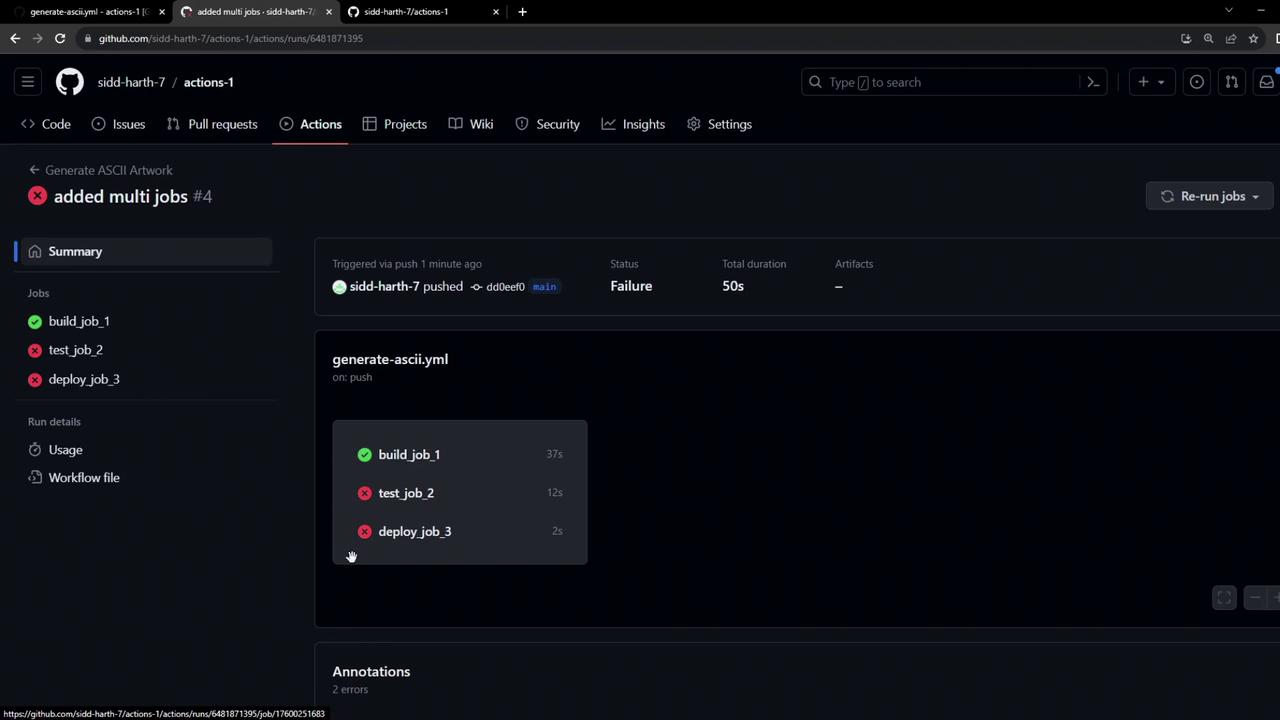
Jobs in GitHub Actions are **isolated** by default. To share files or enforce ordering, you’ll need to use [job dependencies](https://docs.github.com/actions/using-workflows/workflow-syntax-for-github-actions#jobsjob_idneeds) and [artifacts](https://docs.github.com/actions/using-workflows/storing-workflow-data-as-artifacts).
***
## Common Errors
When jobs run in parallel without dependencies, you may see errors like:
```bash theme={null}
grep -i "dragon" dragon.txt
cat dragon.txt
# cat: dragon.txt: No such file or directory
# Error: Process completed with exit code 1.
```
***
## Issues to Address Next
1. **Job Sequencing**\
Ensure `build_job_1` completes before `test_job_2`, and `test_job_2` before `deploy_job_3` using the `needs` keyword.
2. **Artifact Sharing**\
Use `actions/upload-artifact` in the build job and `actions/download-artifact` in downstream jobs to pass `dragon.txt`.
***
## References
* [GitHub Actions: Workflow syntax](https://docs.github.com/actions/using-workflows/workflow-syntax-for-github-actions)
* [GitHub Actions: Using artifacts](https://docs.github.com/actions/using-workflows/storing-workflow-data-as-artifacts)
* [GitHub Actions: Job dependencies](https://docs.github.com/actions/using-workflows/workflow-syntax-for-github-actions#jobsjob_idneeds)