> ## Documentation Index
> Fetch the complete documentation index at: https://notes.kodekloud.com/llms.txt
> Use this file to discover all available pages before exploring further.
# Configure organizational use policies for GitHub Actions
> Learn to enforce organization-wide policies for GitHub Actions to secure CI/CD pipelines and restrict unapproved third-party code execution.
Learn how to enforce organization-wide policies for GitHub Actions to secure your CI/CD pipelines. Using the **solar-system** repository as an example, you’ll see how to restrict which actions can run, preventing unapproved third-party code from executing.
## Types of Actions in Your Workflows
* **Official GitHub Actions** (e.g., `actions/checkout`, `actions/setup-node`)
* **Custom Composite Actions** (e.g., `./github/custom-actions/npm-action`)
* **Verified Marketplace Actions** (e.g., Docker, Azure)
* **Community Actions** (e.g., `jakejarvis/s3-sync-action@master`)
## Example Workflow: NodeJS CI
Below is an excerpt from `.github/workflows/nodejs-ci.yml` showcasing various action types:
```yaml theme={null}
name: NodeJS CI
on:
push:
branches: [main]
pull_request:
branches: [main]
env:
MONGO_URI: "mongodb://localhost:27017/superstar"
MONGO_USERNAME: non-prod-user
MONGO_PASSWORD: non-prod-password
strategy:
matrix:
nodejs_version: [18, 20]
operating_system: [ubuntu-latest]
runs-on: ${{ matrix.operating_system }}
steps:
- name: Checkout Repository
uses: actions/checkout@v4
- name: Set up Node.js ${{ matrix.nodejs_version }}
uses: actions/setup-node@v3
with:
node-version: ${{ matrix.nodejs_version }}
- name: Cache & Install NPM Packages
uses: ./github/custom-actions/npm-action
with:
path-of-folder: node_modules
- name: Run Unit Tests
run: npm test
- name: Archive Test Results
if: always()
uses: actions/upload-artifact@v3
- name: Upload Reports to S3
uses: jakejarvis/s3-sync-action@master
with:
args: --follow-symlinks --delete
env:
AWS_S3_BUCKET: solar-system-reports-bucket
AWS_ACCESS_KEY_ID: ${{ secrets.AWS_ACCESS_KEY_ID }}
AWS_SECRET_ACCESS_KEY: ${{ secrets.AWS_SECRET_ACCESS_KEY }}
AWS_REGION: us-east-1
SOURCE_DIR: reports-${{ github.sha }}
DEST_DIR: reports-${{ github.sha }}
```
If you enable strict policies without allowing required actions, existing workflows will fail. Always test policy changes on a non-production branch first.
## Configuring Organization-Level Policies
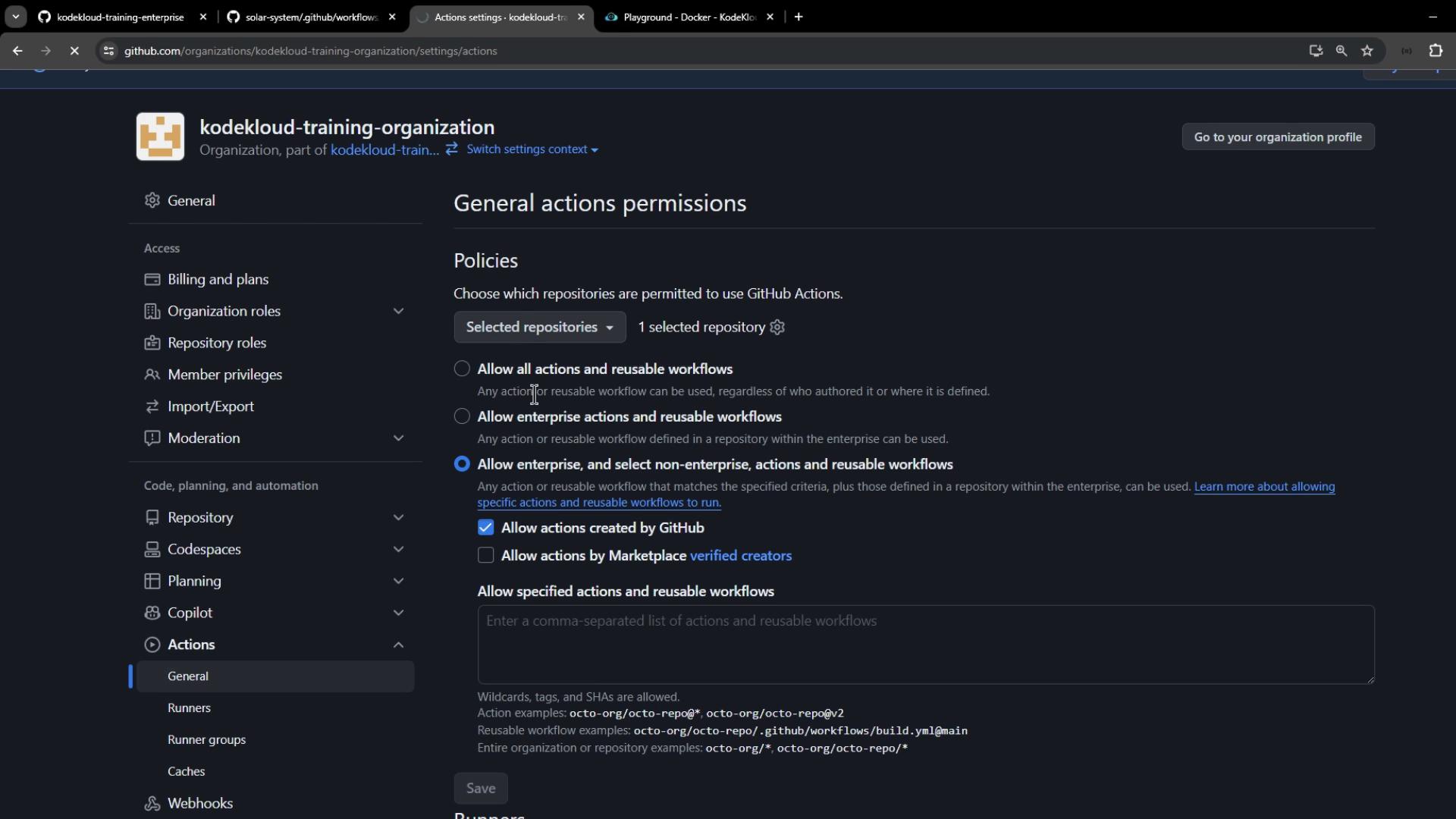
1. Navigate to **Organization** → **Settings** → **Actions** → **General**.
2. Under **Repository access**, select **Allow actions and reusable workflows selected repositories**, then add **solar-system**.
3. Choose a **Workflow permissions** option:
| Policy Level | Description |
| ------------------------------------------ | --------------------------------------------------------- |
| Allow all actions and reusable workflows | No restrictions; all actions run freely. |
| Allow local actions only | Only actions within your enterprise repositories. |
| Allow local & verified Marketplace actions | Actions from your enterprise or GitHub-verified creators. |
| Custom policy | Precisely list allowed actions and workflows. |
4. To restrict to official GitHub actions, select **Allow actions created by GitHub**.
5. Click **Save**.
## Testing Your Policy
In **solar-system** repository:
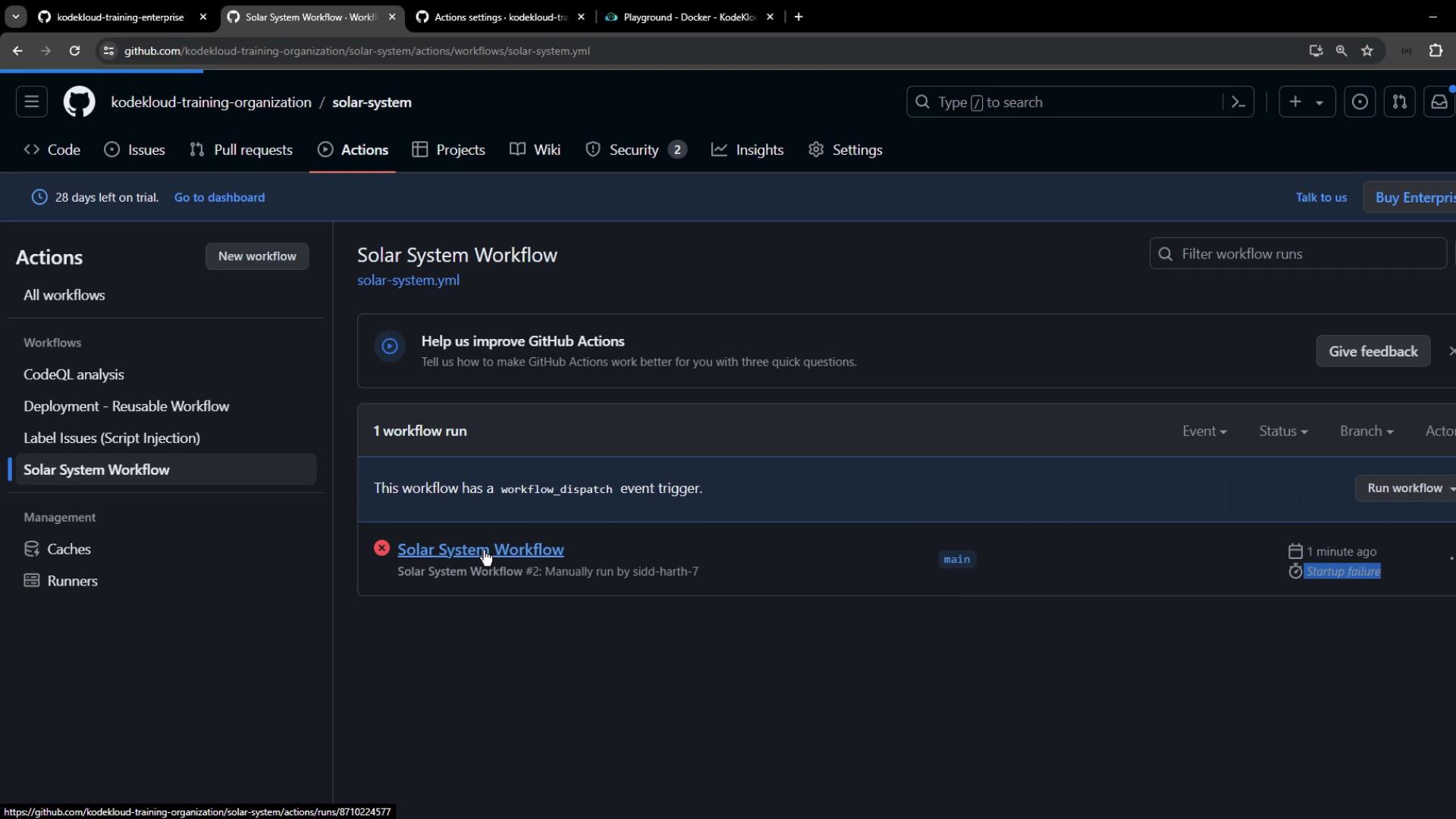
1. Open the **Actions** tab.
2. Choose **Solar System Workflow**.
3. Click **Run workflow**.
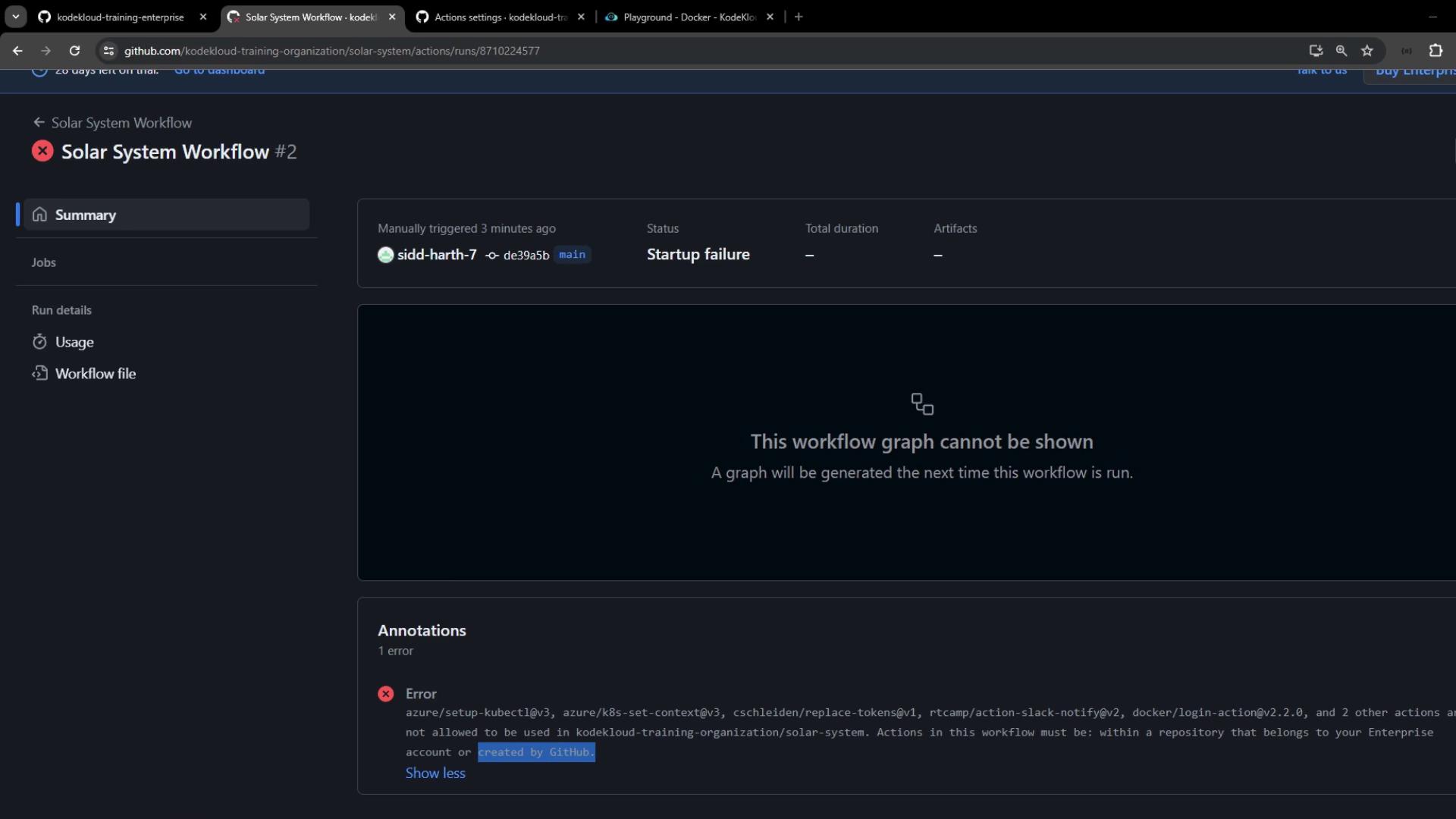
The run will fail at startup if unapproved actions are blocked:
```text theme={null}
Error: Actions in this workflow must be within a repository that belongs to our enterprise account or created by GitHub.
```
## Allowing Verified & Specific Community Actions
To include verified Marketplace actions (Azure, Docker) without approving all third-party code:
1. Go back to **Organization** → **Settings** → **Actions** → **General**.
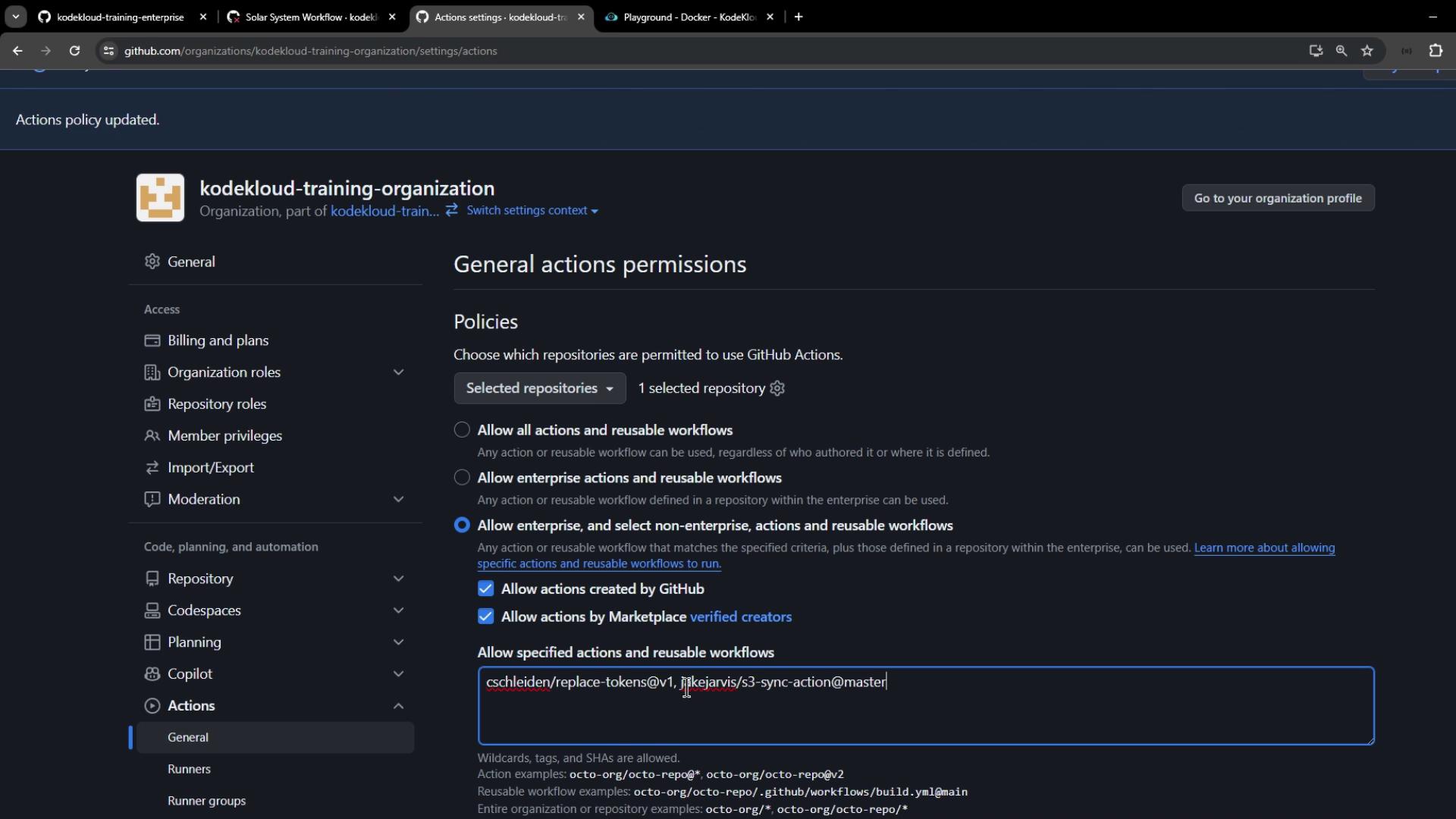
2. Under **Workflow permissions**, select **Allow actions from GitHub, local Enterprise, and GitHub Marketplace (verified creators)**.
3. Click **Save** and rerun the workflow.
Community actions still blocked? Add them explicitly under **Custom policy**:
```text theme={null}
jakejarvis/s3-sync-action@master, my-org/my-custom-action@v1
```
Save your changes and retry. Any remaining disallowed actions will be reported:
```text theme={null}
Error: Actions in this workflow must be within a repository that belongs to our enterprise account, created by GitHub, verified in the GitHub Marketplace, or match the following list: jakejarvis/s3-sync-action@master, my-org/my-custom-action@v1.
```
## Summary
By enforcing organization-level use policies for GitHub Actions, you can:
* Restrict workflows to approved actions
* Mitigate risks from untrusted third-party code
* Maintain consistent, secure CI/CD practices across all repositories
## Links and References
* [GitHub Actions Permissions](https://docs.github.com/en/enterprise-server@latest/admin/configuring-actions/configuring-allowed-actions)
* [Controlling Access to Actions](https://docs.github.com/en/actions/reference/permissions-reference)
* [GitHub Marketplace](https://github.com/marketplace)