> ## Documentation Index
> Fetch the complete documentation index at: https://notes.kodekloud.com/llms.txt
> Use this file to discover all available pages before exploring further.
# Prepare a Job for reporting
> This lesson extends a GitHub Actions workflow by adding a reporting job for uploading test and coverage reports to AWS S3.
In this lesson, we’ll extend our existing GitHub Actions workflow by adding a reporting job that:
1. Downloads unit-test and code-coverage artifacts
2. Merges them into a directory named after the current commit SHA
3. Prepares the reports for upload to an AWS S3 bucket
Our workflow already defines the following jobs:
* `unit-testing`
* `code-coverage`
* `docker`
* `dev-deploy`
* `dev-integration-testing`
* `prod-deploy`
* `prod-integration-testing`
We’ll insert a new job, `reports-s3`, right after `code-coverage`. It uses `needs` to depend on both `unit-testing` and `code-coverage`.
```yaml theme={null}
name: Solar System Workflow
on:
workflow_dispatch:
push:
branches:
- main
- 'feature/*'
env:
MONGO_URI: 'mongodb+srv://supercluster.d83jj.mongodb.net/superData'
MONGO_USERNAME: ${{ vars.MONGO_USERNAME }}
MONGO_PASSWORD: ${{ secrets.MONGO_PASSWORD }}
jobs:
unit-testing: ... # existing definition
code-coverage: ... # existing definition
reports-s3:
name: AWS S3 – Upload Reports
needs: [unit-testing, code-coverage]
runs-on: ubuntu-latest
continue-on-error: true
steps:
- name: Download Mocha Test Artifact
uses: actions/download-artifact@v3
with:
name: Mocha-Test-Result
- name: Download Code Coverage Artifact
uses: actions/download-artifact@v3
with:
name: Code-Coverage-Result
- name: Merge Test Files
run: |
echo "Listing workspace contents..."
ls -ltr
echo "Creating reports directory..."
mkdir reports-${{ github.sha }}
mv cobertura-coverage.xml reports-${{ github.sha }}/
mv test-results.xml reports-${{ github.sha }}/
echo "Final contents:"
ls -ltr reports-${{ github.sha }}/
- name: Upload to AWS S3
# TODO: Replace with official AWS S3 upload action or AWS CLI
run: echo "Uploading reports to S3..."
```
The artifact `name` in `actions/upload-artifact` must match the `name` in `actions/download-artifact`.\
For example, `Mocha-Test-Result` and `Code-Coverage-Result` should remain consistent.
## Previous Jobs: Archiving Artifacts
Below are the essential steps for uploading artifacts in your `unit-testing` and `code-coverage` jobs:
| Job Type | Artifact Name | Path |
| ------------- | ---------------------- | ------------------ |
| Unit Testing | `Mocha-Test-Result` | `test-results.xml` |
| Code Coverage | `Code-Coverage-Result` | `coverage/` |
### unit-testing
```yaml theme={null}
jobs:
unit-testing:
runs-on: ubuntu-latest
steps:
- name: Checkout Repository
uses: actions/checkout@v4
- name: Setup Node.js
uses: actions/setup-node@v3
with:
node-version: ${{ matrix.nodejs_version }}
- name: Install Dependencies
run: npm install
- name: Run Unit Tests
id: nodejs-unit-testing
run: npm test
- name: Archive Test Result
if: always()
uses: actions/upload-artifact@v3
with:
name: Mocha-Test-Result
path: test-results.xml
```
### code-coverage
```yaml theme={null}
code-coverage:
runs-on: ubuntu-latest
steps:
- name: Checkout Repository
uses: actions/checkout@v4
- name: Setup Node.js
uses: actions/setup-node@v3
with:
node-version: 18
- name: Install Dependencies
run: npm install
- name: Run Coverage
continue-on-error: true
run: npm run coverage
- name: Archive Coverage Report
uses: actions/upload-artifact@v3
with:
name: Code-Coverage-Result
path: coverage
retention-days: 5
```
Using `continue-on-error: true` allows the workflow to proceed even if tests or coverage fail, but you may miss critical failures.\
Consider disabling it for stricter enforcement.
## Workflow Graph and Logs
Once merged, your GitHub Actions graph will show the new **AWS S3 – Upload Reports** job with arrows from `unit-testing` and `code-coverage`. All upstream jobs complete before `reports-s3` starts, and downstream jobs run in parallel.
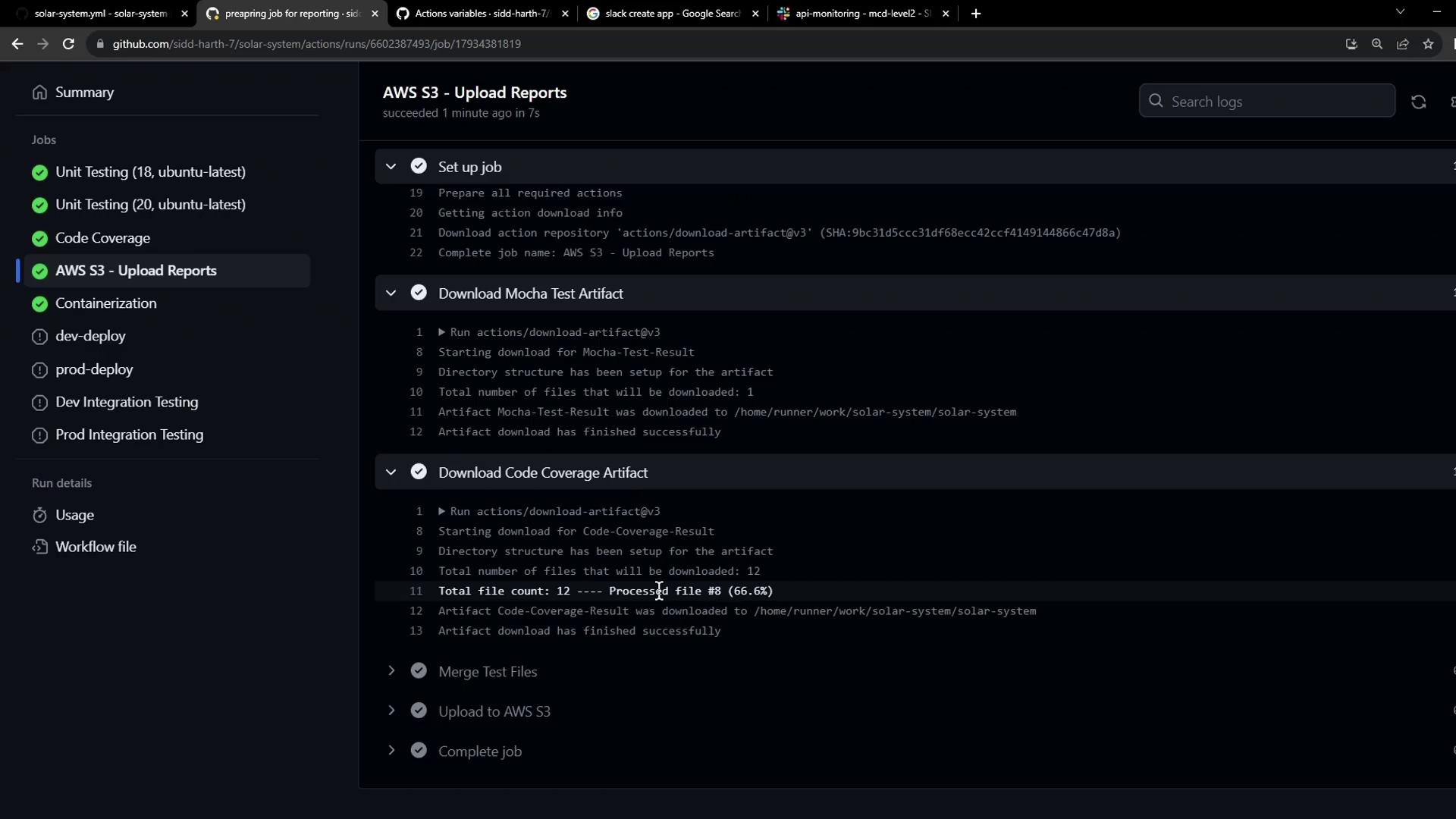
In the logs, you’ll observe:
1. **Download Mocha Test Artifact** – via `actions/download-artifact@v3`.
2. **Download Code Coverage Artifact** – similarly.
3. **Merge Test Files** – creation of `reports-` and movement of `cobertura-coverage.xml` and `test-results.xml`.
4. **Upload to AWS S3** – placeholder echo until we configure an S3 action.
That completes adding the `reports-s3` job. Next, we’ll configure the actual AWS S3 upload step.
## Links and References
* [GitHub Actions: Workflow syntax](https://docs.github.com/actions/using-workflows/workflow-syntax-for-github-actions)
* [actions/download-artifact](https://github.com/actions/download-artifact)
* [actions/upload-artifact](https://github.com/actions/upload-artifact)
* [AWS CLI S3 Upload Documentation](https://docs.aws.amazon.com/cli/latest/reference/s3/)