> ## Documentation Index
> Fetch the complete documentation index at: https://notes.kodekloud.com/llms.txt
> Use this file to discover all available pages before exploring further.
# Step 1 Configure new Reusable Workflow
> This article explains how to configure and use reusable workflows in GitHub Actions to avoid duplication in CI/CD processes.
GitHub Actions lets you **reuse common CI/CD logic** across multiple workflows and repositories. Instead of duplicating identical deployment steps in both `dev-deploy` and `prod-deploy`, extract them into a single reusable workflow.
## Why Avoid Duplication?
A typical “Solar System Workflow” might look like this:
```yaml theme={null}
# .github/workflows/solar-system.yml
name: Solar System Workflow
on:
workflow_dispatch:
branches:
- main
- 'feature/*'
env:
MONGO_URI: 'mongodb+srv://supercluster.d83jj.mongodb.net/superData'
MONGO_USERNAME: ${{ vars.MONGO_USERNAME }}
MONGO_PASSWORD: ${{ secrets.MONGO_PASSWORD }}
jobs:
unit-testing: …
code-coverage: …
docker: …
dev-deploy: …
dev-integration-testing: …
prod-deploy: …
prod-integration-testing: …
```
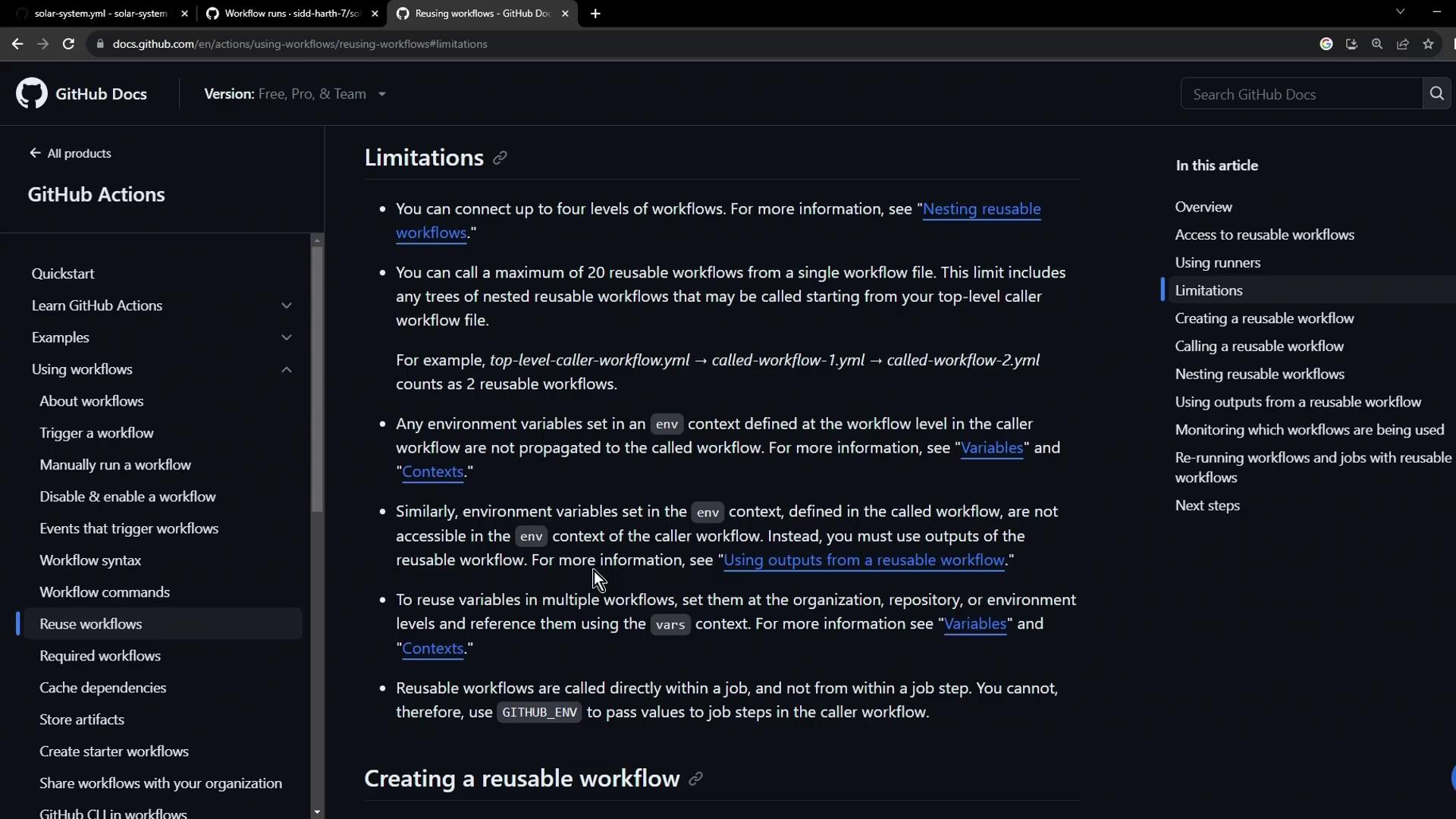
Maintaining nearly identical steps in `dev-deploy` and `prod-deploy` quickly becomes error-prone. Use [reusable workflows](https://docs.github.com/actions/learn-github-actions/reusing-workflows) to centralize your logic.
See the official documentation for an overview of [reusing workflows in GitHub Actions](https://docs.github.com/actions/learn-github-actions/reusing-workflows).
***
## 1. Create the Reusable Workflow
1. **File location**: `.github/workflows/reuse-deployment.yml`
2. **Trigger**: replace `on: workflow_dispatch` with `on: workflow_call`.
3. **Inputs**: declare `kubeconfig` as a required string.
```yaml theme={null}
# .github/workflows/reuse-deployment.yml
name: Deployment – Reusable Workflow
on:
workflow_call:
inputs:
kubeconfig:
description: 'Kubernetes config for the target cluster'
required: true
type: string
```
### Full Workflow Definition
```yaml theme={null}
# .github/workflows/reuse-deployment.yml
name: Deployment – Reusable Workflow
on:
workflow_call:
inputs:
kubeconfig:
description: 'Kubernetes config for the target cluster'
required: true
type: string
jobs:
reuse-deploy:
runs-on: ubuntu-latest
environment:
name: development # Can be overridden by caller
url: https://${{ steps.set-ingress-host.outputs.APP_INGRESS_HOST }}
outputs:
APP_INGRESS_URL: ${{ steps.set-ingress-host.outputs.APP_INGRESS_HOST }}
steps:
- name: Checkout repository
uses: actions/checkout@v4
- name: Install kubectl CLI
uses: azure/setup-kubectl@v3
with:
version: 'v1.26.0'
- name: Set Kubeconfig
uses: azure/k8s-set-context@v3
with:
method: kubeconfig
kubeconfig: ${{ inputs.kubeconfig }}
- name: Fetch cluster details
run: |
kubectl version --short
echo '---'
kubectl get nodes
- name: Save Nginx Ingress Controller IP to GITHUB_ENV
run: |
echo "INGRESS_IP=$(kubectl -n ingress-nginx \
get svc ingress-nginx-controller \
-o jsonpath='{.status.loadBalancer.ingress[0].ip}')" >> $GITHUB_ENV
- name: Replace tokens in manifest files
uses: cschleiden/replace-tokens@v1
with:
tokenPrefix: '_'
tokenSuffix: '_'
files: ['kubernetes/development/*.yaml']
env:
NAMESPACE: ${{ vars.NAMESPACE }}
REPLICAS: ${{ vars.REPLICAS }}
DOCKER_IMAGE: ${{ vars.DOCKER_IMAGE }}
- name: Create MongoDB secret
run: |
kubectl -n ${{ vars.NAMESPACE }} create secret generic mongo-db-creds \
--from-literal=MONGO_URI=${{ vars.MONGO_URI }} \
--from-literal=MONGO_USERNAME=${{ vars.MONGO_USERNAME }} \
--from-literal=MONGO_PASSWORD=${{ secrets.MONGO_PASSWORD }} \
--save-config --dry-run=client -o yaml | kubectl apply -f -
- name: Deploy to development
run: |
kubectl apply -f kubernetes/development
- name: Set application ingress host URL
id: set-ingress-host
run: |
echo "APP_INGRESS_HOST=$(kubectl -n ${{ vars.NAMESPACE }} \
get ingress -o jsonpath='{.items[0].spec.tls[0].hosts[0]}')" >> "$GITHUB_OUTPUT"
```
***
## 2. Call the Reusable Workflow
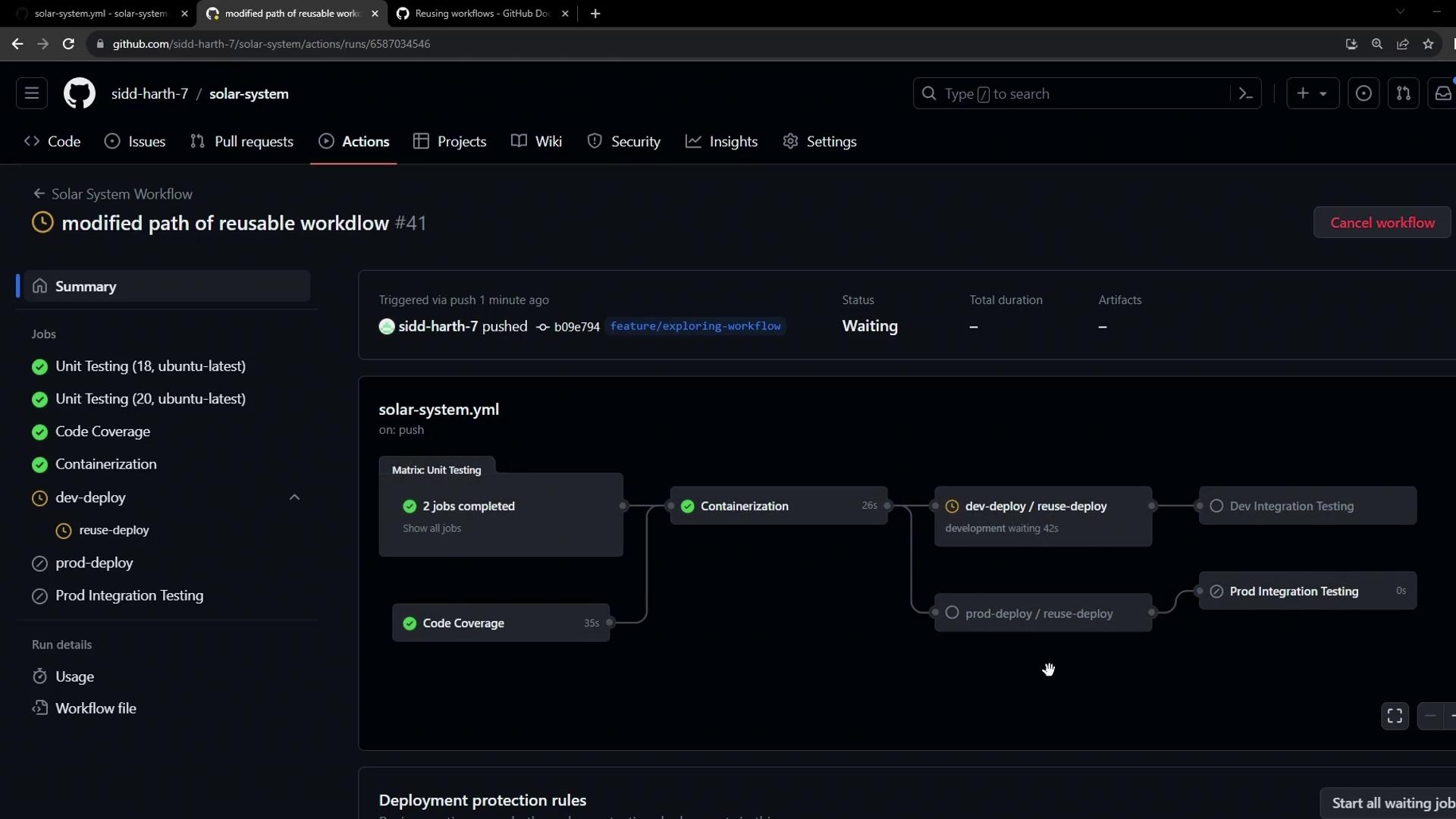
Replace the inline `dev-deploy` and `prod-deploy` jobs in your main pipeline:
```yaml theme={null}
# .github/workflows/solar-system.yml
name: Solar System Workflow
on:
workflow_dispatch:
branches:
- main
- 'feature/*'
env:
MONGO_URI: 'mongodb+srv://supercluster.d83jj.mongodb.net/superData'
MONGO_USERNAME: ${{ vars.MONGO_USERNAME }}
MONGO_PASSWORD: ${{ secrets.MONGO_PASSWORD }}
jobs:
unit-testing: …
code-coverage: …
docker: …
dev-deploy:
if: contains(github.ref, 'feature/')
needs: docker
uses: ./.github/workflows/reuse-deployment.yml
with:
kubeconfig: ${{ secrets.KUBECONFIG }}
dev-integration-testing: …
prod-deploy:
if: github.ref == 'refs/heads/main'
needs: docker
uses: ./.github/workflows/reuse-deployment.yml
with:
kubeconfig: ${{ secrets.KUBECONFIG }}
prod-integration-testing: …
```
| Original Job | Reusable Workflow Call |
| ------------- | ------------------------------------------------ |
| `dev-deploy` | `uses: ./.github/workflows/reuse-deployment.yml` |
| `prod-deploy` | `uses: ./.github/workflows/reuse-deployment.yml` |
***
## 3. Troubleshoot Missing Inputs
If your pipeline fails with:
```text theme={null}
Input required and not supplied: kubeconfig
```
it indicates that the caller did not pass the required `kubeconfig` input.
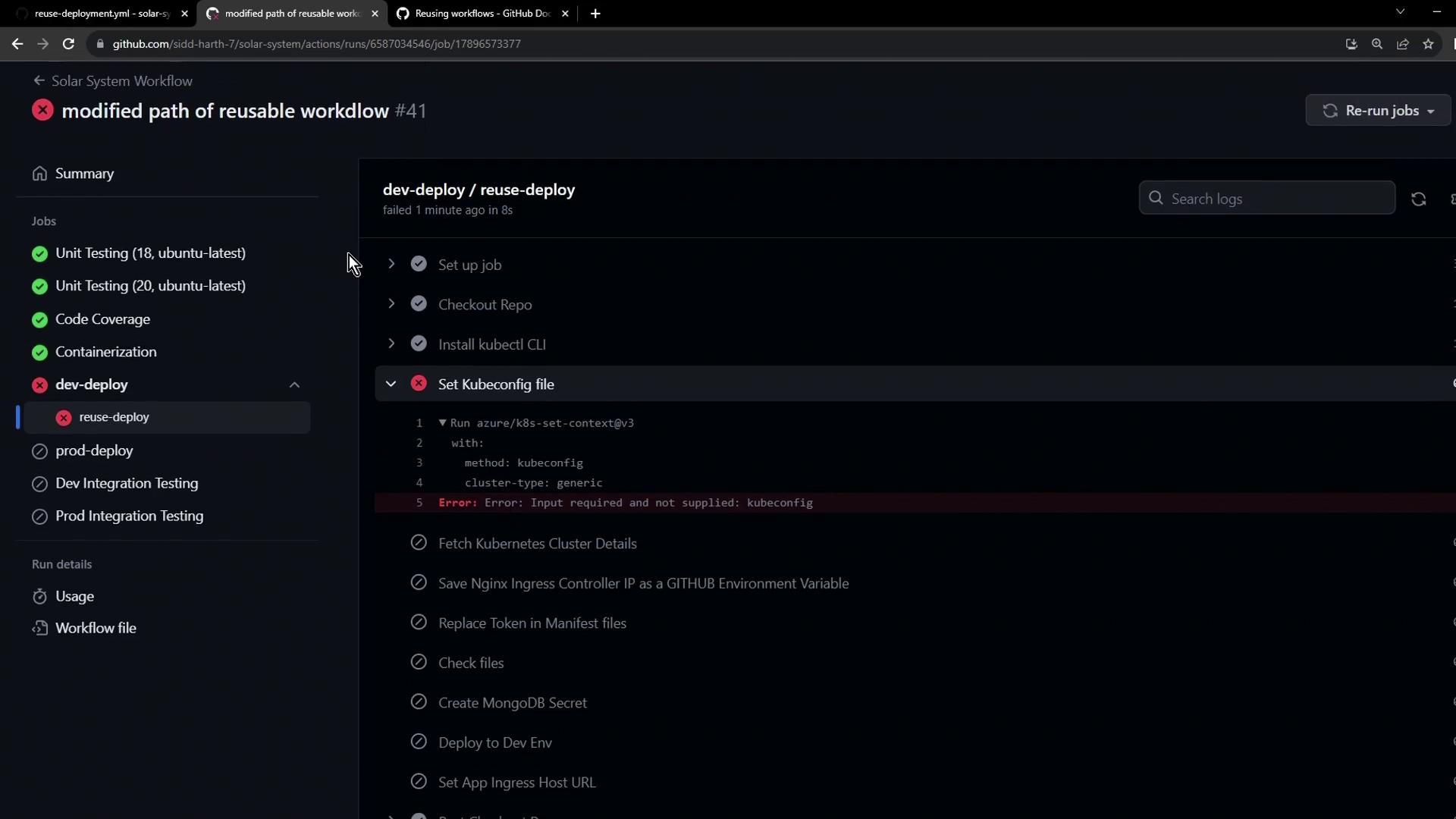
Always pass **all** required inputs when calling a reusable workflow:
```yaml theme={null}
with:
kubeconfig: ${{ secrets.KUBECONFIG }}
```
***
## References
* [Reusing workflows in GitHub Actions](https://docs.github.com/actions/learn-github-actions/reusing-workflows)
* [azure/setup-kubectl GitHub Action](https://github.com/Azure/setup-kubectl)
* [azure/k8s-set-context GitHub Action](https://github.com/Azure/k8s-set-context)