> ## Documentation Index
> Fetch the complete documentation index at: https://notes.kodekloud.com/llms.txt
> Use this file to discover all available pages before exploring further.
# Step 4 Using Outputs in Reusable Workflow
> This article explains how to expose and use outputs from a reusable GitHub Actions workflow for downstream jobs.
In this lesson, we’ll walk through exposing outputs from a reusable workflow so downstream jobs—in this case, **dev-integration-testing**—can access the application URL generated during deployment.
## Troubleshooting the Integration Test Failure
When **dev-integration-testing** runs without the exposed URL, you might see:
```bash theme={null}
echo $URL
# shell: /usr/bin/bash -e {0}
# env:
# MONGO_URI: mongodb+srv://...
URL: [
Error: Process completed with exit code 1.
```
The root cause is that `APP_INGRESS_URL` isn’t available to the test job. To fix this, we need to define and export `outputs` in our reusable workflow.
## 1. Define Workflow-Level Outputs
Edit `.github/workflows/reuse-deployment.yml` and add an `outputs` section under `on.workflow_call`:
```yaml theme={null}
name: Deployment - Reusable Workflow
on:
workflow_call:
inputs:
environment:
description: Deployment environment (dev or prod)
required: true
default: dev
type: string
mongodb-uri:
description: MongoDB connection URI
required: true
type: string
k8s-manifest-dir:
description: Path to Kubernetes manifests
required: true
type: string
kubectl-version:
description: kubectl version
required: false
default: v1.24.0
type: string
secrets:
k8s-kubeconfig:
required: true
mongodb-password:
required: true
outputs:
application-url:
description: The application ingress URL
value: ${{ jobs.reuse-deploy.outputs.APP_INGRESS_URL }}
```
## 2. Map Job Outputs to Workflow Outputs
Inside the `reuse-deploy` job, expose the ingress host address:
```yaml theme={null}
jobs:
reuse-deploy:
runs-on: ubuntu-latest
environment:
name: ${{ inputs.environment }}
url: https://${{ steps.set-ingress-host.outputs.ingress_host }}
outputs:
APP_INGRESS_URL: ${{ steps.set-ingress-host.outputs.ingress_host }}
steps:
- name: Checkout repository
uses: actions/checkout@v4
- name: Install kubectl
uses: azure/setup-kubectl@v3
with:
version: ${{ inputs.kubectl-version }}
- name: Configure kubeconfig
uses: azure/k8s-set-context@v3
with:
kubeconfig: ${{ secrets.k8s-kubeconfig }}
- name: Deploy manifests
run: |
kubectl apply -f ${{ inputs.k8s-manifest-dir }}
echo "Deployment complete."
- name: Extract ingress host
id: set-ingress-host
run: |
host=$(kubectl get ingress \
-n ${{ inputs.environment }} \
-o jsonpath='{.status.loadBalancer.ingress[0].hostname}')
echo "ingress_host=$host" >> $GITHUB_OUTPUT
```
Make sure the `id` in the step (here: `set-ingress-host`) matches when you reference `steps..outputs`.
## 3. Consume Outputs in the Caller Workflow
In your main workflow (e.g., `.github/workflows/ci.yml`), invoke the reusable workflow and pass its outputs to integration tests:
```yaml theme={null}
jobs:
docker:
runs-on: ubuntu-latest
# Build and push image
steps: …
dev-deploy:
needs: docker
uses: ./.github/workflows/reuse-deployment.yml
with:
mongodb-uri: ${{ vars.MONGO_URI }}
environment: development
k8s-manifest-dir: kubernetes/development
secrets:
k8s-kubeconfig: ${{ secrets.KUBECONFIG }}
mongodb-password: ${{ secrets.MONGO_PASSWORD }}
dev-integration-testing:
needs: dev-deploy
runs-on: ubuntu-latest
steps:
- name: Run integration tests
env:
URL: ${{ needs.dev-deploy.outputs.application-url }}
run: |
echo "Testing $URL"
curl -s -k https://$URL/live | jq -r '.status' | grep -qi live
prod-deploy:
if: github.ref == 'refs/heads/main'
needs: docker
uses: ./.github/workflows/reuse-deployment.yml
with:
mongodb-uri: ${{ vars.MONGO_URI }}
environment: production
k8s-manifest-dir: kubernetes/production
secrets:
k8s-kubeconfig: ${{ secrets.KUBECONFIG }}
mongodb-password: ${{ secrets.MONGO_PASSWORD }}
prod-integration-testing:
if: github.ref == 'refs/heads/main'
needs: prod-deploy
runs-on: ubuntu-latest
steps:
- name: Validate production URL
env:
URL: ${{ needs.prod-deploy.outputs.application-url }}
run: |
echo "Production URL: $URL"
curl -s -k https://$URL/live | jq -r '.status' | grep -qi live
```
| Job | Consumes Output |
| ------------------------ | ------------------------------------------------------- |
| dev-deploy | Generates `application-url` via reusable wf |
| dev-integration-testing | Uses `${{ needs.dev-deploy.outputs.application-url }}` |
| prod-deploy | Generates `application-url` for production |
| prod-integration-testing | Uses `${{ needs.prod-deploy.outputs.application-url }}` |
## 4. Verify the Workflow Summary
After committing and pushing, the GitHub Actions summary will show all jobs passing, including the integration tests with the correct URLs.
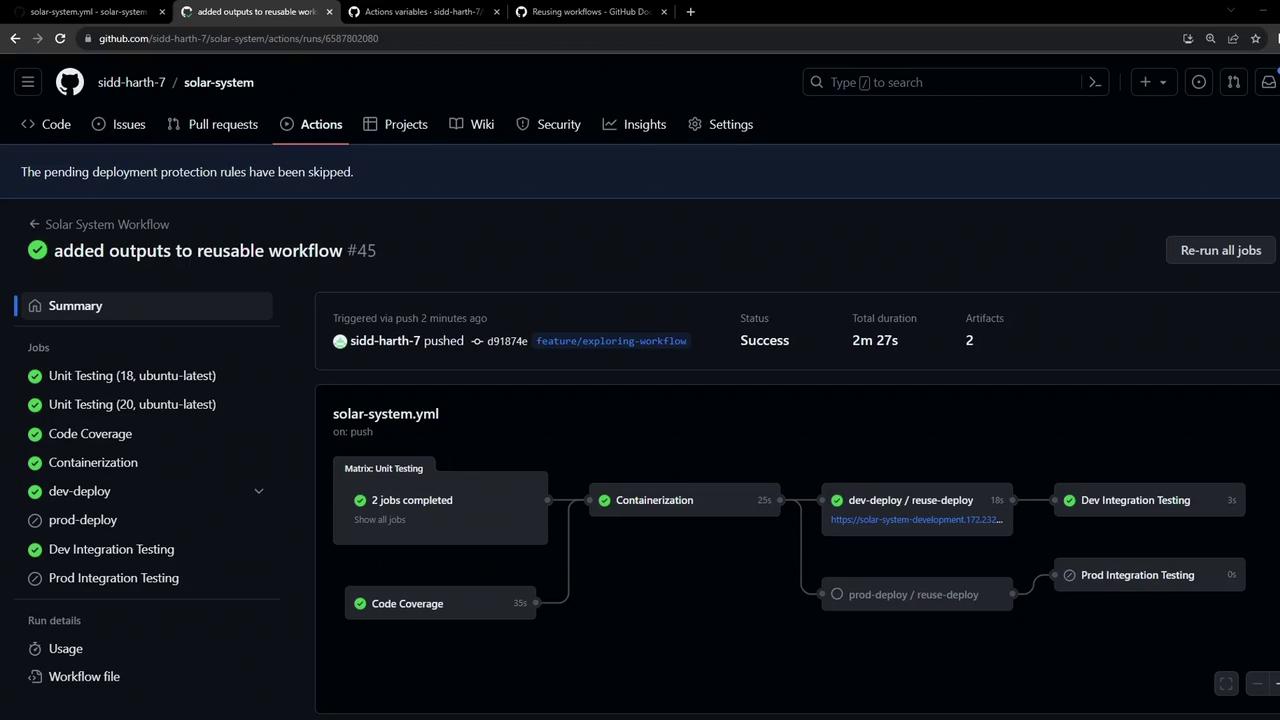
A snippet from **dev-integration-testing** logs confirms the URL is passed correctly:
```bash theme={null}
# env: URL: solar-system-development.172.232.87.200.nip.io
# Testing solar-system-development.172.232.87.200.nip.io
curl -s -k https://solar-system-development.172.232.87.200.nip.io/live | jq -r '.status'…
```
With this setup, your workflows remain modular, DRY, and easy to manage by:
* Defining inputs, secrets, and outputs in a reusable workflow.
* Mapping job-level outputs to workflow-level outputs.
* Accessing those outputs in downstream jobs.
## Links and References
* [GitHub Actions: Reusable Workflows](https://docs.github.com/actions/learn-github-actions/reusing-workflows)
* [workflow\_call event](https://docs.github.com/actions/using-workflows/events-that-trigger-workflows#workflow_call)
* [GitHub Actions Outputs](https://docs.github.com/actions/using-workflows/workflow-outputs)