> ## Documentation Index
> Fetch the complete documentation index at: https://notes.kodekloud.com/llms.txt
> Use this file to discover all available pages before exploring further.
# Security hardening for GitHub Actions
> This guide covers key areas for enhancing security in GitHub Actions workflows.
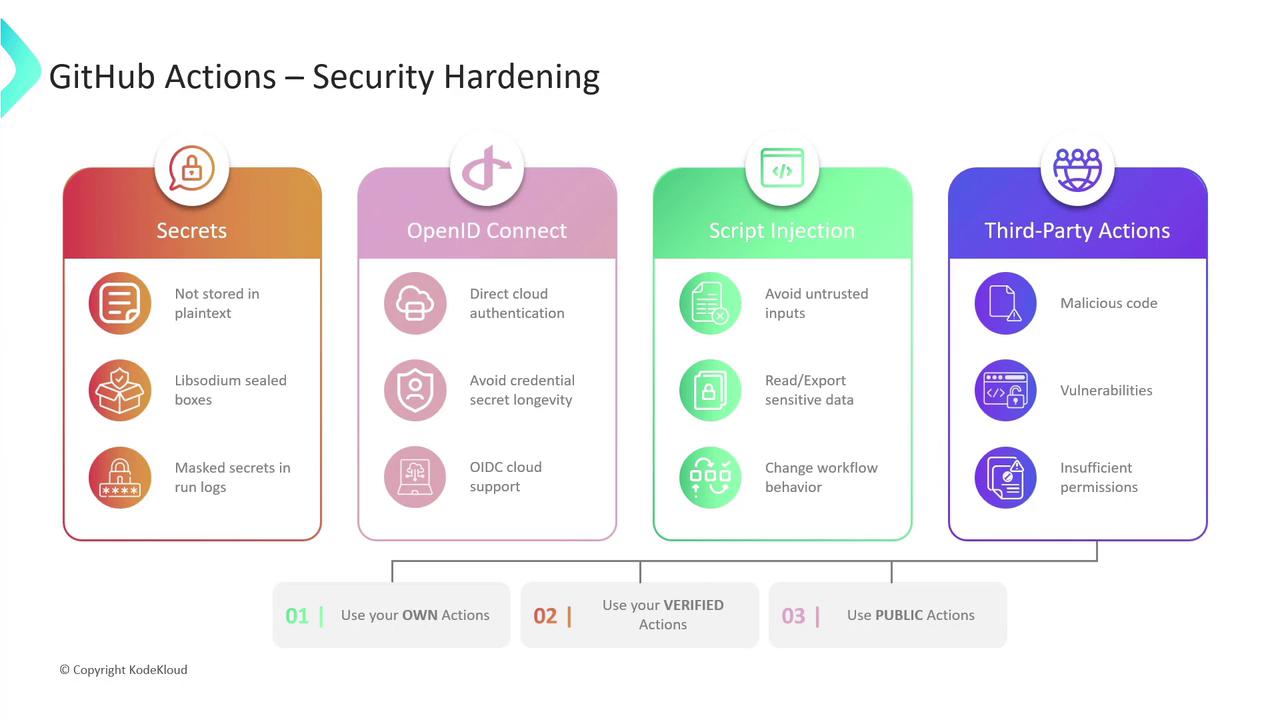
GitHub Actions is a powerful CI/CD platform, but without proper safeguards, workflows can introduce risks to your code, infrastructure, and sensitive data. This guide walks through four key areas of hardening your GitHub Actions security:
* Secrets Management
* OpenID Connect (OIDC)
* Mitigating Script Injection
* Third-Party Actions
***
## 1. Secrets Management
Storing credentials, tokens, and other sensitive information directly in workflows is a critical security risk. GitHub provides a robust secrets management system:
* **Encrypted storage**\
Secrets are encrypted client-side with [Libsodium sealed boxes](https://doc.libsodium.org/public-key_cryptography/sealed_boxes) before being sent to GitHub.
* **Scoped access**\
You can define secrets at the organization, repository, or environment level.
* **Masked output**\
Any secret that appears in logs is automatically redacted.
Use the GitHub UI or REST API to add secrets. In your workflow, reference them as follows:
```yaml theme={null}
env:
AWS_ACCESS_KEY_ID: ${{ secrets.AWS_ACCESS_KEY_ID }}
AWS_SECRET_ACCESS_KEY: ${{ secrets.AWS_SECRET_ACCESS_KEY }}
jobs:
build:
runs-on: ubuntu-latest
steps:
- name: Checkout repository
uses: actions/checkout@v3
- name: Run build script
run: |
echo "Building project..."
./build.sh
```
Regularly rotate your secrets and remove any unused credentials to limit blast radius.
***
## 2. OpenID Connect (OIDC)
Instead of long-lived cloud credentials, leverage short-lived tokens via OIDC. This eliminates static secrets and reduces credential exposure.
1. **Trust GitHub’s issuer**\
Configure your cloud provider to trust `https://token.actions.githubusercontent.com` as an OIDC identity provider.
2. **Grant OIDC permissions**\
In your workflow, request the `id-token` permission:
```yaml theme={null}
permissions:
id-token: write
contents: read
```
3. **Configure credentials with an action**\
For AWS, you can use the official AWS OIDC action:
```yaml theme={null}
jobs:
deploy:
runs-on: ubuntu-latest
steps:
- name: Checkout code
uses: actions/checkout@v3
- name: Configure AWS credentials via OIDC
uses: aws-actions/configure-aws-credentials@v2
with:
role-to-assume: arn:aws:iam::123456789012:role/MyRole
aws-region: us-east-1
- name: List S3 buckets
run: aws s3 ls
```
Short-lived tokens automatically expire, minimizing the risk of credential theft or misuse.
***
## 3. Mitigating Script Injection
When workflows process external or user-supplied data, attackers may inject malicious commands. Protect your runners by following these best practices:
* Never concatenate untrusted input into shell commands.
* Use action inputs or parameterized APIs instead of manually building commands.
* Validate and sanitize all external data.
* Prefer official or well-audited actions for complex processing.
Running unchecked user input in a shell step can expose secrets, corrupt workflows, or allow remote code execution.
***
## 4. Third-Party Actions
Community actions speed up development but can also introduce vulnerabilities or excessive permissions. Evaluate and manage third-party risks with this matrix:
| Action Type | Risk | Mitigation |
| ---------------- | --------------------------------------- | ------------------------------------------------- |
| Community/Public | Malicious code, supply-chain attacks | Pin to a specific commit SHA; review source code |
| GitHub-Verified | Lower risk but still subject to updates | Check blue-verified badge; grant least privilege |
| Custom (Own) | You control code integrity | Maintain under version control; audit permissions |
Best practices:
* Pin actions to a commit SHA instead of a floating tag.
* Limit the `permissions` scope to the bare minimum (principle of least privilege).
* Periodically review third-party code for updates or security advisories.
***
## Links and References
* [GitHub Secrets Documentation](https://docs.github.com/en/actions/security-guides/encrypted-secrets)
* [OpenID Connect (OIDC)](https://openid.net/connect/)
* [Libsodium Sealed Boxes](https://doc.libsodium.org/public-key_cryptography/sealed_boxes)
* [GitHub-verified Actions](https://docs.github.com/en/products/actions/using-github-actions/trusted-publishing-program/about-github-verified-publishers)
* [aws-actions/configure-aws-credentials](https://github.com/aws-actions/configure-aws-credentials)