> ## Documentation Index
> Fetch the complete documentation index at: https://notes.kodekloud.com/llms.txt
> Use this file to discover all available pages before exploring further.
# Workflow Create Secret and Deploy to Kubernetes Dev Environment
> This article explains how to create a MongoDB secret and deploy it to a Kubernetes development environment using GitHub Actions.
Extend your GitHub Actions CI/CD pipeline to securely generate a MongoDB secret and deploy your Kubernetes manifests into a `development` namespace. This ensures automated, secure credential management and consistent application delivery.
## 1. Configuring the Dev-Deploy Job
Under `jobs:` in your workflow YAML, add a `dev-deploy` job that:
* Replaces placeholders in your manifest files
* Creates a Kubernetes secret for MongoDB credentials
* Applies all manifests to your development namespace
```yaml theme={null}
name: Solar System Workflow
on:
workflow_dispatch:
push:
branches:
- main
- 'feature/*'
env:
MONGO_URI: 'mongodb+srv://supercluster.d83jj.mongodb.net/superData'
MONGO_USERNAME: ${{ vars.MONGO_USERNAME }}
MONGO_PASSWORD: ${{ secrets.MONGO_PASSWORD }}
jobs:
unit-testing: …
code-coverage: …
docker: …
dev-deploy:
name: Deploy to Dev Env
runs-on: ubuntu-latest
steps:
- name: Checkout repository
uses: actions/checkout@v3
- name: Replace tokens in manifests
uses: cschlieden/replace-tokens@v1
with:
tokenPrefix: '_{'
tokenSuffix: '}'
files:
- kubernetes/development/*.yaml
env:
NAMESPACE: ${{ vars.NAMESPACE }}
REPLICAS: ${{ vars.REPLICAS }}
IMAGE: ${{ vars.DOCKERHUB_USERNAME }}/solar-system:${{ github.sha }}
INGRESS_IP: ${{ env.INGRESS_IP }}
- name: Show processed manifests
run: cat kubernetes/development/*.yaml
- name: Create MongoDB secret
run: |
kubectl -n ${{ vars.NAMESPACE }} create secret generic mongo-db-creds \
--from-literal=MONGO_URI=${{ env.MONGO_URI }} \
--from-literal=MONGO_USERNAME=${{ env.MONGO_USERNAME }} \
--from-literal=MONGO_PASSWORD=${{ secrets.MONGO_PASSWORD }} \
--save-config \
--dry-run=client \
-o yaml | kubectl apply -f -
- name: Deploy manifests
run: kubectl apply -f kubernetes/development
```
Ensure that `vars.NAMESPACE`, `vars.REPLICAS`, and your Docker Hub credentials are configured in your GitHub repository settings.
### Workflow Steps at a Glance
| Step | Action | Description |
| ----------------- | ----------------------- | -------------------------------------------------- |
| Checkout | `actions/checkout@v3` | Clones your repository |
| Token Replacement | `replace-tokens@v1` | Injects variables into Kubernetes YAML files |
| Secret Creation | `kubectl create secret` | Generates or updates `mongo-db-creds` in namespace |
| Deployment | `kubectl apply` | Applies all manifests in `kubernetes/development` |
## 2. Kubernetes Deployment Manifest
In `kubernetes/development/deployment.yaml`, reference the `mongo-db-creds` secret to populate environment variables for your container:
```yaml theme={null}
apiVersion: apps/v1
kind: Deployment
metadata:
name: solar-system
namespace: _{NAMESPACE}
labels:
app: solar-system
spec:
replicas: _{REPLICAS}
selector:
matchLabels:
app: solar-system
template:
metadata:
labels:
app: solar-system
spec:
containers:
- name: solar-system
image: _{IMAGE}
imagePullPolicy: Always
ports:
- containerPort: 3000
name: http
protocol: TCP
envFrom:
- secretRef:
name: mongo-db-creds
```
For more on Kubernetes secrets, see [Kubernetes Secrets](https://kubernetes.io/docs/concepts/configuration/secret/).
## 3. Why Use a Secret?
Your Dockerfile includes placeholder environment variables:
```dockerfile theme={null}
FROM node:18-alpine3.17
WORKDIR /usr/app
COPY package.json /usr/app/
RUN npm install
COPY . .
ENV MONGODB_URI=uriPlaceholder
ENV MONGO_USERNAME=usernamePlaceholder
ENV MONGO_PASSWORD=passwordPlaceholder
EXPOSE 3000
CMD ["npm", "start"]
```
By leveraging a Kubernetes secret:
* You avoid hard-coding sensitive data
* Credentials are injected at runtime
* Configuration is decoupled from your application image
Never commit real credentials into source control. Use GitHub Secrets and Kubernetes Secrets to manage sensitive data.
## 4. Verify a Fresh `development` Namespace
Before deployment, confirm that the namespace is empty:
```bash theme={null}
kubectl -n development get all
kubectl -n development get secrets
# NAME TYPE DATA AGE
# default-token-xxxxx kubernetes.io/service-account-token 3 47h
```
## 5. Watching GitHub Actions in Motion
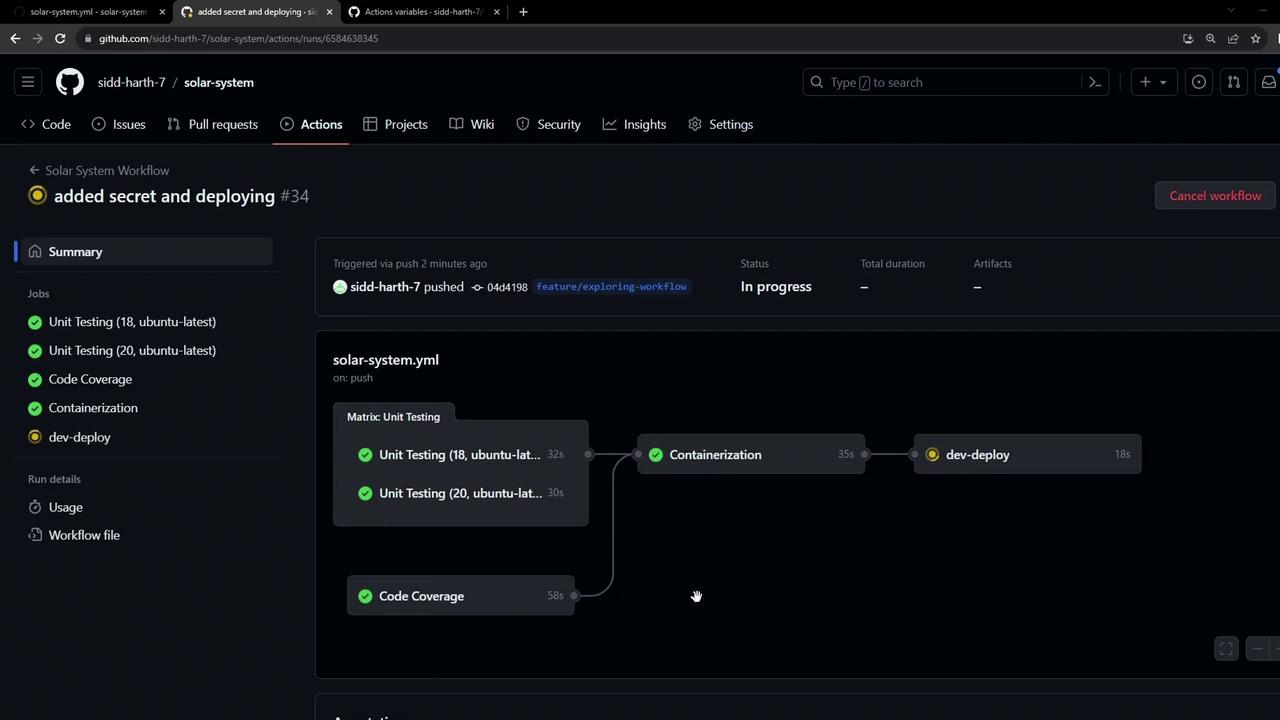
When you push changes, the `dev-deploy` job runs alongside other CI tasks:
### 5.1 Secret Creation Logs
```bash theme={null}
kubectl -n development create secret generic mongo-db-creds \
--from-literal=MONGO_URI=... \
--from-literal=MONGO_USERNAME=... \
--from-literal=MONGO_PASSWORD=...
# Output:
secret/mongo-db-creds created
```
### 5.2 Applying Manifests
```bash theme={null}
kubectl apply -f kubernetes/development
# Output:
deployment.apps/solar-system created
ingress.networking.k8s.io/solar-system created
service/solar-system created
```
## 6. Validate Resources in the Cluster
Check that your secret and resources are live:
```bash theme={null}
kubectl -n development get secrets
# NAME TYPE DATA AGE
# default-token-xxxxx kubernetes.io/service-account-token 3 47h
kubectl -n development get all
# NAME READY STATUS RESTARTS AGE
# pod/solar-system-xxxxx 1/1 Running 0 30s
# NAME TYPE CLUSTER-IP EXTERNAL-IP PORT(S) AGE
# NAME READY UP-TO-DATE AVAILABLE AGE
# NAME DESIRED CURRENT READY AGE
# replicaset.apps/solar-system-xxxxx 2 2 2 1m
```
Retrieve your ingress host:
```bash theme={null}
kubectl -n development get ing
# NAME HOSTS ADDRESS PORTS AGE
# solar-system solar-system-development.172.232.87.200.nip.io 80 1m
```
## 7. Access the Application
Open the ingress hostname in your browser. You may see a self-signed TLS warning—proceed to view your live Solar System app:
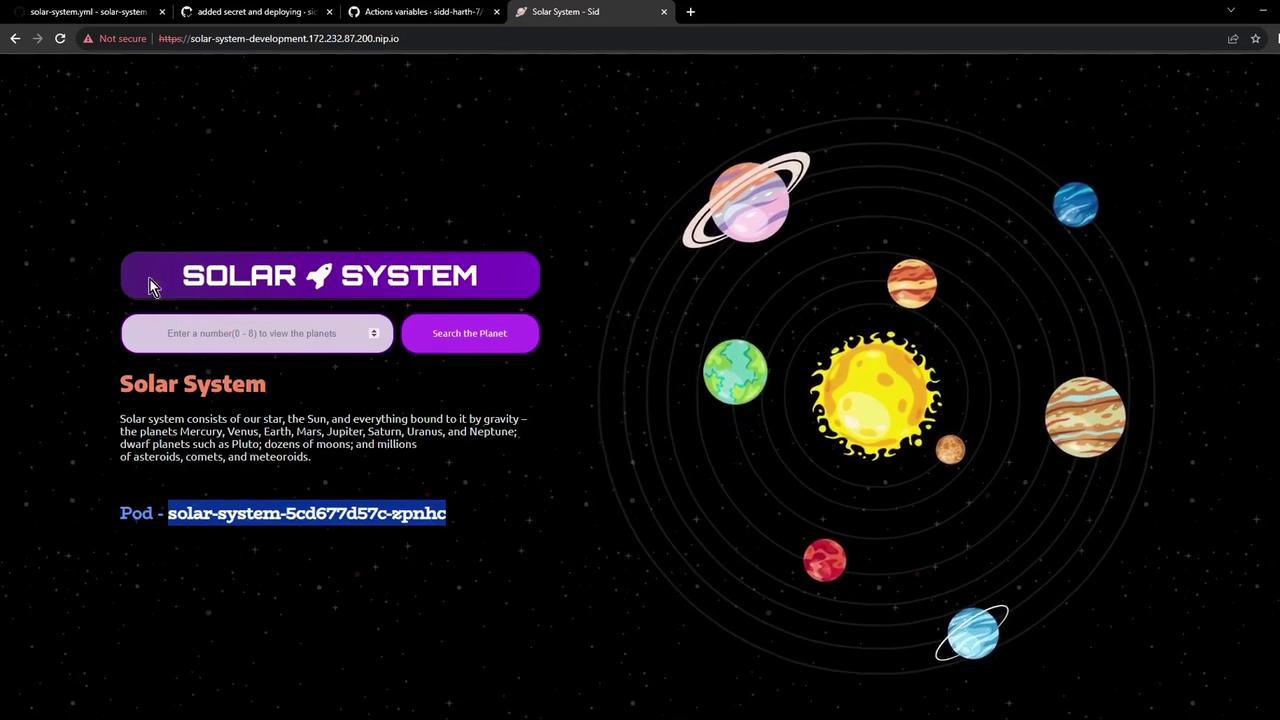
Your Solar System application is now running in the development environment, ready for integration testing!
## References
* [GitHub Actions: Workflow Syntax](https://docs.github.com/en/actions/using-workflows/workflow-syntax-for-github-actions)
* [Kubernetes Secrets Documentation](https://kubernetes.io/docs/concepts/configuration/secret/)
* [Kubectl Cheat Sheet](https://kubernetes.io/docs/reference/kubectl/cheatsheet/)