> ## Documentation Index
> Fetch the complete documentation index at: https://notes.kodekloud.com/llms.txt
> Use this file to discover all available pages before exploring further.
# Workflow Configure Code Coverage
> This guide enhances a GitHub Actions workflow by adding a code coverage job that runs parallel to unit tests and archives coverage reports.
In this guide, we’ll enhance an existing GitHub Actions workflow by adding a dedicated **code coverage** job. The new job runs in parallel with unit tests, generates coverage reports using `npm run coverage`, and archives the results for later inspection.
## Environment Variables
Make sure the following variables are defined in your repository settings:
| Variable | Purpose |
| --------------- | ---------------------------------- |
| MONGO\_URI | MongoDB connection URI |
| MONGO\_USERNAME | MongoDB username (GitHub Variable) |
| MONGO\_PASSWORD | MongoDB password (GitHub Secret) |
## 1. Existing Unit Testing Job
This YAML snippet configures a matrix-based unit testing job across multiple Node.js versions and OS environments:
```yaml theme={null}
env:
MONGO_URI: 'mongodb+srv://supercluster.d83jj.mongodb.net/superData'
MONGO_USERNAME: ${{ vars.MONGO_USERNAME }}
MONGO_PASSWORD: ${{ secrets.MONGO_PASSWORD }}
jobs:
unit-testing:
name: Unit Testing
strategy:
matrix:
nodejs_version: [18, 19, 20]
operating_system: [ubuntu-latest, macos-latest]
exclude:
- nodejs_version: 18
operating_system: macos-latest
runs-on: ${{ matrix.operating_system }}
steps:
- name: Checkout Repository
uses: actions/checkout@v4
- name: Setup Node.js ${{ matrix.nodejs_version }}
uses: actions/setup-node@v3
with:
node-version: ${{ matrix.nodejs_version }}
- name: Install Dependencies
run: npm install
- name: Run Unit Tests
run: npm test
- name: Archive Test Results
uses: actions/upload-artifact@v3
with:
name: Unit-Test-Results
path: test-results
retention-days: 5
```
## 2. Job Overview
| Job | Runs On | Script |
| ------------- | ---------------------------------------- | ------------------ |
| unit-testing | Matrix: Node.js 18/19/20 on Ubuntu/MacOS | `npm test` |
| code-coverage | Ubuntu-latest, Node.js 18 | `npm run coverage` |
## 3. Adding the Code Coverage Job
Add a second job named `code-coverage` right below the existing `unit-testing` definition:
```yaml theme={null}
env:
MONGO_URI: 'mongodb+srv://supercluster.d83jj.mongodb.net/superData'
MONGO_USERNAME: ${{ vars.MONGO_USERNAME }}
MONGO_PASSWORD: ${{ secrets.MONGO_PASSWORD }}
jobs:
unit-testing: # existing job…
code-coverage:
name: Code Coverage
runs-on: ubuntu-latest
steps:
- name: Checkout Repository
uses: actions/checkout@v4
- name: Setup Node.js 18
uses: actions/setup-node@v3
with:
node-version: 18
- name: Install Dependencies
run: npm install
- name: Generate Coverage Report
run: npm run coverage
- name: Archive Coverage Report
uses: actions/upload-artifact@v3
with:
name: Code-Coverage-Result
path: coverage
retention-days: 5
```
Running `npm run coverage` outputs coverage data under the `coverage` folder, which the `upload-artifact` action then archives for 5 days.
## 4. Viewing Artifacts in the GitHub Actions UI
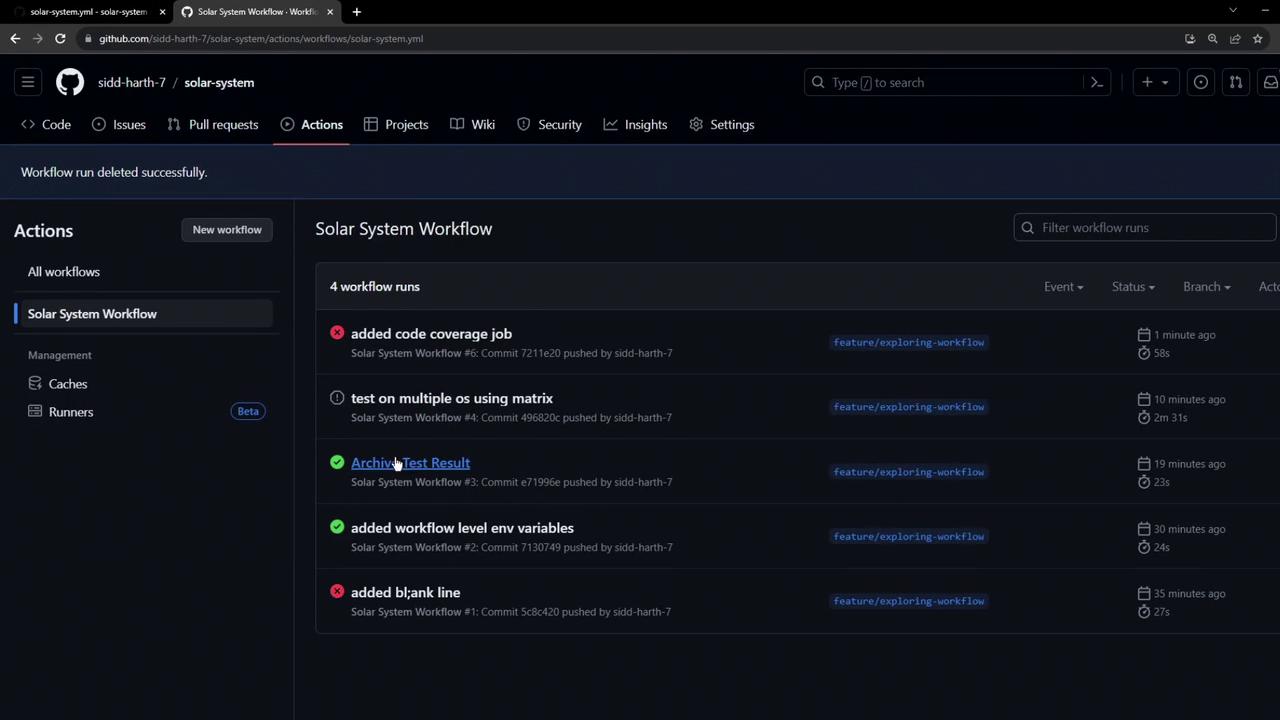
Artifacts from each workflow run appear in the **Artifacts** section of the run summary. You can remove individual artifacts manually or rely on the `retention-days` setting for automatic cleanup.
## 5. Handling Coverage Threshold Failures
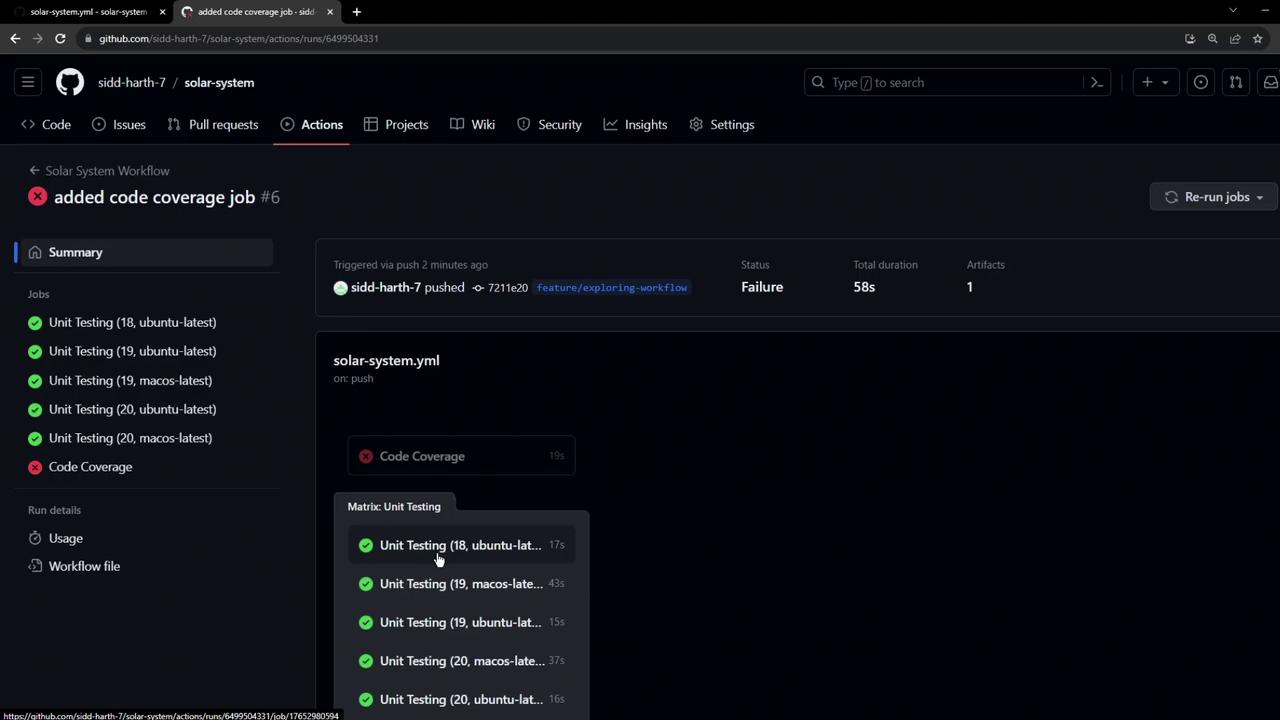
If your global coverage threshold (for example, 90%) isn’t met, the coverage step exits with a non-zero code. Subsequent steps—including artifact uploads—are skipped.
```plaintext theme={null}
ERROR: Coverage for lines (88.88%) does not meet global threshold (90%)
File | % Stmts | % Branch | % Funcs | % Lines | Uncovered Line #s
-----------|---------|----------|---------|---------|-------------------
All files | 88.88 | 50 | 87.5 | 88.88 | 21, 47-48, 56
app.js | 88.88 | 50 | 87.5 | 88.88 | 21, 47-48, 56
Error: Process completed with exit code 1.
```
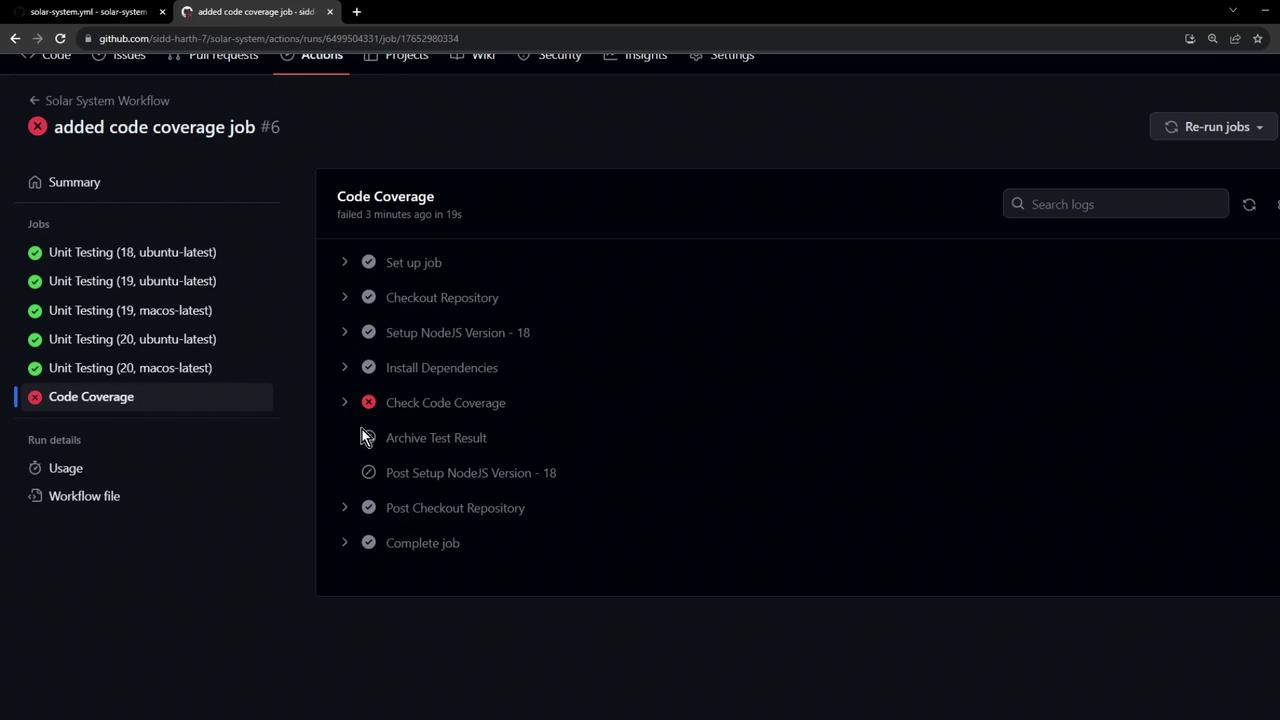
To ensure artifact upload even on failure, consider using `continue-on-error: true` for the coverage step or placing the upload step in a separate `always()` conditional.
## 6. Next Steps
* Write additional tests to boost coverage above your threshold.
* Tweak or disable the coverage threshold in your test config.
* Implement error-handling strategies to archive critical artifacts regardless of step failures.
## Links and References
* [GitHub Actions Documentation](https://docs.github.com/actions)
* [actions/checkout @ GitHub Marketplace](https://github.com/actions/checkout)
* [actions/setup-node @ GitHub Marketplace](https://github.com/actions/setup-node)
* [actions/upload-artifact @ GitHub Marketplace](https://github.com/actions/upload-artifact)