> ## Documentation Index
> Fetch the complete documentation index at: https://notes.kodekloud.com/llms.txt
> Use this file to discover all available pages before exploring further.
# Execute multiple jobs in Sequence using needs
> Learn to use the `needs` syntax in GitHub Actions to manage job execution order and dependencies effectively.
Use the `needs` syntax in GitHub Actions to control job execution order. In this tutorial, you'll chain `build_job_1`, `test_job_2`, and `deploy_job_3` so that each runs only after its dependency succeeds.
## How `needs` Works
The `needs` keyword, defined at the job level, accepts a single job name or an array of job names. A job won't start until all its specified dependencies complete successfully.
## 1. Basic Build + Test Workflow
Here’s a minimal workflow where `test_job_2` waits for `build_job_1`:
```yaml theme={null}
name: Generate ASCII Artwork
on:
push:
jobs:
build_job_1:
runs-on: ubuntu-latest
steps:
- name: Install Cowsay
run: sudo apt-get install cowsay -y
- name: Generate message
run: cowsay -f dragon "Run for cover, I am a DRAGON....RAWR" >> dragon.txt
- name: Pause for 30 seconds
run: sleep 30
test_job_2:
needs: build_job_1
runs-on: ubuntu-latest
steps:
- name: Pause for 10 seconds
run: sleep 10
- name: Verify file exists
run: test -f dragon.txt
```
With this setup, `test_job_2` only starts once `build_job_1` finishes without errors.
## 2. Detecting Cyclic Dependencies
If you introduce a cycle, GitHub Actions will reject your workflow before it runs.
Circular dependencies (e.g., `build_job_1` needs `test_job_2` and vice versa) are invalid. The runner throws an error on push.
Invalid example:
```yaml theme={null}
jobs:
build_job_1:
needs: test_job_2 # ❌ Invalid: cycle detected
runs-on: ubuntu-latest
steps:
- run: echo "Building..."
test_job_2:
needs: build_job_1
runs-on: ubuntu-latest
steps:
- run: echo "Testing..."
```
## 3. Adding a Deploy Phase
You can chain multiple jobs by listing dependencies as an array. Below is a full build–test–deploy sequence:
```yaml theme={null}
name: Generate ASCII Artwork
on:
push:
jobs:
build_job_1:
runs-on: ubuntu-latest
steps:
- name: Install Cowsay
run: sudo apt-get install cowsay -y
- name: Generate message
run: cowsay -f dragon "Run for cover, I am a DRAGON....RAWR" >> dragon.txt
- name: Pause for 30 seconds
run: sleep 30
test_job_2:
needs: build_job_1
runs-on: ubuntu-latest
steps:
- name: Pause for 10 seconds
run: sleep 10
- name: Verify content
run: grep -i "dragon" dragon.txt
deploy_job_3:
needs: [test_job_2]
runs-on: ubuntu-latest
steps:
- name: Display file
run: cat dragon.txt
```
### Job Dependency Table
| Job | needs | Purpose |
| -------------- | --------------- | -------------------------------------------- |
| build\_job\_1 | — | Installs Cowsay and generates `dragon.txt` |
| test\_job\_2 | build\_job\_1 | Verifies that `dragon.txt` contains "dragon" |
| deploy\_job\_3 | \[test\_job\_2] | Outputs the contents of `dragon.txt` |
## 4. Observing the Workflow Run
When you push this workflow:
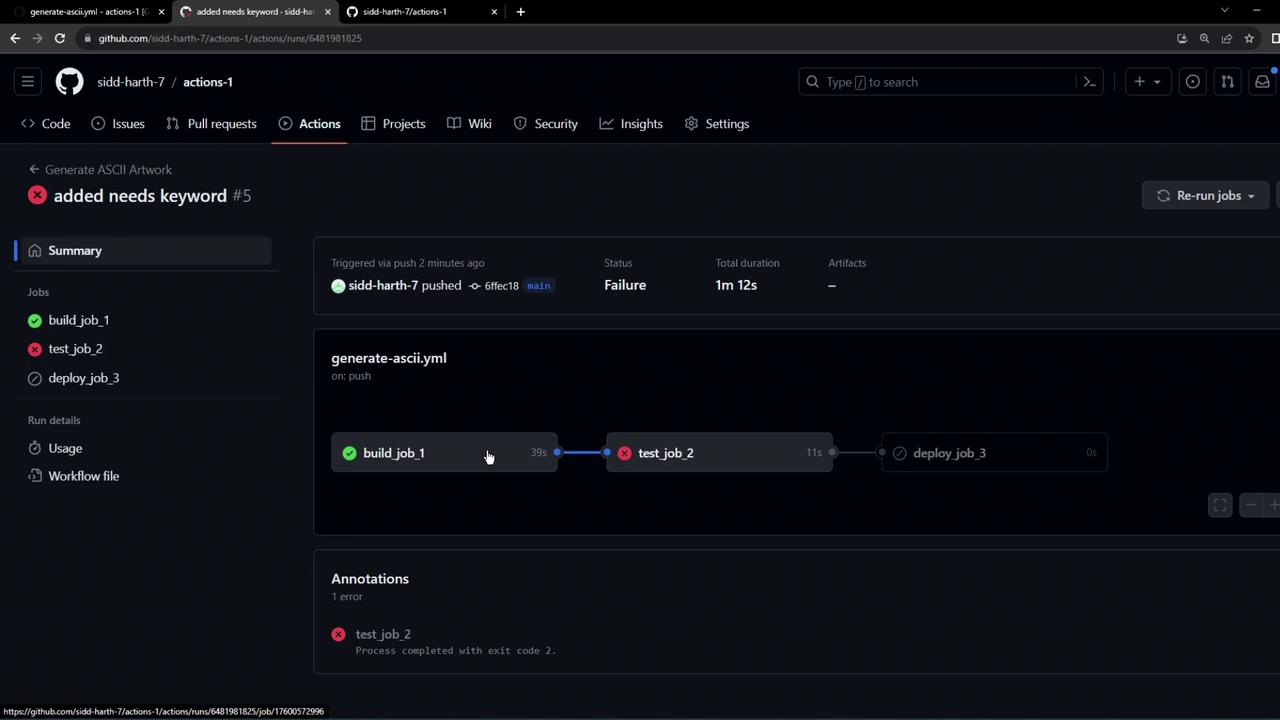
1. The GitHub Actions graph displays:\
`build_job_1 → test_job_2 → deploy_job_3`
2. Each job runs on a separate runner; files are not shared by default.
3. If `test_job_2` fails to find `dragon.txt`, the runner skips `deploy_job_3`:
```bash theme={null}
grep -i "dragon" dragon.txt
# exit status 1
```
To share files between jobs, explicitly upload and download artifacts using the [`actions/upload-artifact`](https://github.com/actions/upload-artifact) and [`actions/download-artifact`](https://github.com/actions/download-artifact) actions.
## References
* [Workflow syntax for GitHub Actions](https://docs.github.com/en/actions/using-workflows/workflow-syntax-for-github-actions)
* [actions/upload-artifact](https://github.com/actions/upload-artifact)
* [actions/download-artifact](https://github.com/actions/download-artifact)