> ## Documentation Index
> Fetch the complete documentation index at: https://notes.kodekloud.com/llms.txt
> Use this file to discover all available pages before exploring further.
# Basics of CI CD
> This article explains CI/CD processes, Git workflows for feature development, and the differences between Continuous Delivery and Continuous Deployment.
Continuous Integration and Continuous Deployment (CI/CD) streamline modern software delivery by automating builds, tests, and deployments. With a robust CI/CD pipeline, teams catch issues early, maintain consistent environments, and accelerate time to market.
## Git Workflow for Feature Development
All source code is versioned in a Git repository, often hosted on platforms like [GitHub](https://github.com) or [GitLab](https://gitlab.com). Teams typically follow this branching strategy:
1. **main** (or **master**): Production-ready code
2. **feature/**\*: Isolated branches for new work
When implementing a new feature:
1. Create a feature branch off `main`.
2. Commit code and open a Pull Request (PR).
3. Run automated checks via CI.
4. Peer-review and approve the PR.
5. Merge back into `main` and trigger deployment.
Keeping `main` always deployable reduces integration headaches and rollbacks.
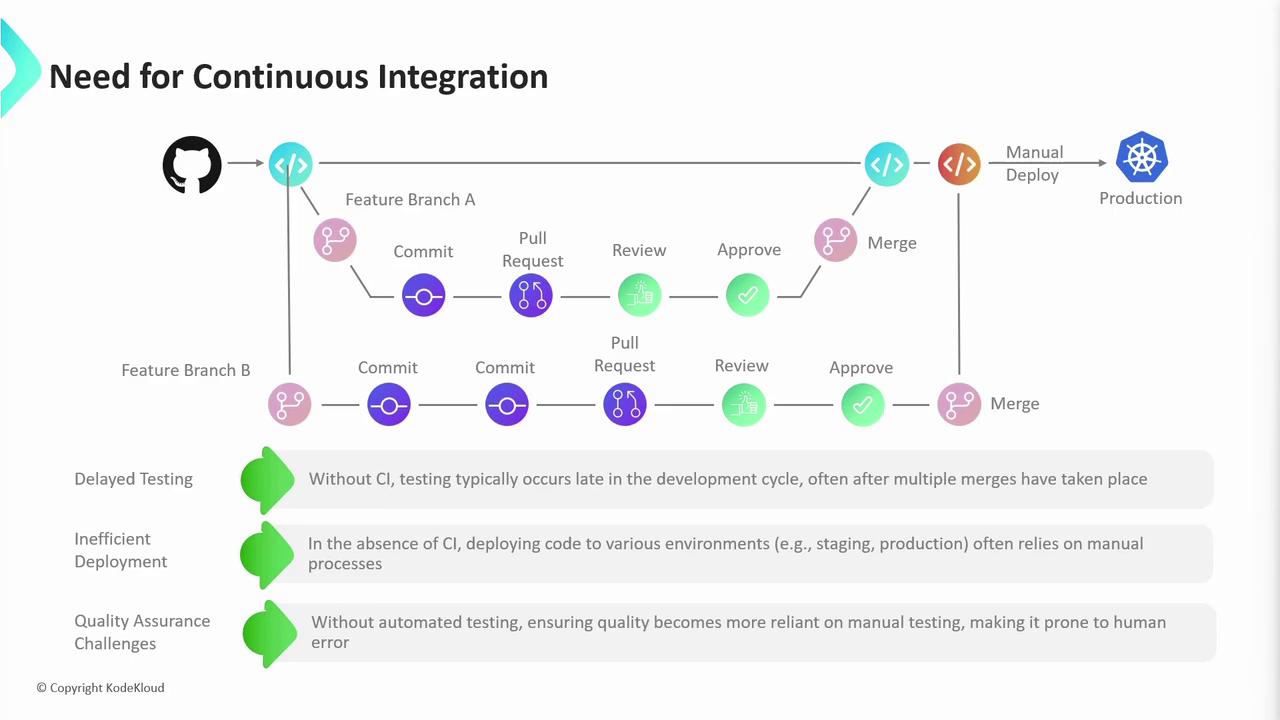
Without CI/CD, manual testing and deployments introduce risks:
* Delayed feedback and bug discovery
* Configuration drift between environments
* Heavy reliance on manual QA
***
## Continuous Integration
Continuous Integration (CI) automates the moment code is pushed:
1. Developer opens a PR against `main`.
2. A CI pipeline runs:
| Stage | Purpose | Example Tool |
| ------------------------- | --------------------------------------- | ----------------- |
| Unit Tests | Verify individual components | Jest, JUnit |
| Dependency Scanning | Identify outdated or vulnerable libs | Dependabot, Snyk |
| Build & Artifact Creation | Compile code and produce deployables | Docker, Maven |
| Code Quality & Security | Static analysis and vulnerability check | SonarQube, CodeQL |
3. Any failure halts the merge and notifies the author.
4. On success, the PR is merged and triggers a final CI run on the updated `main` branch.
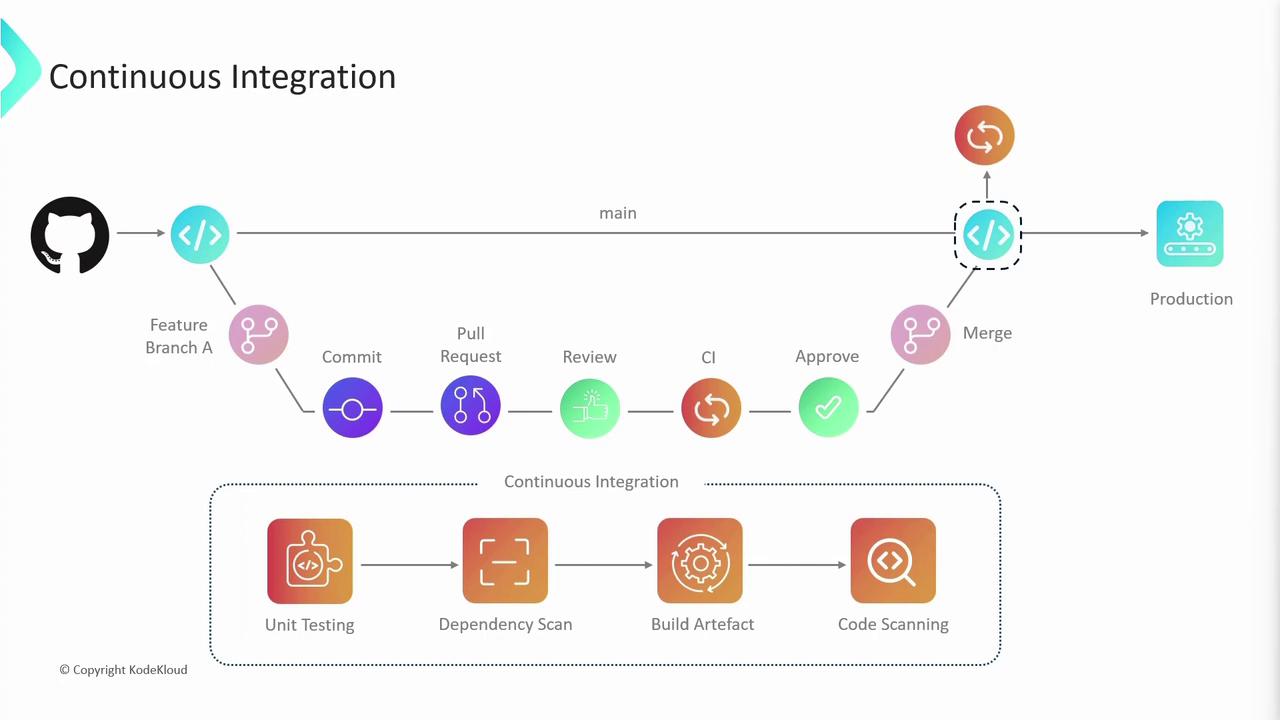
Imagine developers Alice and Bob each working on separate feature branches. Their individual CI runs validate changes in isolation. After merging both PRs, a collective CI run on `main` ensures compatibility across all contributions.
***
## Continuous Delivery vs Continuous Deployment
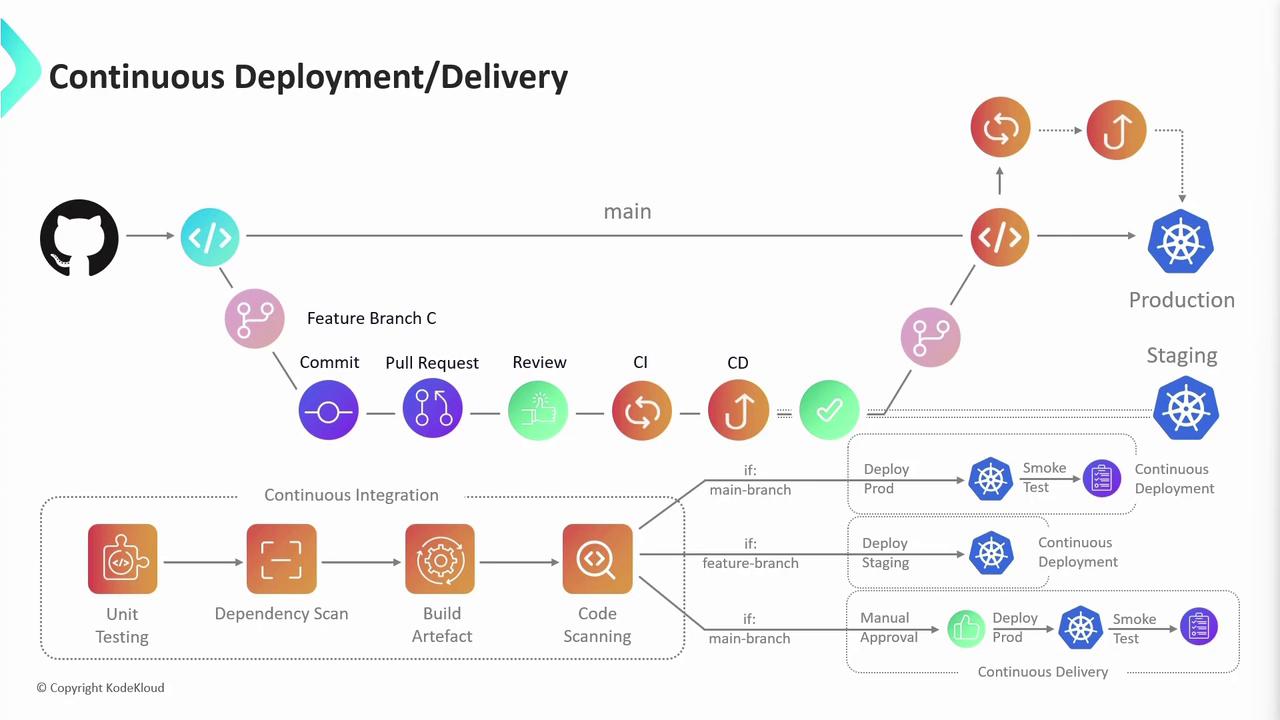
After CI, the next stage is CD—either **Continuous Delivery** or **Continuous Deployment**:
1. **Continuous Delivery**
* Deployments to staging happen automatically.
* Production releases require manual approval.
2. **Continuous Deployment**
* Every successful build on `main` is pushed straight to production without human intervention.
A typical CD pipeline:
* Deploy to **staging** → run integration/regression tests
* (Optional) Manual approval for production
* Deploy to **production**
Automated production deployments can speed delivery but require robust rollback and monitoring strategies.
***
## Further Reading
* [GitHub Actions Documentation](https://docs.github.com/actions)
* [Kubernetes Basics](https://kubernetes.io/docs/concepts/overview/what-is-kubernetes/)
* [Docker Hub](https://hub.docker.com/)
* [Terraform Registry](https://registry.terraform.io/)