> ## Documentation Index
> Fetch the complete documentation index at: https://notes.kodekloud.com/llms.txt
> Use this file to discover all available pages before exploring further.
# Prepare a Job for reporting
> This guide demonstrates adding a GitHub Actions job to upload unit test and code coverage reports to an Amazon S3 bucket.
This guide demonstrates how to add a GitHub Actions job that uploads unit test and code coverage reports to an [Amazon S3 bucket](https://aws.amazon.com/s3/). You can place this reporting job anywhere in your workflow by adjusting the `needs` dependencies. In this example, we insert it after the code coverage job.
## Workflow Configuration
First, define any required environment variables at the top of your workflow:
```yaml theme={null}
env:
MONGO_URI: mongodb+srv://supercluster.d83jj.mongodb.net/superData
MONGO_USERNAME: ${{ vars.MONGO_USERNAME }}
MONGO_PASSWORD: ${{ secrets.MONGO_PASSWORD }}
```
### reports-s3 Job
Add the following `reports-s3` job to download artifacts, merge XML reports, and prepare for an S3 upload:
```yaml theme={null}
jobs:
reports-s3:
name: AWS S3 - Upload Reports
runs-on: ubuntu-latest
needs: [code-coverage, unit-testing]
continue-on-error: true
steps:
- name: Download Mocha Test Artifact
uses: actions/download-artifact@v3
with:
name: Mocha-Test-Result
- name: Download Code Coverage Artifact
uses: actions/download-artifact@v3
with:
name: Code-Coverage-Result
- name: Merge Test Files
run: |
mkdir reports-${{ github.sha }}
mv cobertura-coverage.xml reports-${{ github.sha }}/
mv test-results.xml reports-${{ github.sha }}/
ls -ltr reports-${{ github.sha }}/
- name: Upload to S3 (placeholder)
run: echo "Uploading reports directory to S3"
```
* The `needs: [code-coverage, unit-testing]` directive ensures this job runs only after your unit tests and coverage jobs finish.
* `continue-on-error: true` prevents build failures if uploads fail.
* Use `actions/download-artifact@v3` to fetch artifacts from previous jobs.
### Step Summary
| Step | Action | Artifact / Directory |
| -------------------------- | ----------------------------------------- | ---------------------------- |
| Download Mocha Test | `actions/download-artifact@v3` | `Mocha-Test-Result` |
| Download Code Coverage | `actions/download-artifact@v3` | `Code-Coverage-Result` |
| Merge XML Reports | Shell commands | `reports-${{ github.sha }}/` |
| Upload to S3 (placeholder) | `run: echo "Uploading reports directory"` | N/A |
***
## Example: Unit Testing Job
The following job runs unit tests and uploads the results as an artifact named `Mocha-Test-Result`.
```yaml theme={null}
unit-testing:
runs-on: ubuntu-latest
steps:
- name: Checkout Repository
uses: actions/checkout@v4
- name: Setup Node.js
uses: actions/setup-node@v3
with:
node-version: ${{ matrix.nodejs_version }}
- name: Cache npm dependencies
uses: actions/cache@v3
with:
path: node_modules
key: ${{ runner.os }}-node-modules-${{ hashFiles('package-lock.json') }}
- name: Install Dependencies
run: npm install
- name: Run Unit Tests
run: npm test
- name: Archive Test Result
if: always()
uses: actions/upload-artifact@v3
with:
name: Mocha-Test-Result
path: test-results.xml
```
***
## Example: Code Coverage Job
This job executes your coverage script and archives the `coverage` directory:
```yaml theme={null}
code-coverage:
runs-on: ubuntu-latest
steps:
- name: Checkout Repository
uses: actions/checkout@v4
- name: Setup Node.js
uses: actions/setup-node@v3
with:
node-version: ${{ matrix.nodejs_version }}
- name: Cache npm dependencies
uses: actions/cache@v3
with:
path: node_modules
key: ${{ runner.os }}-node-modules-${{ hashFiles('package-lock.json') }}
- name: Install Dependencies
run: npm install
- name: Run Code Coverage
continue-on-error: true
run: npm run coverage
- name: Archive Coverage Report
uses: actions/upload-artifact@v3
with:
name: Code-Coverage-Result
path: coverage
retention-days: 5
```
***
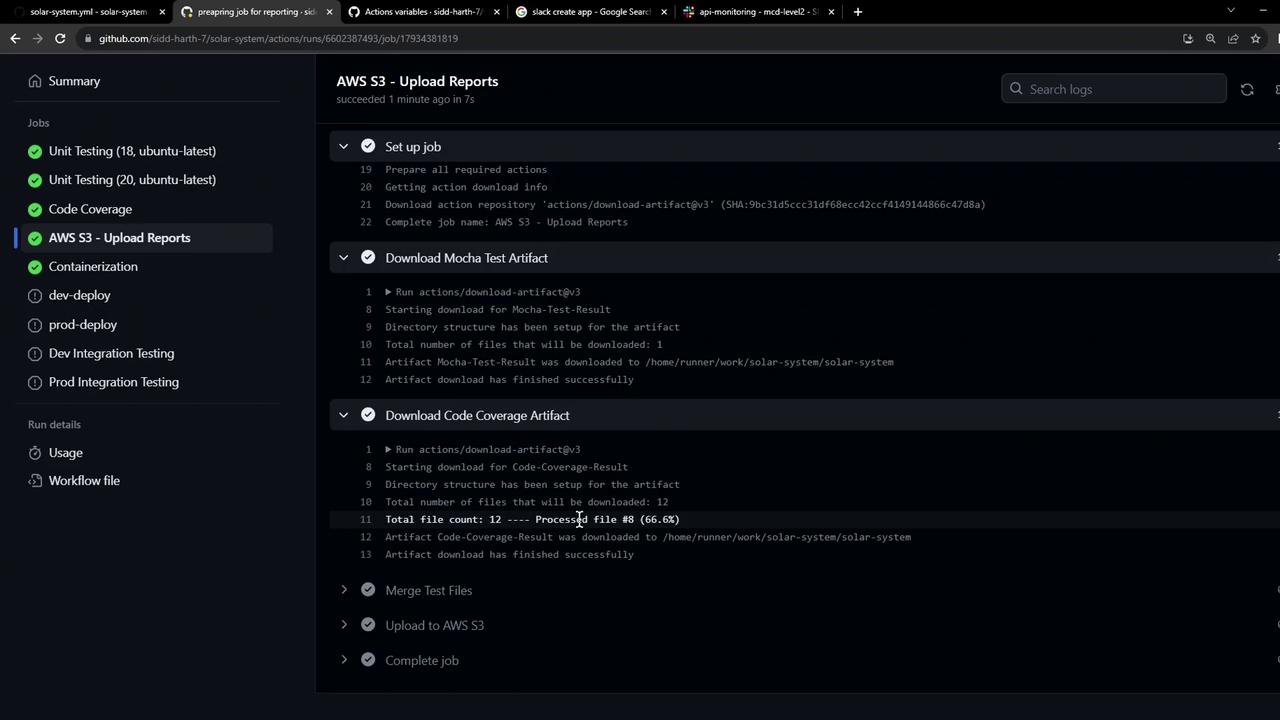
After you push these changes, the GitHub Actions graph will display the **AWS S3 - Upload Reports** job dependent on both unit testing and code coverage.
***
## Sample Merge Output
When this job runs, you’ll see output similar to:
```bash theme={null}
mkdir reports-570s29c8d7109c898d1ca252789dbece268d3/
mv cobertura-coverage.xml reports-570s29c8d7109c898d1ca252789dbece268d3/
mv test-results.xml reports-570s29c8d7109c898d1ca252789dbece268d3/
ls -ltr reports-570s29c8d7109c898d1ca252789dbece268d3/
```
This confirms your XML reports are consolidated under `reports-${{ github.sha }}`.
***
## Next Steps
In the next guide, you’ll implement the actual Amazon S3 upload using AWS CLI or an official GitHub Action.
## Links and References
* [GitHub Actions Documentation](https://docs.github.com/actions)
* [AWS S3 Overview](https://aws.amazon.com/s3/)
* [actions/upload-artifact](https://github.com/actions/upload-artifact)
* [actions/download-artifact](https://github.com/actions/download-artifact)