> ## Documentation Index
> Fetch the complete documentation index at: https://notes.kodekloud.com/llms.txt
> Use this file to discover all available pages before exploring further.
# Step 1 Configure new Reusable Workflow
> Learn to refactor GitHub Actions workflows by creating reusable workflows for common deployment steps, reducing duplication and simplifying maintenance across repositories.
In this lesson, you’ll learn how to refactor your GitHub Actions workflows by extracting common deployment steps into a reusable workflow. This approach reduces duplication, ensures consistency, and simplifies maintenance across multiple repositories.
## 1.1 The “Solar System” Workflow: Before Refactoring
Imagine you have a single workflow handling everything from testing to deploying in both development and production. The deployment steps for `dev-deploy` and `prod-deploy` are identical—this is a maintenance headache:
```yaml theme={null}
name: Solar System Workflow
on:
workflow_dispatch:
branches:
- main
- 'feature/*'
env:
MONGO_URI: 'mongodb+srv://supercluster.d83jj.mongodb.net/superData'
MONGO_USERNAME: ${{ vars.MONGO_USERNAME }}
MONGO_PASSWORD: ${{ secrets.MONGO_PASSWORD }}
jobs:
unit-testing:
# ...
code-coverage:
# ...
docker:
# ...
dev-deploy:
# duplicate deployment steps
dev-integration-testing:
# ...
prod-deploy:
# duplicate deployment steps
prod-integration-testing:
# ...
```
As your organization grows, you might copy these same steps into every project, leading to even more duplication.
## 1.2 Review Official Documentation
Before you begin, consult the GitHub Actions guide on reusing workflows. It details supported triggers, inputs, outputs, and known limitations:
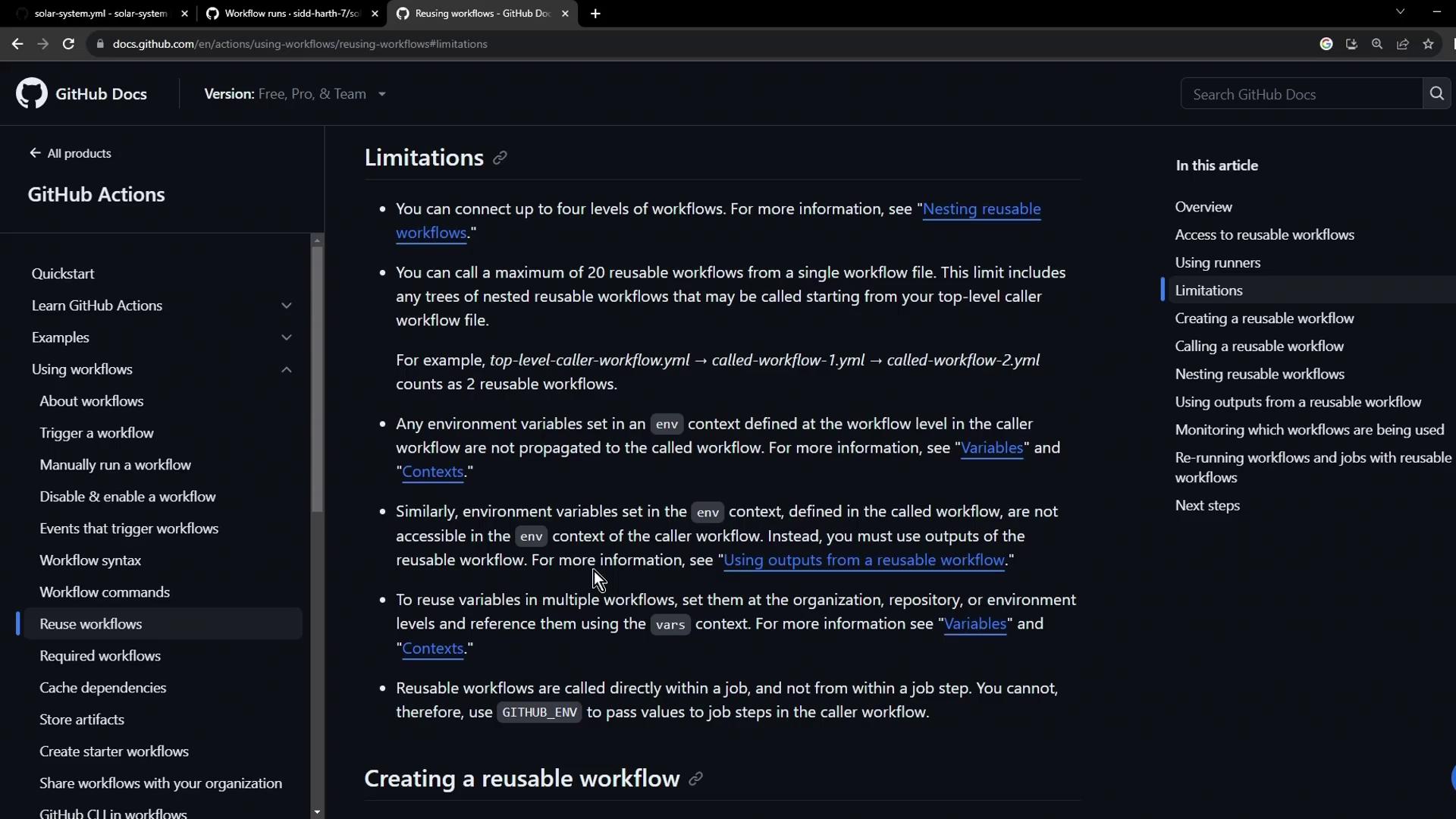
See [Reusing workflows](https://docs.github.com/en/actions/using-workflows/reusing-workflows) for all details on `workflow_call` triggers and scopes.
## 1.3 Create the Reusable Deployment Workflow
Create a new file `.github/workflows/reuse-deployment.yml` that declares a `workflow_call` trigger. Define all required inputs and secrets up front:
### Inputs and Secrets
| Name | Description | Required | Type |
| ---------- | ------------------------ | -------- | ------ |
| namespace | Kubernetes namespace | true | string |
| kubeconfig | Kubeconfig file contents | true | string |
| Secret | Description | Required |
| ---------- | ---------------------------- | -------- |
| KUBECONFIG | Kubernetes kubeconfig secret | true |
### Workflow Definition
```yaml theme={null}
# .github/workflows/reuse-deployment.yml
name: Deployment - Reusable Workflow
on:
workflow_call:
inputs:
namespace:
description: 'Kubernetes namespace'
required: true
type: string
kubeconfig:
description: 'Kubeconfig file contents'
required: true
type: string
secrets:
KUBECONFIG:
description: 'Kubernetes kubeconfig secret'
required: true
jobs:
reuse-deploy:
runs-on: ubuntu-latest
environment:
name: ${{ inputs.namespace }}
url: https://${{ steps.set-ingress-host.outputs.APP_INGRESS_URL }}
outputs:
APP_INGRESS_URL: ${{ steps.set-ingress-host.outputs.APP_INGRESS_URL }}
steps:
- name: Checkout code
uses: actions/checkout@v4
- name: Install kubectl
uses: azure/setup-kubectl@v3
with:
version: '1.26.0'
- name: Set kubeconfig
run: |
echo "${{ secrets.KUBECONFIG }}" > kubeconfig
export KUBECONFIG=$PWD/kubeconfig
- name: Fetch cluster details
run: |
kubectl version --short
echo "----------"
kubectl get nodes
- name: Replace tokens in manifests
uses: cschleiden/replace-tokens@v1
with:
tokenPrefix: '_'
tokenSuffix: '_'
files: 'kubernetes/${{ inputs.namespace }}/*.yaml'
env:
NAMESPACE: ${{ inputs.namespace }}
REPLICAS: ${{ vars.REPLICAS }}
DOCKER_IMAGE: ${{ vars.DOCKER_IMAGE }}
GITHUB_SHA: ${{ github.sha }}
- name: Create MongoDB Secret
run: |
kubectl -n ${{ inputs.namespace }} create secret generic mongo-db-creds \
--from-literal=MONGO_URI=${{ env.MONGO_URI }} \
--from-literal=MONGO_USERNAME=${{ vars.MONGO_USERNAME }} \
--from-literal=MONGO_PASSWORD=${{ secrets.MONGO_PASSWORD }} \
--save-config \
--dry-run=client \
-o yaml | kubectl apply -f -
- name: Deploy to ${{ inputs.namespace }}
run: |
kubectl apply -f kubernetes/${{ inputs.namespace }}
- name: Set Ingress Host URL
id: set-ingress-host
run: |
HOST=$(kubectl -n ${{ inputs.namespace }} get ingress \
-o jsonpath='{.items[0].spec.tls[0].hosts[0]}')
echo "APP_INGRESS_URL=$HOST" >> $GITHUB_OUTPUT
```
This reusable workflow:
* Defines required `inputs` and `secrets`.
* Contains a single `reuse-deploy` job that checks out the code, configures `kubectl`, replaces tokens, creates secrets, deploys manifests, and outputs the ingress URL.
## 1.4 Invoke the Reusable Workflow
In your original workflow file (`.github/workflows/solar-system.yml`), replace the inline `dev-deploy` and `prod-deploy` jobs with calls to the reusable workflow:
```yaml theme={null}
# .github/workflows/solar-system.yml
name: Solar System Workflow
on:
workflow_dispatch:
branches:
- main
- 'feature/*'
env:
MONGO_URI: 'mongodb+srv://supercluster.d83jj.mongodb.net/superData'
MONGO_USERNAME: ${{ vars.MONGO_USERNAME }}
MONGO_PASSWORD: ${{ secrets.MONGO_PASSWORD }}
jobs:
unit-testing:
# ...
code-coverage:
# ...
docker:
# ...
dev-deploy:
if: contains(github.ref, 'feature/')
needs: docker
uses: ./.github/workflows/reuse-deployment.yml
with:
namespace: development
kubeconfig: ${{ secrets.KUBECONFIG }}
secrets:
KUBECONFIG: ${{ secrets.KUBECONFIG }}
dev-integration-testing:
needs: dev-deploy
# ...
prod-deploy:
if: github.ref == 'refs/heads/main'
needs: docker
uses: ./.github/workflows/reuse-deployment.yml
with:
namespace: production
kubeconfig: ${{ secrets.KUBECONFIG }}
secrets:
KUBECONFIG: ${{ secrets.KUBECONFIG }}
prod-integration-testing:
needs: prod-deploy
# ...
```
### Workflow Run Summary
After pushing these changes to a feature branch, the GitHub Actions UI will show the reusable workflow invocations:
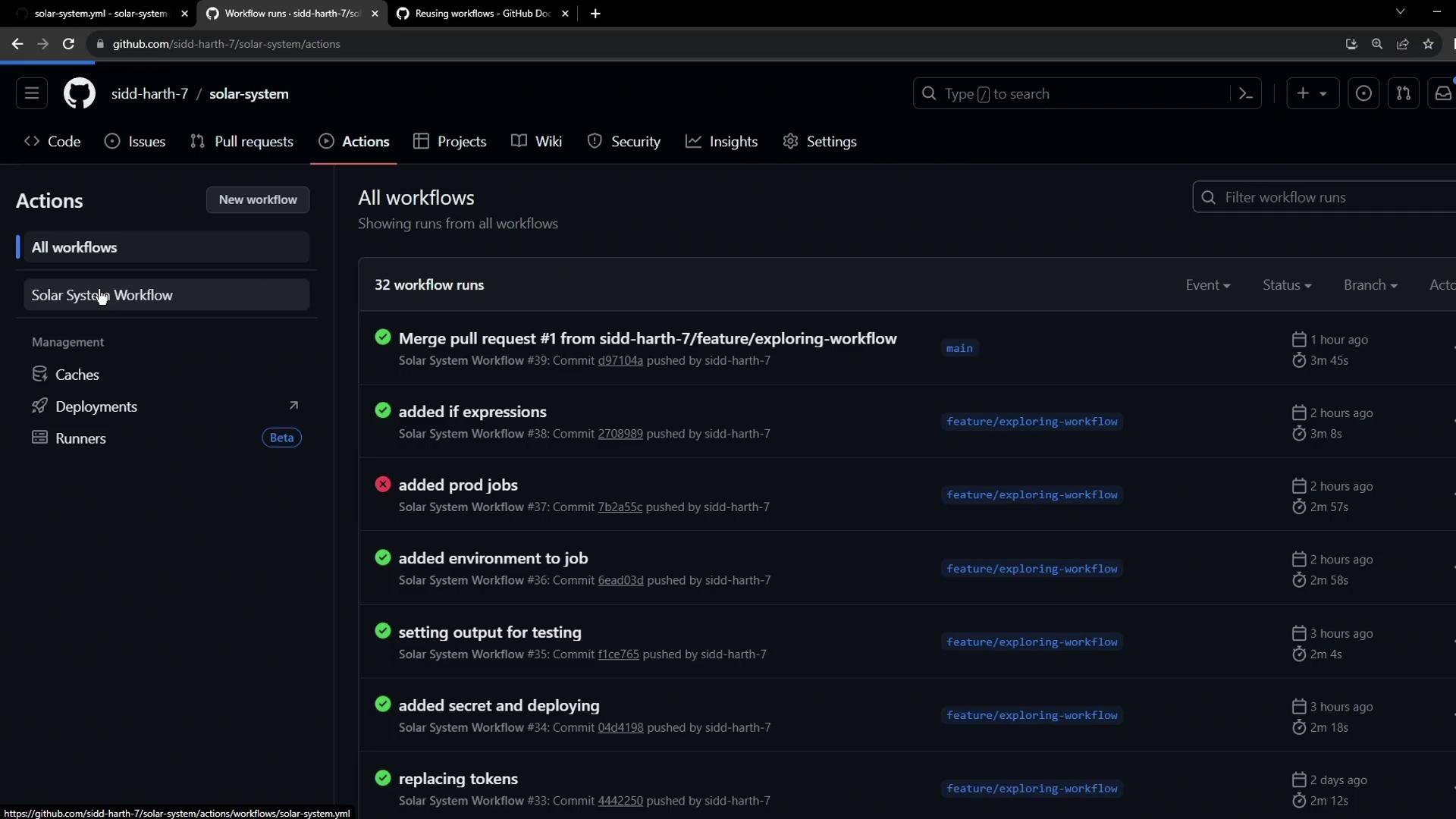
Notice each deployment job now references `reuse-deployment.yml`.
### Job Names and Statuses
The UI prefixes the reusable-job name under `dev-deploy` and `prod-deploy` so you can easily identify the steps executed:
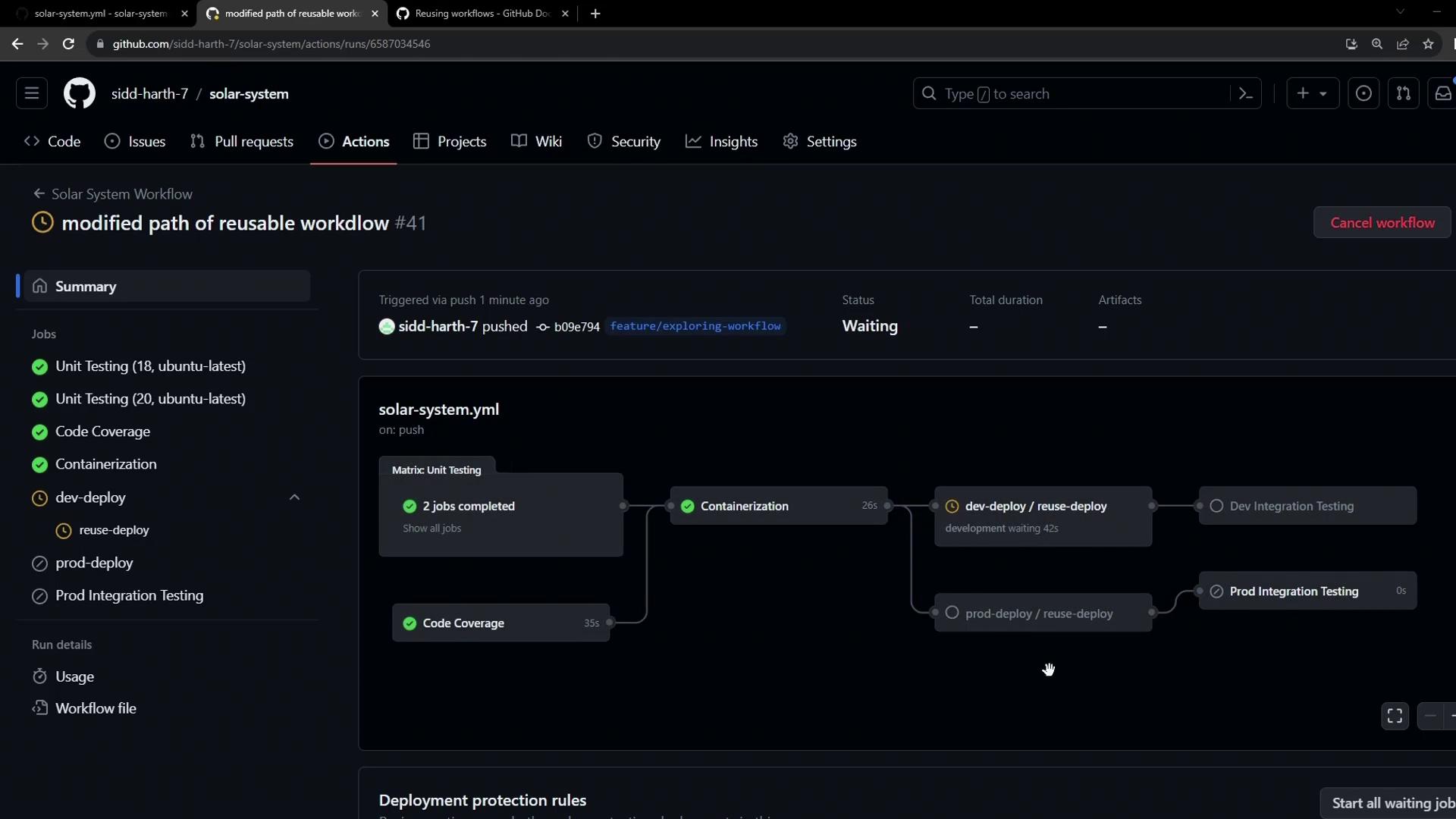
If you forget to pass a required `input` or `secret`, the job will fail. For example, omitting `kubeconfig` will cause the `Set kubeconfig` step to error out:
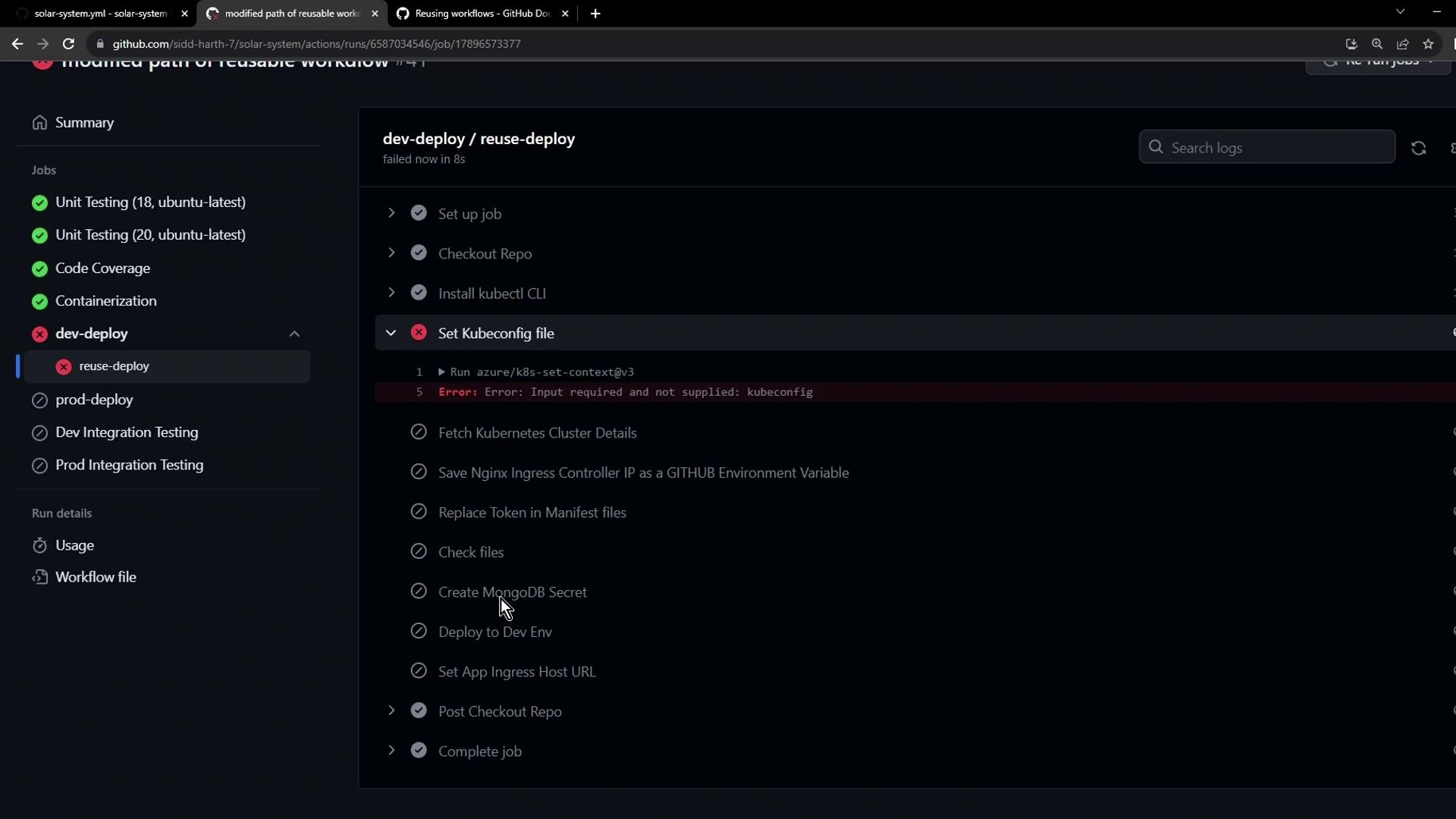
Always verify that every `input` and `secret` listed under `on.workflow_call` is provided when invoking the reusable workflow.
***
In the next lesson, we’ll cover advanced patterns for sharing secrets and artifacts across reusable workflows.
## Links and References
* [GitHub Actions: Reusing workflows](https://docs.github.com/en/actions/using-workflows/reusing-workflows)
* [Azure Setup Kubectl Action](https://github.com/Azure/setup-kubectl)
* [cschleiden/replace-tokens](https://github.com/cschleiden/replace-tokens)