> ## Documentation Index
> Fetch the complete documentation index at: https://notes.kodekloud.com/llms.txt
> Use this file to discover all available pages before exploring further.
# Demo Inline Suggestions
> Learn to use GitHub Copilots inline suggestions to enhance Flask API development efficiency.
In this tutorial, you’ll learn how to leverage GitHub Copilot’s inline suggestions to speed up building a Flask API. We’ll cover:
* Inline completions for new routes
* Inline chat refinements
* Comment-driven code generation
* Next-edit suggestions for refactoring
## Prerequisites
* Python ≥ 3.7
* Flask installed (`pip install flask`)
* GitHub Copilot extension enabled in your editor
* Basic knowledge of RESTful APIs
This demo uses an **in-memory database** (`items_db`). For production workloads, integrate a persistent data store like PostgreSQL or MongoDB.
## 1. Basic Flask App with In-Memory DB
Start with a simple Flask application. Create an `app.py` file:
```python theme={null}
from flask import Flask, request, jsonify
from models import Item
app = Flask(__name__)
# In-memory storage
items_db = []
current_id = 1
@app.route('/items', methods=['POST'])
def create_item():
global current_id
data = request.get_json()
if not data or 'name' not in data:
return jsonify({'error': 'Name is required'}), 400
new_item = Item(
id=current_id,
name=data['name'],
description=data.get('description', '')
)
items_db.append(new_item)
current_id += 1
return jsonify(new_item.to_dict()), 201
```
As you type, Copilot suggests method bodies in real time.
## 2. Deleting All Items
Type a new route decorator and function signature:
```python theme={null}
@app.route('/deleteall', methods=['DELETE'])
def delete_all_items():
```
Copilot may auto-complete:
```python theme={null}
global items_db
items_db = []
return jsonify({'message': 'All items deleted successfully'})
```
## 3. Generating Random Items
Define a “create random items” endpoint:
```python theme={null}
@app.route('/createrandom', methods=['POST'])
def create_random_items():
global current_id
data = request.get_json()
```
Copilot often suggests:
```python theme={null}
if not data or 'count' not in data:
return jsonify({'error': 'Count is required'}), 400
count = data['count']
for _ in range(count):
new_item = Item(
id=current_id,
name=f"Random Item {current_id}",
description=f"This is random item number {current_id}"
)
items_db.append(new_item)
current_id += 1
return jsonify([item.to_dict() for item in items_db[-count:]]), 201
```
## 4. Inline Chat: Analyze Numbers
Start with:
```python theme={null}
@app.route('/analyzenumbers', methods=['POST'])
def analyze_numbers():
data = request.get_json()
```
Invoke Copilot’s **inline chat** and ask for number analysis. It may return:
```python theme={null}
numbers = data.get('numbers')
if not numbers:
return jsonify({'error': 'No numbers provided'}), 400
total = sum(numbers)
average = total / len(numbers)
return jsonify({'total': total, 'average': average})
```
### 4.1 Enhanced Validation & Stats
Refine the route for stronger validation:
```python theme={null}
@app.route('/analyzenumbers', methods=['POST'])
def analyze_numbers():
data = request.get_json()
if not data or 'numbers' not in data:
return jsonify({'error': 'Numbers are required'}), 400
numbers = data['numbers']
if not all(isinstance(n, int) for n in numbers):
return jsonify({'error': 'All elements must be integers'}), 400
result = {
'sum': sum(numbers),
'average': sum(numbers) / len(numbers) if numbers else 0,
'min': min(numbers) if numbers else None,
'max': max(numbers) if numbers else None
}
return jsonify(result), 200
# Alternative registration:
app.add_url_rule(
'/analyzenumbers',
'analyze_numbers',
analyze_numbers,
methods=['POST']
)
```
## 5. Comment-Driven Suggestions
Write a descriptive comment, then let Copilot generate code:
```python theme={null}
# create a route to delete all items
@app.route('/items', methods=['DELETE'])
def delete_all_items():
global items_db
items_db = []
return jsonify({'message': 'All items deleted successfully'})
```
## 6. Next-Edit Suggestions for Refactoring
Enable **Next-Edit Suggestions** in Copilot settings to receive automated refactors. Example: renaming `items_db` to `items_db_new`.
Before:
```python theme={null}
@app.route('/items', methods=['DELETE'])
def delete_all_items():
global items_db
items_db = []
return jsonify({'message': 'All items deleted successfully'})
```
After accepting suggestion:
```python theme={null}
@app.route('/items', methods=['DELETE'])
def delete_all_items():
global items_db_new
items_db_new = []
return jsonify({'message': 'All items deleted successfully'})
```
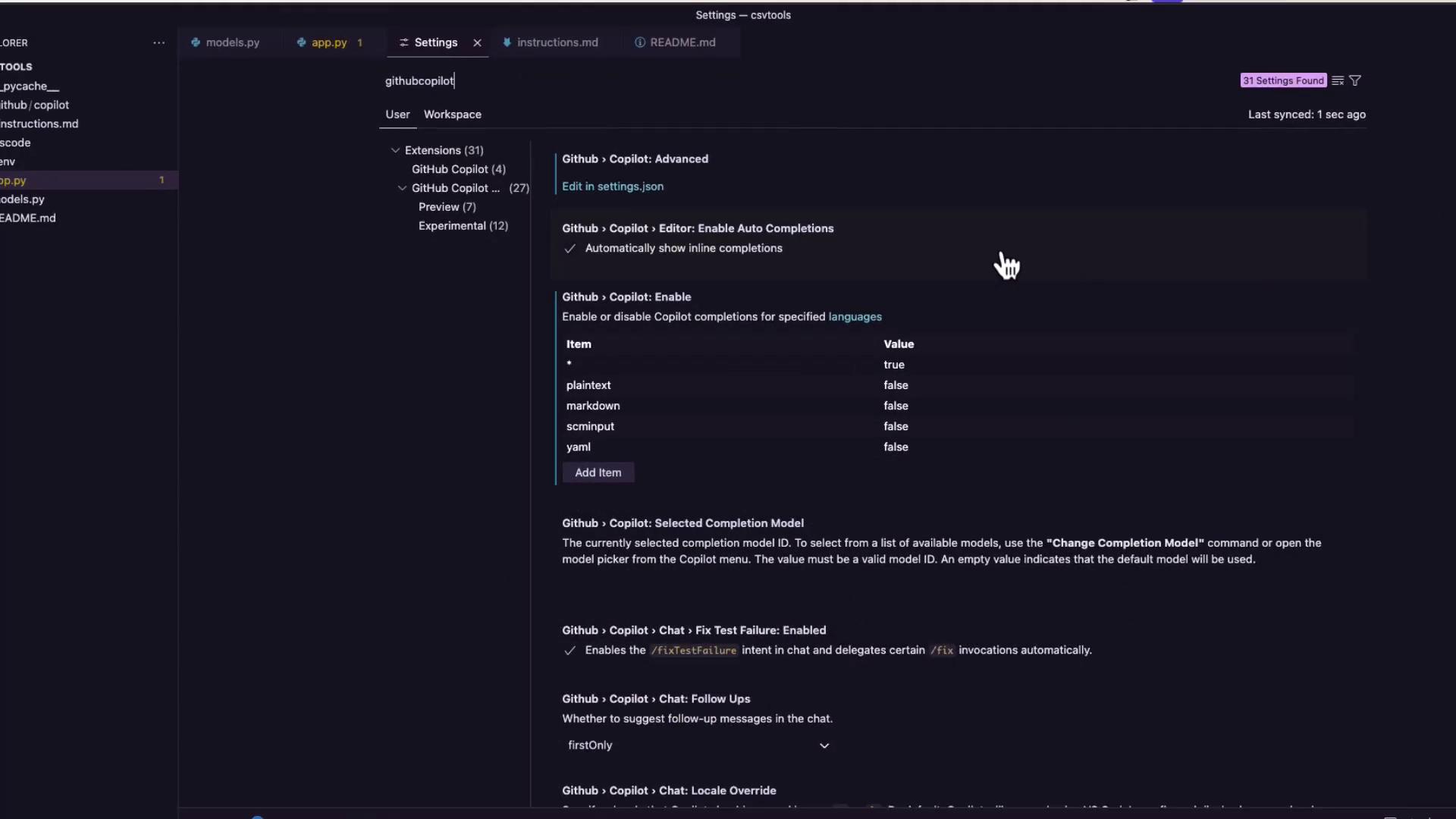
### Enabling Next-Edit Suggestions
Open GitHub Copilot settings and search for **next edit suggestions**. Toggle it on under the **Preview** options:
## Comparison of Copilot Features
| Suggestion Type | Use Case | Activation |
| --------------------- | -------------------------------------------- | -------------------------------------------------- |
| Inline Completions | Auto-complete functions and blocks | Typing code |
| Inline Chat | Context-aware code suggestions via chat pane | Trigger inline chat (e.g., `Ctrl+Shift+I`) |
| Comment-Driven | Generate code from descriptive comments | Add comment above function |
| Next-Edit Suggestions | Automated refactoring & renames | Enable in Copilot settings, accept suggested edits |
## Links and References
* [GitHub Copilot Documentation](https://docs.github.com/en/copilot)
* [Flask Quickstart](https://flask.palletsprojects.com/en/latest/quickstart/)
* [Python Packaging Guide](https://packaging.python.org/)
By combining these Copilot features, you can write, refine, and refactor Flask APIs faster and with confidence.