> ## Documentation Index
> Fetch the complete documentation index at: https://notes.kodekloud.com/llms.txt
> Use this file to discover all available pages before exploring further.
# Creating API Documentation
> Learn to build interactive API documentation with FastAPI using OpenAPI, including setting up a Fake Data API and customizing Swagger UI and Redoc interfaces.
Learn how to build and refine interactive API docs using FastAPI’s built-in OpenAPI support. You’ll set up a simple “Fake Data API,” write clear docstrings, and customize the generated Swagger UI and Redoc interfaces.
* Python 3.7 or higher
* A virtual environment with `fastapi`, `uvicorn`, and `pydantic` installed
* SQLite for a local database
## Table of Contents
1. [Project Layout & Dependencies](#1-project-layout--dependencies)
2. [Initializing the FastAPI App](#2-initializing-the-fastapi-app)
3. [Database Context Manager](#3-database-context-manager)
4. [Fetching Fake Data](#4-fetching-fake-data)
5. [Defining the API Endpoint](#5-defining-the-api-endpoint)
6. [Running the Server](#6-running-the-server)
7. [Swagger UI & Redoc Interfaces](#7-swagger-ui--redoc-interfaces)
8. [Fine-Tuning Your OpenAPI Schema](#8-fine-tuning-your-openapi-schema)
9. [Links and References](#9-links-and-references)
***
## 1. Project Layout & Dependencies
Ensure your project uses this structure:
```text theme={null}
.
├── main.py
└── data
└── db
└── fakedata.db
```
| Dependency | Purpose |
| ---------- | ---------------------------------- |
| fastapi | Web framework with OpenAPI support |
| uvicorn | ASGI server |
| pydantic | Data validation and settings |
## 2. Initializing the FastAPI App
```python theme={null}
# main.py
from fastapi import FastAPI, HTTPException
from pydantic import BaseModel
import sqlite3
from typing import List, Dict
from contextlib import contextmanager
from pathlib import Path
app = FastAPI(
title="Fake Data API",
description="Generate and retrieve random personal data entries via RESTful endpoints",
version="1.0.0",
)
class DataRequest(BaseModel):
count: int
BASE_DIR = Path(__file__).resolve().parent
DATA_DIR = BASE_DIR / "data" / "db"
DB_PATH = DATA_DIR / "fakedata.db"
# Ensure database directory exists
DATA_DIR.mkdir(parents=True, exist_ok=True)
```
## 3. Database Context Manager
```python theme={null}
# main.py (continued)
@contextmanager
def get_db_connection():
"""
Manage SQLite connections with row_factory for dict-like access.
Yields:
sqlite3.Connection: Active database connection.
Raises:
sqlite3.Error: On connection failures.
"""
conn = sqlite3.connect(DB_PATH)
conn.row_factory = sqlite3.Row
try:
yield conn
finally:
conn.close()
```
## 4. Fetching Fake Data
```python theme={null}
# main.py (continued)
def fetch_fake_data(count: int) -> List[Dict]:
"""
Retrieve a random selection of fake data entries.
Args:
count (int): Number of records (1–1000).
Returns:
List[Dict]: Fake data entries.
Raises:
HTTPException(400): If count is out of range.
HTTPException(404): If no records are found.
"""
if not (1 <= count <= 1000):
raise HTTPException(status_code=400, detail="Count must be between 1 and 1000")
with get_db_connection() as conn:
cursor = conn.cursor()
cursor.execute(
"""
SELECT first_name, last_name, email_address, age, city, occupation
FROM fake_data
ORDER BY RANDOM()
LIMIT ?
""",
(count,),
)
rows = cursor.fetchall()
if not rows:
raise HTTPException(status_code=404, detail="No data entries found")
return [dict(row) for row in rows]
```
Requests exceeding 1000 entries will return a **400 Bad Request**. Always validate `count` before calling the endpoint.
## 5. Defining the API Endpoint
```python theme={null}
# main.py (continued)
from fastapi.responses import JSONResponse
@app.post(
"/api/v1/getfakedata",
response_model=List[Dict],
tags=["Fake Data Generation"],
summary="Generate random fake personal data entries",
)
async def get_fake_data(request: DataRequest):
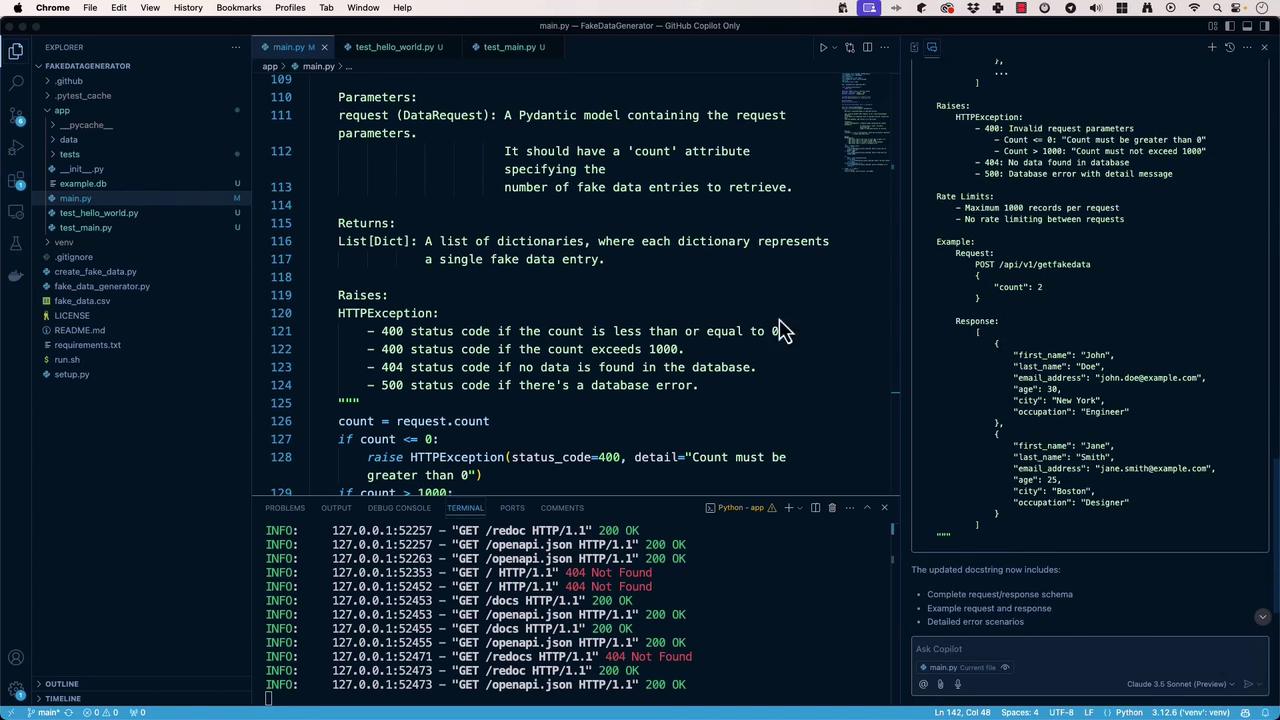
"""
Generate and return fake personal data.
- **count**: Number of entries (min: 1, max: 1000)
**Responses**
- 200: Successfully retrieved data
- 400: Invalid parameters
- 404: No records found
- 500: Internal server error
"""
data = fetch_fake_data(request.count)
return JSONResponse(content=data)
```
| Status Code | Description |
| ----------- | -------------------------------- |
| 200 | Successfully retrieved fake data |
| 400 | Invalid request parameters |
| 404 | No data entries found |
| 500 | Internal server error |
## 6. Running the Server
```python theme={null}
# main.py (continued)
if __name__ == "__main__":
import uvicorn
uvicorn.run(app, host="0.0.0.0", port=8000)
```
Start your server:
```bash theme={null}
(venv) $ python main.py
INFO: Started server process [12345]
INFO: Uvicorn running on http://127.0.0.1:8000 (Press CTRL+C to quit)
```
Visit:
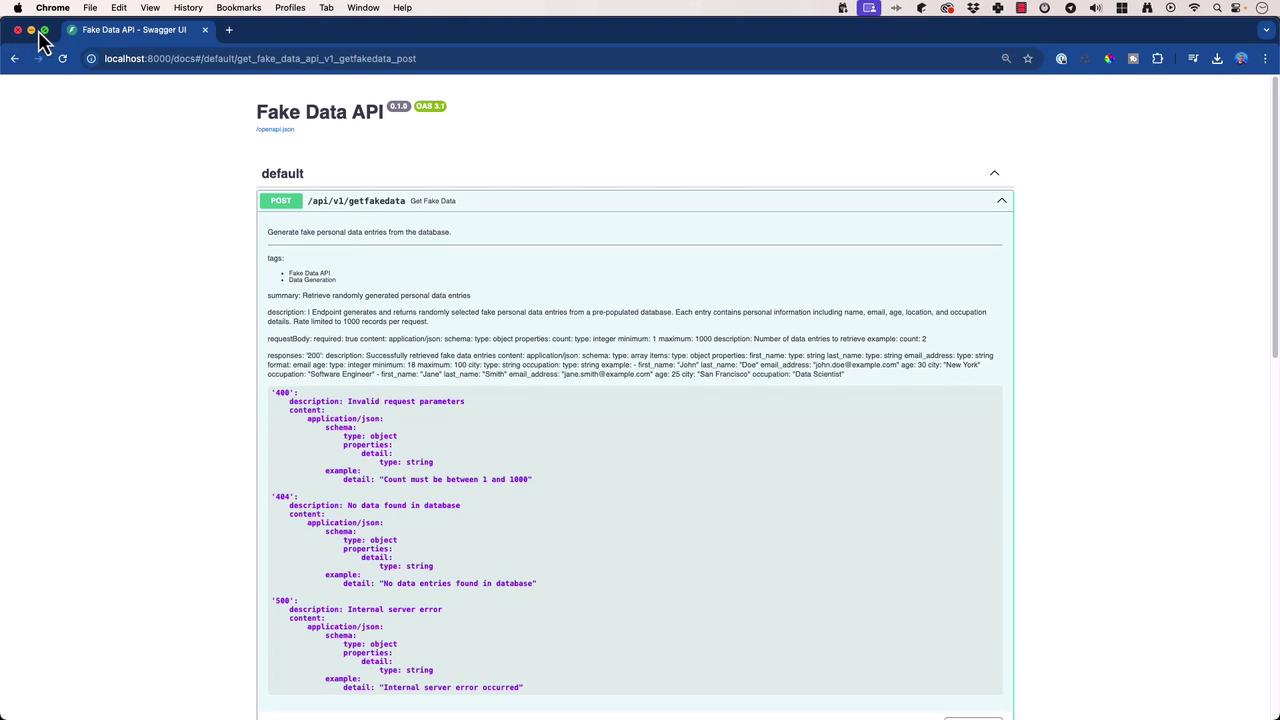
* Swagger UI: [http://127.0.0.1:8000/docs](http://127.0.0.1:8000/docs)
* Redoc: [http://127.0.0.1:8000/redoc](http://127.0.0.1:8000/redoc)
* OpenAPI JSON: [http://127.0.0.1:8000/openapi.json](http://127.0.0.1:8000/openapi.json)
## 7. Swagger UI & Redoc Interfaces
The interactive Swagger UI provides parameter descriptions, request/response examples, and error schemas.
## 8. Fine-Tuning Your OpenAPI Schema
* **Docstring Conventions**: Follow [PEP 257](https://peps.python.org/pep-0257/) and embed OpenAPI YAML blocks for richer metadata.
* **Examples & Schemas**: Include `example` sections for request/response payloads.
* **Error Documentation**: Clearly list possible HTTP error codes and messages.
* **Security & Rate Limits**: Add `securitySchemes` and rate-limit info under `components` and endpoint descriptions.
FastAPI updates your docs in real time as you refine docstrings—no extra tooling required!
## 9. Links and References
* [FastAPI Documentation](https://fastapi.tiangolo.com/)
* [Uvicorn — The Lightning-Fast ASGI Server](https://www.uvicorn.org/)
* [Pydantic Documentation](https://pydantic-docs.helpmanual.io/)
* [SQLite Official Docs](https://www.sqlite.org/docs.html)