> ## Documentation Index
> Fetch the complete documentation index at: https://notes.kodekloud.com/llms.txt
> Use this file to discover all available pages before exploring further.
# Securing Your Account With 2FA
> Guide to enabling and managing two-factor authentication and SAML SSO on GitHub Enterprise, comparing security methods and offering setup, recovery, and enforcement best practices
Two-factor authentication (2FA) is a critical layer of defense against credential theft and unauthorized access. GitHub Enterprise supports strong authentication while balancing user productivity, offering two primary identity approaches: SAML single sign-on (SSO) and two-factor authentication. This guide explains the options, compares methods, and outlines best practices to help you secure user and machine accounts.
Why enable 2FA?
* Reduces risk from password compromise, phishing, and credential stuffing.
* Provides an additional verification factor beyond a password.
* Helps organizations meet compliance and security policy requirements.
SAML single sign-on (SSO)
* Centralizes identity management by delegating authentication to an external identity provider (IdP).
* Users sign in once with the IdP and gain access across integrated services.
* Supported IdPs include Active Directory Federation Services (AD FS), Microsoft Entra ID, Okta, OneLogin, PingOne, and Shibboleth.
* Use SAML SSO when you need centralized control of authentication, group membership, and session policies.
Two-factor authentication methods (ranked from most secure to least secure)
| Method | Security level | Typical examples | Pros | Cons | Recommended for |
| ------------- | -------------- | ---------------------------------------------------- | ------------------------------------------------------------------------------ | ----------------------------------------------------- | ----------------------------------------------- |
| Security keys | Most secure | YubiKey, other FIDO2/WebAuthn devices | Phishing-resistant, cryptographic, works across devices with USB/NFC/Bluetooth | Requires physical device; initial provisioning needed | High-risk accounts, admins, organization owners |
| TOTP apps | Recommended | Authy, Google Authenticator, Microsoft Authenticator | Works offline, user-friendly, many apps support encrypted backups | Requires secure device backup/transfer process | Most user accounts and teams |
| SMS | Least secure | One-time codes sent via text | Simple to set up and widely accessible | Vulnerable to SIM swapping and interception | Use only if stronger options are unavailable |
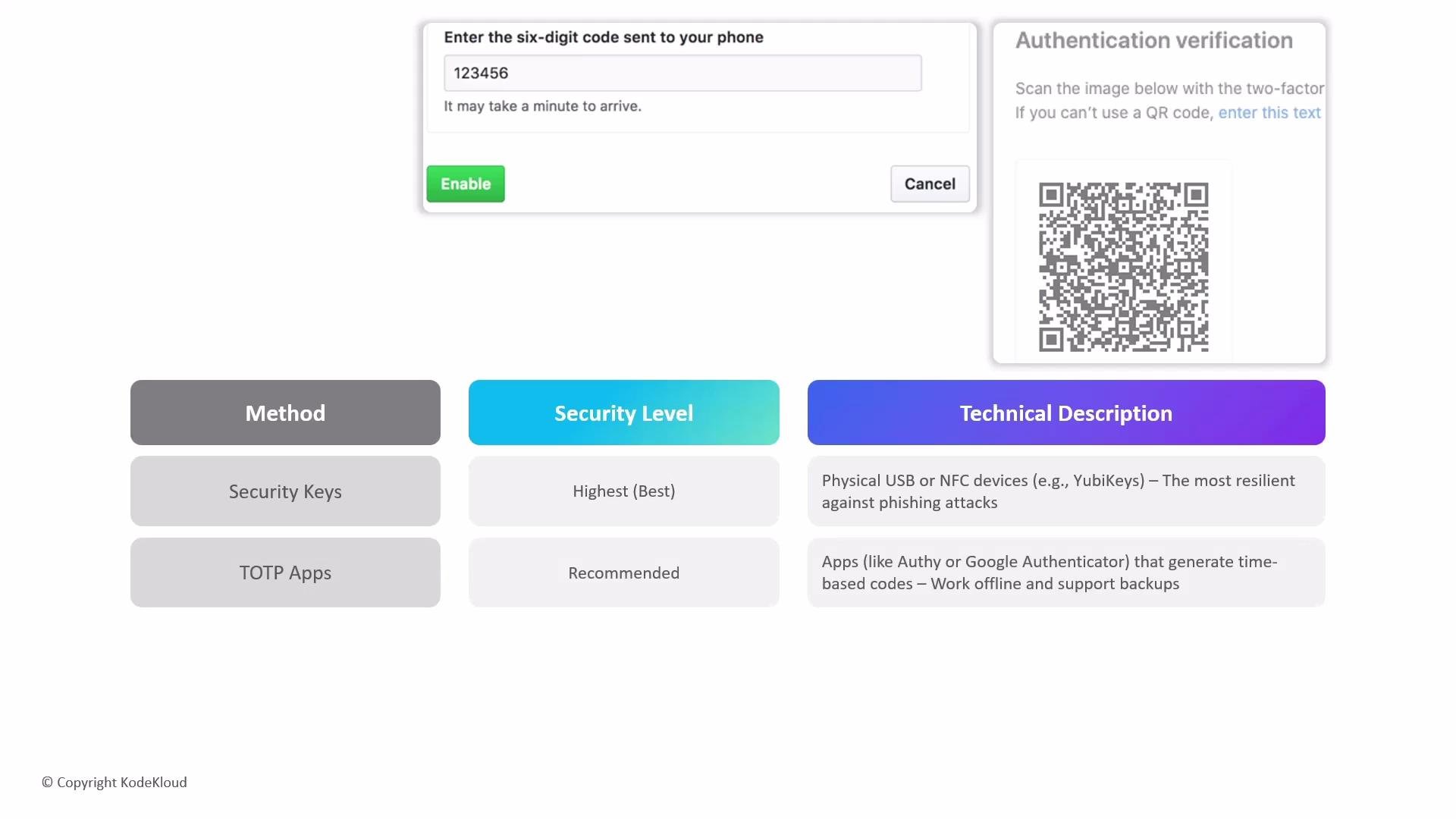 TOTP authenticator apps offer a strong balance of security and convenience for most users. For the highest assurance, register a security key as your primary factor and keep a TOTP app as a recoverable backup.
Typical 2FA sign-in prompt
```text theme={null}
Enter the six-digit code sent to your phone
123456
```
Important enforcement note
When an organization enforces two-factor authentication, GitHub will automatically block access for any account in that organization that does not have 2FA configured. This applies to human users and to machine or bot accounts without a configured second factor. Plan enforcement windows, notify stakeholders, and ensure all service accounts have appropriate 2FA methods or recovery options (for example, backup codes, alternate authenticators, or registered security keys).
Practical setup tips
* Register at least two recovery methods (for example, a security key and a TOTP app) so you can recover access if a device is lost. Store recovery codes in a secure password manager or encrypted vault.
* Prefer security keys for accounts with administrative privileges or access to sensitive repositories.
* Use TOTP apps for day-to-day access across mobile and desktop devices. Consider an authenticator that supports encrypted backups (e.g., Authy).
* Avoid relying solely on SMS where possible; if SMS is used, pair it with an additional, more secure method.
* For automated or CI system access, use dedicated machine accounts with their own 2FA methods and plan how automation will authenticate (e.g., deploy keys, GitHub Apps, or service principals) to avoid human-based 2FA issues.
Checklist for administrators
* Audit all org members and machine accounts to identify missing 2FA.
* Communicate enforcement timelines and provide step-by-step onboarding docs for users.
* Provide clear recovery procedures for lost devices, including how to use backup codes and register alternate authenticators.
* Consider enforcing SAML SSO for centralized control if you already manage identities via an IdP.
Further reading and references
* [GitHub Docs: About two-factor authentication (2FA)](https://docs.github.com/en/authentication/securing-your-account-with-two-factor-authentication-2fa)
* [FIDO Alliance: WebAuthn and FIDO2](https://fidoalliance.org)
TOTP authenticator apps offer a strong balance of security and convenience for most users. For the highest assurance, register a security key as your primary factor and keep a TOTP app as a recoverable backup.
Typical 2FA sign-in prompt
```text theme={null}
Enter the six-digit code sent to your phone
123456
```
Important enforcement note
When an organization enforces two-factor authentication, GitHub will automatically block access for any account in that organization that does not have 2FA configured. This applies to human users and to machine or bot accounts without a configured second factor. Plan enforcement windows, notify stakeholders, and ensure all service accounts have appropriate 2FA methods or recovery options (for example, backup codes, alternate authenticators, or registered security keys).
Practical setup tips
* Register at least two recovery methods (for example, a security key and a TOTP app) so you can recover access if a device is lost. Store recovery codes in a secure password manager or encrypted vault.
* Prefer security keys for accounts with administrative privileges or access to sensitive repositories.
* Use TOTP apps for day-to-day access across mobile and desktop devices. Consider an authenticator that supports encrypted backups (e.g., Authy).
* Avoid relying solely on SMS where possible; if SMS is used, pair it with an additional, more secure method.
* For automated or CI system access, use dedicated machine accounts with their own 2FA methods and plan how automation will authenticate (e.g., deploy keys, GitHub Apps, or service principals) to avoid human-based 2FA issues.
Checklist for administrators
* Audit all org members and machine accounts to identify missing 2FA.
* Communicate enforcement timelines and provide step-by-step onboarding docs for users.
* Provide clear recovery procedures for lost devices, including how to use backup codes and register alternate authenticators.
* Consider enforcing SAML SSO for centralized control if you already manage identities via an IdP.
Further reading and references
* [GitHub Docs: About two-factor authentication (2FA)](https://docs.github.com/en/authentication/securing-your-account-with-two-factor-authentication-2fa)
* [FIDO Alliance: WebAuthn and FIDO2](https://fidoalliance.org)