> ## Documentation Index
> Fetch the complete documentation index at: https://notes.kodekloud.com/llms.txt
> Use this file to discover all available pages before exploring further.
# Demo Pull Request Templates
> Guide on creating and storing GitHub pull request templates, showing single or multiple template setups, benefits, examples, and best practices to standardize PR descriptions.
Adding a pull request (PR) template to your repository helps contributors provide consistent, actionable PR descriptions. This guide explains where to place templates, how to create a single or multiple templates, and how the template appears when opening a PR on GitHub.
Create a single template or multiple templates
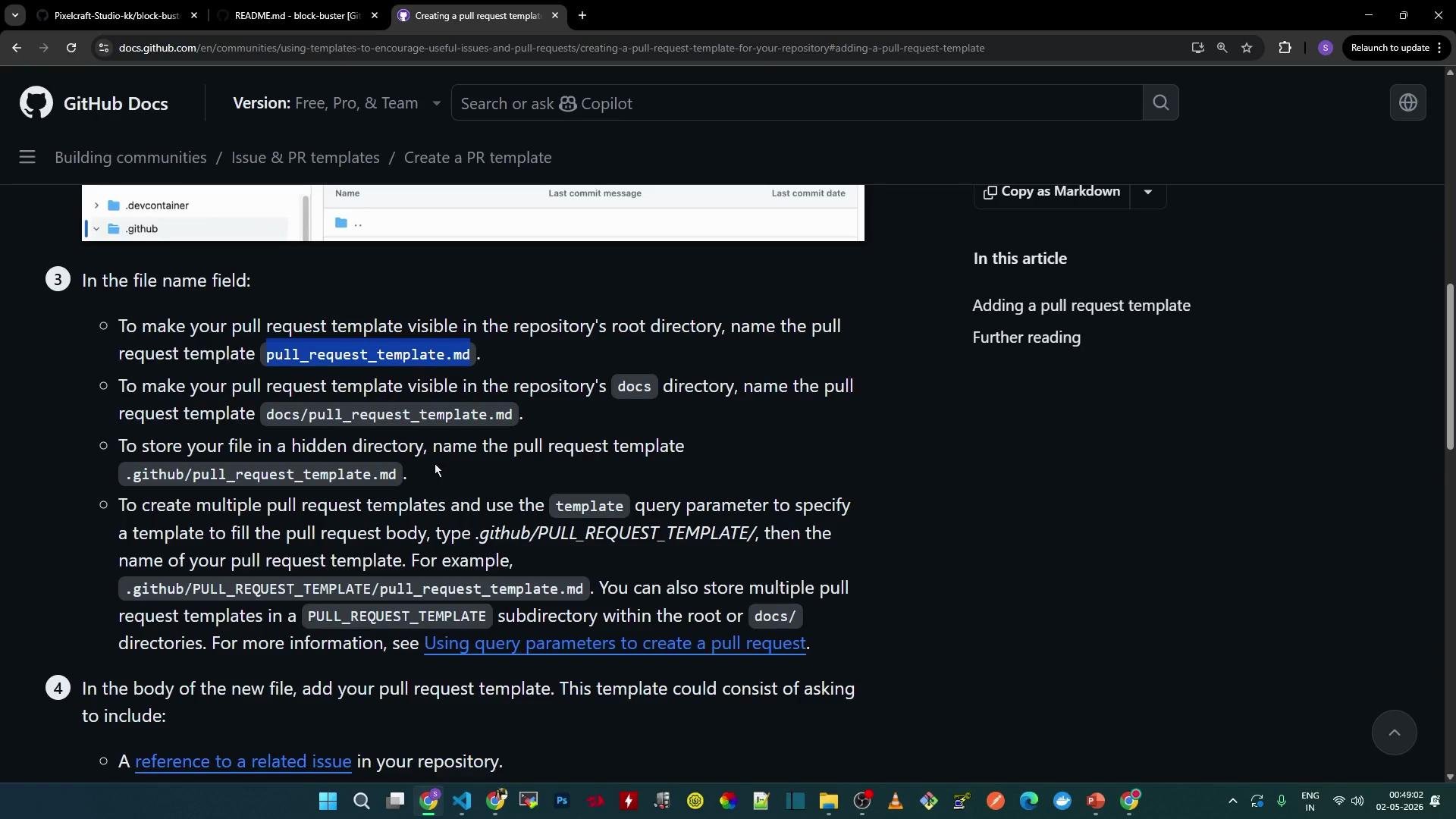
* Single template: Add a file named `pull_request_template.md` in one of these locations: repository root, the `docs` directory, or the `.github` directory.
* Multiple templates: Create a folder such as `PULL_REQUEST_TEMPLATE/` inside `.github` and add multiple Markdown files there. GitHub will surface those templates when a contributor opens a new PR.
 Why use PR templates
* Promote consistent PR descriptions that make reviews faster and more effective.
* Encourage contributors to link related issues and indicate the type of change.
* Ensure required checks or test confirmations are documented before merging.
Quick comparison: single vs multiple templates
| Use case | Where to add | Example path |
| ------------------ | ------------------------------------- | ------------------------------------------ |
| Single template | Repository root, `docs`, or `.github` | `.github/pull_request_template.md` |
| Multiple templates | Folder inside `.github` | `.github/PULL_REQUEST_TEMPLATE/feature.md` |
Use the `.github` directory to keep repository metadata centralized. If you store templates in `docs` or the repository root, make sure contributors know where to find them.
Example: add a single template
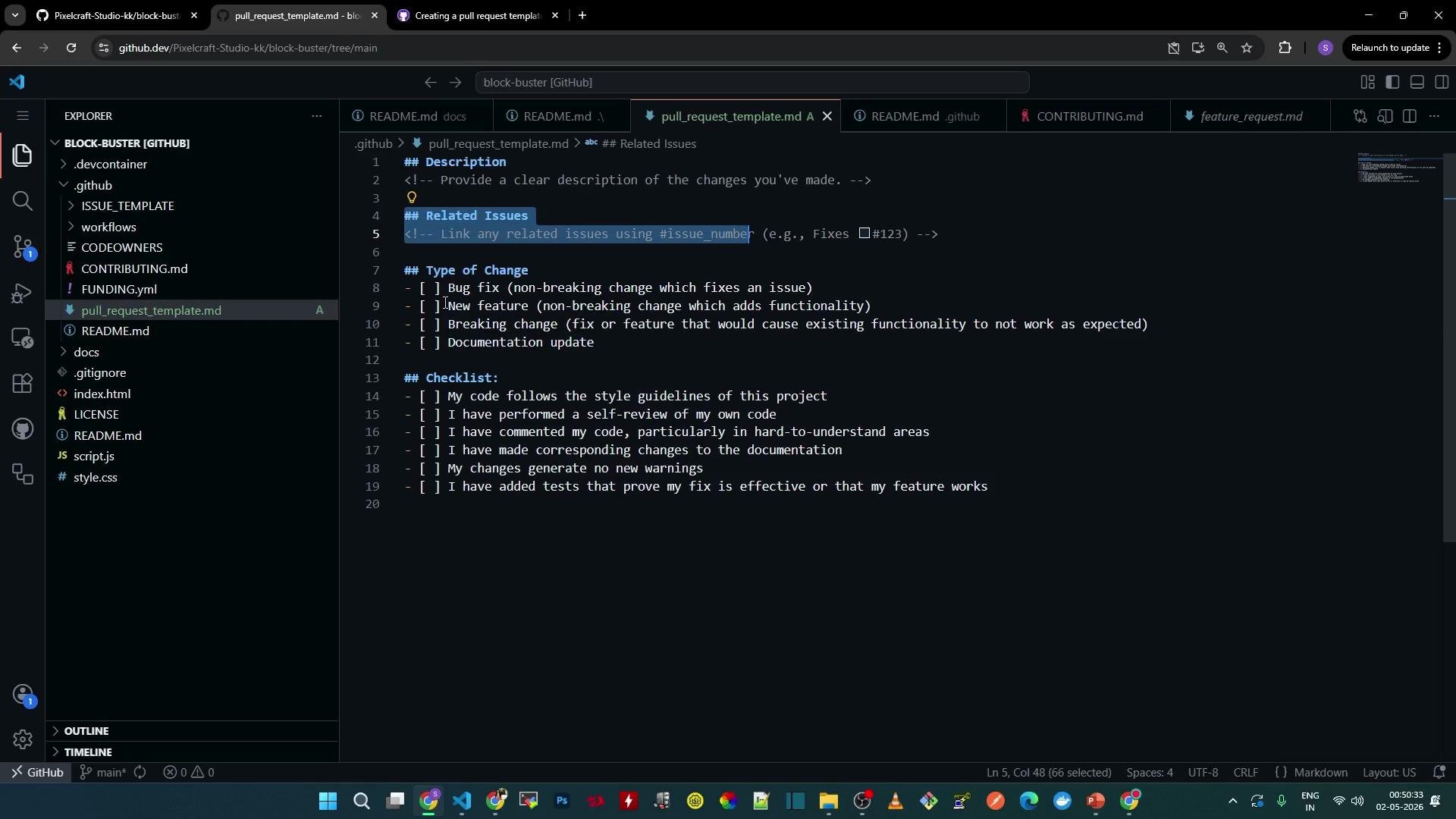
* Create a single PR template file at `.github/pull_request_template.md`.
* The template should request a clear description, a reference to related issues, the type of change, and a minimal checklist to confirm tests and documentation.
Create a file named `pull_request_template.md` and paste the following content (customize it to match your project’s workflow):
```markdown theme={null}
## Description
Please provide a clear description of the changes in this PR.
Fixes: #
## Type of change
- [ ] Bug fix
- [ ] New feature
- [ ] Breaking change
- [ ] Documentation update
## Checklist
- [ ] I have added tests where applicable
- [ ] I have updated the documentation
- [ ] I have run the project tests locally
```
Open the repository in the web editor or in your local editor (for example, VS Code), add the file under `.github`, and commit with a descriptive message like `Add PR template`.
Why use PR templates
* Promote consistent PR descriptions that make reviews faster and more effective.
* Encourage contributors to link related issues and indicate the type of change.
* Ensure required checks or test confirmations are documented before merging.
Quick comparison: single vs multiple templates
| Use case | Where to add | Example path |
| ------------------ | ------------------------------------- | ------------------------------------------ |
| Single template | Repository root, `docs`, or `.github` | `.github/pull_request_template.md` |
| Multiple templates | Folder inside `.github` | `.github/PULL_REQUEST_TEMPLATE/feature.md` |
Use the `.github` directory to keep repository metadata centralized. If you store templates in `docs` or the repository root, make sure contributors know where to find them.
Example: add a single template
* Create a single PR template file at `.github/pull_request_template.md`.
* The template should request a clear description, a reference to related issues, the type of change, and a minimal checklist to confirm tests and documentation.
Create a file named `pull_request_template.md` and paste the following content (customize it to match your project’s workflow):
```markdown theme={null}
## Description
Please provide a clear description of the changes in this PR.
Fixes: #
## Type of change
- [ ] Bug fix
- [ ] New feature
- [ ] Breaking change
- [ ] Documentation update
## Checklist
- [ ] I have added tests where applicable
- [ ] I have updated the documentation
- [ ] I have run the project tests locally
```
Open the repository in the web editor or in your local editor (for example, VS Code), add the file under `.github`, and commit with a descriptive message like `Add PR template`.
 How the template appears in a new pull request
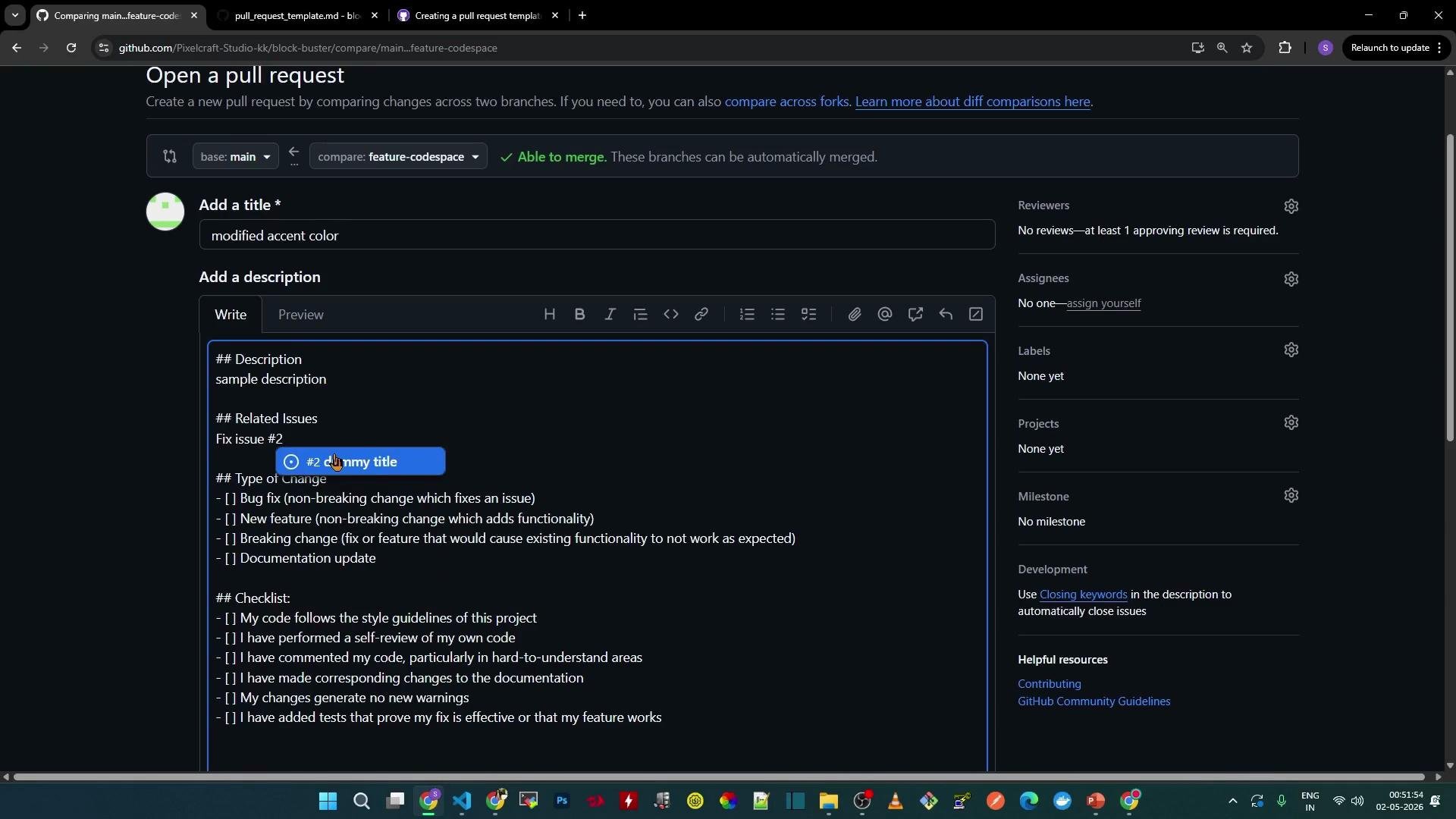
* When a contributor creates a new PR, GitHub automatically pre-populates the PR description with the template content.
* Contributors replace placeholders with the actual description, reference issues with `Fixes: #`, and select the appropriate checkboxes.
* If the PR includes code changes, the PR editor displays file diffs below the description area. For example, a CSS change might show:
```css theme={null}
--accent-cyan: #a81566;
```
When the contributor clicks Create Pull Request, the content from the template remains editable and can be previewed before submission.
How the template appears in a new pull request
* When a contributor creates a new PR, GitHub automatically pre-populates the PR description with the template content.
* Contributors replace placeholders with the actual description, reference issues with `Fixes: #`, and select the appropriate checkboxes.
* If the PR includes code changes, the PR editor displays file diffs below the description area. For example, a CSS change might show:
```css theme={null}
--accent-cyan: #a81566;
```
When the contributor clicks Create Pull Request, the content from the template remains editable and can be previewed before submission.
 Best practices
* Keep templates concise and focused—use checkboxes for required confirmations (tests, docs, security review).
* Include example issue links using `Fixes: #` so GitHub can auto-close linked issues when the PR is merged.
* Avoid placing secrets or sensitive info in templates.
* Consider adding different templates for bug fixes, features, or release changes in a `.github/PULL_REQUEST_TEMPLATE/` folder to help contributors select the right format.
Do not include sensitive data or credentials in PR templates. Templates are visible to all repository contributors and may be copied into PR histories.
Summary
* For a single template, add `pull_request_template.md` to `.github`, `docs`, or the repository root.
* For multiple templates, create a folder inside `.github` (for example, `.github/PULL_REQUEST_TEMPLATE/`) and add each Markdown file.
* Templates standardize PR descriptions, streamline reviews, and help ensure contributors link issues and confirm required checks.
Links and references
* [GitHub: Creating a pull request template](https://docs.github.com/en/repositories/managing-your-repositorys-settings-and-features/customizing-your-repository/about-issue-and-pull-request-templates)
* [GitHub Docs: Managing PR templates](https://docs.github.com/)
Best practices
* Keep templates concise and focused—use checkboxes for required confirmations (tests, docs, security review).
* Include example issue links using `Fixes: #` so GitHub can auto-close linked issues when the PR is merged.
* Avoid placing secrets or sensitive info in templates.
* Consider adding different templates for bug fixes, features, or release changes in a `.github/PULL_REQUEST_TEMPLATE/` folder to help contributors select the right format.
Do not include sensitive data or credentials in PR templates. Templates are visible to all repository contributors and may be copied into PR histories.
Summary
* For a single template, add `pull_request_template.md` to `.github`, `docs`, or the repository root.
* For multiple templates, create a folder inside `.github` (for example, `.github/PULL_REQUEST_TEMPLATE/`) and add each Markdown file.
* Templates standardize PR descriptions, streamline reviews, and help ensure contributors link issues and confirm required checks.
Links and references
* [GitHub: Creating a pull request template](https://docs.github.com/en/repositories/managing-your-repositorys-settings-and-features/customizing-your-repository/about-issue-and-pull-request-templates)
* [GitHub Docs: Managing PR templates](https://docs.github.com/)