> ## Documentation Index
> Fetch the complete documentation index at: https://notes.kodekloud.com/llms.txt
> Use this file to discover all available pages before exploring further.
# Demo Describe GitHub Pages
> Guide to publishing a static website with GitHub Pages using a Block Buster game demo
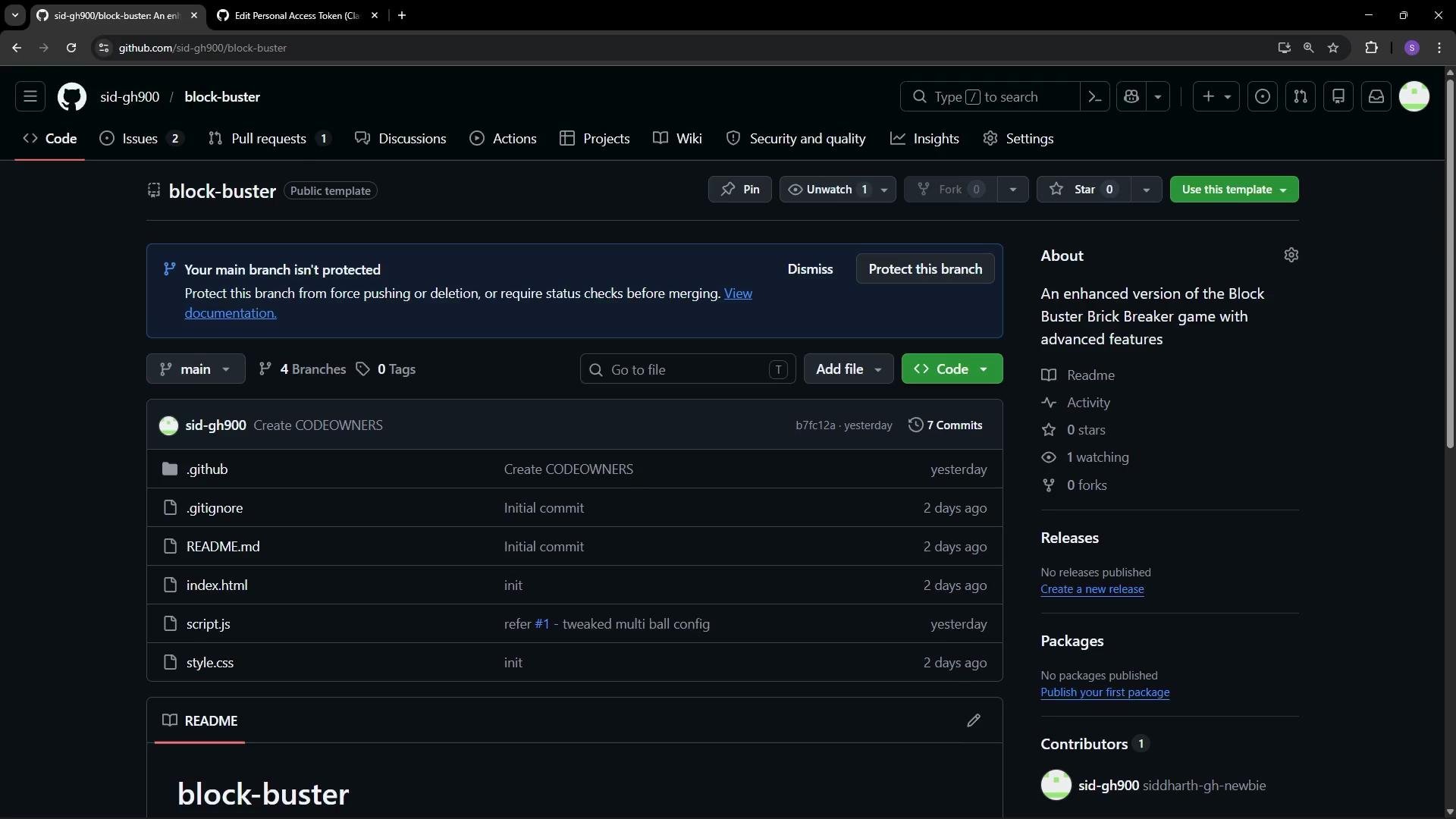
GitHub Pages lets you publish a static website directly from a GitHub repository without needing separate hosting. If your repo contains standard web assets such as `index.html`, `style.css`, and `script.js`, GitHub Pages can serve them so visitors can open a URL and run your site or web app in any browser.
In this repository, `index.html`, `style.css`, and `script.js` combine to make the Block Buster game playable in the browser without downloading files.
 ## How to enable GitHub Pages for your repository
Follow these steps to publish the repository as a static site:
1. Open the repository on GitHub and select **Settings**.
2. In the left sidebar, choose **Pages** under the “Code and automation” section.
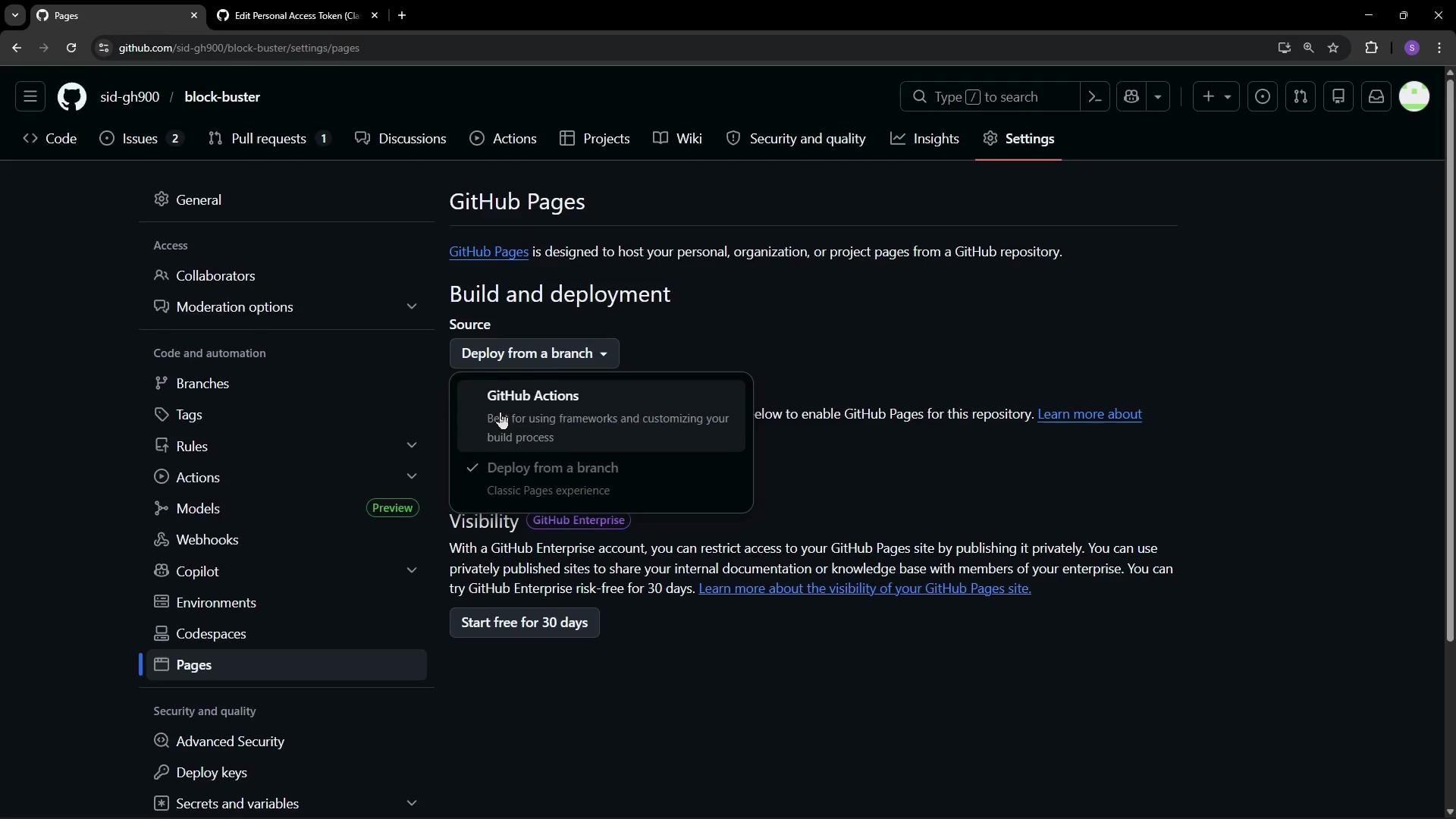
3. Under **Build and deployment**, choose a source for your site:
* Deploy from a branch — quick and simple for static project pages.
* Use GitHub Actions — useful when you need a build pipeline (for example, bundling, minification, or static site generators).
4. If you choose **Deploy from a branch**, select the branch (e.g., `main`) and pick the folder to publish:
* Root (`/`) — use when `index.html` is in the repository root.
* `/docs` — use if you maintain site files inside a `docs` directory.
5. Save your settings. GitHub Pages will start building the site; this can take a few minutes.
## How to enable GitHub Pages for your repository
Follow these steps to publish the repository as a static site:
1. Open the repository on GitHub and select **Settings**.
2. In the left sidebar, choose **Pages** under the “Code and automation” section.
3. Under **Build and deployment**, choose a source for your site:
* Deploy from a branch — quick and simple for static project pages.
* Use GitHub Actions — useful when you need a build pipeline (for example, bundling, minification, or static site generators).
4. If you choose **Deploy from a branch**, select the branch (e.g., `main`) and pick the folder to publish:
* Root (`/`) — use when `index.html` is in the repository root.
* `/docs` — use if you maintain site files inside a `docs` directory.
5. Save your settings. GitHub Pages will start building the site; this can take a few minutes.
 ### Quick reference: source options
| Source option | When to use it | Notes |
| ------------------- | ----------------------------------------------------- | ---------------------------------------------------- |
| `Branch > root (/)` | Simple sites where `index.html` is at repository root | Recommended for single-page projects and small demos |
| `Branch > /docs` | Repo contains docs or site assets under `docs/` | Keeps site files separate from repo root |
| `GitHub Actions` | Use a build step (e.g., Jekyll, Hugo, Webpack) | Provides CI/CD control and custom build steps |
## Accessing your published site
After a successful build, GitHub Pages supplies the public URL for your site. For project pages the URL format is:
```text theme={null}
https://.github.io//
```
Example:
```text theme={null}
https://sid-dh900.github.io/blog-post-course/
```
Copy the provided URL from the Pages settings and open it in a browser tab. If the build is still running, wait a few minutes and refresh the page. If you see a 404, double-check that `index.html` is in the selected publish folder (`/` or `/docs`) and that the build completed successfully.
Ensure `index.html` exists in the folder you selected to publish (root or `docs`). Without a valid `index.html`, GitHub Pages has no default file to serve and the site will return a 404.
A few minutes after enabling Pages and once the build finishes, the Block Buster game in this repo is served publicly and can be played directly from the GitHub Pages URL.
### Quick reference: source options
| Source option | When to use it | Notes |
| ------------------- | ----------------------------------------------------- | ---------------------------------------------------- |
| `Branch > root (/)` | Simple sites where `index.html` is at repository root | Recommended for single-page projects and small demos |
| `Branch > /docs` | Repo contains docs or site assets under `docs/` | Keeps site files separate from repo root |
| `GitHub Actions` | Use a build step (e.g., Jekyll, Hugo, Webpack) | Provides CI/CD control and custom build steps |
## Accessing your published site
After a successful build, GitHub Pages supplies the public URL for your site. For project pages the URL format is:
```text theme={null}
https://.github.io//
```
Example:
```text theme={null}
https://sid-dh900.github.io/blog-post-course/
```
Copy the provided URL from the Pages settings and open it in a browser tab. If the build is still running, wait a few minutes and refresh the page. If you see a 404, double-check that `index.html` is in the selected publish folder (`/` or `/docs`) and that the build completed successfully.
Ensure `index.html` exists in the folder you selected to publish (root or `docs`). Without a valid `index.html`, GitHub Pages has no default file to serve and the site will return a 404.
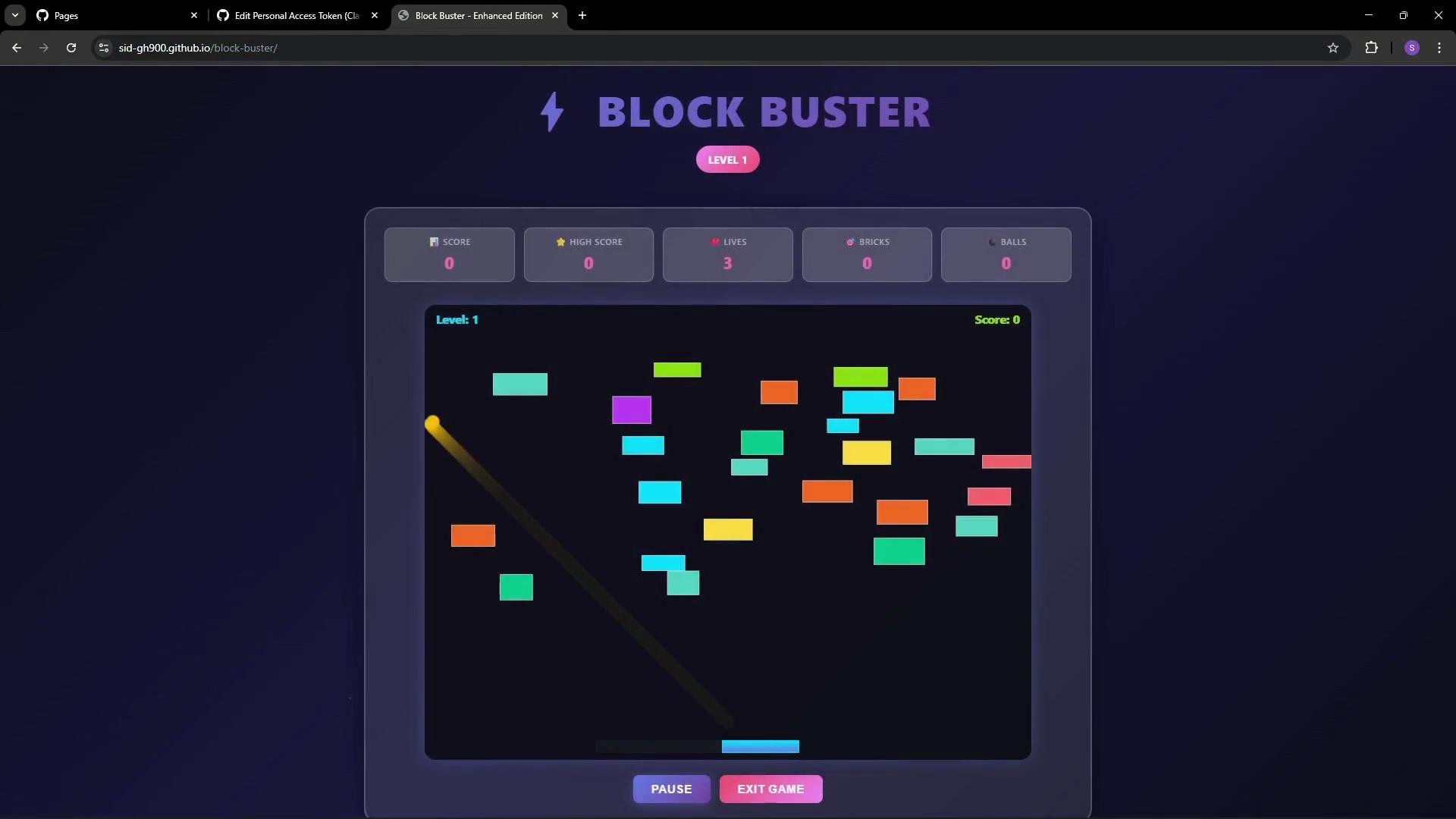
A few minutes after enabling Pages and once the build finishes, the Block Buster game in this repo is served publicly and can be played directly from the GitHub Pages URL.
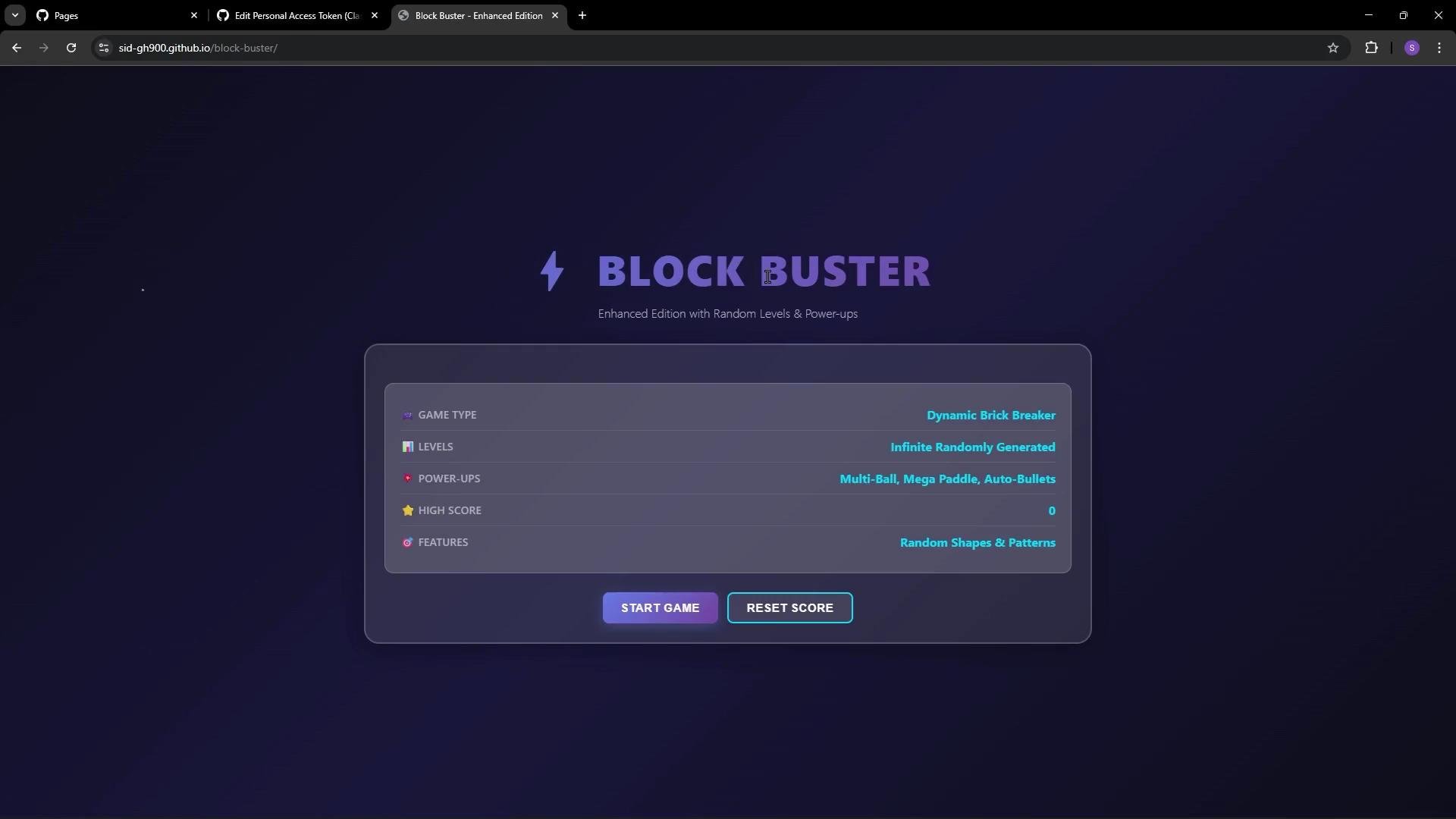 Anyone with the URL can open and play the game in their browser.
 ## Additional configuration and troubleshooting
* Custom domain: Configure a custom domain from the Pages settings if you own a domain. GitHub provides DNS instructions and will create a `CNAME` file for you.
* Themes: For content sites, you can apply a theme (Jekyll themes are available) via the repository settings or a static site generator.
* Common issues:
* 404 after build: Verify `index.html` location and successful build logs.
* Changes not visible: Clear browser cache or force-refresh (Ctrl/⌘+Shift+R).
* HTTPS not enabled: Pages provides HTTPS by default; verify the certificate is active in Pages settings.
## Links and references
* [GitHub Pages documentation](https://docs.github.com/en/pages)
* [GitHub Actions documentation](https://docs.github.com/en/actions)
## Additional configuration and troubleshooting
* Custom domain: Configure a custom domain from the Pages settings if you own a domain. GitHub provides DNS instructions and will create a `CNAME` file for you.
* Themes: For content sites, you can apply a theme (Jekyll themes are available) via the repository settings or a static site generator.
* Common issues:
* 404 after build: Verify `index.html` location and successful build logs.
* Changes not visible: Clear browser cache or force-refresh (Ctrl/⌘+Shift+R).
* HTTPS not enabled: Pages provides HTTPS by default; verify the certificate is active in Pages settings.
## Links and references
* [GitHub Pages documentation](https://docs.github.com/en/pages)
* [GitHub Actions documentation](https://docs.github.com/en/actions)