> ## Documentation Index
> Fetch the complete documentation index at: https://notes.kodekloud.com/llms.txt
> Use this file to discover all available pages before exploring further.
# GitHub Wiki Pages
> Guide to using GitHub repository wikis, covering enabling, editing, cloning, permissions, and when to use wikis versus README or docs for project documentation.
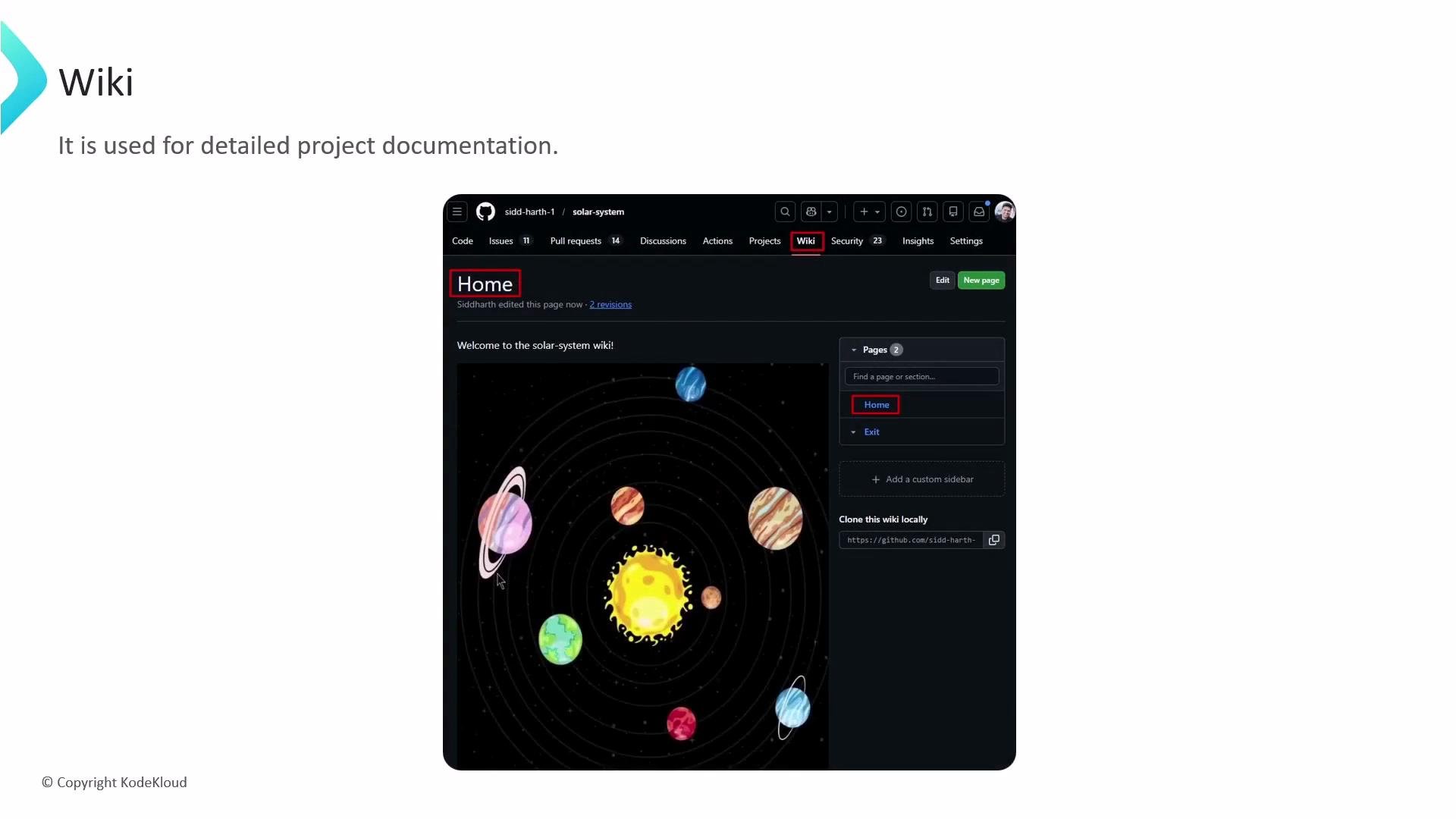
GitHub repositories can include a dedicated wiki for hosting long-form project documentation. While the repository README gives a quick start and overview, the wiki is ideal for detailed guides such as user manuals, architecture notes, and project philosophies. The screenshot below shows a sample repository wiki page with sidebar navigation.
 ## Enable the wiki for a repository
1. Open the repository on GitHub.
2. Go to **Settings → Features**.
3. Check the **Wikis** option to enable the wiki for that repository.
## Create and edit wiki pages
* Click the **Wiki** tab in the repository UI to create and edit pages directly in the browser.
* Pages support Markdown (and other formats) and can include headings, links, images, and internal navigation.
* Add special files like `_Sidebar.md` and `_Footer.md` to customize the sidebar and footer that appear across all wiki pages.
If your repository is public, be aware that the wiki can be edited by contributors depending on repository settings. Use the "Restrict editing to users with push access" option to limit who can update the wiki.
## Work with the wiki as a Git repository
Each wiki is a separate Git repository. Clone it locally, edit Markdown files, and push changes like any other repository:
```bash theme={null}
# Clone the wiki repository (replace OWNER and REPO with your values)
git clone https://github.com/OWNER/REPO.wiki.git
cd REPO.wiki
# Create or edit pages as Markdown files, then commit and push
git add .
git commit -m "Update wiki pages"
# Push to the wiki repository's default branch (often 'main' or 'master')
git push origin HEAD
```
This workflow lets you use your favorite editor and local tools to manage wiki content.
## Permissions, workflows, and review considerations
* By default, wiki edits are made through the web UI by users with repository access.
* You can restrict editing to collaborators with push access via repository settings.
* Wikis do not use the same pull-request (PR) review model as the main repository. If you require PR-based reviews, CI checks, or stricter versioning for documentation, consider keeping docs in the main repository instead.
## When to use Wiki vs README vs docs/
Use the following guidance to choose the right place for documentation:
| Resource | Best for | Typical example |
| -------------- | --------------------------------------------------------------------------------------------: | ------------------------------------------------------------------- |
| README | Short onboarding, quick start, and high-level overview | `README.md` with quick-start commands and examples |
| Wiki | Long-form, evolving, page-oriented documentation that benefits from a simple editing UI | How-to guides, architecture overviews, and tutorials |
| `docs/` folder | Documentation that needs PR reviews, CI integration, or static-site publishing (GitHub Pages) | `docs/` published with a static site generator and reviewed via PRs |
## Links and references
* [GitHub Docs: About wikis](https://docs.github.com/en/communities/documenting-your-project-with-wikis/about-wikis)
* [GitHub Docs: Cloning a wiki locally](https://docs.github.com/en/communities/documenting-your-project-with-wikis/creating-and-editing-wiki-pages)
* [GitHub Pages](https://pages.github.com/)
Wikis are great for collaborative, long-form documentation. If you need documentation that must be reviewed via pull requests or integrated with CI, prefer the repository `docs/` directory and GitHub Pages instead.
## Enable the wiki for a repository
1. Open the repository on GitHub.
2. Go to **Settings → Features**.
3. Check the **Wikis** option to enable the wiki for that repository.
## Create and edit wiki pages
* Click the **Wiki** tab in the repository UI to create and edit pages directly in the browser.
* Pages support Markdown (and other formats) and can include headings, links, images, and internal navigation.
* Add special files like `_Sidebar.md` and `_Footer.md` to customize the sidebar and footer that appear across all wiki pages.
If your repository is public, be aware that the wiki can be edited by contributors depending on repository settings. Use the "Restrict editing to users with push access" option to limit who can update the wiki.
## Work with the wiki as a Git repository
Each wiki is a separate Git repository. Clone it locally, edit Markdown files, and push changes like any other repository:
```bash theme={null}
# Clone the wiki repository (replace OWNER and REPO with your values)
git clone https://github.com/OWNER/REPO.wiki.git
cd REPO.wiki
# Create or edit pages as Markdown files, then commit and push
git add .
git commit -m "Update wiki pages"
# Push to the wiki repository's default branch (often 'main' or 'master')
git push origin HEAD
```
This workflow lets you use your favorite editor and local tools to manage wiki content.
## Permissions, workflows, and review considerations
* By default, wiki edits are made through the web UI by users with repository access.
* You can restrict editing to collaborators with push access via repository settings.
* Wikis do not use the same pull-request (PR) review model as the main repository. If you require PR-based reviews, CI checks, or stricter versioning for documentation, consider keeping docs in the main repository instead.
## When to use Wiki vs README vs docs/
Use the following guidance to choose the right place for documentation:
| Resource | Best for | Typical example |
| -------------- | --------------------------------------------------------------------------------------------: | ------------------------------------------------------------------- |
| README | Short onboarding, quick start, and high-level overview | `README.md` with quick-start commands and examples |
| Wiki | Long-form, evolving, page-oriented documentation that benefits from a simple editing UI | How-to guides, architecture overviews, and tutorials |
| `docs/` folder | Documentation that needs PR reviews, CI integration, or static-site publishing (GitHub Pages) | `docs/` published with a static site generator and reviewed via PRs |
## Links and references
* [GitHub Docs: About wikis](https://docs.github.com/en/communities/documenting-your-project-with-wikis/about-wikis)
* [GitHub Docs: Cloning a wiki locally](https://docs.github.com/en/communities/documenting-your-project-with-wikis/creating-and-editing-wiki-pages)
* [GitHub Pages](https://pages.github.com/)
Wikis are great for collaborative, long-form documentation. If you need documentation that must be reviewed via pull requests or integrated with CI, prefer the repository `docs/` directory and GitHub Pages instead.