> ## Documentation Index
> Fetch the complete documentation index at: https://notes.kodekloud.com/llms.txt
> Use this file to discover all available pages before exploring further.
# Demo GitHub Actions Marketplace
> Guide to adding Super-Linter from the GitHub Actions Marketplace to automate HTML CSS and JavaScript linting in workflows with configuration and best practices
GitHub Marketplace helps you extend workflows with community and partner Actions, applications, and services that streamline CI/CD tasks such as linting, testing, and deployment. In the Actions marketplace you can filter by use case (for example: API management, code review, linting) and install reusable Actions to automate routine checks.
In this lesson we'll add an automated linting step to a workflow so the repository runs static analysis on HTML, CSS, and JavaScript files. Running linters early helps surface quality and syntax issues before code is merged.
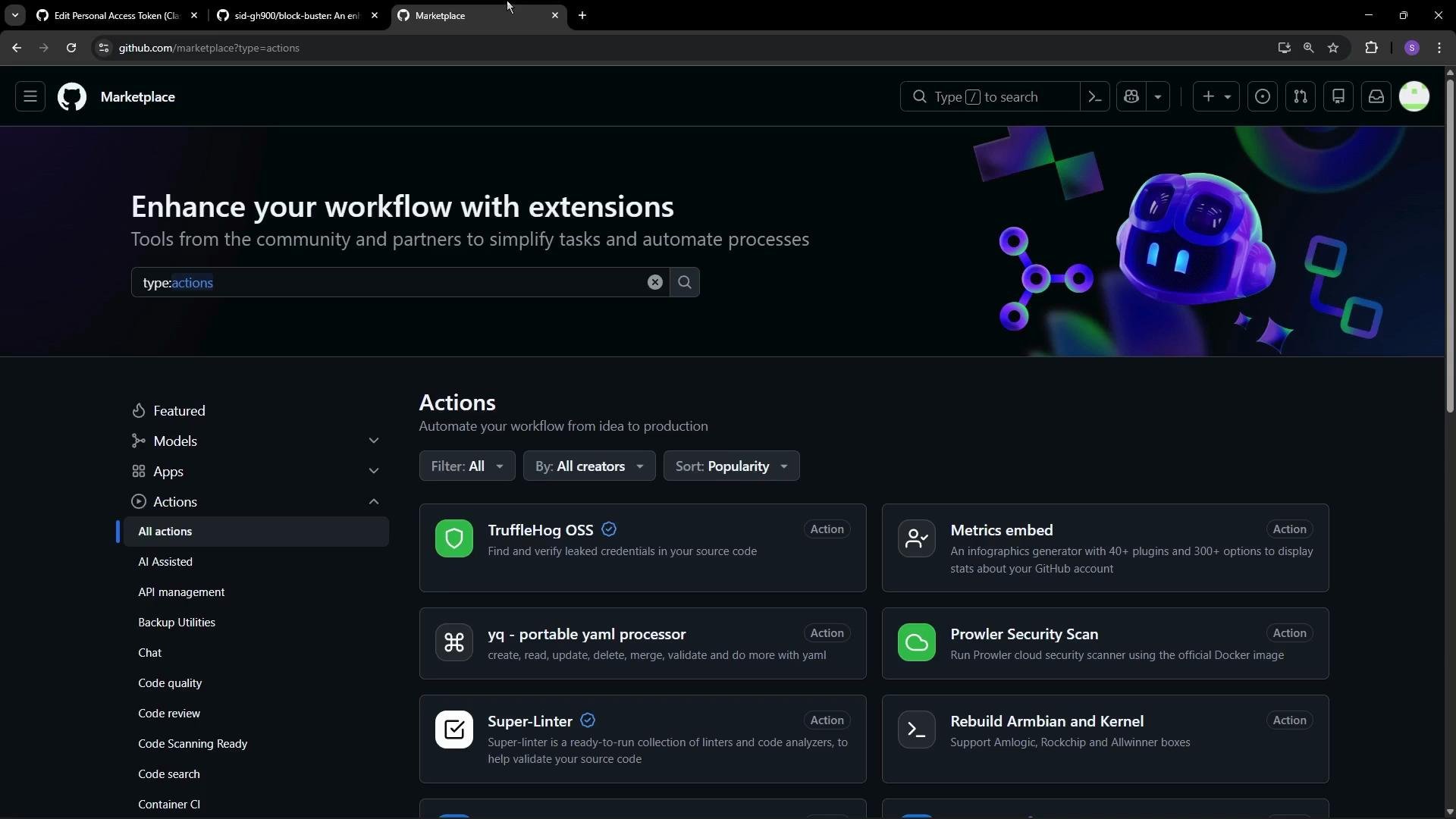 How to choose an Action
* Search the Marketplace for relevant keywords, e.g., "lint".
* Look for a check/tick icon (verified Actions) — this indicates GitHub has vetted the publisher.
* Always review the Action’s README and source code before adding it to important workflows.
Verified actions (the tick/check icon) indicate that GitHub has vetted the publisher. Prefer verified actions when possible, but always review the action's documentation and code before using it in important workflows.
One widely used option is Super-Linter, a community-maintained Action that bundles multiple linters and formatters so you can validate many file types with a single step. The repository and Marketplace page list supported linters, configuration options, usage examples, and environment variables you can set to tune behavior.
How to choose an Action
* Search the Marketplace for relevant keywords, e.g., "lint".
* Look for a check/tick icon (verified Actions) — this indicates GitHub has vetted the publisher.
* Always review the Action’s README and source code before adding it to important workflows.
Verified actions (the tick/check icon) indicate that GitHub has vetted the publisher. Prefer verified actions when possible, but always review the action's documentation and code before using it in important workflows.
One widely used option is Super-Linter, a community-maintained Action that bundles multiple linters and formatters so you can validate many file types with a single step. The repository and Marketplace page list supported linters, configuration options, usage examples, and environment variables you can set to tune behavior.
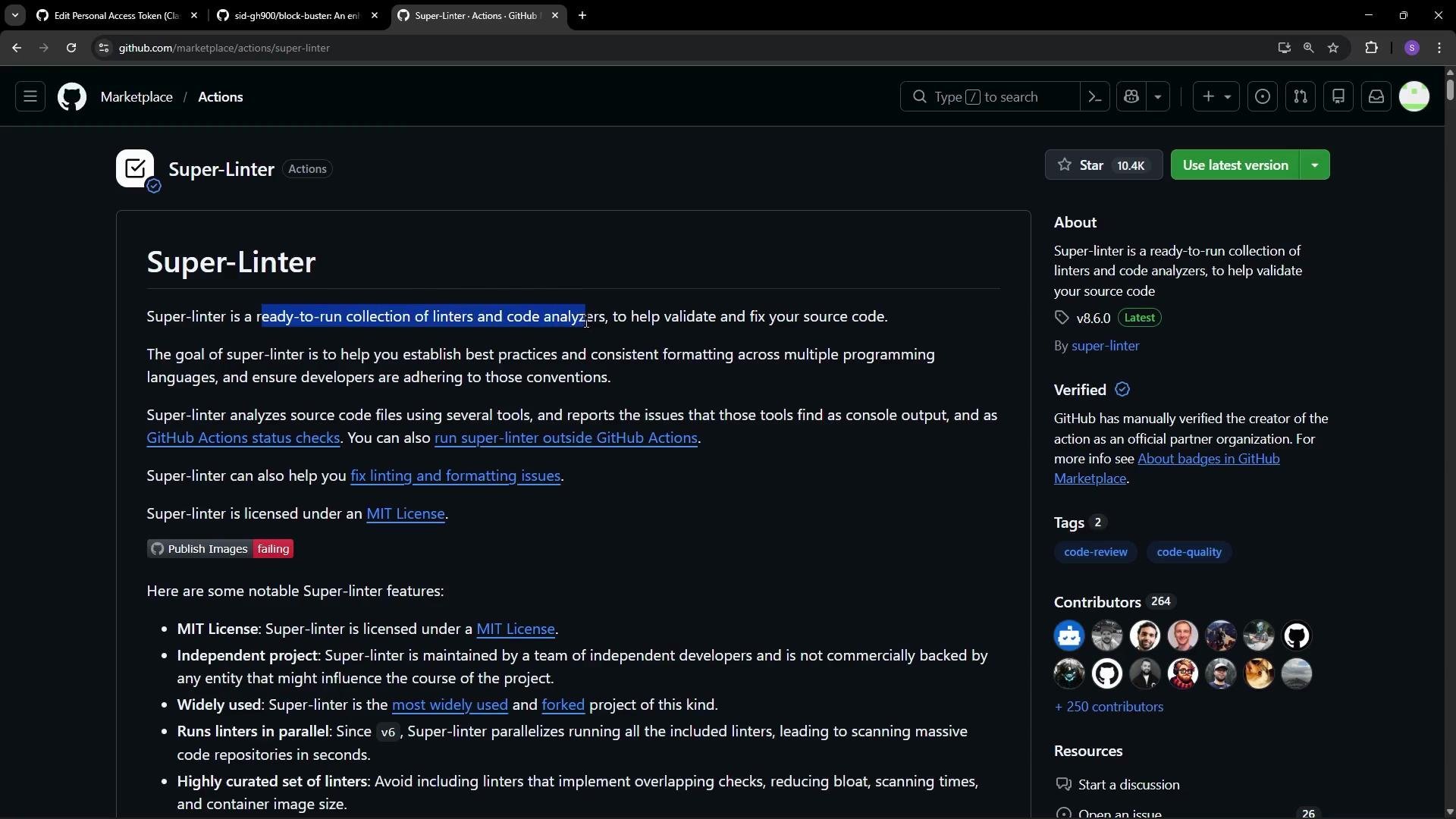 Super-Linter configuration
* You can configure which linters run, whether to lint the whole repository or only changed files, and which branch to compare against.
* These options are typically set with environment variables on the `uses:` step that runs the Action.
Super-Linter configuration
* You can configure which linters run, whether to lint the whole repository or only changed files, and which branch to compare against.
* These options are typically set with environment variables on the `uses:` step that runs the Action.
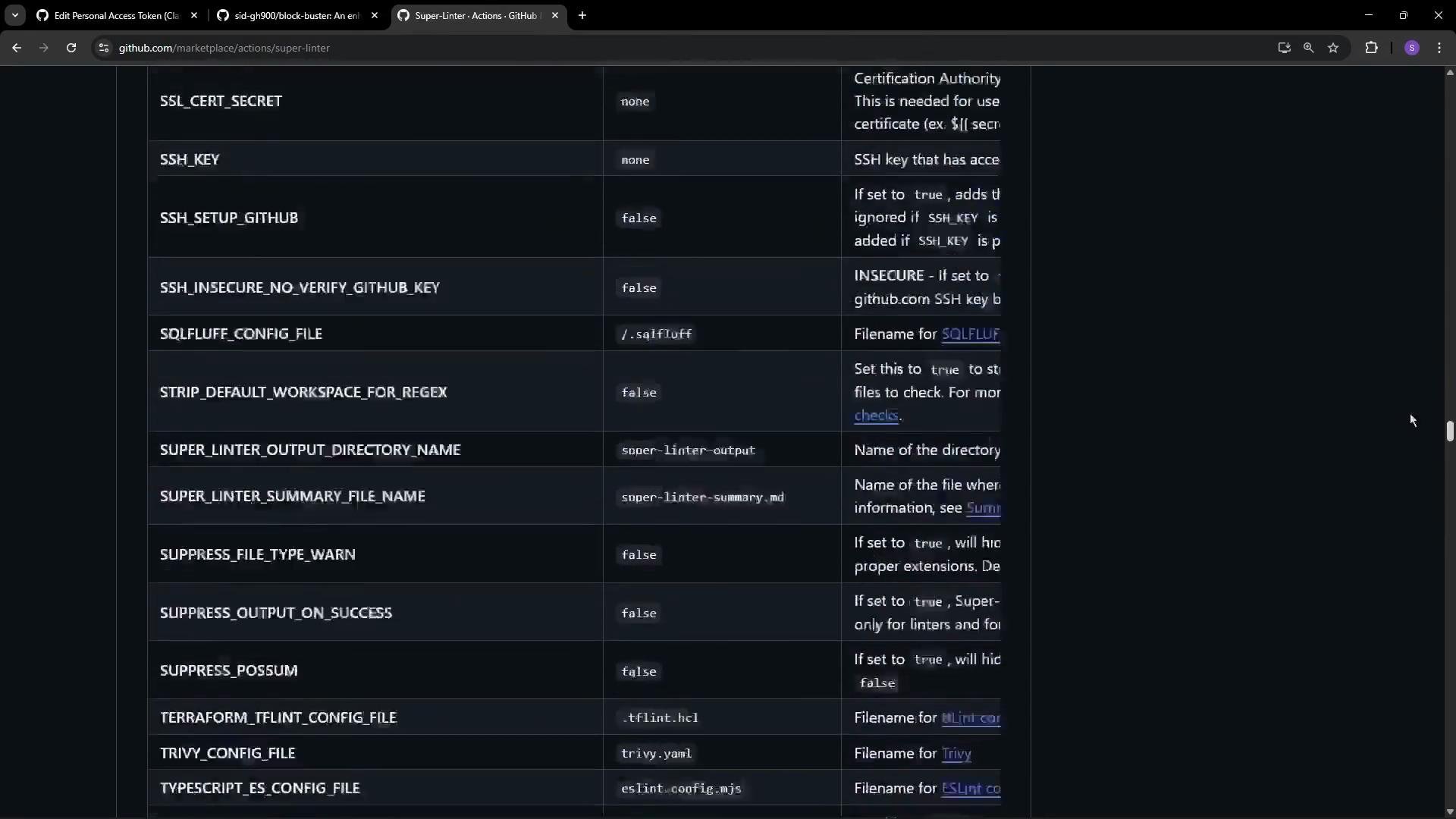 Example workflow (consolidated)
Below is a concise, final YAML example that checks out the repository, verifies a core file exists, and runs Super-Linter. This workflow triggers on pushes and pull requests to `main`.
```yaml theme={null}
name: Game Quality Check
on:
push:
branches: [ main ]
pull_request:
branches: [ main ]
jobs:
lint-and-test:
runs-on: ubuntu-latest
steps:
# Step 1: Check out the repository
- name: Checkout Repository
uses: actions/checkout@v4
# Step 2: Simple validation: ensure index.html exists
- name: Verify Core Files
run: |
if [ -f "index.html" ]; then
echo "📄 index.html found. Ready for launch!"
else
echo "❌ index.html is missing! Game will not load."
exit 1
fi
# Step 3: Run Super-Linter to validate code (HTML, JS, CSS)
- name: Lint Code Base
uses: github/super-linter@v5
env:
VALIDATE_ALL_CODEBASE: true # true = lint entire repo; false = lint changed files only
DEFAULT_BRANCH: main
GITHUB_TOKEN: ${{ secrets.GITHUB_TOKEN }}
VALIDATE_HTML: true
VALIDATE_JAVASCRIPT_ES: true
VALIDATE_CSS: true
```
Key environment variables
| Variable | Purpose | Example / Notes |
| ------------------------ | ------------------------------------------------------------------------- | ------------------------------------------------------------- |
| `VALIDATE_ALL_CODEBASE` | Controls whether Super-Linter scans the entire repo or only changed files | `true` (scan everything) or `false` (scan changed files only) |
| `DEFAULT_BRANCH` | Branch to compare against when determining changed files | `main` or `master` |
| `GITHUB_TOKEN` | Token that allows the Action to access repo data and post results | use `${{ secrets.GITHUB_TOKEN }}` |
| `VALIDATE_HTML` | Enable/disable HTML linter | `true` / `false` |
| `VALIDATE_JAVASCRIPT_ES` | Enable/disable ESLint checks for JavaScript | `true` / `false` |
| `VALIDATE_CSS` | Enable/disable CSS linters (e.g., stylelint) | `true` / `false` |
What happens during a run
* The workflow checks out your repository.
* It runs a quick validation step (example: ensure `index.html` exists).
* It runs Super-Linter (as a Docker container) with the provided environment variables.
* Super-Linter invokes the configured linters and returns any issues. If any linter exits non-zero, the Action step fails and the job is marked failed.
Example of the run output (abridged)
```bash theme={null}
Run if [ -f "index.html" ]; then
index.html found. Ready for launch!
fi
Run github/super-linter@v5
env:
VALIDATE_ALL_CODEBASE: true
DEFAULT_BRANCH: main
GITHUB_TOKEN: ***
VALIDATE_HTML: true
VALIDATE_JAVASCRIPT_ES: true
VALIDATE_CSS: true
/usr/bin/docker run --name ghcriosuperlinterv5 --workdir /github/workspace --rm \
-e "VALIDATE_ALL_CODEBASE" -e "DEFAULT_BRANCH" -e "GITHUB_TOKEN" \
-e "VALIDATE_HTML" -e "VALIDATE_JAVASCRIPT_ES" -e "VALIDATE_CSS" \
ghcr.io/github/super-linter:5
```
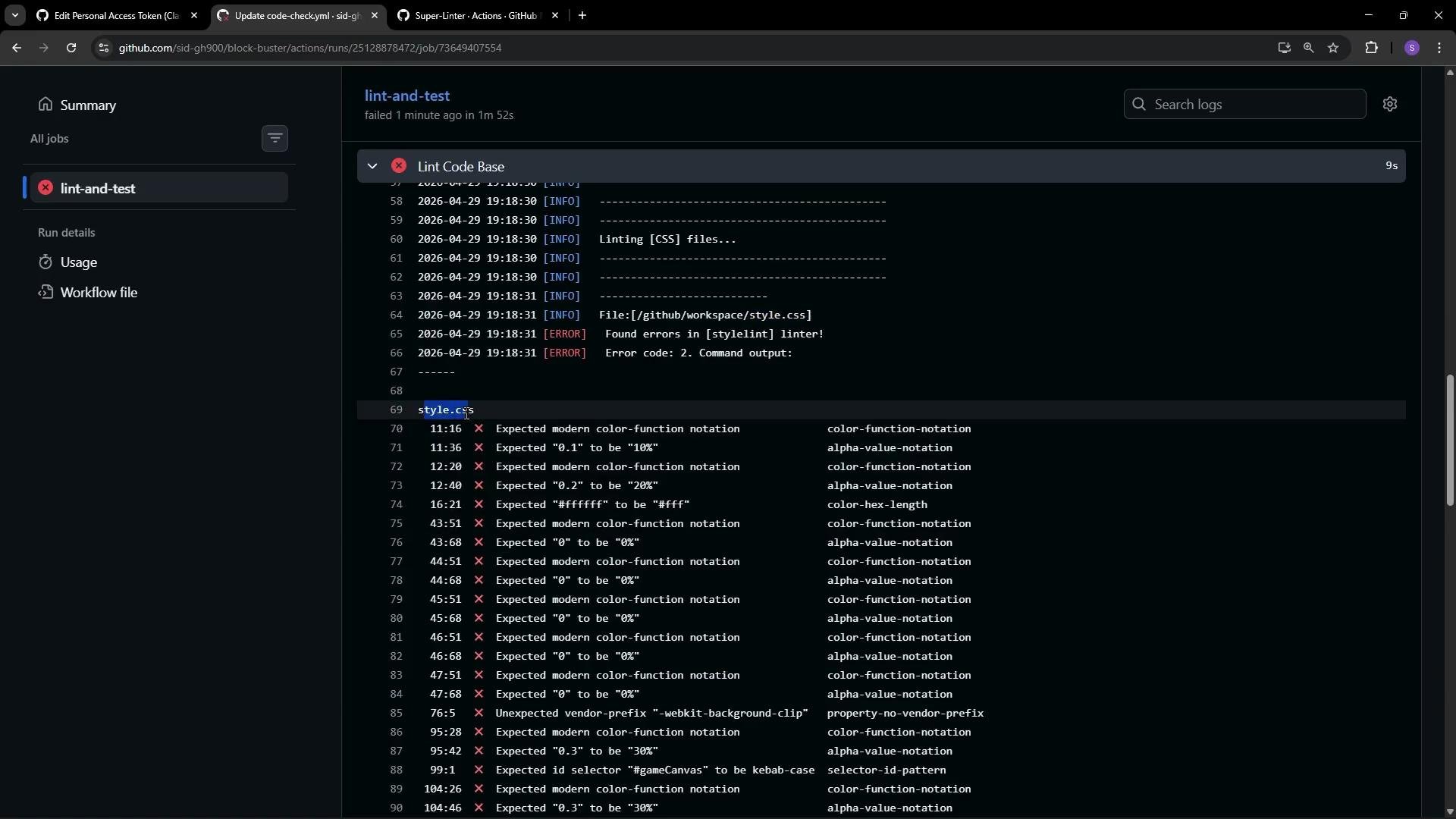
Typical linter failure example (stylelint output)
```text theme={null}
File: [/github/workspace/style.css]
Found errors in [stylelint] linter!
Error code: 2. Command output:
style.css
11:16 × Expected modern color-function notation color-function-notation
12:20 × Expected "0.1" to be "10" alpha-value-notation
12:40 × Expected "2" to be "20" alpha-value-notation
43:31 × Expected "#ffffff" to be "#fff" color-hex-length
41:51 × Expected modern color-function notation color-function-notation
```
If Super-Linter reports issues, the linter step exits with a non-zero code and the workflow run is marked as failed. In the run shown below, the verification step passed but the lint step failed due to CSS/HTML problems.
Example workflow (consolidated)
Below is a concise, final YAML example that checks out the repository, verifies a core file exists, and runs Super-Linter. This workflow triggers on pushes and pull requests to `main`.
```yaml theme={null}
name: Game Quality Check
on:
push:
branches: [ main ]
pull_request:
branches: [ main ]
jobs:
lint-and-test:
runs-on: ubuntu-latest
steps:
# Step 1: Check out the repository
- name: Checkout Repository
uses: actions/checkout@v4
# Step 2: Simple validation: ensure index.html exists
- name: Verify Core Files
run: |
if [ -f "index.html" ]; then
echo "📄 index.html found. Ready for launch!"
else
echo "❌ index.html is missing! Game will not load."
exit 1
fi
# Step 3: Run Super-Linter to validate code (HTML, JS, CSS)
- name: Lint Code Base
uses: github/super-linter@v5
env:
VALIDATE_ALL_CODEBASE: true # true = lint entire repo; false = lint changed files only
DEFAULT_BRANCH: main
GITHUB_TOKEN: ${{ secrets.GITHUB_TOKEN }}
VALIDATE_HTML: true
VALIDATE_JAVASCRIPT_ES: true
VALIDATE_CSS: true
```
Key environment variables
| Variable | Purpose | Example / Notes |
| ------------------------ | ------------------------------------------------------------------------- | ------------------------------------------------------------- |
| `VALIDATE_ALL_CODEBASE` | Controls whether Super-Linter scans the entire repo or only changed files | `true` (scan everything) or `false` (scan changed files only) |
| `DEFAULT_BRANCH` | Branch to compare against when determining changed files | `main` or `master` |
| `GITHUB_TOKEN` | Token that allows the Action to access repo data and post results | use `${{ secrets.GITHUB_TOKEN }}` |
| `VALIDATE_HTML` | Enable/disable HTML linter | `true` / `false` |
| `VALIDATE_JAVASCRIPT_ES` | Enable/disable ESLint checks for JavaScript | `true` / `false` |
| `VALIDATE_CSS` | Enable/disable CSS linters (e.g., stylelint) | `true` / `false` |
What happens during a run
* The workflow checks out your repository.
* It runs a quick validation step (example: ensure `index.html` exists).
* It runs Super-Linter (as a Docker container) with the provided environment variables.
* Super-Linter invokes the configured linters and returns any issues. If any linter exits non-zero, the Action step fails and the job is marked failed.
Example of the run output (abridged)
```bash theme={null}
Run if [ -f "index.html" ]; then
index.html found. Ready for launch!
fi
Run github/super-linter@v5
env:
VALIDATE_ALL_CODEBASE: true
DEFAULT_BRANCH: main
GITHUB_TOKEN: ***
VALIDATE_HTML: true
VALIDATE_JAVASCRIPT_ES: true
VALIDATE_CSS: true
/usr/bin/docker run --name ghcriosuperlinterv5 --workdir /github/workspace --rm \
-e "VALIDATE_ALL_CODEBASE" -e "DEFAULT_BRANCH" -e "GITHUB_TOKEN" \
-e "VALIDATE_HTML" -e "VALIDATE_JAVASCRIPT_ES" -e "VALIDATE_CSS" \
ghcr.io/github/super-linter:5
```
Typical linter failure example (stylelint output)
```text theme={null}
File: [/github/workspace/style.css]
Found errors in [stylelint] linter!
Error code: 2. Command output:
style.css
11:16 × Expected modern color-function notation color-function-notation
12:20 × Expected "0.1" to be "10" alpha-value-notation
12:40 × Expected "2" to be "20" alpha-value-notation
43:31 × Expected "#ffffff" to be "#fff" color-hex-length
41:51 × Expected modern color-function notation color-function-notation
```
If Super-Linter reports issues, the linter step exits with a non-zero code and the workflow run is marked as failed. In the run shown below, the verification step passed but the lint step failed due to CSS/HTML problems.
 Best practices and next steps
* Start by running linters on the full codebase to get a baseline, then move to changed-files-only for performance.
* Configure only the linters you need to reduce noise.
* Use annotations and PR comments (if supported) to surface issues directly in pull requests.
* When integrating third-party Actions, review the Action's source and restrict permissions using least privilege.
Review third-party Action code and limit workflow permissions. Even verified Actions may have configuration or permission implications—always check the source repository and apply the principle of least privilege.
Links and references
* Super-Linter repository: [https://github.com/github/super-linter](https://github.com/github/super-linter)
* GitHub Marketplace: [https://github.com/marketplace](https://github.com/marketplace)
* GitHub Actions docs: [https://docs.github.com/actions](https://docs.github.com/actions)
Best practices and next steps
* Start by running linters on the full codebase to get a baseline, then move to changed-files-only for performance.
* Configure only the linters you need to reduce noise.
* Use annotations and PR comments (if supported) to surface issues directly in pull requests.
* When integrating third-party Actions, review the Action's source and restrict permissions using least privilege.
Review third-party Action code and limit workflow permissions. Even verified Actions may have configuration or permission implications—always check the source repository and apply the principle of least privilege.
Links and references
* Super-Linter repository: [https://github.com/github/super-linter](https://github.com/github/super-linter)
* GitHub Marketplace: [https://github.com/marketplace](https://github.com/marketplace)
* GitHub Actions docs: [https://docs.github.com/actions](https://docs.github.com/actions)