> ## Documentation Index
> Fetch the complete documentation index at: https://notes.kodekloud.com/llms.txt
> Use this file to discover all available pages before exploring further.
# Finding Existing GitHub Actions
> Guide to finding and evaluating GitHub Actions in the Marketplace while assessing security, pinning versions, and following best practices to reduce supply chain risk
Where do we find existing GitHub Actions?
GitHub Actions are reusable automation components for workflows. They let you integrate tools and services into your CI/CD pipelines without reinventing common tasks. Actions can be authored by GitHub, partner organizations, or the community — enabling easy sharing and reuse across repositories.
The primary place to discover and evaluate actions is the GitHub Marketplace: [https://github.com/marketplace?type=actions](https://github.com/marketplace?type=actions). Marketplace listings show badges for GitHub-verified partners as well as community-created actions. Verified actions generally provide a higher level of trust, but community actions can also be useful when reviewed carefully.
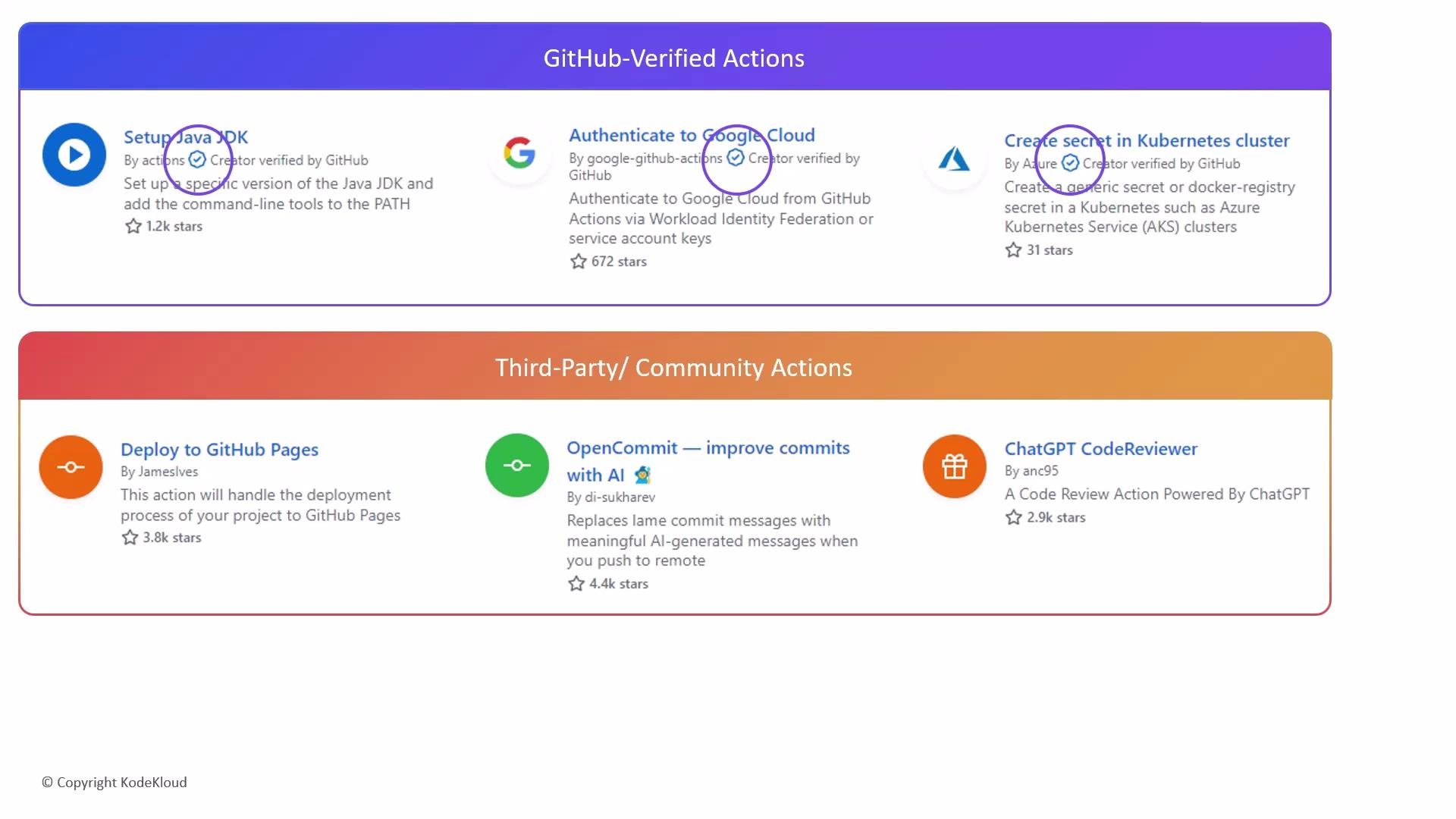 Before adopting any third-party action, inspect its source code, documentation, and permissions to ensure it fits your security and maintenance standards.
When possible, prefer GitHub-verified actions. Always pin third-party actions to a specific tag or commit SHA to reduce supply-chain risk and avoid using moving references like `@main`.
Evaluation checklist
| What to check | Why it matters | How to verify |
| ----------------------------- | ----------------------------------------- | ------------------------------------------------------------------------------------ |
| Repository health | Determines maintenance and responsiveness | Look for recent commits, open/closed issues, PR activity, and number of contributors |
| Source code & README | Confirms behavior and inputs/outputs | Review the code, example usages, tests, and documented inputs/secrets |
| Permissions & required scopes | Prevents over-privileged workflows | Check the action README and your workflow’s `permissions` block (see docs) |
| Release strategy | Locks behavior to a known good version | Prefer `uses: owner/repo@v1.2.3` or a commit SHA over branch names like `@main` |
| License & ownership | Ensures legal and support clarity | Verify license file and maintainer information in the repo |
| Community signals | Helps gauge trustworthiness | Stars, forks, issues, and external references or blog posts help assess adoption |
Example: pin an action to a commit SHA in your workflow
```yaml theme={null}
# .github/workflows/ci.yml
jobs:
build:
runs-on: ubuntu-latest
steps:
- uses: actions/checkout@v3
- name: Run a pinned community action
uses: user/action-name@4f2c3b1a9e8d6f7a0b1c2d3e4f5a6b7c8d9e0f1
with:
example-input: value
```
See the `actions/checkout` repository for implementation details: [https://github.com/actions/checkout](https://github.com/actions/checkout)
Additional practical tips
* Use Dependabot and other supply-chain tools to monitor action updates and vulnerabilities: [https://docs.github.com/en/code-security/supply-chain-security/keeping-your-dependencies-updated-automatically/about-dependabot](https://docs.github.com/en/code-security/supply-chain-security/keeping-your-dependencies-updated-automatically/about-dependabot)
* Limit repository secrets to only what workflows require; avoid exposing secrets to untrusted actions.
* If an action is useful but you need to audit or customize it, fork the repository and use your forked reference in workflows.
* Consider running untrusted actions inside isolated repositories or environments until audited.
Be cautious with actions that request broad permissions or ask for sensitive inputs. Always pin to a release tag or a commit SHA, and prefer audited or verified actions for production workflows.
Links and references
* GitHub Marketplace (Actions): [https://github.com/marketplace?type=actions](https://github.com/marketplace?type=actions)
* GitHub Actions permissions docs: [https://docs.github.com/en/actions/learn-github-actions/workflow-syntax-for-github-actions#permissions](https://docs.github.com/en/actions/learn-github-actions/workflow-syntax-for-github-actions#permissions)
* Dependabot: [https://docs.github.com/en/code-security/supply-chain-security/keeping-your-dependencies-updated-automatically/about-dependabot](https://docs.github.com/en/code-security/supply-chain-security/keeping-your-dependencies-updated-automatically/about-dependabot)
* actions/checkout repository: [https://github.com/actions/checkout](https://github.com/actions/checkout)
Before adopting any third-party action, inspect its source code, documentation, and permissions to ensure it fits your security and maintenance standards.
When possible, prefer GitHub-verified actions. Always pin third-party actions to a specific tag or commit SHA to reduce supply-chain risk and avoid using moving references like `@main`.
Evaluation checklist
| What to check | Why it matters | How to verify |
| ----------------------------- | ----------------------------------------- | ------------------------------------------------------------------------------------ |
| Repository health | Determines maintenance and responsiveness | Look for recent commits, open/closed issues, PR activity, and number of contributors |
| Source code & README | Confirms behavior and inputs/outputs | Review the code, example usages, tests, and documented inputs/secrets |
| Permissions & required scopes | Prevents over-privileged workflows | Check the action README and your workflow’s `permissions` block (see docs) |
| Release strategy | Locks behavior to a known good version | Prefer `uses: owner/repo@v1.2.3` or a commit SHA over branch names like `@main` |
| License & ownership | Ensures legal and support clarity | Verify license file and maintainer information in the repo |
| Community signals | Helps gauge trustworthiness | Stars, forks, issues, and external references or blog posts help assess adoption |
Example: pin an action to a commit SHA in your workflow
```yaml theme={null}
# .github/workflows/ci.yml
jobs:
build:
runs-on: ubuntu-latest
steps:
- uses: actions/checkout@v3
- name: Run a pinned community action
uses: user/action-name@4f2c3b1a9e8d6f7a0b1c2d3e4f5a6b7c8d9e0f1
with:
example-input: value
```
See the `actions/checkout` repository for implementation details: [https://github.com/actions/checkout](https://github.com/actions/checkout)
Additional practical tips
* Use Dependabot and other supply-chain tools to monitor action updates and vulnerabilities: [https://docs.github.com/en/code-security/supply-chain-security/keeping-your-dependencies-updated-automatically/about-dependabot](https://docs.github.com/en/code-security/supply-chain-security/keeping-your-dependencies-updated-automatically/about-dependabot)
* Limit repository secrets to only what workflows require; avoid exposing secrets to untrusted actions.
* If an action is useful but you need to audit or customize it, fork the repository and use your forked reference in workflows.
* Consider running untrusted actions inside isolated repositories or environments until audited.
Be cautious with actions that request broad permissions or ask for sensitive inputs. Always pin to a release tag or a commit SHA, and prefer audited or verified actions for production workflows.
Links and references
* GitHub Marketplace (Actions): [https://github.com/marketplace?type=actions](https://github.com/marketplace?type=actions)
* GitHub Actions permissions docs: [https://docs.github.com/en/actions/learn-github-actions/workflow-syntax-for-github-actions#permissions](https://docs.github.com/en/actions/learn-github-actions/workflow-syntax-for-github-actions#permissions)
* Dependabot: [https://docs.github.com/en/code-security/supply-chain-security/keeping-your-dependencies-updated-automatically/about-dependabot](https://docs.github.com/en/code-security/supply-chain-security/keeping-your-dependencies-updated-automatically/about-dependabot)
* actions/checkout repository: [https://github.com/actions/checkout](https://github.com/actions/checkout)