> ## Documentation Index
> Fetch the complete documentation index at: https://notes.kodekloud.com/llms.txt
> Use this file to discover all available pages before exploring further.
# Using GitHub Actions Within GitHub
> Overview of GitHub Actions as a general purpose automation platform for workflows triggered by repository events, schedules, or manual triggers, covering use cases and best practices
So where do we use GitHub Actions in GitHub?
Is GitHub Actions solely used for automating CI/CD pipelines for building, testing, and releasing code?
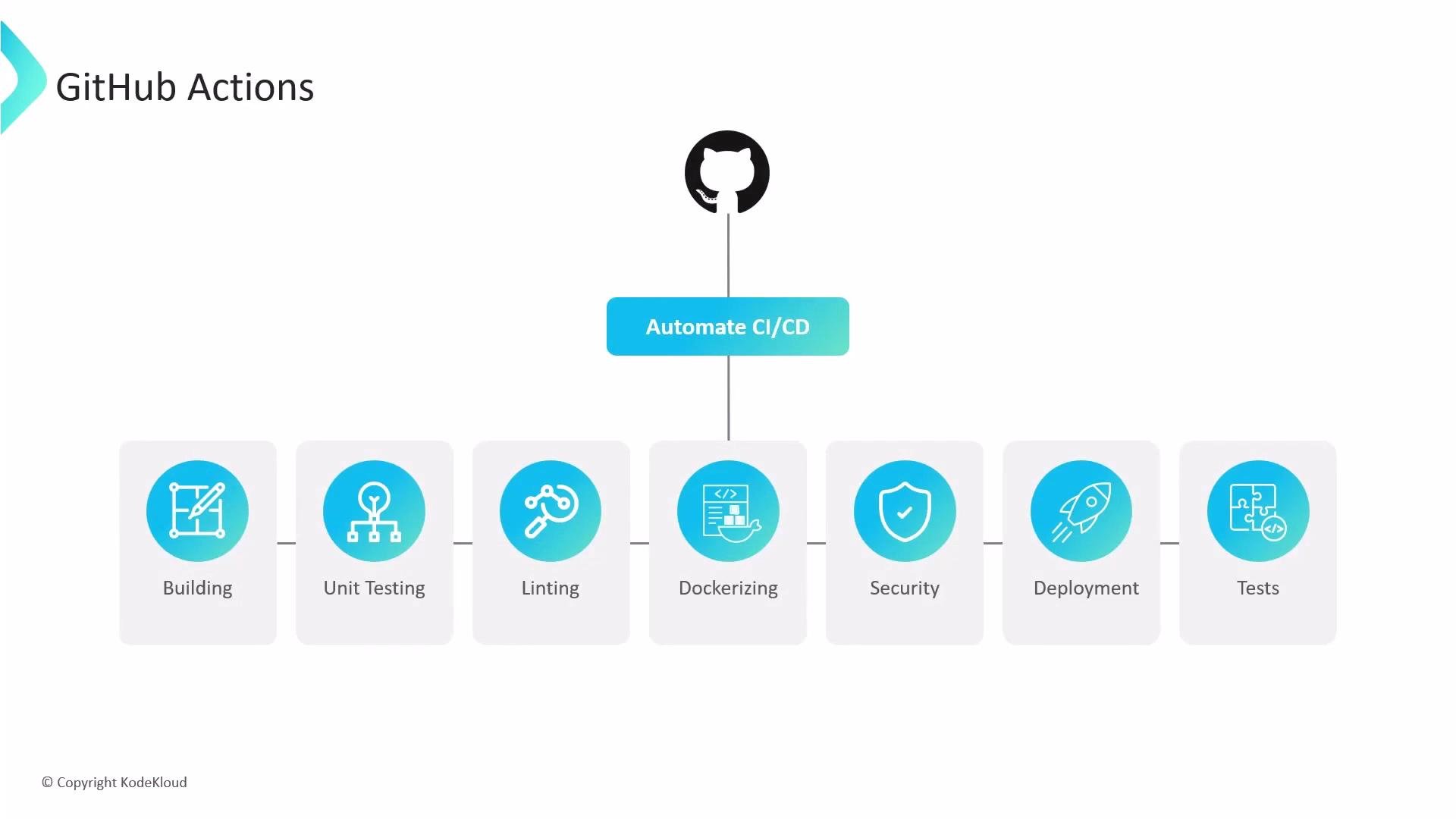 No — GitHub Actions is far more than just CI/CD.
GitHub Actions is a flexible automation and orchestration platform built into GitHub that runs workflows in response to repository events, time-based schedules, manual triggers, or external signals. You can use Actions to automate many repository tasks, including but not limited to building and releasing code.
Common events and triggers you can use to start workflows include `push`, `pull_request`, `issues`, `release`, `package`, `workflow_dispatch` (manual), `schedule` (cron), and `repository_dispatch` (external systems). Other triggers include label changes, issue comments, project events, Dependabot alerts, and security alerts—making Actions useful for issue triage, security scanning, publishing packages, and automated deployments.
GitHub Actions can be triggered by a wide variety of repository events. Use `workflow_dispatch` for manual runs, `schedule` for periodic checks, and `repository_dispatch` to integrate external CI or automation systems.
Here are typical automation use cases for GitHub Actions:
* Auto-labeling, triaging, and responding to issues or pull requests.
* Running unit tests, linting, and integration tests on `push` and `pull_request`.
* Publishing packages to registries on `release` or `package` events.
* Running security scans, license checks, and dependency updates on a schedule.
* Building Docker images and deploying artifacts after a successful build.
* Triggering workflows from external systems via `repository_dispatch`.
Common triggers and examples
| Trigger | When it runs | Example use case |
| --------------------- | ----------------------------------------------- | -------------------------------------------- |
| `push` | When commits are pushed to branches or tags | Run CI (build/test) on every commit |
| `pull_request` | When a PR is opened, synchronized, or closed | Run PR validations and review checks |
| `issues` | On issue events (`opened`, `edited`, `labeled`) | Auto-label or triage incoming issues |
| `release` | When a release is created or published | Publish artifacts or trigger deployments |
| `package` | When packages are published to GitHub Packages | Notify downstream systems or update docs |
| `workflow_dispatch` | Manual trigger from the Actions UI | Run ad-hoc maintenance workflows |
| `schedule` | Cron-style schedule | Nightly security scans or dependency updates |
| `repository_dispatch` | Called by external services via API | Integrate external CI or automation tools |
Example GitHub Actions triggers in a workflow YAML:
```yaml theme={null}
name: Example workflow
on:
push:
branches: [ main ]
pull_request:
types: [ opened, synchronize ]
schedule:
- cron: '0 0 * * 0' # weekly run
workflow_dispatch: {} # manual trigger
```
Best practices and recommended patterns
* Use event-specific workflows: Keep CI workflows for `push`/`pull_request`, and use separate workflows for scheduled scans, release publishing, or issue automation.
* Limit permissions: Configure workflow permissions and secrets to follow the principle of least privilege.
* Reuse common actions: Publish and use composite actions or reusable workflows to reduce duplication across repositories.
* Monitor runs: Use branch protection rules and required checks to ensure critical workflows must pass before merging.
No — GitHub Actions is far more than just CI/CD.
GitHub Actions is a flexible automation and orchestration platform built into GitHub that runs workflows in response to repository events, time-based schedules, manual triggers, or external signals. You can use Actions to automate many repository tasks, including but not limited to building and releasing code.
Common events and triggers you can use to start workflows include `push`, `pull_request`, `issues`, `release`, `package`, `workflow_dispatch` (manual), `schedule` (cron), and `repository_dispatch` (external systems). Other triggers include label changes, issue comments, project events, Dependabot alerts, and security alerts—making Actions useful for issue triage, security scanning, publishing packages, and automated deployments.
GitHub Actions can be triggered by a wide variety of repository events. Use `workflow_dispatch` for manual runs, `schedule` for periodic checks, and `repository_dispatch` to integrate external CI or automation systems.
Here are typical automation use cases for GitHub Actions:
* Auto-labeling, triaging, and responding to issues or pull requests.
* Running unit tests, linting, and integration tests on `push` and `pull_request`.
* Publishing packages to registries on `release` or `package` events.
* Running security scans, license checks, and dependency updates on a schedule.
* Building Docker images and deploying artifacts after a successful build.
* Triggering workflows from external systems via `repository_dispatch`.
Common triggers and examples
| Trigger | When it runs | Example use case |
| --------------------- | ----------------------------------------------- | -------------------------------------------- |
| `push` | When commits are pushed to branches or tags | Run CI (build/test) on every commit |
| `pull_request` | When a PR is opened, synchronized, or closed | Run PR validations and review checks |
| `issues` | On issue events (`opened`, `edited`, `labeled`) | Auto-label or triage incoming issues |
| `release` | When a release is created or published | Publish artifacts or trigger deployments |
| `package` | When packages are published to GitHub Packages | Notify downstream systems or update docs |
| `workflow_dispatch` | Manual trigger from the Actions UI | Run ad-hoc maintenance workflows |
| `schedule` | Cron-style schedule | Nightly security scans or dependency updates |
| `repository_dispatch` | Called by external services via API | Integrate external CI or automation tools |
Example GitHub Actions triggers in a workflow YAML:
```yaml theme={null}
name: Example workflow
on:
push:
branches: [ main ]
pull_request:
types: [ opened, synchronize ]
schedule:
- cron: '0 0 * * 0' # weekly run
workflow_dispatch: {} # manual trigger
```
Best practices and recommended patterns
* Use event-specific workflows: Keep CI workflows for `push`/`pull_request`, and use separate workflows for scheduled scans, release publishing, or issue automation.
* Limit permissions: Configure workflow permissions and secrets to follow the principle of least privilege.
* Reuse common actions: Publish and use composite actions or reusable workflows to reduce duplication across repositories.
* Monitor runs: Use branch protection rules and required checks to ensure critical workflows must pass before merging.
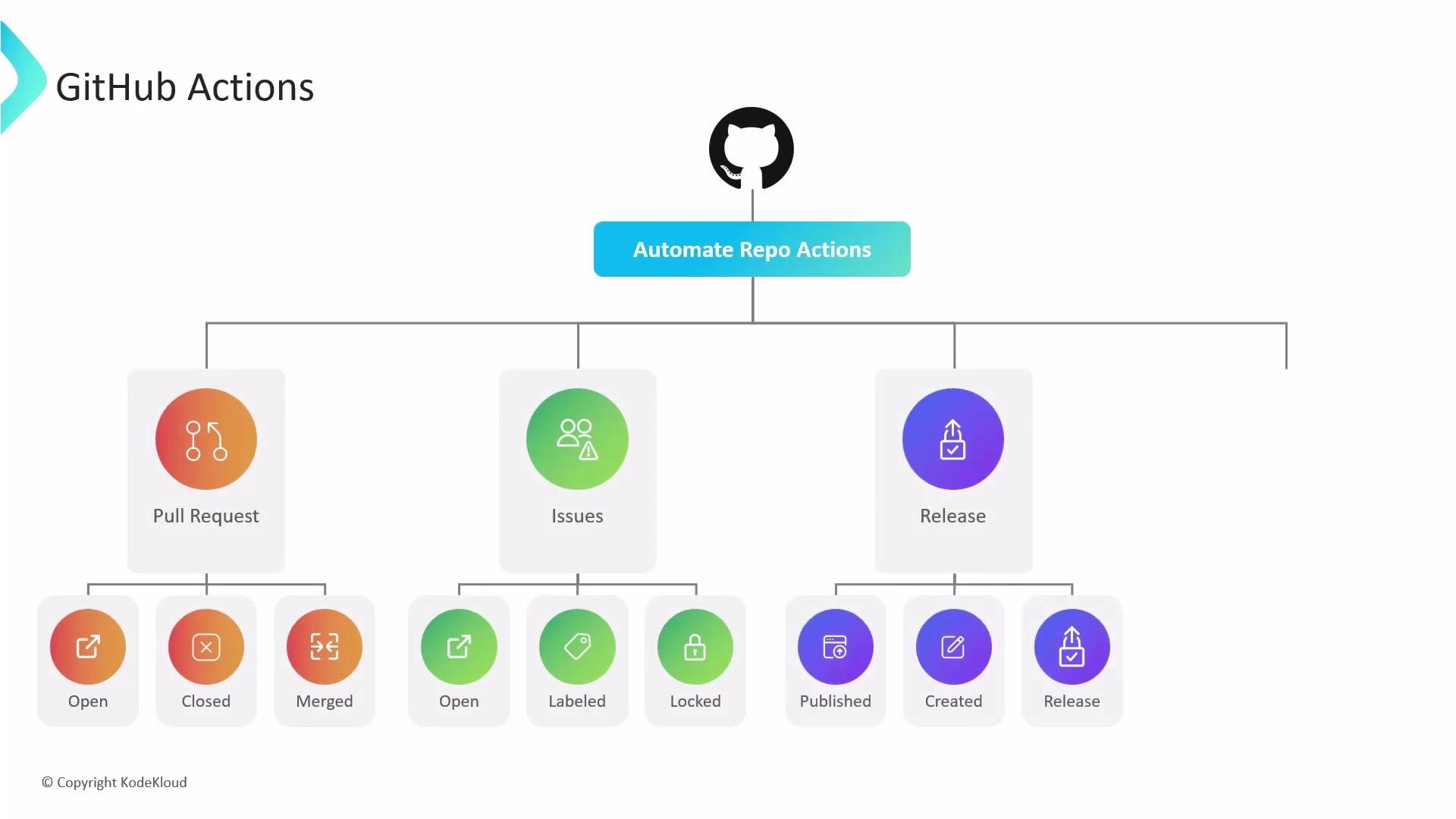 In short, GitHub Actions is a general-purpose automation platform inside GitHub that can be used anywhere you can define an event or trigger—CI/CD is a major use, but not the only one.
Links and references
* [GitHub Actions documentation](https://docs.github.com/actions)
* [Events that trigger workflows](https://docs.github.com/actions/using-workflows/events-that-trigger-workflows)
* [Workflow syntax for GitHub Actions](https://docs.github.com/actions/using-workflows/workflow-syntax-for-github-actions)
In short, GitHub Actions is a general-purpose automation platform inside GitHub that can be used anywhere you can define an event or trigger—CI/CD is a major use, but not the only one.
Links and references
* [GitHub Actions documentation](https://docs.github.com/actions)
* [Events that trigger workflows](https://docs.github.com/actions/using-workflows/events-that-trigger-workflows)
* [Workflow syntax for GitHub Actions](https://docs.github.com/actions/using-workflows/workflow-syntax-for-github-actions)