> ## Documentation Index
> Fetch the complete documentation index at: https://notes.kodekloud.com/llms.txt
> Use this file to discover all available pages before exploring further.
# Demo How to Use the githubdev Editor
> Guide to creating and sharing GitHub Codespaces deep links and using the github.dev web editor for quick repository edits versus full Codespace environments
This guide explains how to create and share GitHub Codespaces deep links for quick environment launch and how to use the lightweight `github.dev` editor to edit repository files without starting a full Codespace. It covers:
* What a Codespaces deep link is and how to generate one
* How to embed a deep link in your README
* How and when to use the `github.dev` web editor for quick edits
* Limitations of `github.dev` and when to opt for a full Codespace
## What is a Codespaces Deep Link?
A Codespaces deep link is a shareable URL that points users to a repository-specific page where they can create or resume a GitHub Codespace. You can include startup parameters in the URL (branch, devcontainer, machine type, etc.) so collaborators open a Codespace with the intended environment immediately.
Official documentation: [Codespaces Deep Link](https://docs.github.com/en/codespaces/developing-in-codespaces/sharing-a-deep-link-to-a-codespace)
### Common URL parameters
| Parameter | Purpose | Example |
| -------------- | ------------------------------------------------- | ---------------------------------------------- |
| `repository` | Specifies the repository to open | `repository=OWNER/REPO` |
| `ref` | Selects the branch or ref to open | `ref=BRANCH` |
| `machine` | (Optional) Selects machine type | `machine=standardLinux` |
| `devcontainer` | (Optional) Points to a devcontainer configuration | `devcontainer=.devcontainer/devcontainer.json` |
Example pattern (use the exact snippet GitHub provides or update `OWNER/REPO` and `BRANCH`):
```markdown theme={null}
[Open in Codespaces](https://github.com/codespaces/new?repository=OWNER/REPO&ref=BRANCH)
```
## How to create and share a deep link
1. Open the repository on GitHub.
2. Click the green **Code** button.
3. Choose **Codespaces**, then select **Share a deep link**.
4. Pick an output format: **URL**, **HTML**, or **Markdown**. Use the Markdown snippet for README embedding.
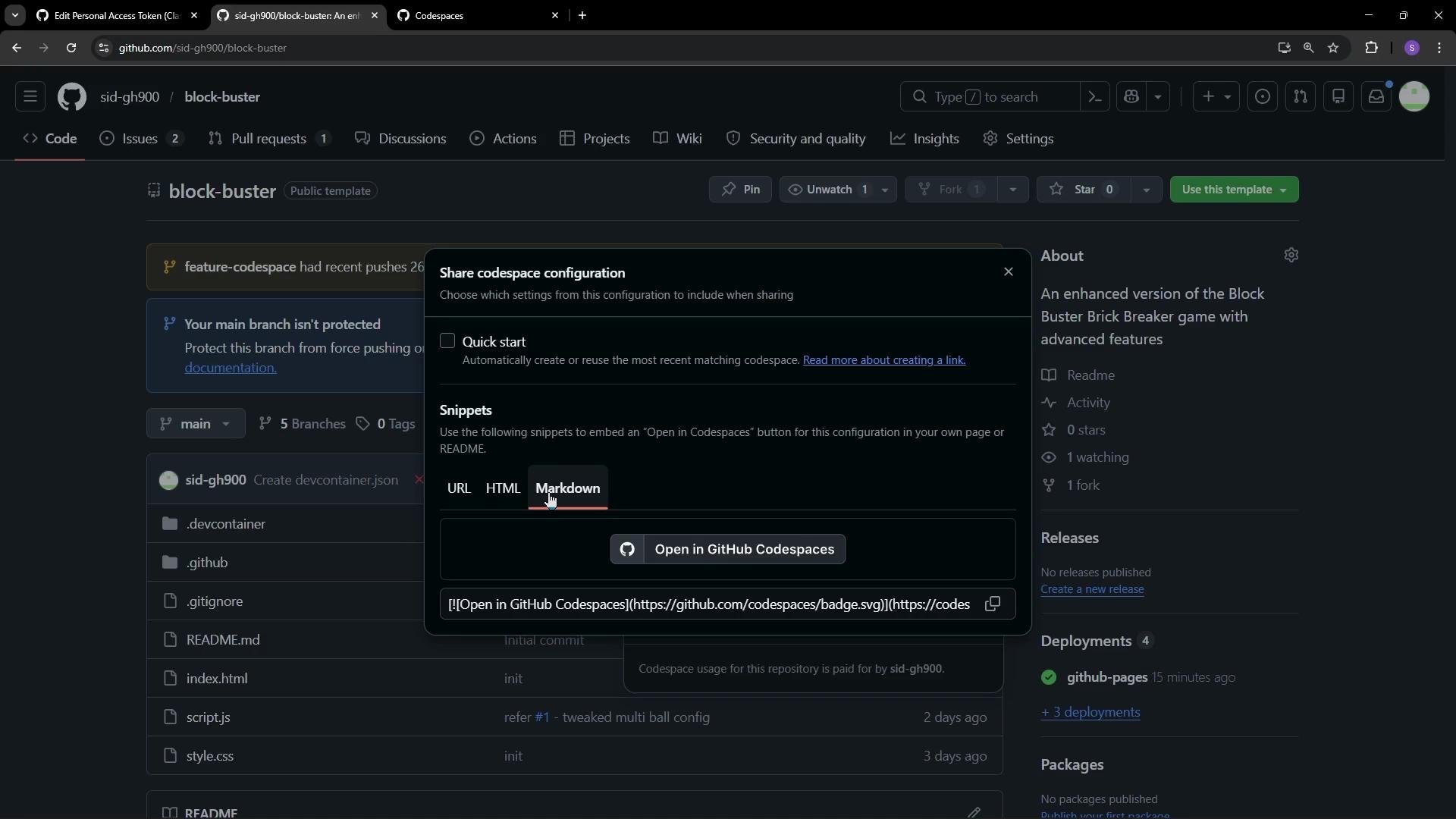 If you choose the Markdown option, paste the snippet into your README so viewers can click it to create a Codespace. The Markdown snippet is ready-to-use and helps contributors launch the repository with the configured environment.
## Edit files quickly with `github.dev` (no Codespace needed)
When you only need to make simple edits (README, docs, small code changes), use the `github.dev` editor — a fast, browser-based VS Code-like editor that edits files directly in the repository without starting a container.
How to open:
* Press the `.` (period) key while viewing the repository on GitHub, or
* Click **Code** and select the `github.dev` option.
In the `github.dev` editor you can:
* Make edits in the browser
* Cancel any unnecessary prompts (for example, GitHub Actions setup prompts)
* Commit changes using the web UI
Committing a small README change from the web UI performs the equivalent local Git commands:
```bash theme={null}
git add README.md
git commit -m "added Codespace deep link"
git push
```
After pushing, the Markdown deep link will be visible in the README. Users who click it will be taken into the Codespaces flow for your repository. If GitHub detects a previous session, it may offer to resume that session or create a new Codespace.
If you choose the Markdown option, paste the snippet into your README so viewers can click it to create a Codespace. The Markdown snippet is ready-to-use and helps contributors launch the repository with the configured environment.
## Edit files quickly with `github.dev` (no Codespace needed)
When you only need to make simple edits (README, docs, small code changes), use the `github.dev` editor — a fast, browser-based VS Code-like editor that edits files directly in the repository without starting a container.
How to open:
* Press the `.` (period) key while viewing the repository on GitHub, or
* Click **Code** and select the `github.dev` option.
In the `github.dev` editor you can:
* Make edits in the browser
* Cancel any unnecessary prompts (for example, GitHub Actions setup prompts)
* Commit changes using the web UI
Committing a small README change from the web UI performs the equivalent local Git commands:
```bash theme={null}
git add README.md
git commit -m "added Codespace deep link"
git push
```
After pushing, the Markdown deep link will be visible in the README. Users who click it will be taken into the Codespaces flow for your repository. If GitHub detects a previous session, it may offer to resume that session or create a new Codespace.
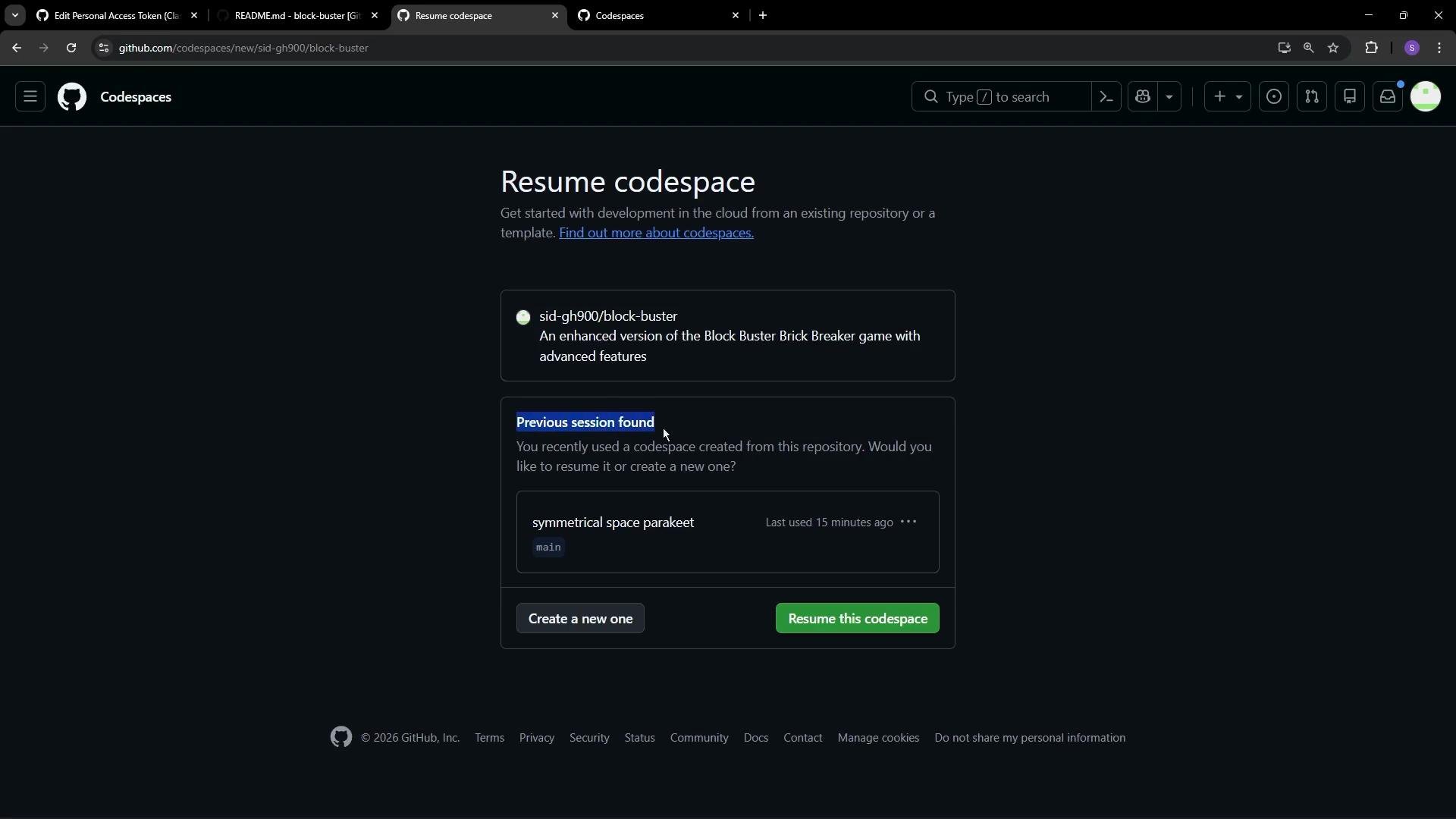 When creating a new Codespace, GitHub displays configuration options such as branch selection, machine type, and devcontainer settings so you can launch with the desired environment.
The `github.dev` editor is ideal for quick edits, documentation updates, and light browsing of the codebase. It does not run a development container, and you cannot launch terminals or run/debug code from it. Use a full Codespace when you need a runnable environment, terminal access, or debugging capabilities.
## When to use each option
| Task | Use `github.dev` | Use Codespaces deep link / full Codespace |
| ----------------------------------------------- | ------------------- | ----------------------------------------- |
| Edit README or docs | ✅ Fast, lightweight | ❌ Overkill |
| Run or debug code | ❌ Cannot run/debug | ✅ Full environment needed |
| Configure dev container or machine type | ❌ Not applicable | ✅ Include parameters in deep link |
| Share reproducible environment for contributors | ❌ Not applicable | ✅ Use deep link with parameters |
## Links and references
* [Codespaces Deep Link documentation](https://docs.github.com/en/codespaces/developing-in-codespaces/sharing-a-deep-link-to-a-codespace)
* [github.dev — quick editor](https://github.dev)
* [GitHub Codespaces overview](https://docs.github.com/en/codespaces)
When creating a new Codespace, GitHub displays configuration options such as branch selection, machine type, and devcontainer settings so you can launch with the desired environment.
The `github.dev` editor is ideal for quick edits, documentation updates, and light browsing of the codebase. It does not run a development container, and you cannot launch terminals or run/debug code from it. Use a full Codespace when you need a runnable environment, terminal access, or debugging capabilities.
## When to use each option
| Task | Use `github.dev` | Use Codespaces deep link / full Codespace |
| ----------------------------------------------- | ------------------- | ----------------------------------------- |
| Edit README or docs | ✅ Fast, lightweight | ❌ Overkill |
| Run or debug code | ❌ Cannot run/debug | ✅ Full environment needed |
| Configure dev container or machine type | ❌ Not applicable | ✅ Include parameters in deep link |
| Share reproducible environment for contributors | ❌ Not applicable | ✅ Use deep link with parameters |
## Links and references
* [Codespaces Deep Link documentation](https://docs.github.com/en/codespaces/developing-in-codespaces/sharing-a-deep-link-to-a-codespace)
* [github.dev — quick editor](https://github.dev)
* [GitHub Codespaces overview](https://docs.github.com/en/codespaces)