> ## Documentation Index
> Fetch the complete documentation index at: https://notes.kodekloud.com/llms.txt
> Use this file to discover all available pages before exploring further.
# Starting a GitHub Codespace
> Guide to launching and provisioning GitHub Codespaces, using devcontainer configurations to create reproducible cloud development environments accessible via browser, VS Code, or the GitHub CLI.
In this lesson we’ll cover how to start a GitHub Codespace and what happens when one is provisioned. GitHub Codespaces provides cloud-hosted, containerized development environments you can launch from multiple interfaces and stages of the development lifecycle. Codespaces run on virtual machines hosted on Azure and use a devcontainer configuration to deliver a reproducible workspace with the tools, extensions, and runtimes your project needs.
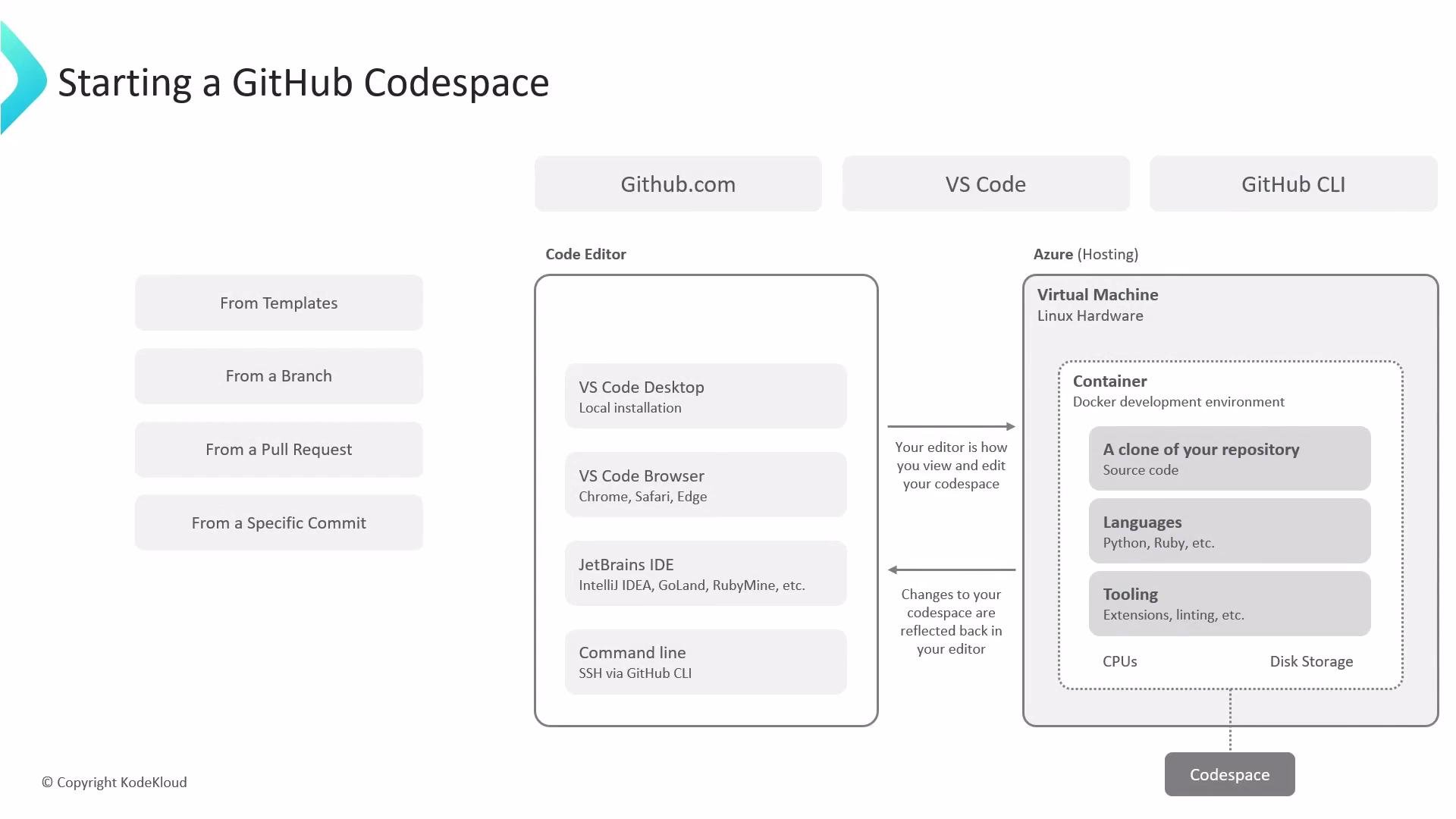 What you can do with Codespaces
* Create a fresh, reproducible development environment for a repository without installing dependencies locally.
* Connect from the browser, from Visual Studio Code (desktop or web), or manage environments from the terminal using the GitHub CLI.
* Launch environments that match a repository’s branch, pull request, commit, or template state to ensure deterministic development and testing.
Primary ways to launch and manage a Codespace
| Channel | Best for | Quick example |
| -------------------- | ---------------------------------------------------------------------------------- | --------------------------------------------------------------------------------------------- |
| GitHub.com (browser) | Fast, no-local-setup creation; good for reviewers and contributors | Use the Code menu → Codespaces to create a new environment for a repo, branch, PR, or commit. |
| Visual Studio Code | Native editing, debugging, and extension support connected to the remote container | Open VS Code, choose "Remote - Containers" or use the Codespaces extension to connect. |
| GitHub CLI | Terminal-driven workflows, scripts and automation | `gh codespace create --repo owner/repo --branch feature-branch` and `gh codespace list` |
Example: GitHub CLI snippets
```bash theme={null}
# Create a codespace for a repo and branch
gh codespace create --repo owner/repo --branch feature-branch
# List running/available codespaces
gh codespace list
```
How Codespaces are initialized
* Templates: Repository templates or starter templates bootstrap a new project. Templates commonly include a `.devcontainer` folder (with `devcontainer.json` and an optional Dockerfile) that specifies the container image, required packages, extensions, and forwarded ports.
Using a `.devcontainer` codifies the OS image, packages, and editor extensions so every codespace launched from the repo delivers a consistent developer experience.
* Branch: Launch from a specific branch to develop in the same code and config context as that branch.
* Pull request: Start a Codespace from a pull request to run the changes in an isolated environment for review and validation.
* Commit: Create a Codespace tied to a commit hash to reproduce the repository state at a precise point in time—valuable for debugging and regression testing.
Under the hood
When you start a Codespace, GitHub provisions an Azure virtual machine and then starts one or more containers defined by the devcontainer configuration. The container image and devcontainer settings determine which languages, runtimes, CLIs, and VS Code extensions are available when the environment starts. This architecture ensures that the development environment is portable, reproducible, and isolated from your local machine.
Important considerations
Codespaces availability and billing depend on your GitHub account or organization plan and policies. Verify enabled regions, allowed machine types, and usage quotas in your organization settings before provisioning large or long-running environments.
Quick tips and best practices
* Add a complete `.devcontainer` configuration to your repository to lower onboarding friction for contributors.
* Use lightweight base images for faster spin-up times.
* Forward only required ports and set workspace-specific secrets via repository or organization settings.
* Stop or delete idle Codespaces to minimize billing and resource usage.
Links and references
* [GitHub Codespaces documentation](https://docs.github.com/en/codespaces)
* [Visual Studio Code - Dev Containers](https://code.visualstudio.com/docs/devcontainers/containers)
* [GitHub CLI](https://cli.github.com/)
* [Azure Virtual Machines](https://azure.microsoft.com/services/virtual-machines/)
What you can do with Codespaces
* Create a fresh, reproducible development environment for a repository without installing dependencies locally.
* Connect from the browser, from Visual Studio Code (desktop or web), or manage environments from the terminal using the GitHub CLI.
* Launch environments that match a repository’s branch, pull request, commit, or template state to ensure deterministic development and testing.
Primary ways to launch and manage a Codespace
| Channel | Best for | Quick example |
| -------------------- | ---------------------------------------------------------------------------------- | --------------------------------------------------------------------------------------------- |
| GitHub.com (browser) | Fast, no-local-setup creation; good for reviewers and contributors | Use the Code menu → Codespaces to create a new environment for a repo, branch, PR, or commit. |
| Visual Studio Code | Native editing, debugging, and extension support connected to the remote container | Open VS Code, choose "Remote - Containers" or use the Codespaces extension to connect. |
| GitHub CLI | Terminal-driven workflows, scripts and automation | `gh codespace create --repo owner/repo --branch feature-branch` and `gh codespace list` |
Example: GitHub CLI snippets
```bash theme={null}
# Create a codespace for a repo and branch
gh codespace create --repo owner/repo --branch feature-branch
# List running/available codespaces
gh codespace list
```
How Codespaces are initialized
* Templates: Repository templates or starter templates bootstrap a new project. Templates commonly include a `.devcontainer` folder (with `devcontainer.json` and an optional Dockerfile) that specifies the container image, required packages, extensions, and forwarded ports.
Using a `.devcontainer` codifies the OS image, packages, and editor extensions so every codespace launched from the repo delivers a consistent developer experience.
* Branch: Launch from a specific branch to develop in the same code and config context as that branch.
* Pull request: Start a Codespace from a pull request to run the changes in an isolated environment for review and validation.
* Commit: Create a Codespace tied to a commit hash to reproduce the repository state at a precise point in time—valuable for debugging and regression testing.
Under the hood
When you start a Codespace, GitHub provisions an Azure virtual machine and then starts one or more containers defined by the devcontainer configuration. The container image and devcontainer settings determine which languages, runtimes, CLIs, and VS Code extensions are available when the environment starts. This architecture ensures that the development environment is portable, reproducible, and isolated from your local machine.
Important considerations
Codespaces availability and billing depend on your GitHub account or organization plan and policies. Verify enabled regions, allowed machine types, and usage quotas in your organization settings before provisioning large or long-running environments.
Quick tips and best practices
* Add a complete `.devcontainer` configuration to your repository to lower onboarding friction for contributors.
* Use lightweight base images for faster spin-up times.
* Forward only required ports and set workspace-specific secrets via repository or organization settings.
* Stop or delete idle Codespaces to minimize billing and resource usage.
Links and references
* [GitHub Codespaces documentation](https://docs.github.com/en/codespaces)
* [Visual Studio Code - Dev Containers](https://code.visualstudio.com/docs/devcontainers/containers)
* [GitHub CLI](https://cli.github.com/)
* [Azure Virtual Machines](https://azure.microsoft.com/services/virtual-machines/)