> ## Documentation Index
> Fetch the complete documentation index at: https://notes.kodekloud.com/llms.txt
> Use this file to discover all available pages before exploring further.
# Deployment Options for GitHub Enterprise
> Comparison of GitHub Enterprise Server and Cloud, their features, identity management, tradeoffs, and guidance for choosing the right deployment
This guide summarizes the two primary GitHub Enterprise deployment models, their differences, and when to choose each. Use this to align your organization's requirements—control, compliance, scalability, and identity management—with the right platform: self-hosted or managed cloud.
## Overview
There are two main GitHub Enterprise deployment options:
* GitHub Enterprise Server
* GitHub Enterprise Cloud
The core distinction is where the platform runs and who operates the infrastructure:
* GitHub Enterprise Server is self-hosted on your infrastructure (on-premises or IaaS). It gives you full control over hardware, networking, backups, compliance controls, and update cadence.
* GitHub Enterprise Cloud is hosted and operated by GitHub (built on GitHub.com). It delivers a managed, multi-tenant cloud experience with built-in scalability and many cloud-first features.
## Feature comparison
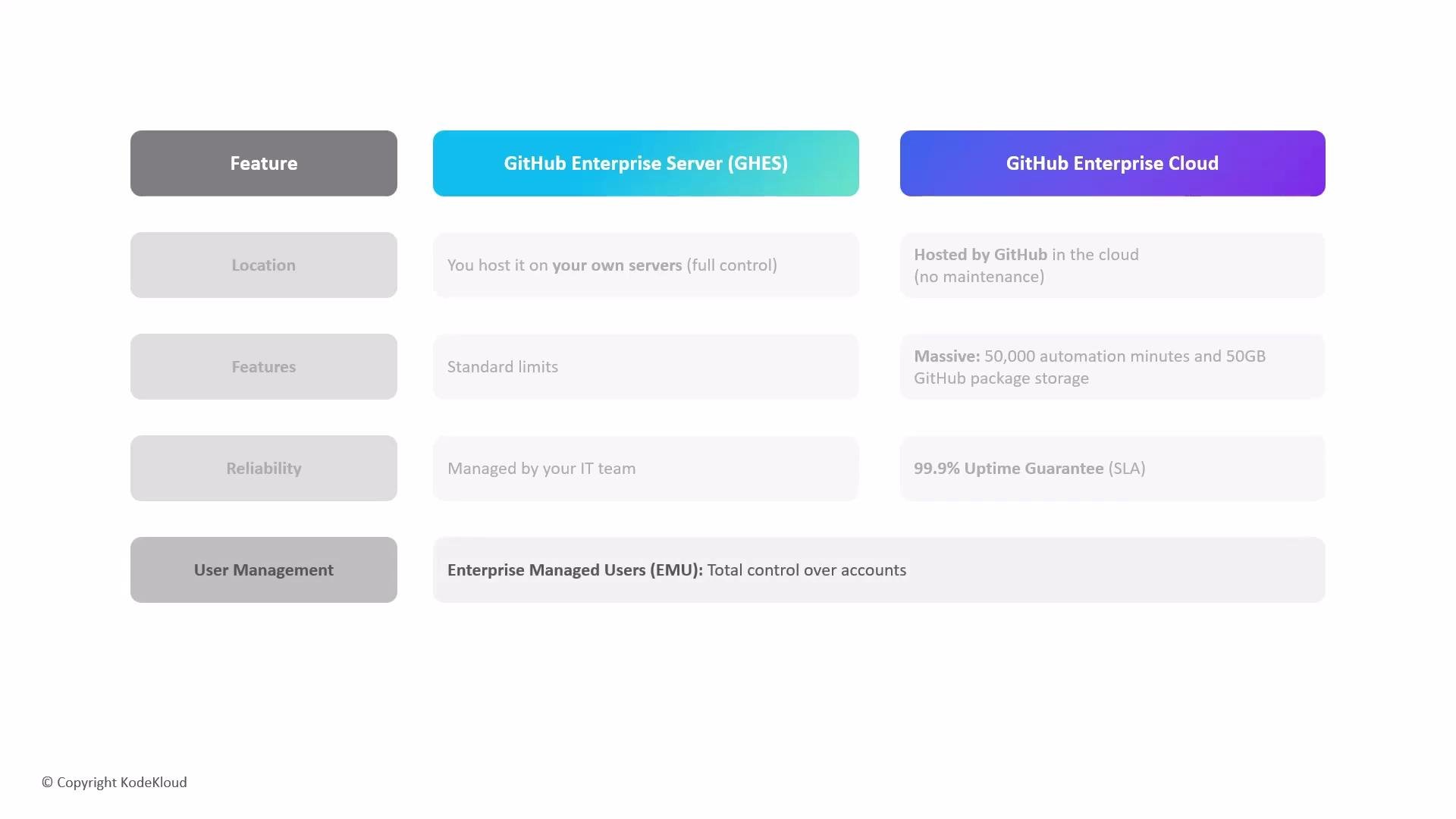
| Feature | GitHub Enterprise Server (Self-hosted) | GitHub Enterprise Cloud (Managed) |
| -------------------------- | --------------------------------------------------------------------: | ----------------------------------------------------------------------: |
| Hosting location | Your data centers or cloud accounts | Hosted by GitHub (GitHub.com) |
| Infrastructure management | You manage servers, networking, and backups | GitHub manages infrastructure and availability |
| Update cadence | You control when to patch and upgrade | GitHub handles updates and patches |
| Scalability | Scales as you provision resources | Elastic, built-in scalability |
| Identity integration | Integrates with your identity providers; more manual provisioning | Deep integration with enterprise IdP, SSO, and Enterprise Managed Users |
| Automation & CI/CD | Uses GitHub Actions but resource quotas depend on self-hosted runners | Enterprise plans include generous Actions minutes and managed runners |
| Packages & storage | Controlled by your environments | Generous GitHub Packages storage included in many plans |
| SLA & reliability | Depends on your architecture | Enterprise SLAs (e.g., 99.9% uptime) |
| Centralized administration | Possible, but managed by you | Centralized enterprise dashboard for billing, security, and policy |
 ## Why choose GitHub Enterprise Cloud?
Key cloud-specific advantages often included or available with enterprise plans:
* Large automation capacity: enterprise plans commonly include significant allocations of GitHub Actions minutes for CI/CD workflows (examples vary by plan).
* Generous GitHub Packages storage: enterprise plans frequently include substantial package storage (for example, 50 GB in many offerings).
* Service-level agreement (SLA): enterprise-tier accounts typically receive high-availability SLAs (for example, 99.9% uptime).
* Centralized administration: enterprise dashboards simplify billing, security policy enforcement, and governance across multiple organizations and teams.
Useful links:
* [GitHub Packages documentation](https://docs.github.com/en/packages)
* [GitHub Actions overview](https://docs.github.com/en/actions)
## Identity and account management differences
A major cloud-only capability is Enterprise Managed Users. These are company-owned GitHub accounts that your organization controls on GitHub Enterprise Cloud. They simplify provisioning, access control, and offboarding.
Key characteristics:
* Centralized provisioning and deprovisioning: organizations can create and remove accounts to control onboarding/offboarding.
* Federated sign-in: integrates with enterprise identity providers and SSO systems (SAML, OAuth) so developers authenticate with corporate credentials.
* Immediate access revocation: when an employee leaves, the organization can quickly disable or delete the managed account to revoke access.
## Add-ons and extras
Some premium services are add-ons and are billed separately from core enterprise plans.
* GitHub Copilot: an AI coding assistant offered as an add-on. Organizations purchase Copilot seats and manage them through enterprise billing and provisioning controls.
## Choosing between Server and Cloud
Consider these high-level criteria when deciding:
* Choose GitHub Enterprise Server when:
* You require strict data residency or on-premises deployments.
* You need full infrastructure control for compliance or custom integrations.
* You want to control upgrade and patch schedules.
* Choose GitHub Enterprise Cloud when:
* You prefer a managed, scalable service with built-in automation.
* You want centralized administration, enterprise identity features, and vendor-managed availability.
* You want to reduce operational burden and leverage cloud-native capabilities.
Choose GitHub Enterprise Server when you need full control over infrastructure, strict data residency, or customized compliance requirements. Choose GitHub Enterprise Cloud when you prefer a managed, scalable service with built-in automation, centralized administration, and cloud identity features.
## Links and references
* [GitHub Documentation](https://docs.github.com/)
* [GitHub Packages](https://docs.github.com/en/packages)
* [GitHub Actions](https://docs.github.com/en/actions)
* [GitHub Copilot](https://learn.kodekloud.com/user/courses/github-copilot-in-action)
## Why choose GitHub Enterprise Cloud?
Key cloud-specific advantages often included or available with enterprise plans:
* Large automation capacity: enterprise plans commonly include significant allocations of GitHub Actions minutes for CI/CD workflows (examples vary by plan).
* Generous GitHub Packages storage: enterprise plans frequently include substantial package storage (for example, 50 GB in many offerings).
* Service-level agreement (SLA): enterprise-tier accounts typically receive high-availability SLAs (for example, 99.9% uptime).
* Centralized administration: enterprise dashboards simplify billing, security policy enforcement, and governance across multiple organizations and teams.
Useful links:
* [GitHub Packages documentation](https://docs.github.com/en/packages)
* [GitHub Actions overview](https://docs.github.com/en/actions)
## Identity and account management differences
A major cloud-only capability is Enterprise Managed Users. These are company-owned GitHub accounts that your organization controls on GitHub Enterprise Cloud. They simplify provisioning, access control, and offboarding.
Key characteristics:
* Centralized provisioning and deprovisioning: organizations can create and remove accounts to control onboarding/offboarding.
* Federated sign-in: integrates with enterprise identity providers and SSO systems (SAML, OAuth) so developers authenticate with corporate credentials.
* Immediate access revocation: when an employee leaves, the organization can quickly disable or delete the managed account to revoke access.
## Add-ons and extras
Some premium services are add-ons and are billed separately from core enterprise plans.
* GitHub Copilot: an AI coding assistant offered as an add-on. Organizations purchase Copilot seats and manage them through enterprise billing and provisioning controls.
## Choosing between Server and Cloud
Consider these high-level criteria when deciding:
* Choose GitHub Enterprise Server when:
* You require strict data residency or on-premises deployments.
* You need full infrastructure control for compliance or custom integrations.
* You want to control upgrade and patch schedules.
* Choose GitHub Enterprise Cloud when:
* You prefer a managed, scalable service with built-in automation.
* You want centralized administration, enterprise identity features, and vendor-managed availability.
* You want to reduce operational burden and leverage cloud-native capabilities.
Choose GitHub Enterprise Server when you need full control over infrastructure, strict data residency, or customized compliance requirements. Choose GitHub Enterprise Cloud when you prefer a managed, scalable service with built-in automation, centralized administration, and cloud identity features.
## Links and references
* [GitHub Documentation](https://docs.github.com/)
* [GitHub Packages](https://docs.github.com/en/packages)
* [GitHub Actions](https://docs.github.com/en/actions)
* [GitHub Copilot](https://learn.kodekloud.com/user/courses/github-copilot-in-action)