> ## Documentation Index
> Fetch the complete documentation index at: https://notes.kodekloud.com/llms.txt
> Use this file to discover all available pages before exploring further.
# Features of GitHub Mobile
> GitHub Mobile lets developers review code, manage issues and pull requests, make quick edits, triage notifications, and approve secure sign-ins from iOS and Android devices
GitHub Mobile is the official first-party app for iOS and Android that brings core repository workflows to your phone. It helps developers stay productive and maintain account security away from a workstation, enabling timely code review, issue triage, and secure sign-ins from anywhere.
What can you do with GitHub Mobile?
* Search and discover
* Quickly search for users, repositories, issues, or pull requests and jump to the exact resource you need.
* Participate in issues and pull requests
* Read, comment, and participate in conversations on issues and pull requests.
* Leave reviews (approve, request changes, or comment).
* Merge pull requests when you have the appropriate permissions.
* Make quick, targeted code changes
* Edit files directly in a pull request to fix typos, update documentation, or apply small code fixes without switching to a desktop environment.
* Manage notifications and your inbox
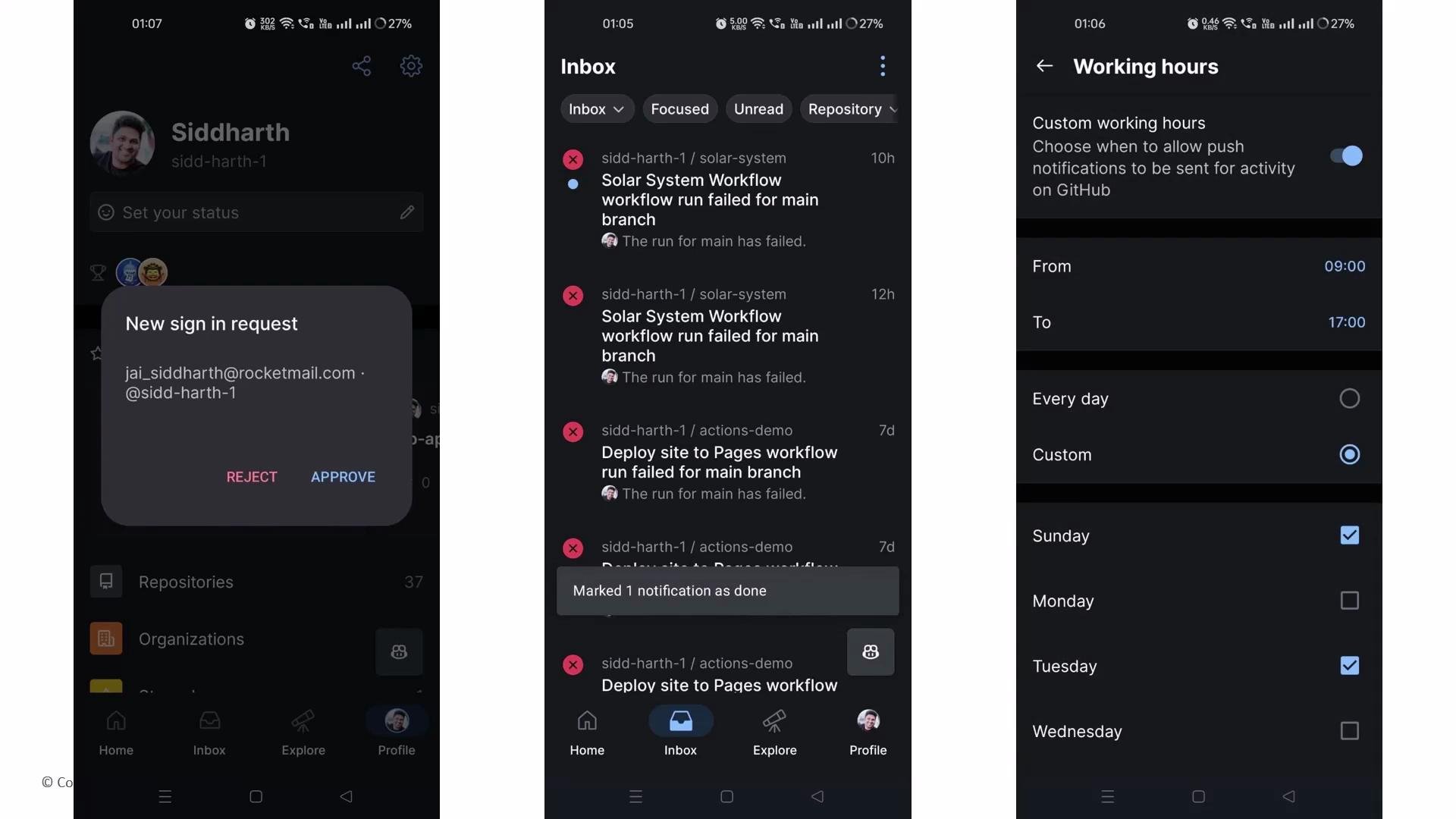
* Filter and triage notifications, mute noisy threads, or mark items as read while on the go so you focus on what matters most.
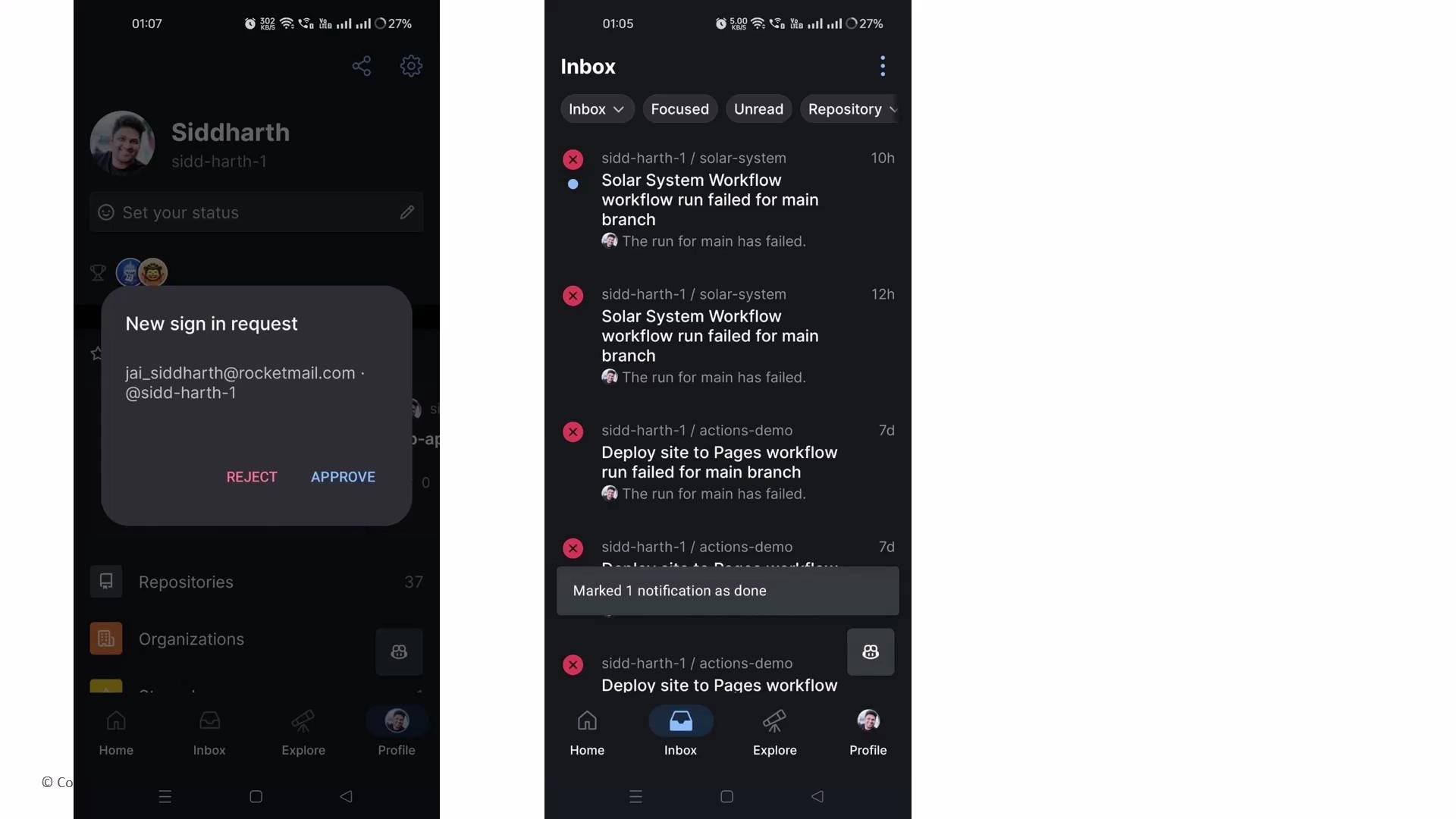 You can configure push notifications to receive instant alerts when you’re mentioned, when CI fails, or when other important events occur in your repositories.
Use GitHub Mobile to receive sign-in approvals and two-factor authentication prompts directly on your device. Register and verify your device under your account security settings to enable Mobile for authentication approvals.
* Account security and sign-in verification
* Approve sign-ins and respond to two-factor authentication (2FA) prompts from your phone, and confirm suspicious sign-in attempts to keep your account secure.
* Work-life balance features
* Set custom quiet hours or working hours for push notifications so alerts are delivered only during times you choose.
You can configure push notifications to receive instant alerts when you’re mentioned, when CI fails, or when other important events occur in your repositories.
Use GitHub Mobile to receive sign-in approvals and two-factor authentication prompts directly on your device. Register and verify your device under your account security settings to enable Mobile for authentication approvals.
* Account security and sign-in verification
* Approve sign-ins and respond to two-factor authentication (2FA) prompts from your phone, and confirm suspicious sign-in attempts to keep your account secure.
* Work-life balance features
* Set custom quiet hours or working hours for push notifications so alerts are delivered only during times you choose.
 Feature summary
| Feature area | What it does | Example use |
| ------------------ | ------------------------------------------------ | ------------------------------------------------------------- |
| Search & discovery | Find people, repos, issues, and PRs quickly | Search a repo to open a stale PR and leave a review |
| Issues & PRs | Full conversation, review, merge flows | Comment on an issue or approve a pull request from your phone |
| Inline editing | Small code or doc edits inside PRs | Fix a README typo or update configuration values in a PR |
| Notifications | Filter, mute, and triage notifications on the go | Receive CI failure alerts and mark them read after triage |
| Account security | Sign-in approvals and 2FA prompts | Approve a suspicious sign-in request or confirm 2FA |
| Work-life balance | Quiet hours and custom notification schedules | Silence push notifications outside of working hours |
Best practices and tips
* Use mobile for quick triage and light edits—save heavy refactors for a full development environment.
* Register your device in GitHub account settings before relying on Mobile for sign-in approvals or 2FA.
* Configure notification filters and quiet hours to reduce noise and focus on critical events.
Links and references
* \[GitHub Mobile documentation]\([https://docs.github.com/en/get-started/using-githu](https://docs.github.com/en/get-started/using-githu) b/github-mobile)
* [Securing your account with two-factor authentication (2FA)](https://docs.github.com/en/authentication/securing-your-account-with-two-factor-authentication-2fa)
In short, GitHub Mobile keeps your team’s work moving by enabling lightweight code and project tasks, real-time notifications, and secure sign-in approvals—so you can stay productive without being tethered to a workstation.
Feature summary
| Feature area | What it does | Example use |
| ------------------ | ------------------------------------------------ | ------------------------------------------------------------- |
| Search & discovery | Find people, repos, issues, and PRs quickly | Search a repo to open a stale PR and leave a review |
| Issues & PRs | Full conversation, review, merge flows | Comment on an issue or approve a pull request from your phone |
| Inline editing | Small code or doc edits inside PRs | Fix a README typo or update configuration values in a PR |
| Notifications | Filter, mute, and triage notifications on the go | Receive CI failure alerts and mark them read after triage |
| Account security | Sign-in approvals and 2FA prompts | Approve a suspicious sign-in request or confirm 2FA |
| Work-life balance | Quiet hours and custom notification schedules | Silence push notifications outside of working hours |
Best practices and tips
* Use mobile for quick triage and light edits—save heavy refactors for a full development environment.
* Register your device in GitHub account settings before relying on Mobile for sign-in approvals or 2FA.
* Configure notification filters and quiet hours to reduce noise and focus on critical events.
Links and references
* \[GitHub Mobile documentation]\([https://docs.github.com/en/get-started/using-githu](https://docs.github.com/en/get-started/using-githu) b/github-mobile)
* [Securing your account with two-factor authentication (2FA)](https://docs.github.com/en/authentication/securing-your-account-with-two-factor-authentication-2fa)
In short, GitHub Mobile keeps your team’s work moving by enabling lightweight code and project tasks, real-time notifications, and secure sign-in approvals—so you can stay productive without being tethered to a workstation.