> ## Documentation Index
> Fetch the complete documentation index at: https://notes.kodekloud.com/llms.txt
> Use this file to discover all available pages before exploring further.
# Course Introduction
> Introductory GitHub Foundations course teaching Git and GitHub fundamentals through hands on labs, workflows, CI CD automation, security, collaboration, developer tools, and certification exam preparation.
Welcome to the GitHub Foundations certification course.
I'm Siddharth Barahalikar, and I'll guide you through the fundamentals of GitHub — the industry-standard platform for version control and collaborative software development.
GitHub hosts over one hundred million repositories and is used by organizations such as Microsoft, Google, and Stripe. Mastering GitHub and Git is essential for modern developers, DevOps engineers, and anyone working on team-based software projects.
This course emphasizes active learning: each module pairs foundational concepts with hands-on labs so you can practice workflows, make mistakes safely, and learn by doing.
## What you'll learn
This course combines theory with practical labs to build confidence in everyday Git and GitHub workflows. Key topics include:
* Version control fundamentals: why version control matters and how Git models history.
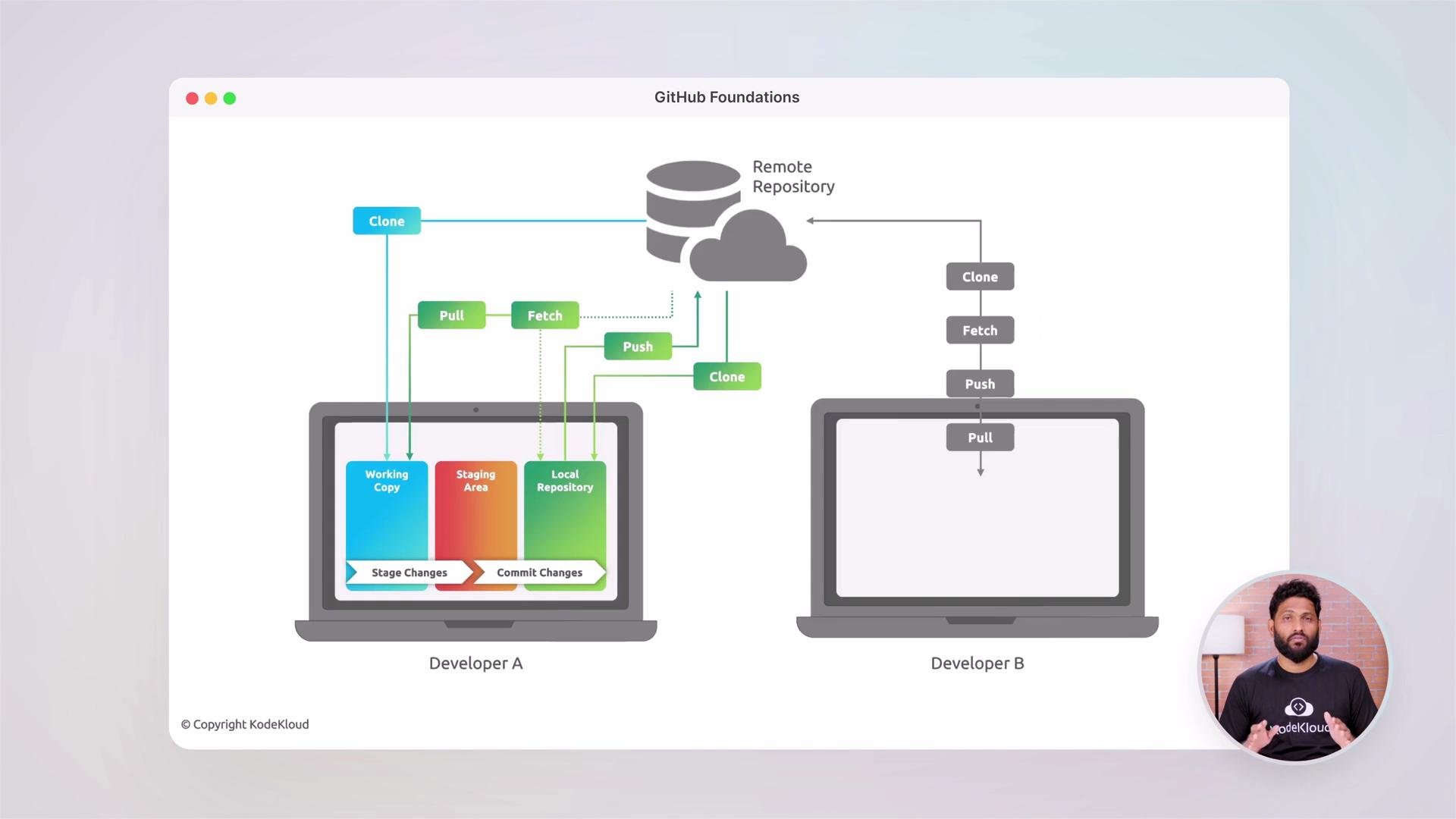
* Git architecture: local repository, staging area (index), and remote repository.
* Core Git workflows and commands: cloning, fetching, pulling, committing, staging, branching, merging, and pushing.
* Working with GitHub: repository creation and configuration, branch protection, pull requests, issues, discussions, and documentation best practices.
* GitHub platform features: account types, product tiers, and interfaces (web, Desktop, mobile).
* Automation and developer tooling: GitHub Actions for CI/CD, GitHub Copilot for AI-assisted coding, and Codespaces for cloud development.
* Project and release management: project boards, milestones, and automation to track work.
* Security and permissions: authentication, access control, best practices for securing code and workflows.
* Open source and community engagement: inner source, contributing to projects, and community collaboration strategies.
* Exam readiness: comprehensive practice assessments to validate knowledge for certification.
## Version control and Git workflow
You’ll learn the concepts and then apply them with practical examples. Here’s a quick view of the local ↔ remote workflow this course covers:
 Example: common commands you’ll practice in labs
```bash theme={null}
# clone a repository
git clone git@github.com:owner/repo.git
# make changes, stage, and commit
git add .
git commit -m "Add feature X"
# fetch and merge remote changes, then push your commit
git fetch origin
git merge origin/main
git push origin feature-branch
```
## Exploring the GitHub platform
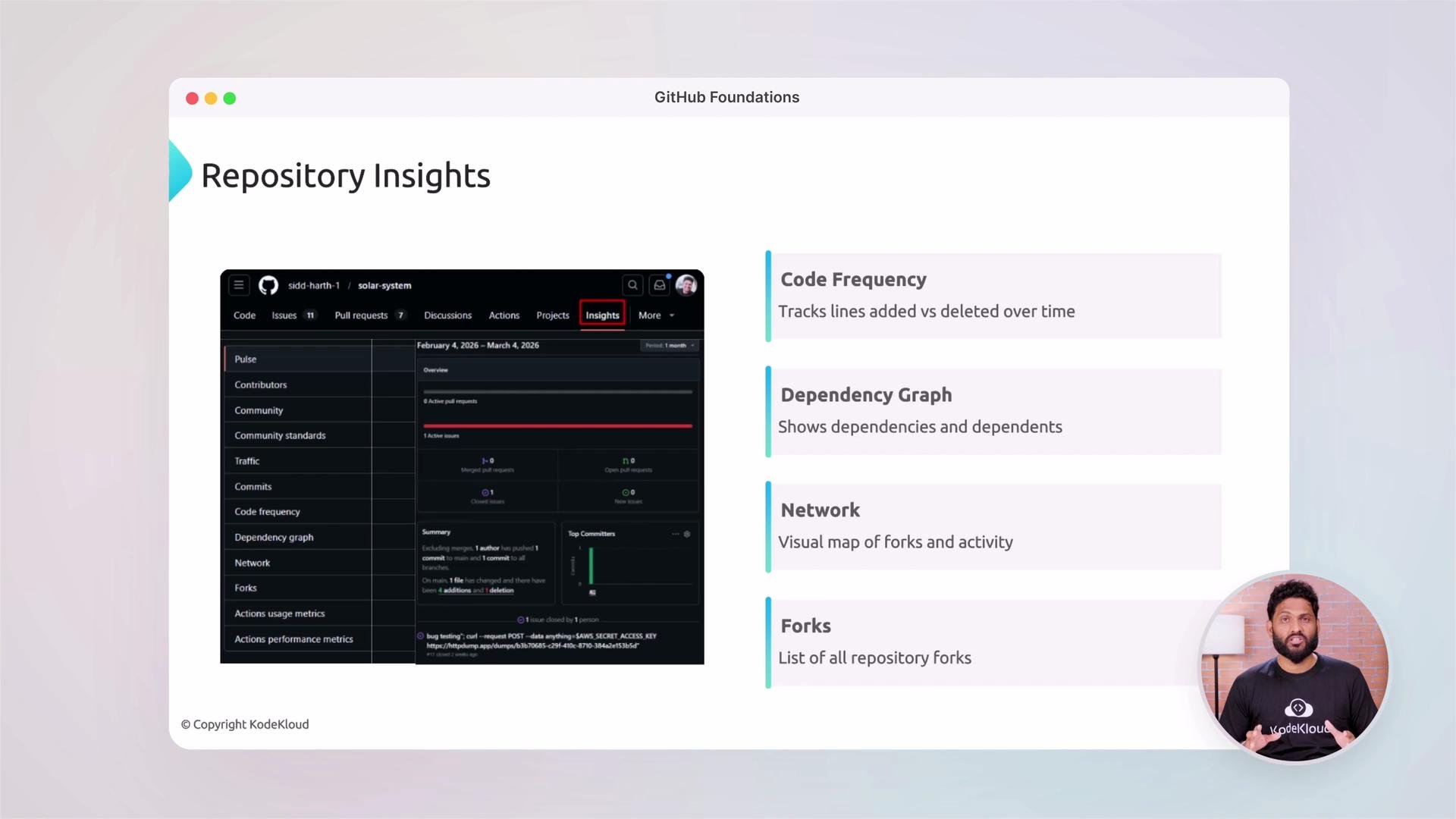
You’ll get hands-on with the GitHub UI and features that help teams collaborate and deliver reliably. Topics include repository insights (code frequency, dependency graph, network), forks, and how to configure visibility and branch protection.
Example: common commands you’ll practice in labs
```bash theme={null}
# clone a repository
git clone git@github.com:owner/repo.git
# make changes, stage, and commit
git add .
git commit -m "Add feature X"
# fetch and merge remote changes, then push your commit
git fetch origin
git merge origin/main
git push origin feature-branch
```
## Exploring the GitHub platform
You’ll get hands-on with the GitHub UI and features that help teams collaborate and deliver reliably. Topics include repository insights (code frequency, dependency graph, network), forks, and how to configure visibility and branch protection.
 ## Course outline (at a glance)
| Module | Focus | Example outcomes |
| ----------------------- | ------------------------------- | ----------------------------------------------- |
| Git basics | Local repo, staging, commits | `git init`, `git add`, `git commit` |
| Branching & merging | Feature branches, pull requests | Create & review PRs, resolve merge conflicts |
| GitHub platform | Repos, insights, forks | Configure repo settings, analyze graphs |
| Collaboration | Issues, discussions, docs | Use issues, link PRs to issues, maintain README |
| Automation | GitHub Actions & workflows | CI pipeline that runs tests on PRs |
| Developer tools | Copilot, Codespaces | Use AI suggestions and cloud dev environments |
| Security & permissions | Auth, access control | Set branch protection, manage teams |
| Open source & community | Contributing & inner source | Forking workflow, CLA basics |
| Exam prep | Practice assessments | Mock exams and knowledge checks |
## Who this course is for
* Developers and engineers new to GitHub who want practical, job-ready skills.
* DevOps professionals seeking to automate CI/CD using GitHub Actions.
* Contributors to open source projects who want to understand collaboration workflows.
* Teams adopting GitHub for code review, security, and project management.
## How you’ll learn
* Short conceptual lessons followed by hands-on labs in realistic scenarios.
* Step-by-step exercises to practice Git commands, create PRs, configure Actions, and manage security.
* Practice assessments that simulate the certification exam experience.
## Useful links and references
* [GitHub Actions](https://learn.kodekloud.com/user/courses/github-actions)
* [GitHub Copilot](https://learn.kodekloud.com/user/courses/github-copilot-in-action)
* [GitHub Codespaces](https://github.com/features/codespaces)
* [Git documentation](https://git-scm.com/doc)
* [GitHub Docs - Getting started](https://docs.github.com/en/get-started)
Ready to become proficient with GitHub? Enroll now to start learning one of the most important skills in modern software development.
## Course outline (at a glance)
| Module | Focus | Example outcomes |
| ----------------------- | ------------------------------- | ----------------------------------------------- |
| Git basics | Local repo, staging, commits | `git init`, `git add`, `git commit` |
| Branching & merging | Feature branches, pull requests | Create & review PRs, resolve merge conflicts |
| GitHub platform | Repos, insights, forks | Configure repo settings, analyze graphs |
| Collaboration | Issues, discussions, docs | Use issues, link PRs to issues, maintain README |
| Automation | GitHub Actions & workflows | CI pipeline that runs tests on PRs |
| Developer tools | Copilot, Codespaces | Use AI suggestions and cloud dev environments |
| Security & permissions | Auth, access control | Set branch protection, manage teams |
| Open source & community | Contributing & inner source | Forking workflow, CLA basics |
| Exam prep | Practice assessments | Mock exams and knowledge checks |
## Who this course is for
* Developers and engineers new to GitHub who want practical, job-ready skills.
* DevOps professionals seeking to automate CI/CD using GitHub Actions.
* Contributors to open source projects who want to understand collaboration workflows.
* Teams adopting GitHub for code review, security, and project management.
## How you’ll learn
* Short conceptual lessons followed by hands-on labs in realistic scenarios.
* Step-by-step exercises to practice Git commands, create PRs, configure Actions, and manage security.
* Practice assessments that simulate the certification exam experience.
## Useful links and references
* [GitHub Actions](https://learn.kodekloud.com/user/courses/github-actions)
* [GitHub Copilot](https://learn.kodekloud.com/user/courses/github-copilot-in-action)
* [GitHub Codespaces](https://github.com/features/codespaces)
* [Git documentation](https://git-scm.com/doc)
* [GitHub Docs - Getting started](https://docs.github.com/en/get-started)
Ready to become proficient with GitHub? Enroll now to start learning one of the most important skills in modern software development.