> ## Documentation Index
> Fetch the complete documentation index at: https://notes.kodekloud.com/llms.txt
> Use this file to discover all available pages before exploring further.
# Demo Explain Issue Templates
> Guide to creating and using GitHub issue templates to collect structured, actionable reports.
When a repository becomes public or gains many contributors, maintainers often see a flood of issues: bug reports, feature requests, questions. Issue templates guide contributors to provide consistent, useful information so maintainers can triage and reproduce problems faster.
Issue templates help maintainers triage and reproduce problems faster by collecting structured information up front.
Why use issue templates
* Standardize incoming reports so they include key details (steps to reproduce, expected behavior, environment, logs, screenshots).
* Reduce back-and-forth clarifying questions.
* Improve triage speed and prioritization.
* Encourage contributors to include reproducible examples and relevant metadata.
How to create issue templates (step-by-step)
1. Open your repository and go to Settings.
2. Confirm Issues are enabled for the repository. If they are disabled, enable them before proceeding.
3. Scroll to the “Issues” section and click **Set up issue templates** (or the similarly named option in the settings).
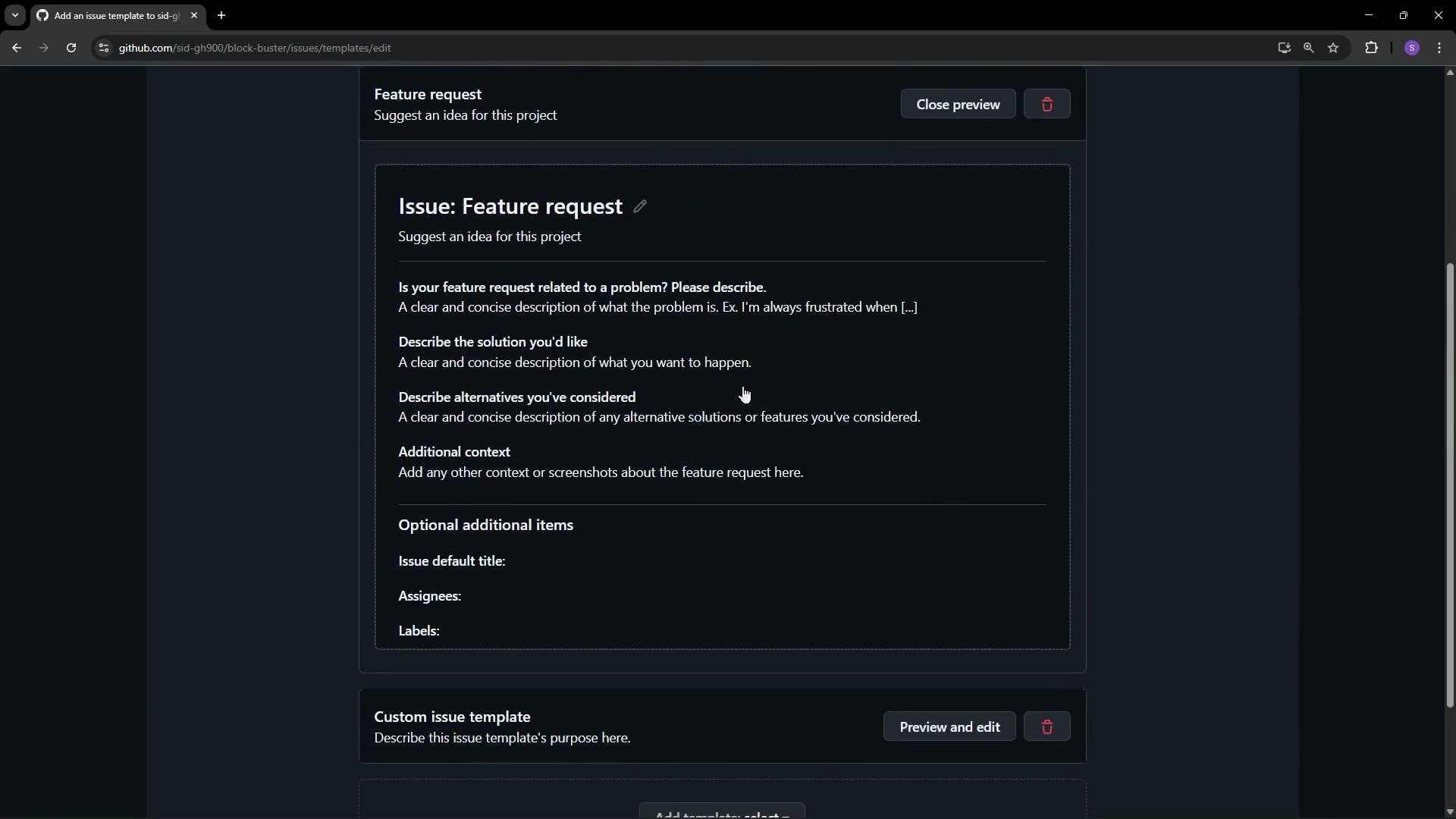
4. Choose which templates to create: Bug report, Feature request, or create a Custom template. Preview and edit each template before saving.
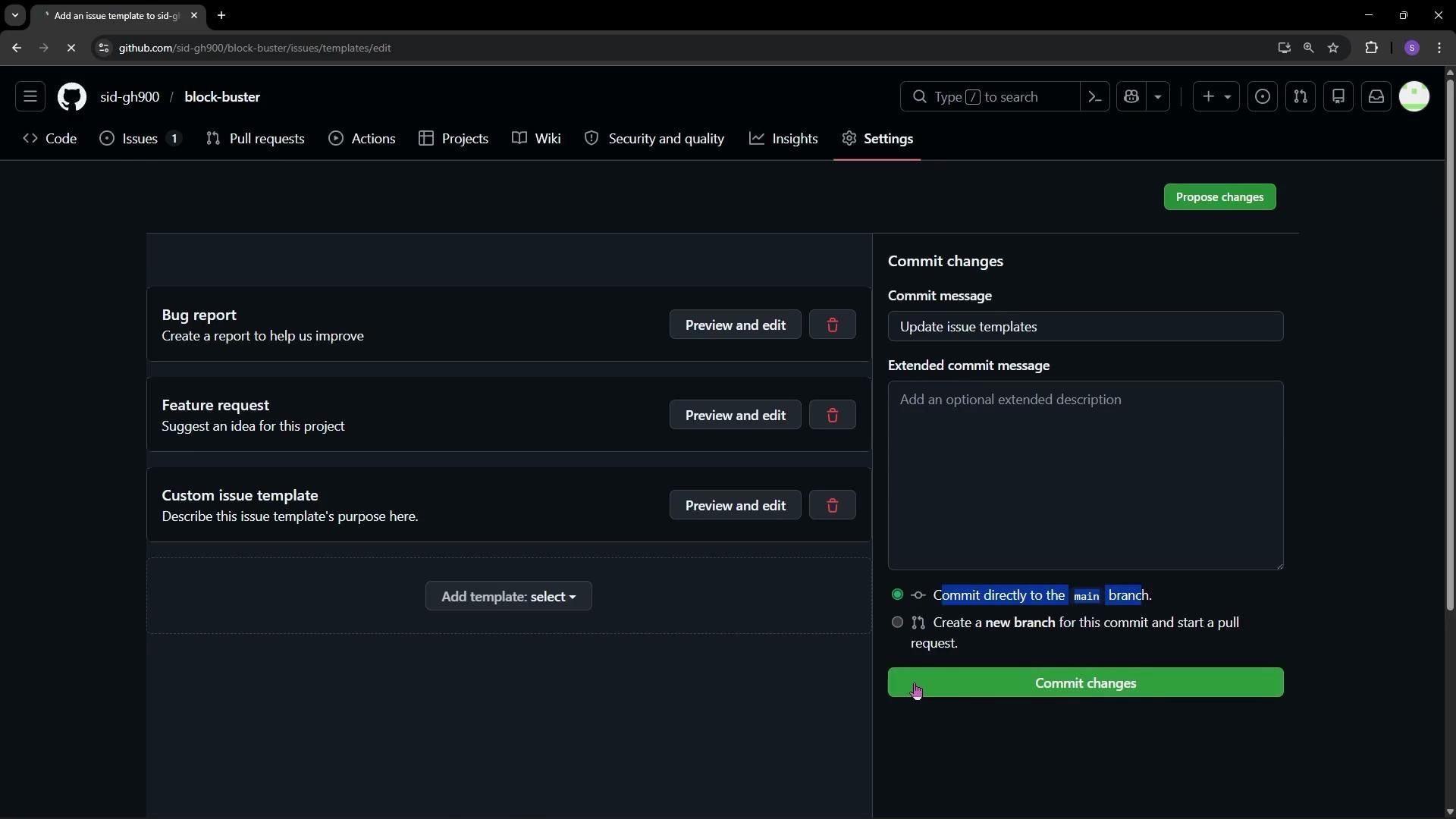
 5. After editing, propose changes and commit them. You can commit directly to the `main` branch or create a branch and open a pull request. In this demo we commit directly to `main`.
 What GitHub creates for you
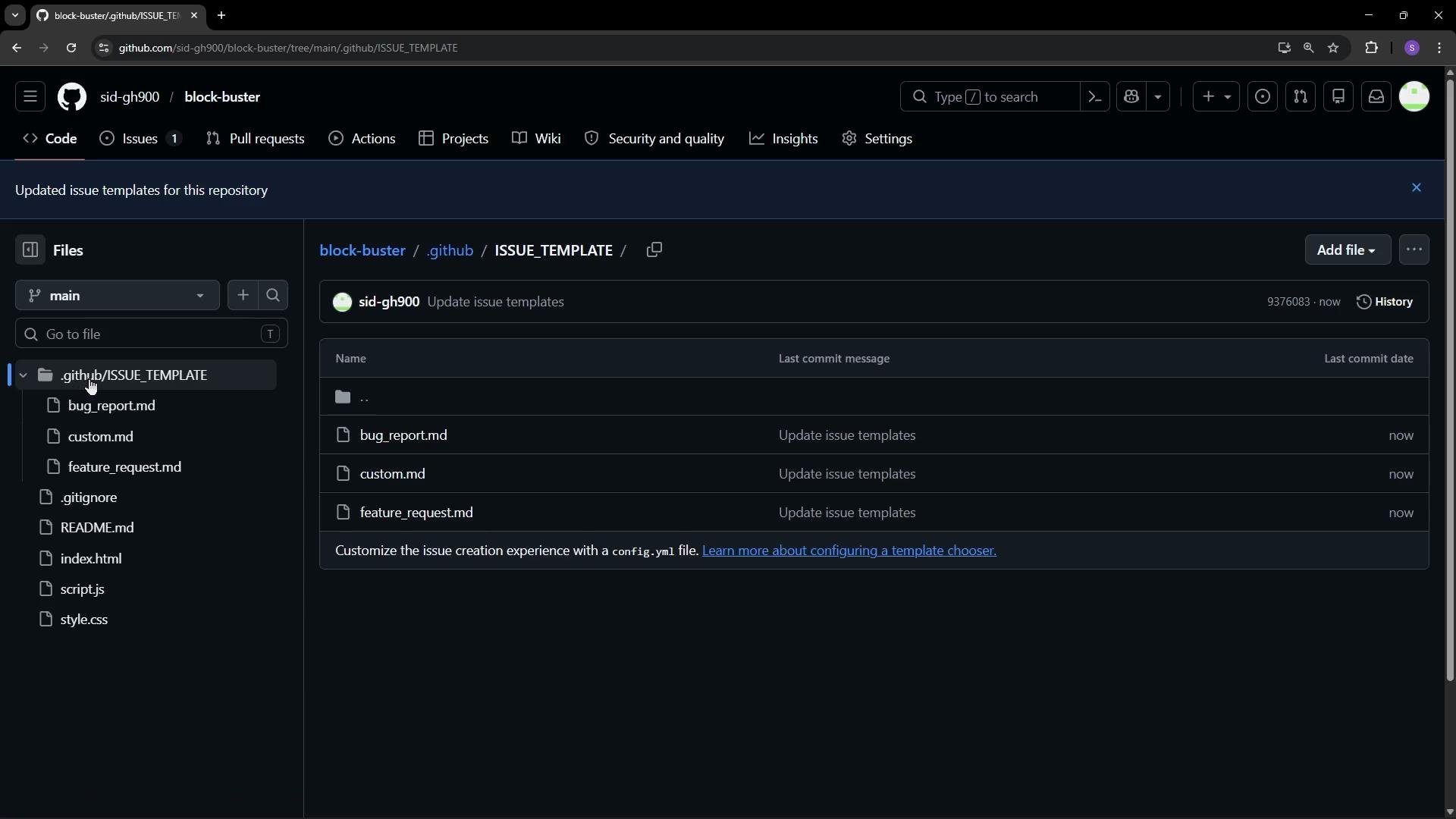
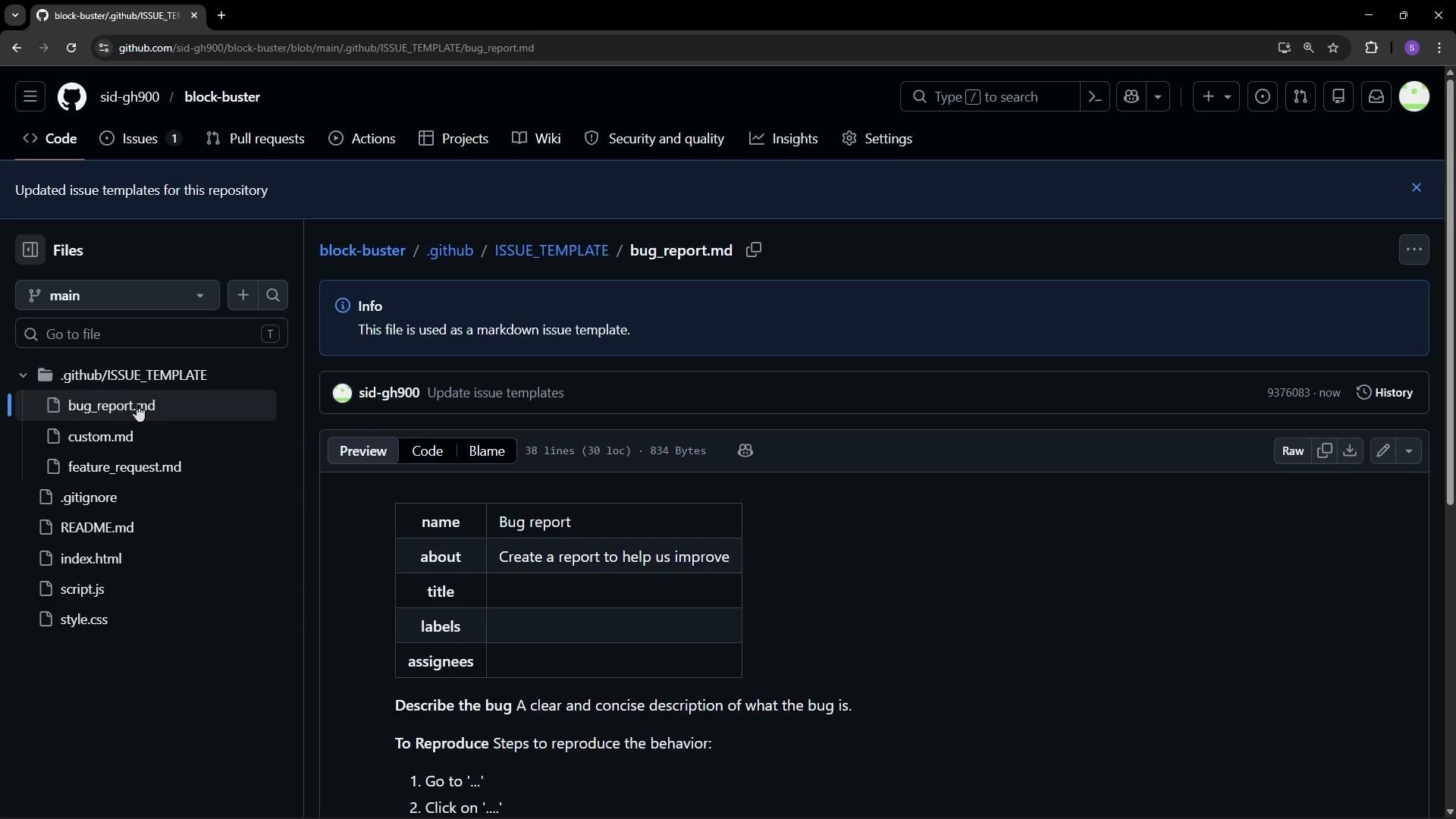
When you commit templates through the UI, GitHub creates a `.github/ISSUE_TEMPLATE/` directory in the repository root. Each template is stored as a Markdown file (for example, `bug_report.md`, `feature_request.md`, `custom.md`) and typically contains YAML front matter for metadata such as default title, labels, and assignees.
Common template files and their purpose:
| Template file | Purpose |
| -------------------- | ------------------------------------------------------------------------------------ |
| `bug_report.md` | Collect steps to reproduce, expected vs actual behavior, environment info, and logs. |
| `feature_request.md` | Provide context, proposed solution, and alternatives for requested features. |
| `custom.md` | Any project-specific template (triage checklist, support request, security report). |
Example: front matter + body for a bug report template
```md theme={null}
---
name: Bug report
about: Create a report to help us debug a problem
title: "[Bug] "
labels: bug
assignees: ''
---
**Describe the bug**
A clear and concise description of what the bug is.
**To Reproduce**
Steps to reproduce the behavior:
1. Go to '...'
2. Click on '....'
3. See error
**Expected behavior**
A clear description of what you expected to happen.
**Screenshots / Logs**
If applicable, add screenshots or logs to help explain your problem.
```
What GitHub creates for you
When you commit templates through the UI, GitHub creates a `.github/ISSUE_TEMPLATE/` directory in the repository root. Each template is stored as a Markdown file (for example, `bug_report.md`, `feature_request.md`, `custom.md`) and typically contains YAML front matter for metadata such as default title, labels, and assignees.
Common template files and their purpose:
| Template file | Purpose |
| -------------------- | ------------------------------------------------------------------------------------ |
| `bug_report.md` | Collect steps to reproduce, expected vs actual behavior, environment info, and logs. |
| `feature_request.md` | Provide context, proposed solution, and alternatives for requested features. |
| `custom.md` | Any project-specific template (triage checklist, support request, security report). |
Example: front matter + body for a bug report template
```md theme={null}
---
name: Bug report
about: Create a report to help us debug a problem
title: "[Bug] "
labels: bug
assignees: ''
---
**Describe the bug**
A clear and concise description of what the bug is.
**To Reproduce**
Steps to reproduce the behavior:
1. Go to '...'
2. Click on '....'
3. See error
**Expected behavior**
A clear description of what you expected to happen.
**Screenshots / Logs**
If applicable, add screenshots or logs to help explain your problem.
```
 Using the templates
* Go to the repository's **Issues** tab and click **New issue**.
* You’ll see choices for a blank issue or any templates you configured. Select a template to preload its content into the issue body.
* Replace the placeholder text with real details: title, steps to reproduce, expected behavior, environment (OS, versions), logs, and screenshots.
* You can still attach files, assign people, add labels, and link the issue to projects or milestones.
* Click **Create** to open the issue with the template content applied.
Using the templates
* Go to the repository's **Issues** tab and click **New issue**.
* You’ll see choices for a blank issue or any templates you configured. Select a template to preload its content into the issue body.
* Replace the placeholder text with real details: title, steps to reproduce, expected behavior, environment (OS, versions), logs, and screenshots.
* You can still attach files, assign people, add labels, and link the issue to projects or milestones.
* Click **Create** to open the issue with the template content applied.
 Additional tips
* Keep templates focused and minimal—ask only for information that helps you triage and reproduce the issue.
* Use checkboxes for optional verification steps or triage checklists.
* Consider separate templates for security reports or support requests to route issues appropriately.
* Review and iterate on templates as your project and contributor base evolves.
Further reading
* GitHub Docs: [Creating issue templates for your repository](https://docs.github.com/en/issues/using-labels-and-milestones-to-track-work/managing-issues-and-pull-requests/about-issue-and-pull-request-templates)
* GitHub Docs: [Configuring issue template metadata](https://docs.github.com/en/repositories/managing-your-repositorys-settings-and-features/customizing-your-repository/about-issue-and-pull-request-templates)
Summary
* Issue templates standardize incoming reports and requests, improving triage and resolution speed.
* Create them from Settings → Set up issue templates.
* GitHub stores them under `.github/ISSUE_TEMPLATE/` as Markdown files with YAML front matter.
* Contributors choose a template when opening an issue, ensuring you receive structured, actionable information.
Additional tips
* Keep templates focused and minimal—ask only for information that helps you triage and reproduce the issue.
* Use checkboxes for optional verification steps or triage checklists.
* Consider separate templates for security reports or support requests to route issues appropriately.
* Review and iterate on templates as your project and contributor base evolves.
Further reading
* GitHub Docs: [Creating issue templates for your repository](https://docs.github.com/en/issues/using-labels-and-milestones-to-track-work/managing-issues-and-pull-requests/about-issue-and-pull-request-templates)
* GitHub Docs: [Configuring issue template metadata](https://docs.github.com/en/repositories/managing-your-repositorys-settings-and-features/customizing-your-repository/about-issue-and-pull-request-templates)
Summary
* Issue templates standardize incoming reports and requests, improving triage and resolution speed.
* Create them from Settings → Set up issue templates.
* GitHub stores them under `.github/ISSUE_TEMPLATE/` as Markdown files with YAML front matter.
* Contributors choose a template when opening an issue, ensuring you receive structured, actionable information.