> ## Documentation Index
> Fetch the complete documentation index at: https://notes.kodekloud.com/llms.txt
> Use this file to discover all available pages before exploring further.
# Demo Identify How to Assign Issues
> Guides assigning GitHub issues, adding labels and mentions, and preventing JavaScript bugs by avoiding mutating arrays while iterating when cloning items.
In this lesson you'll learn how to assign GitHub issues to collaborators, add and manage labels to categorize work, notify teammates, and avoid a common JavaScript bug that can occur when cloning items by mutating an array during iteration.
Scenario
* Alice assigned the repository owner, Siddharth Barahalikar, to this issue because he owns the repository and is the most appropriate reviewer.
* The issue references a problematic code snippet that causes unexpected behavior when adding cloned items to an array while iterating over it.
Problematic code example
```javascript theme={null}
// script.js
case 'multiBall':
if (gameState.balls.length < 5) { // This check is insufficient
gameState.balls.forEach(ball => {
gameState.balls.push({...ball});
});
}
```
Why this is a problem
* Mutating an array while iterating over it (pushing into the same array inside `forEach`) can produce unexpected duplication or effectively run indefinitely in some circumstances.
* The guard `gameState.balls.length < 5` is insufficient because the loop itself increases the array length as it runs, invalidating the original check.
How to fix it
* Iterate over a shallow copy of the array so the list you’re iterating doesn’t change while you push new items.
* Or build a new array of clones and assign it back (using `concat` / spread) to avoid in-loop mutation.
* Always enforce a maximum (e.g., `MAX_BALLS`) and compute how many clones you actually need so you don’t exceed limits.
Example 1 — iterate over a copy
```javascript theme={null}
// script.js
case 'multiBall': {
const MAX_BALLS = 5;
if (gameState.balls.length < MAX_BALLS) {
// Only clone as many as needed to avoid exceeding MAX_BALLS
const clonesNeeded = Math.min(gameState.balls.length, MAX_BALLS - gameState.balls.length);
const existingBalls = gameState.balls.slice(0, clonesNeeded); // copy the items we will clone
existingBalls.forEach(ball => {
gameState.balls.push({ ...ball });
});
}
break;
}
```
Example 2 — create a new array with concat/map
```javascript theme={null}
// script.js
case 'multiBall': {
const MAX_BALLS = 5;
if (gameState.balls.length < MAX_BALLS) {
const clonesNeeded = Math.min(gameState.balls.length, MAX_BALLS - gameState.balls.length);
const clones = gameState.balls.slice(0, clonesNeeded).map(ball => ({ ...ball }));
gameState.balls = gameState.balls.concat(clones);
}
break;
}
```
Avoid mutating the same array while iterating. Use a copy or build a new array to preserve predictable behavior and respect your maximum limits.
Assigning issues to collaborators
* Repository owners and users with write access can assign issues to themselves or other collaborators.
* If someone else is better suited to fix the issue, search for their username in the assignee picker and add them as an assignee.
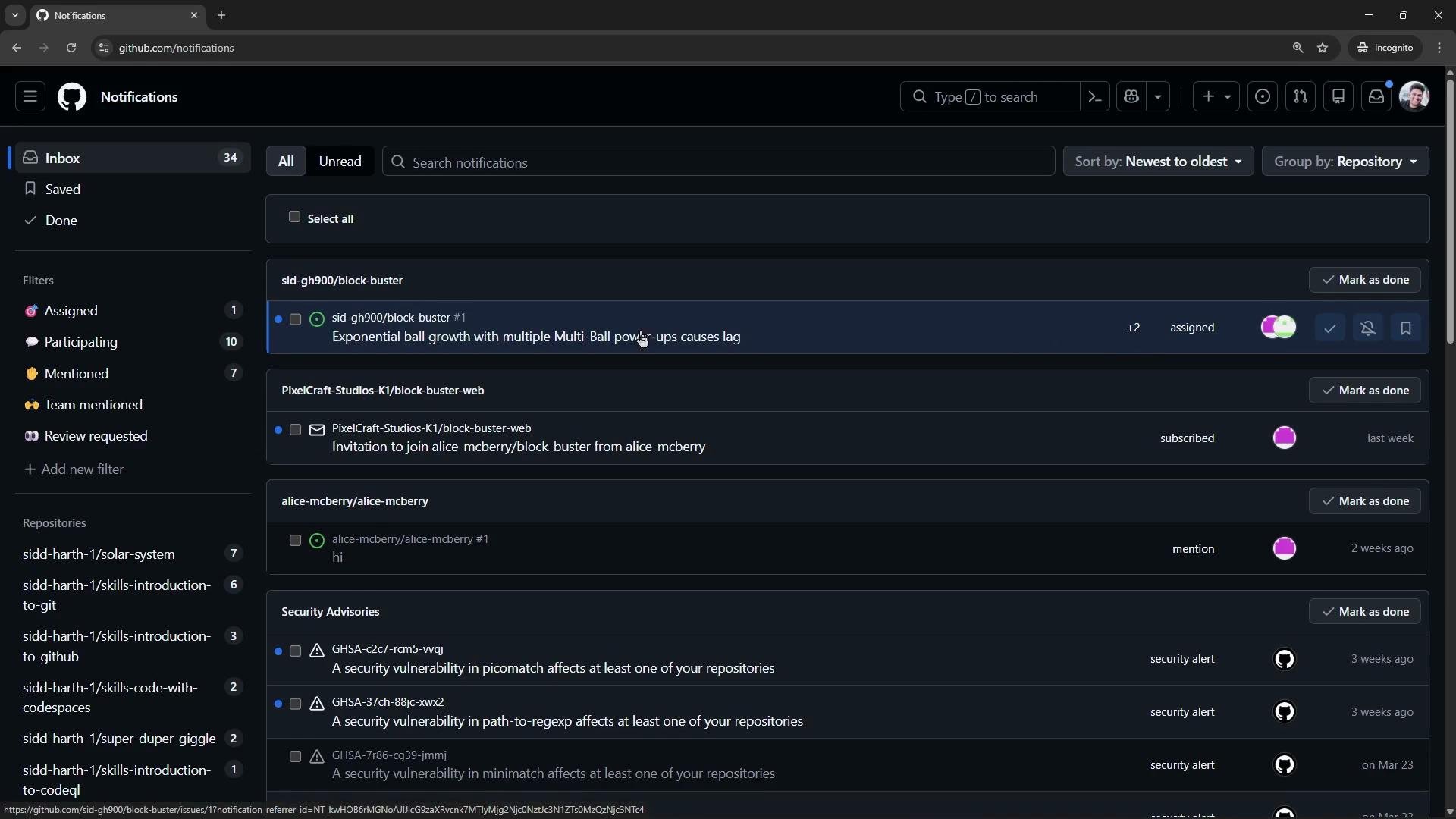
* Assigned users receive GitHub notifications and will see the issue in their notifications feed.
Adding labels to categorize issues
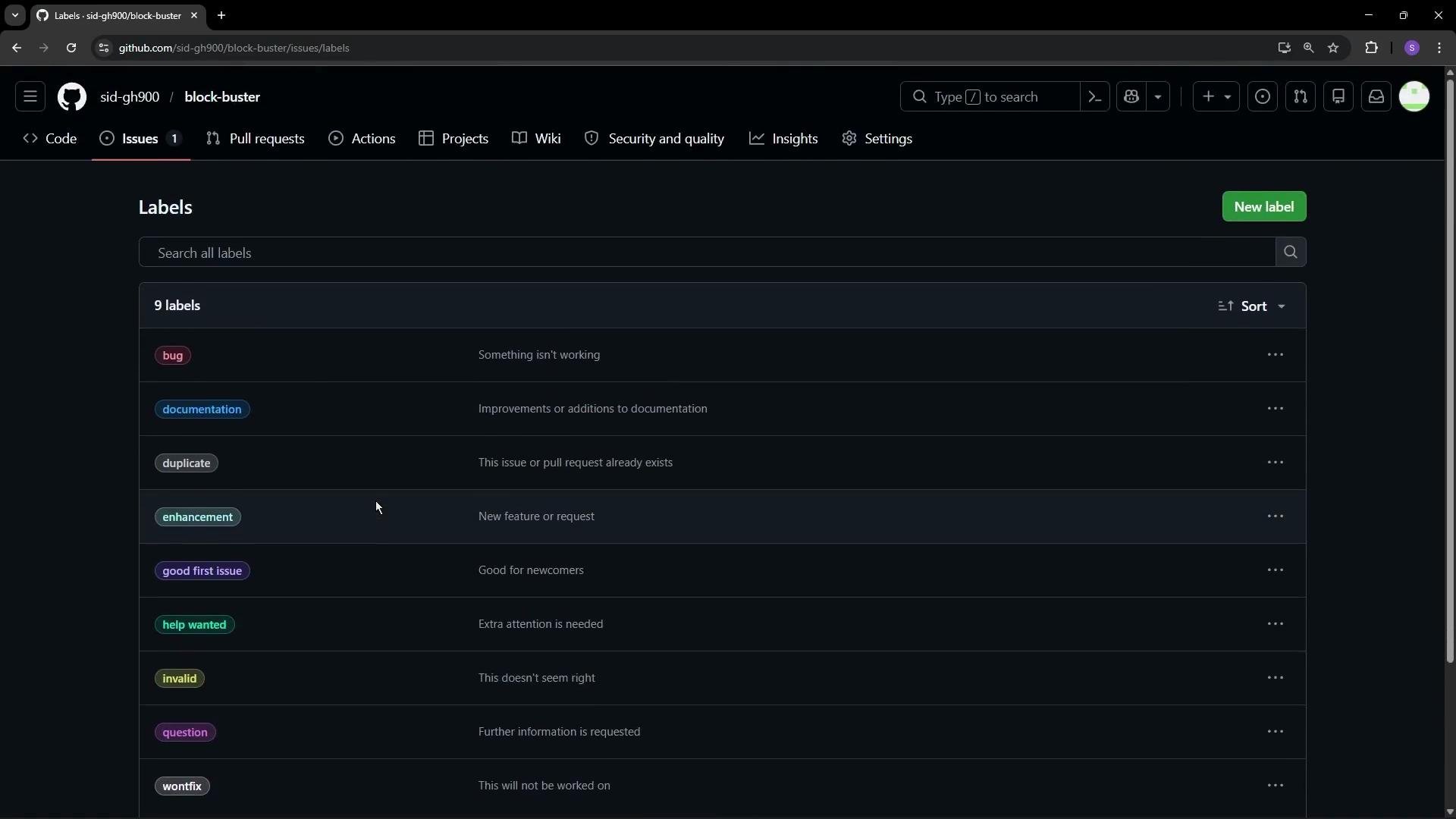
* Labels help triage and prioritize work (e.g., `bug`, `enhancement`, `documentation`, `high-priority`).
* You can use the repository’s default labels or create custom labels to suit your workflow.
* Newly-created labels can take a few seconds to appear in the label picker.
It's going to show you all the default nine labels available for this repository.
 Creating a new label
* Click "New label".
* Enter a name, add a description, and pick a color.
* Example: create a `high-priority` label with description "Must be fixed ASAP".
Creating a new label
* Click "New label".
* Enter a name, add a description, and pick a color.
* Example: create a `high-priority` label with description "Must be fixed ASAP".
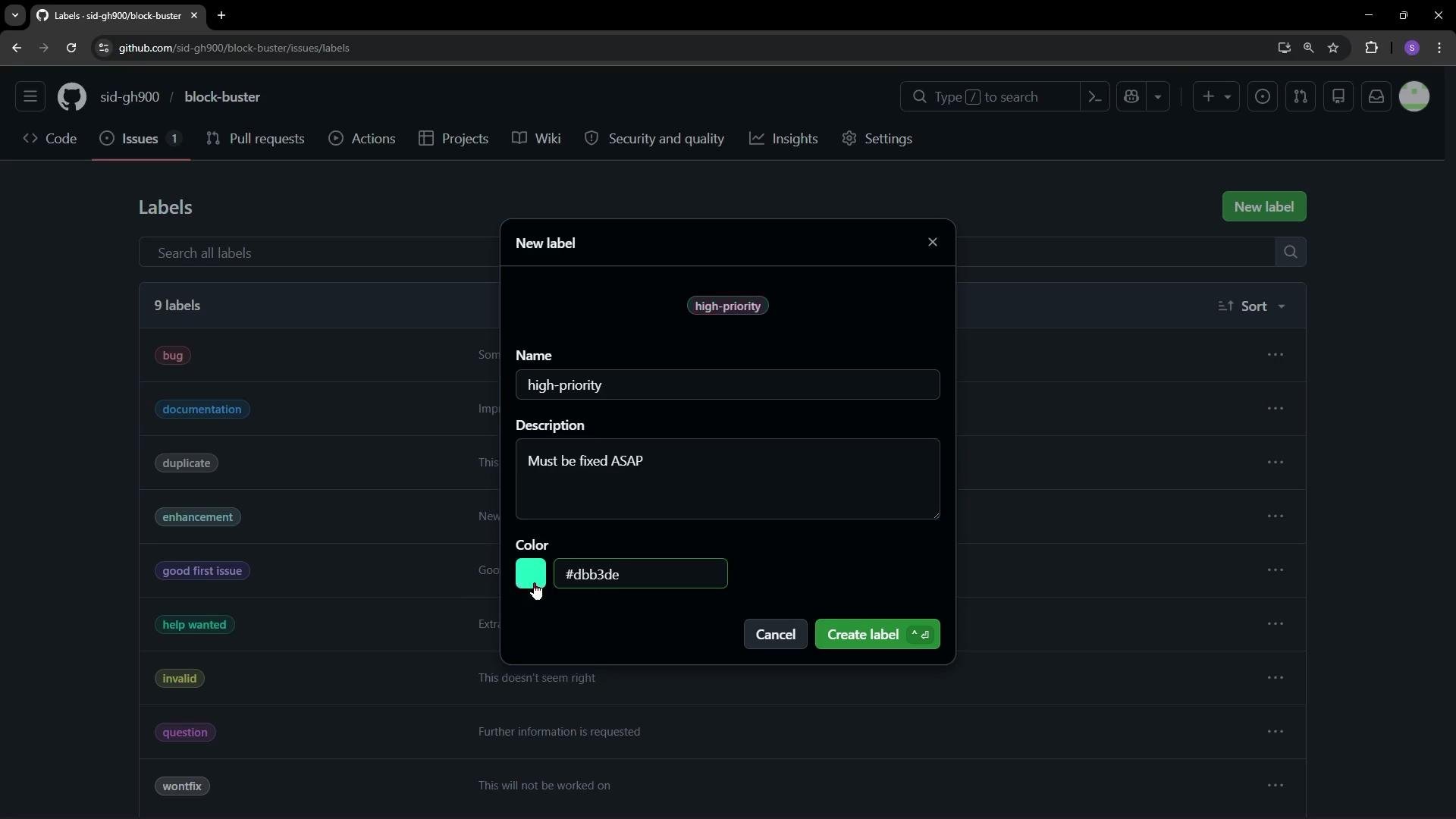 After creating the label, add it to the issue (for example, add `bug` and `high-priority`). It may take a couple of seconds for a newly-created label to appear in the picker.
Once labels and assignees are set, assigned people should receive notifications in their GitHub notifications feed.
After creating the label, add it to the issue (for example, add `bug` and `high-priority`). It may take a couple of seconds for a newly-created label to appear in the picker.
Once labels and assignees are set, assigned people should receive notifications in their GitHub notifications feed.
 Commenting and mentioning users
* Use comments to add context, request reviews, or propose fixes on an issue.
* Use `@username` in a comment to mention someone and trigger a notification so they can respond.
Example comment
```text theme={null}
@SiddharthBarahalikar Can you take a look at the multiBall logic? It duplicates balls by mutating the array while iterating.
```
Quick reference table
| Action | Purpose | Example |
| --------------- | ---------------------------------------- | -------------------------------------------- |
| Assign an issue | Route responsibility to a collaborator | Use the assignee picker, select a teammate |
| Add labels | Categorize and prioritize work | Add `bug`, `enhancement`, or `high-priority` |
| Mention a user | Notify someone about an issue or comment | `@SiddharthBarahalikar` in a comment |
Summary
* Assign issues to the person best suited to resolve them; assignees receive notifications.
* Use labels to triage, filter, and prioritize issues; custom labels help reflect team workflows.
* Do not mutate an array while iterating over it — iterate over a copy or build a new array to add cloned items safely.
Links and references
* [GitHub Docs: About issues](https://docs.github.com/en/issues)
* [GitHub Docs: Managing labels](https://docs.github.com/en/issues/labeling-your-issues-and-pull-requests)
* [GitHub Docs: Mentions and notifications](https://docs.github.com/en/communities/communicating-with-your-project/about-mentions)
Commenting and mentioning users
* Use comments to add context, request reviews, or propose fixes on an issue.
* Use `@username` in a comment to mention someone and trigger a notification so they can respond.
Example comment
```text theme={null}
@SiddharthBarahalikar Can you take a look at the multiBall logic? It duplicates balls by mutating the array while iterating.
```
Quick reference table
| Action | Purpose | Example |
| --------------- | ---------------------------------------- | -------------------------------------------- |
| Assign an issue | Route responsibility to a collaborator | Use the assignee picker, select a teammate |
| Add labels | Categorize and prioritize work | Add `bug`, `enhancement`, or `high-priority` |
| Mention a user | Notify someone about an issue or comment | `@SiddharthBarahalikar` in a comment |
Summary
* Assign issues to the person best suited to resolve them; assignees receive notifications.
* Use labels to triage, filter, and prioritize issues; custom labels help reflect team workflows.
* Do not mutate an array while iterating over it — iterate over a copy or build a new array to add cloned items safely.
Links and references
* [GitHub Docs: About issues](https://docs.github.com/en/issues)
* [GitHub Docs: Managing labels](https://docs.github.com/en/issues/labeling-your-issues-and-pull-requests)
* [GitHub Docs: Mentions and notifications](https://docs.github.com/en/communities/communicating-with-your-project/about-mentions)