> ## Documentation Index
> Fetch the complete documentation index at: https://notes.kodekloud.com/llms.txt
> Use this file to discover all available pages before exploring further.
# Comparing Projects and Projects Classic
> Comparison of Projects Classic and modern GitHub Projects highlighting custom fields flexible views built-in analytics and advanced automation for data driven project management
This lesson explains the key differences between Projects (Classic) and the modern GitHub Projects. The shift from Projects (Classic) to the modern GitHub Projects moves teams from simple, task-oriented boards to a data-driven project management platform that supports flexible views, richer metadata, automation, and analytics.
Below is a concise comparison to help you quickly understand where each approach shines.
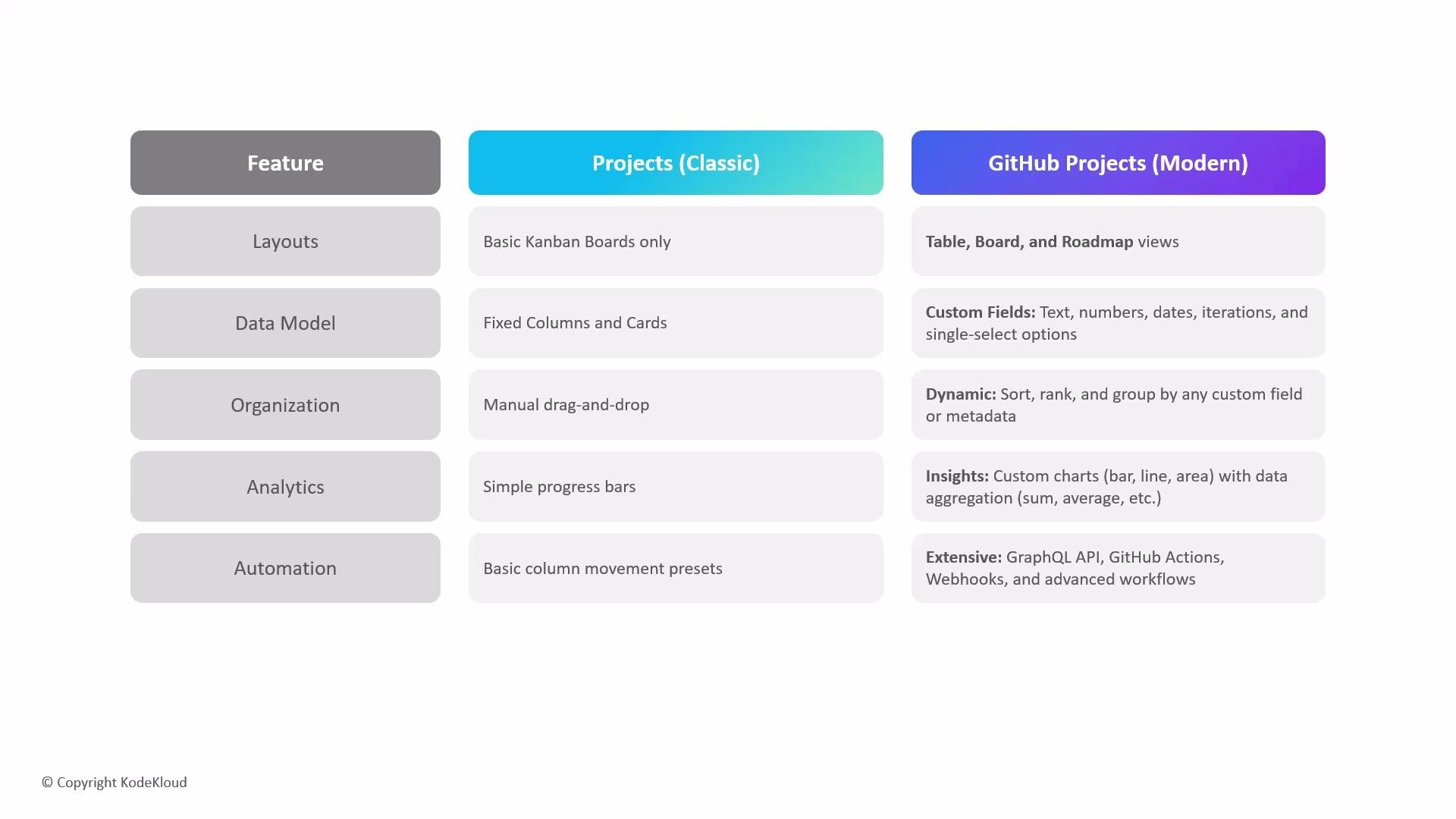
| Area | Projects (Classic) | GitHub Projects (Modern) |
| ------------ | ---------------------------------------------------------------------- | --------------------------------------------------------------------------------------------------------------------------------- |
| Layouts | Basic Kanban-style boards with fixed columns and manual drag-and-drop. | Multiple views (table, board, roadmap) plus draft issues and real-time presence indicators for collaborators. |
| Data model | Fixed columns and cards with limited metadata per card. | Custom fields (text, number, date, etc.), iteration fields for sprints, integrated PR tracking, and richer item metadata. |
| Organization | Manual organization; fixed column structures. | Dynamic sorting, ranking, and grouping by any custom field or metadata for multiple perspectives on the same dataset. |
| Analytics | Simple progress indicators only. | Built-in insights with custom bar, line, and area charts and aggregation options (sum, average) to visualize velocity and health. |
| Automation | Basic column-movement presets. | Advanced automation through APIs, Actions, and webhooks for event-driven workflows and external integrations. |
Layouts
* Projects (Classic): Limited to fixed Kanban columns; items are moved manually and views are single-purpose.
* GitHub Projects (Modern): Supports table, board, and roadmap views so you can choose the visualization that fits your workflow. Modern Projects also support draft issues to capture early ideas and display user presence so collaborators can see who’s viewing or editing a project in real time.
Data model
* Projects (Classic): Uses a simple, fixed model of columns and cards with small amounts of per-card metadata.
* GitHub Projects (Modern): Uses flexible custom fields (text, number, date, select), plus a dedicated iteration field to manage sprints or cycles with flexible date ranges. Items can connect to pull requests, issues, and more rich metadata to support reporting and automation.
Organization
* Projects (Classic): Organization is mostly manual and constrained by column layout.
* GitHub Projects (Modern): Offers instant sorting, ranking, and grouping by any custom field or metadata so you can create multiple live perspectives (for example by assignee, priority, or sprint).
Analytics
* Projects (Classic): Only basic progress metrics are available.
* GitHub Projects (Modern): Includes an insights layer for custom charts (bar, line, area) with aggregation modes (sum, average, count) so teams can track velocity, throughput, and project health.
The last one is about automation. The classic project offers basic column movement presets, whereas the modern project
 features extensive automation via the [GraphQL API](https://docs.github.com/en/graphql), [GitHub Actions](https://learn.kodekloud.com/user/courses/github-actions), and [webhooks](https://docs.github.com/en/developers/webhooks-and-events/webhooks). With these integrations you can:
* Automatically add or move items based on labels, milestones, or custom field values.
* Trigger project updates from CI/CD events, pull request merges, or external systems.
* Build event-based workflows that update status, populate fields, or notify stakeholders without manual steps.
Modern GitHub Projects turn work into structured data. That data enables flexible views, powerful reporting, and automation that scales across repositories and teams.
Summary
Migrating to modern GitHub Projects gives teams a more powerful, flexible, and data-driven way to plan, track, and automate work. The modern experience adds custom fields, richer metadata, multiple views, integrated analytics, and robust automation—enabling deeper insights, multiple perspectives on the same work items, and integrations that support scalable, cross-repository workflows.
Links and references
* [GraphQL API Documentation](https://docs.github.com/en/graphql)
* [GitHub Actions Documentation](https://docs.github.com/en/actions)
* [Webhooks and Events](https://docs.github.com/en/developers/webhooks-and-events/webhooks)
features extensive automation via the [GraphQL API](https://docs.github.com/en/graphql), [GitHub Actions](https://learn.kodekloud.com/user/courses/github-actions), and [webhooks](https://docs.github.com/en/developers/webhooks-and-events/webhooks). With these integrations you can:
* Automatically add or move items based on labels, milestones, or custom field values.
* Trigger project updates from CI/CD events, pull request merges, or external systems.
* Build event-based workflows that update status, populate fields, or notify stakeholders without manual steps.
Modern GitHub Projects turn work into structured data. That data enables flexible views, powerful reporting, and automation that scales across repositories and teams.
Summary
Migrating to modern GitHub Projects gives teams a more powerful, flexible, and data-driven way to plan, track, and automate work. The modern experience adds custom fields, richer metadata, multiple views, integrated analytics, and robust automation—enabling deeper insights, multiple perspectives on the same work items, and integrations that support scalable, cross-repository workflows.
Links and references
* [GraphQL API Documentation](https://docs.github.com/en/graphql)
* [GitHub Actions Documentation](https://docs.github.com/en/actions)
* [Webhooks and Events](https://docs.github.com/en/developers/webhooks-and-events/webhooks)